Domain SearchInstantly check and register your perfect .pk or international domain
 Web HostingGet a .pk domain for as low as PKR 467
 cPanel HostingUser-friendly hosting powered by cPanel
 Reseller HostingLaunch your own hosting business with minimal technical requirements
 Windows HostingOptimized for Windows-based applications and websites
 Affiliate ProgramEarn referral commissions by promoting our services
 WordPress HostingFast & Reliable WordPress Hosting
 Domain TransferMigrate your existing domain seamlessly with zero downtime.
 All DomainsAccess 324+ top-level domains (TLDs) worldwide from a single platform
 Whois LookupIdentify the owner of any domain using our whois and rdap lookup tool
 Managed VPS Hosting
 AI Website BuilderCreate beautiful websites effortlessly using intuitive drag-and-drop features
 Online ShopLaunch a professional online shop with no technical skills required
 BlogDiscover expert guides on hosting, websites, SEO, and digital growth strategies
 ContactGet instant assistance via live chat or email
 SupportAccess help articles, tutorials, and service documentation
 SSL CertificatesEncrypt data, build trust, and boost SEO.
In web hosting, you’ll mostly encounter the term “database” in an error like “Error establishing a database connection.”
When that happens, the website becomes inaccessible. Customers can’t browse products, orders can’t go through, and to anyone landing on the site, your business suddenly looks unreliable, even if everything else is perfectly fine.
The database is often the part of a website nobody thinks about until something breaks.
Behind the scenes, however, it is busy storing and supplying the information your website needs to work. Blog posts, customer accounts, products, orders, comments, and website settings, all depend on it.
So, what are databases in web hosting? How does your website use it? What is stored inside one? And what can cause the connection between your website and database to fail?
Let’s find out.
What is a Database in Web Hosting?
A website generally relies on two major components:
- Website files: themes, plugins, images, PHP files, CSS, JavaScript, and other files that control how the website works and appears.
- Database: the structured information that the website needs to operate.
A useful way to think about the relationship is that the database is the website’s memory.
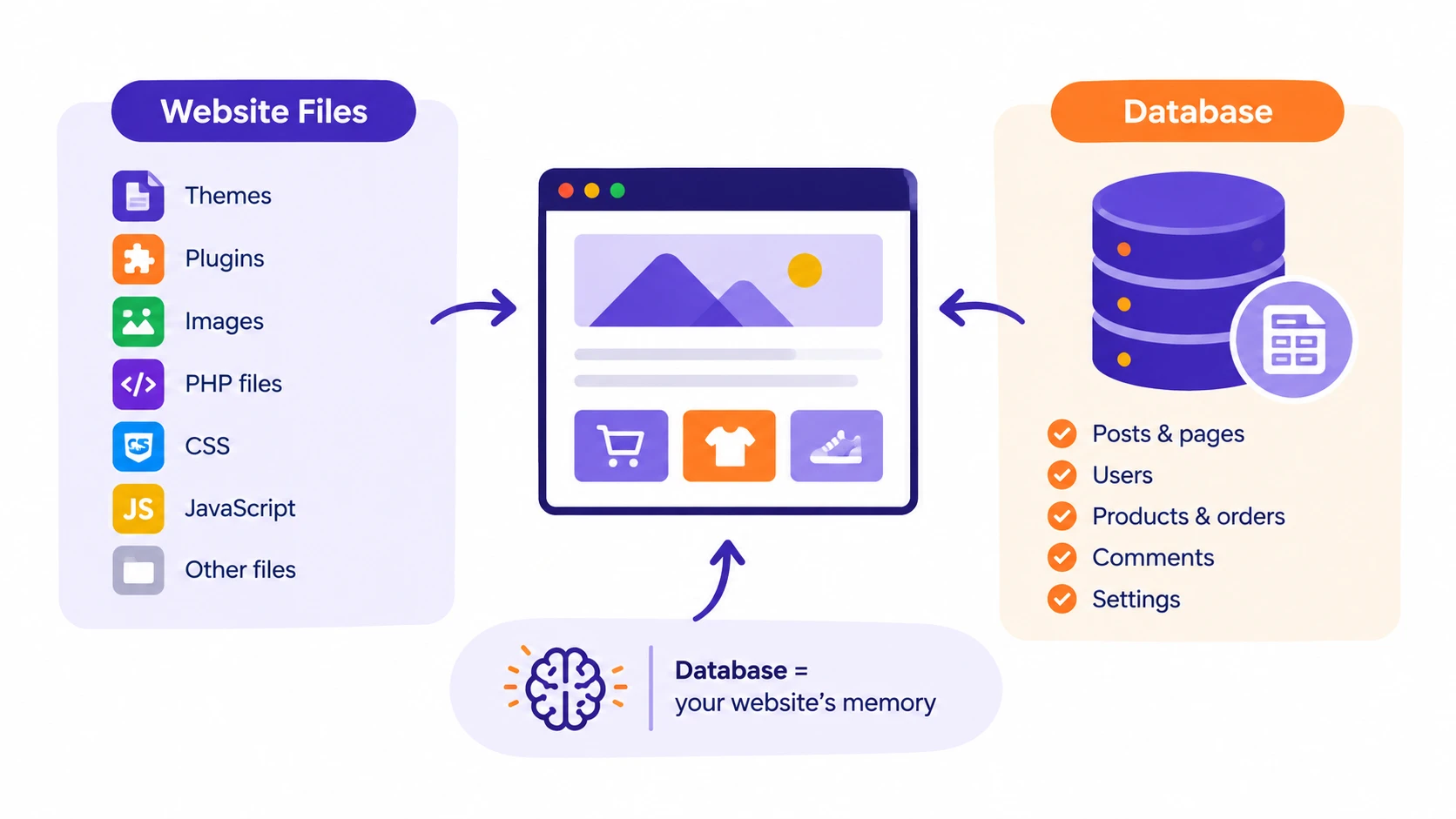
For example, a WordPress website may use its database to store:
- Blog posts
- Product information
- Customer accounts
- Usernames and passwords
- Orders
- Comments
- Website settings
This is one reason WordPress needs a database.
A WordPress site without a database is just a theme sitting on a server. WooCommerce without one cannot display a single product or process a single order.
Every time a visitor reads a post, logs in, or adds something to their cart, the database is doing the work behind the scenes.
This is also what separates a database-driven website from a simple static webpage.
A static page looks the same for every visitor, every time. It needs no database because nothing changes.
A dynamic site like a WordPress blog or an online store is different for every visitor, every session, every moment.
That’s only possible because of the database running underneath it.
How Does a Database Work?
The process may look complicated from the outside, but it follows a series of steps whenever someone requests information from your website.
1. A visitor opens a page. Say, someone visits a product page on a WooCommerce store.
They click the product link or enter the URL into their browser. The browser sends a request to the web server hosting the website.
2. The web server receives the request. It then identifies what information the website needs to display that page. For a dynamic page, the required information is stored in the database.
3. The website sends a query to the database.
A query is simply a request for information. For example, the website might ask the database to find a particular product and return its name, price, description, and stock information.
4. The database searches its stored information. It looks through its organized records and finds the information requested by the website.
Because the information is organized into tables, rows, and columns, the database can locate specific records without searching through every piece of data as one large block.
5. The database sends the information back to the website. The website can then use that information to build the page.
6. The server builds the webpage. It combines the database information with the website’s files, code, theme, and other required elements. For a WordPress website, PHP is commonly involved in this process.
7. The visitor sees the finished page. This entire process happens so quickly that the visitor never notices any of it.
WordPress is primarily built with PHP and commonly uses MySQL-compatible databases such as MySQL or MariaDB.
A simple way to picture this is:
PHP = the worker requesting and assembling information
Database = the organized storage room holding the information
The worker asks for specific items, receives them from storage, and uses them to complete the requested task.
How Does a Database System Look Like?
A database isn’t one big file of scrambled text. It’s organized into four basic components.
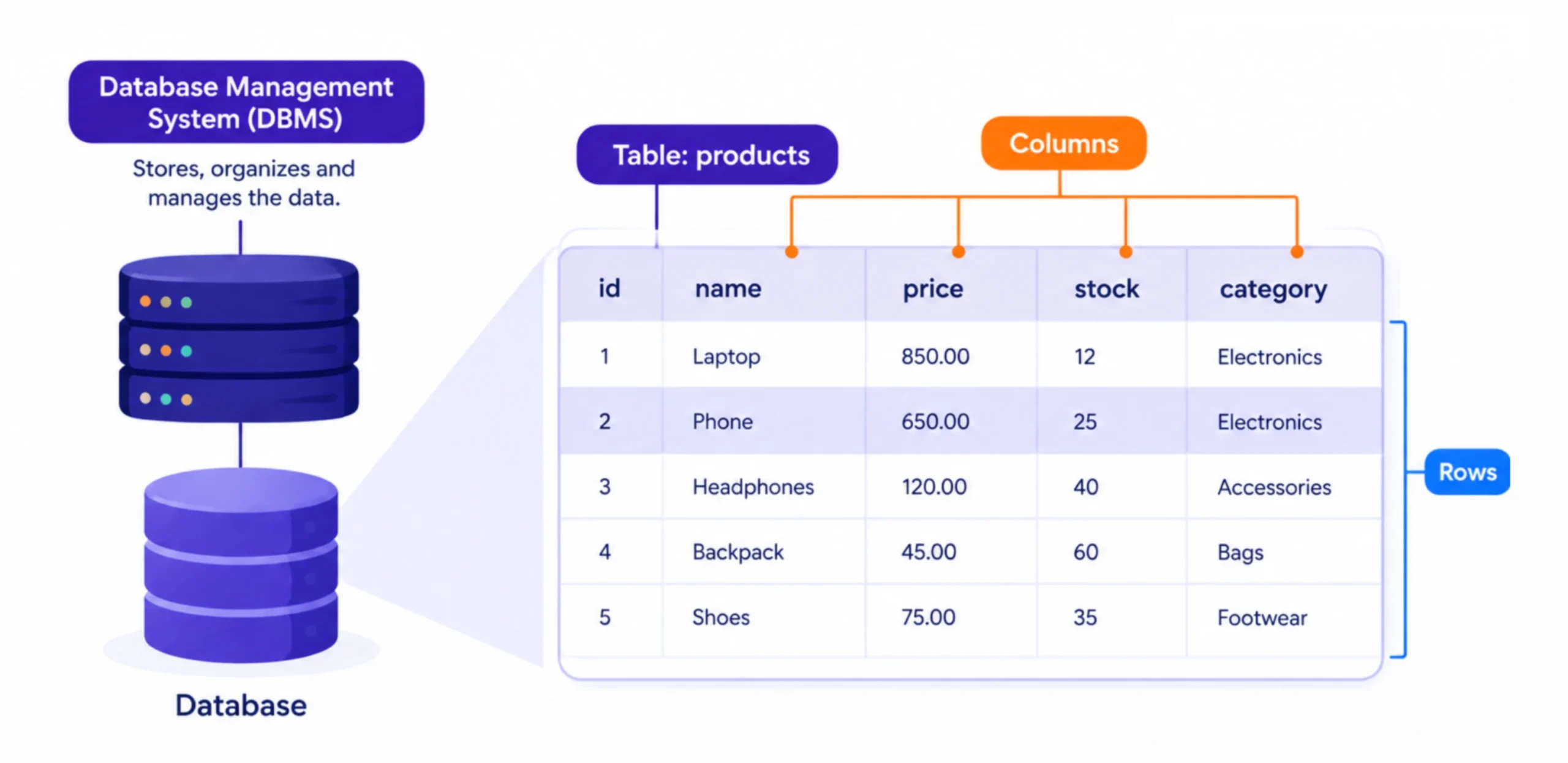
1) Tables
Tables are similar to separate spreadsheet sheets, with each table holding a particular type of related information.
A website database may have tables for:
- Users
- Posts
- Products
- Orders
- Comments
For example, a WooCommerce database can contain tables that store information related to products and orders.
2) Rows
A row represents one record inside a table.
For example:
- One customer can be one record.
- One product can be one record.
- One order can be one record.
If a table contains 500 products, there can be hundreds of product records stored as rows.
3) Columns
Columns contain individual fields that describe each record.
A table containing customer information could have columns for:
- Customer name
- Email address
- Account status
- Registration date
A product table could contain fields such as:
- Product name
- Price
- Stock quantity
- Product category
Each row then contains the values belonging to one particular record.
4) Database Management System (DBMS)
A Database Management System (DBMS) is the software responsible for storing, organizing, and retrieving database information.
It handles database queries and helps applications interact with the stored data.
For example, an orders table could contain fields such as order_id, customer_name, email, total_amount, and order_status. Each order would be represented by a separate record.
Tools such as phpMyAdmin provide a way for hosting users to work with databases without having to manage everything through command-line tools.
Types of Databases Used in Web Hosting
Different applications use different types of databases.
a) MySQL
MySQL is one of the most widely used database systems in web hosting.
It is commonly used with WordPress and other PHP applications, so it’s suitable for blogs, business websites, online stores, and many other websites.
b) MariaDB
MariaDB is a MySQL-compatible relational database system.
It is commonly available in Linux hosting environments and can support many of the applications that also work with MySQL.
c) PostgreSQL
PostgreSQL is another relational database system.
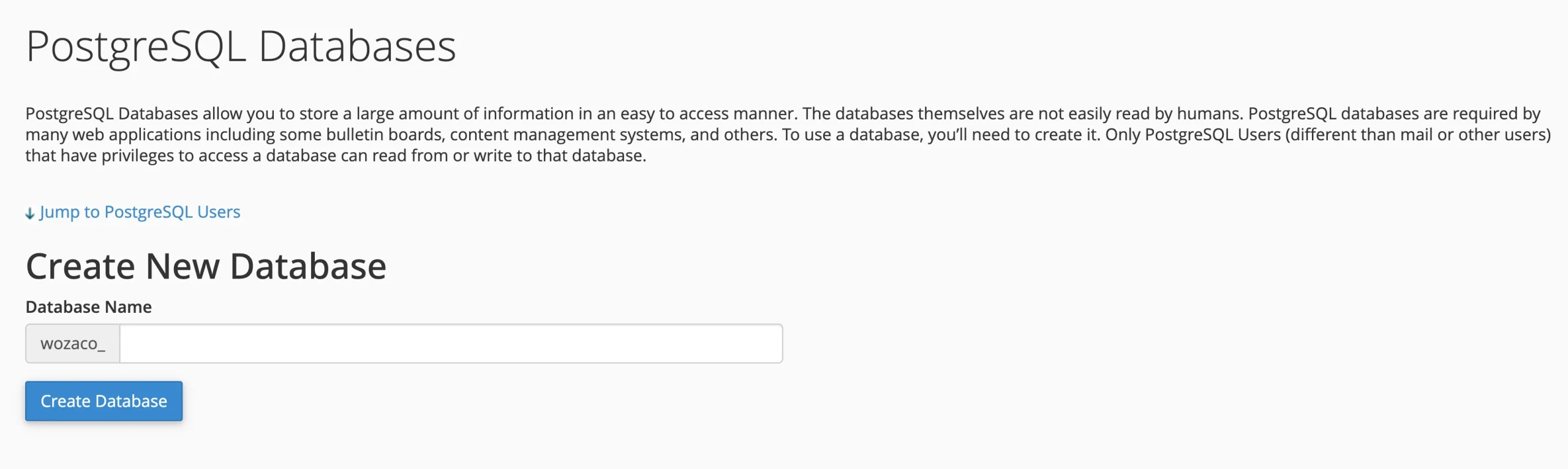
It is often used for custom applications that require advanced database capabilities and gives developers a wide range of features for working with structured data.
d) SQLite
SQLite is a lightweight database that is stored as a file rather than running as a separate database server.
It can be useful for smaller applications, testing, development environments, and software with specific database requirements.
Its setup differs from the database arrangement normally used by WordPress on shared hosting.
e) MongoDB
MongoDB is a NoSQL database designed around document-based data.
Instead of organizing information primarily into traditional relational tables, it stores data as flexible documents. It is commonly found in certain modern application stacks, including some applications built with Node.js.
If you are running a typical WordPress website on shared hosting, MySQL or MariaDB is the database system you are most likely to encounter.
How to Create and Manage a Database on Truehost
If your hosting account uses cPanel, you can create and manage MySQL databases directly from your hosting control panel.
Here is the basic process.
1. Log in to your Truehost hosting account and open cPanel
2. Find and open MySQL databases in cPanel. This is where you can create databases and database users.
3. Enter a suitable name for the database and create it. Choose a name that makes it easy to identify the website or application the database belongs to.
4. Create a database user and set a strong password. The database user is separate from the database itself. The user needs permission to access the database.
5. Add the database user to the database and give it the permissions required by the application. For a normal WordPress installation, the database user needs the appropriate privileges to read and modify the website’s data.
6. Once the database has been created, you can use phpMyAdmin to manage and work with its contents.
phpMyAdmin can be used to:
- View database tables
- Inspect records
- Run SQL queries
- Import databases
- Export databases
- Perform certain maintenance tasks
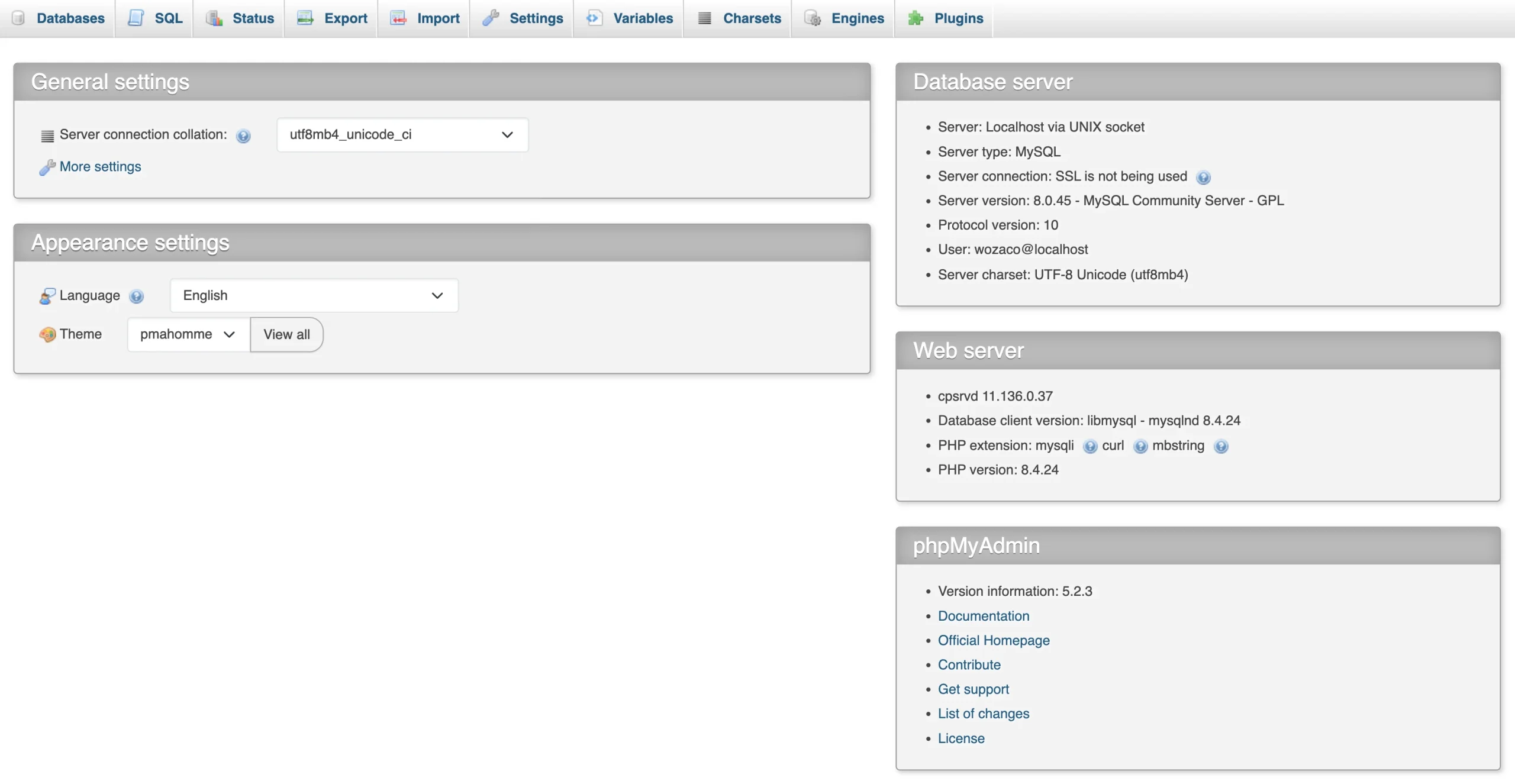
For many website owners, phpMyAdmin provides a visual way to work with database information without having to interact with the database entirely through commands.
Our hosting plans provide the database functionality needed for common WordPress websites and other PHP-based applications.
Why Database Errors in Web Hosting Occur
One of the most recognizable WordPress database errors is: “Error establishing a database connection.”
Several issues can cause this message to appear.
1) Incorrect database credentials
WordPress stores its database connection details in wp-config.php.
If the database name, username, or password in this file is incorrect, WordPress cannot connect to the database.
This can happen after moving a website, changing database credentials, or modifying the hosting setup.
2) Database user isn’t properly assigned
Creating a database and creating a database user are two separate steps. The user must also be assigned to the correct database with the required permissions.
If that connection has not been configured correctly, WordPress may be unable to access the database.
3) Hosting resource or connection limits
A website receiving unusually high traffic can place greater demand on its hosting resources.
Poorly optimized plugins or applications can also generate a large number of database requests.
If the available resources or database connections are exhausted, the website may struggle to communicate with its database.
4) Corrupted database tables
Database tables can sometimes become damaged. This can be associated with certain failed operations, software problems, or other server or application issues.
Depending on the situation, the affected tables may need to be repaired or the database may need to be restored from a backup.
5) Server-side problems
The problem may also be on the hosting server.
A temporary database-server problem or another hosting-side issue can prevent a website from connecting to its database even when the website’s configuration is correct.
Quick troubleshooting
If your WordPress website shows a database connection error, start with these checks:
- Check the database details in
wp-config.php. - Confirm that the database exists.
- Confirm that the database user is assigned to it.
- Check the database through phpMyAdmin.
- Check for hosting or server-side issues.
- Contact hosting support if the problem continues.
Finding the cause first is important because changing database settings without knowing what failed can create additional problems.
How to Keep Your Database Secure and Fast
Your database contains information that your website depends on, so security and regular maintenance should be part of your normal website routine.
Keep the Database Secure
- Use strong, unique database credentials. Avoid weak or reused passwords for database users.
- Do not expose database credentials publicly. Database usernames and passwords should never be placed in publicly accessible files, posts, repositories, or support requests.
- Give database users only the permissions they need. Avoid granting unnecessary access to database users.
- Keep WordPress, plugins, and themes updated. Updates can address security vulnerabilities that attackers could otherwise use to gain unauthorized access.
- Use reputable plugins and themes. Poorly developed or abandoned software can introduce security problems.
SQL injection is one example of a database-related security threat. It occurs when malicious input is used to interfere with database queries. Properly developed applications, secure coding practices, updates, and suitable access controls help reduce this risk.
Keep the Database Performing Well
Database performance can also affect how quickly a website responds.
You can help keep a database manageable by:
- Enabling website caching where appropriate.
- Removing unnecessary plugins and old data.
- Keeping WordPress and plugins updated.
- Optimizing large databases when necessary.
- Using indexes appropriately for custom applications.
- Monitoring hosting resource usage as your website grows.
Back Up Regularly
A backup gives you a way to restore your website’s information if something goes wrong.
For a normal website, regular backups provide a useful safety net. For an active WooCommerce store or another website that changes every day, more frequent backups can reduce the amount of recent data that could be lost after a failure.
Your backup routine should account for how often your website’s database changes.
What Should You Look for in Web Hosting for Database-Driven Websites?
If your website depends on a database, look for a hosting service that provides the environment needed to run and manage it reliably.
Some useful features include:
- Reliable server performance with minimal downtime
- Adequate hosting resources like CPU, RAM, and connection limits that match your traffic
- MySQL/MariaDB support
- cPanel or an easy-to-use management interface
- phpMyAdmin access for direct database management
- Regular automated backups
- SSL support to protect data in transit
- Responsive technical support when something breaks
- Easy WordPress installation, ideally through a one-click installer
- Room to upgrade as your traffic grows
The database does not operate separately from your hosting account.
The server provides the resources your application needs to communicate with the database. Backups give you a way to recover stored information. Security controls help protect access to it. Technical support can help when the problem is beyond what you can fix from cPanel.
So, when comparing hosting plans for a database-driven website, look beyond the database count alone. Check the wider hosting environment that supports it.
Web Hosting with Unlimited Databases on Truehost
Your website’s database is working behind the scenes every time a visitor reads a post, browses a product, submits a form, or places an order. With the right hosting, you don’t have to think about where that data lives or how your website connects to it.
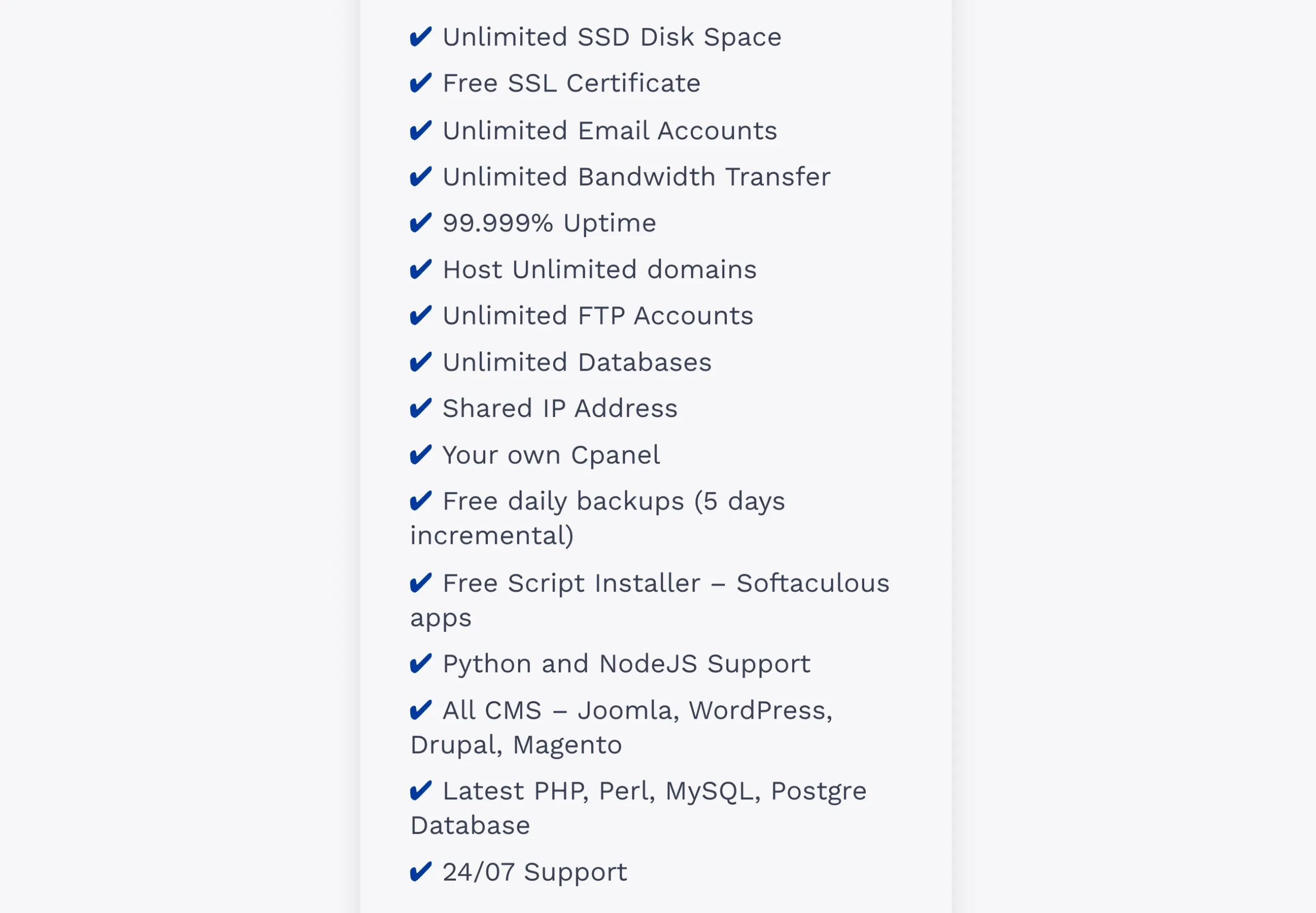
With our Unlimited Web Hosting plan, you can create unlimited databases for your websites and applications.
That gives you the flexibility to run multiple WordPress websites, blogs, online stores, development projects, and other database-driven applications from one hosting account without worrying about hitting a database limit.
If you’re looking for reliable web hosting in Pakistan with the freedom to create as many databases as your projects require, the Unlimited Web Hosting plan gives you exactly that room to grow.