Domain SearchInstantly check and register your perfect .pk or international domain
 Web HostingGet a .pk domain for as low as PKR 467
 cPanel HostingUser-friendly hosting powered by cPanel
 Reseller HostingLaunch your own hosting business with minimal technical requirements
 Windows HostingOptimized for Windows-based applications and websites
 Affiliate ProgramEarn referral commissions by promoting our services
 WordPress HostingFast & Reliable WordPress Hosting
 Domain TransferMigrate your existing domain seamlessly with zero downtime.
 All DomainsAccess 324+ top-level domains (TLDs) worldwide from a single platform
 Whois LookupIdentify the owner of any domain using our whois and rdap lookup tool
 Managed VPS Hosting
 AI Website BuilderCreate beautiful websites effortlessly using intuitive drag-and-drop features
 Online ShopLaunch a professional online shop with no technical skills required
 BlogDiscover expert guides on hosting, websites, SEO, and digital growth strategies
 ContactGet instant assistance via live chat or email
 SupportAccess help articles, tutorials, and service documentation
 SSL CertificatesEncrypt data, build trust, and boost SEO.
Running a WooCommerce store is different from running a basic WordPress website. A blog mostly serves static pages.
A WooCommerce store has to load product pages, run searches, manage shopping carts, handle customer accounts, process payments, update inventory, and cope with traffic spikes. Often all at the same time. If the hosting behind it isn’t built for that, the store slows down or breaks at the worst possible moment.
For Pakistani businesses, there’s more to weigh than raw server performance. PKR pricing, local payment methods, responsive support, appropriate server locations, uptime, security, and room to scale all matter as much as technical specifications.
It’s tempting to pick the cheapest plan available when starting out. But slow pages, checkout errors, and downtime cost sales. A customer who abandons a cart because a page took too long to load is a sale that’s gone, often for good.
This article looks at what actually separates good hosting from hosting that merely claims to be WordPress-friendly. It helps Pakistani business owners identify the best WordPress hosting for WooCommerce in Pakistan based on performance, security, reliability, scalability, support, and value for money.
Whether you are setting up your first online store, or your current WordPress hosting for online stores is starting to struggle under real traffic, the aim here is to give you a practical framework. Not a list of marketing claims. Use it to compare WooCommerce hosting plans with confidence and choose one that fits both your budget and your growth plans.
Ready to see it in action? Keep reading to find the right fit, then head straight to the plans built for your store.
Best WordPress Hosting for WooCommerce in Pakistan
| Provider | Best For | Pricing | WooCommerce | Local Pakistan Focus | Managed WordPress | Scalability |
|---|---|---|---|---|---|---|
| Truehost | Pakistani businesses | From ₨282.65 | Yes | Yes | Yes/Plan dependent | Yes |
| Olitt | Simple stores, solopreneurs | $9.99/year | Yes | Limited | No | Limited |
| Hostinger | Budget-conscious stores | $2.99/month | Yes | Yes | Limited | Yes |
| SiteGround | Managed WooCommerce | $2.99/month | Yes | No | Yes | Yes |
| Bluehost | Beginners | $3.99/month | Yes | No | Yes | Yes |
| HostGator | Small businesses | $3.75/month | Yes | No | Yes | Yes |
All six support WooCommerce and offer some scalability. For Pakistani businesses, the real differentiators come down to local relevance. PKR pricing, local payment methods, and support familiar with the Pakistani market, alongside how much management a store owner wants from their host.
1) Truehost
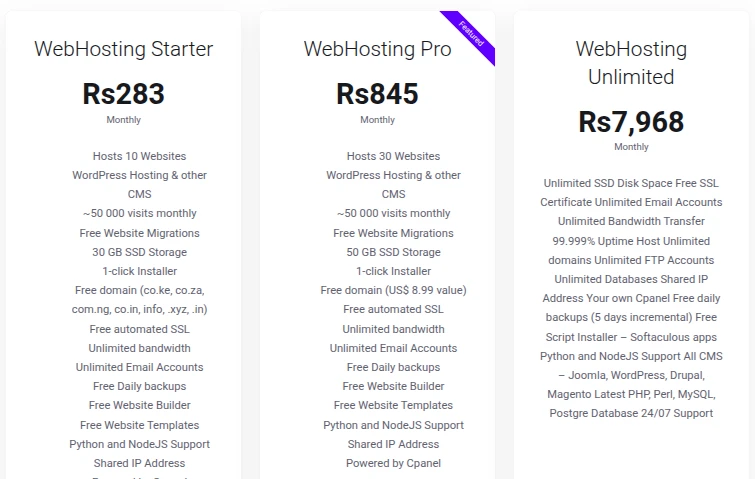
Truehost is the top recommendation for Pakistani WooCommerce businesses. This comes down to its focus on the local market: RS pricing, local payment options, and support that understands Pakistani entrepreneurs.
This local focus is combined with WordPress hosting built specifically for WooCommerce stores.
Key features include:
- WooCommerce-compatible WordPress hosting
- SSD/NVMe-powered infrastructure where applicable
- Free SSL
- WordPress optimisation
- Built-in security features
- Backup options
- Scalable plans, including a path up to VPS hosting as the store grows
- 24/7 support
- Local payment options
Pricing: ₨282.65 / yearly
Best for: Pakistani entrepreneurs, small businesses, online retailers, and growing WooCommerce stores that want hosting built around the local market.
Get started with Truehost WordPress hosting and set your WooCommerce store up on infrastructure made for Pakistani businesses.
2) Olitt
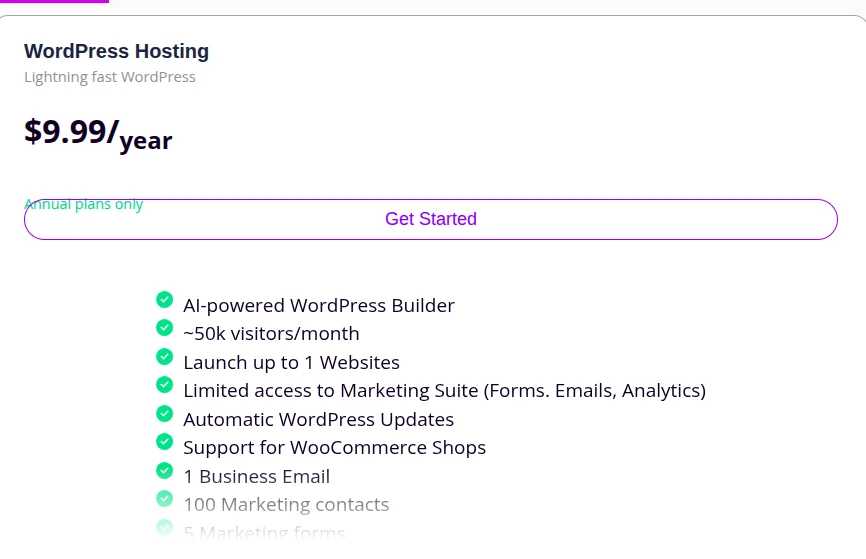
Olitt is best known as an all-in-one AI-powered website builder with its own built-in online store tools, rather than a dedicated WooCommerce host. It also offers a WordPress hosting option for a simpler, more guided setup.
Key features include:
- Free SSL and CDN-backed hosting
- Built-in online store tools for product listings and payments
- WordPress hosting option alongside its own drag-and-drop builder
- Domain registration and DNS management
- AI-assisted site setup for quick launches
Olitt’s hosting suits simple stores and solopreneurs more than full-featured, high-traffic WooCommerce setups, so growing stores should compare its resources against hosts built specifically around WooCommerce.
Best for: solopreneurs and small business owners who want an easy, guided way to launch a basic online store or WordPress site quickly.
3) Hostinger
Hostinger is a WordPress-focused host with solid WooCommerce support. It offers SSD/NVMe storage on applicable plans, free SSL, CDN add-ons, managed WordPress features, and a global data centre network.
It suits small and medium WooCommerce stores, with competitive introductory pricing.
Renewal pricing can be noticeably higher than the promotional rate.
Best for: businesses wanting a global provider with affordable entry-level WordPress hosting.
4) SiteGround
SiteGround offers managed WordPress hosting with WooCommerce support. This includes automatic updates, daily backups, built-in caching, free SSL, CDN integration, and WordPress-focused support.
Trade-off: generally more expensive than budget-focused providers.
Best for: established WooCommerce stores that want fully managed WordPress infrastructure.
5) Bluehost
Bluehost provides WordPress and WooCommerce-focused hosting with easy setup, free SSL, WooCommerce tools, bundled domain options, and global infrastructure. It’s a common choice for beginners.
Trade-off: compare renewal pricing and actual server resources carefully.
Best for: first-time WooCommerce store owners wanting a straightforward setup.
6) HostGator

HostGator offers WordPress hosting with WooCommerce compatibility, free SSL, scalable tiers, migration support, and global infrastructure.
Trade-off: available resources and performance depend heavily on the tier selected.
Best for: small businesses looking for an established international provider.
How to Choose the Right WooCommerce Hosting Plan
Small or New WooCommerce Store
A new store rarely needs VPS or dedicated hosting immediately. An entry-level managed WordPress plan is usually enough.
Look for sufficient CPU and RAM, SSD/NVMe storage, free SSL, automated backups, and reliable support during setup.
Growing WooCommerce Store
As traffic and orders increase, look for more CPU and RAM, faster storage, better caching, CDN, more frequent backups, and easy upgrade paths.
Warning signs your current plan is falling short include slower load times during busy periods, occasional checkout timeouts, delayed order notifications, and resource-limit warnings from your host.
High-Traffic WooCommerce Store
At scale, VPS or cloud hosting with dedicated resources, advanced caching, database optimisation, DDoS protection, and managed server support become important.
A larger catalogue means more database queries. More concurrent checkouts mean more processes competing for resources. Both call for infrastructure built to handle that load.
Common WooCommerce Hosting Mistakes to Avoid
Choosing Hosting Based Only on Price
The cheapest plan may not provide enough CPU and RAM, adequate support, sufficient security, or room to scale. Price matters, but weigh it against what you actually get.
Ignoring Resource Limits
CPU, RAM, storage, inode limits, bandwidth, and concurrent process limits can all affect WooCommerce performance. These limits aren’t always obvious until you hit them.
Skipping Backups
Running a store without reliable, restorable backups is a real risk. A bad update or security incident without a recent backup can mean losing days or weeks of orders and product data.
Installing Too Many Plugins
Every plugin adds database queries and resource usage. Poorly optimised or unnecessary plugins quietly slow a store down over time.
Not Preparing for Traffic Spikes
Promotions, campaigns, seasonal shopping, and flash sales can suddenly increase traffic well beyond your normal daily average. It’s worth planning ahead for known busy periods.
Waiting Too Long to Upgrade
Sticking with shared hosting past the point it’s adequate, simply because upgrading feels like a hassle, usually costs more in lost sales than the upgrade itself.
Recurring slowdowns, frequent resource warnings, and checkout issues during busy periods are signs it’s time to move to VPS, cloud, or dedicated resources.
FAQs
Does WooCommerce Hosting Include an SSL Certificate?
SSL protects customer information and secures checkout pages by encrypting data passed between the browser and server.
Many WordPress hosting providers include free SSL as standard, but this isn’t universal. Confirm what’s included before purchasing.
What Makes the Best WordPress Hosting for WooCommerce?
The best WordPress hosting for WooCommerce needs more than enough storage. Look for a hosting plan with:
- Enough CPU and RAM: WooCommerce uses more server resources than a basic WordPress site, especially when customers browse products, update carts, and check out at the same time.
- SSD or NVMe storage: Faster storage helps with database operations, product pages, images, and other dynamic WooCommerce processes.
- WooCommerce optimisation: Choose hosting that supports current PHP versions and offers features such as caching, database optimisation, and CDN compatibility.
- Strong security: Free SSL, firewalls, malware scanning, DDoS protection, and regular server updates help protect customer and store data.
- Reliable backups: Automated backups of both files and databases make it easier to recover from failed updates, accidental deletions, or security problems.
- High uptime and reliability: Your store needs to remain available so customers can browse and place orders without interruptions.
- Scalability: Your hosting should allow you to increase CPU, RAM, storage, or move to VPS or cloud hosting as your traffic and orders grow.
- Responsive support: 24/7 support with WordPress and WooCommerce knowledge can help resolve technical issues before they affect sales.
- Good overall value: Compare the full cost, including renewal prices, SSL, backups, CDN, migration support, and upgrade costs, rather than choosing based only on the introductory price.
For Pakistani businesses, it is also worth considering server performance, payment options, and support availability when comparing hosting providers. The right plan should give your store enough resources to handle everyday traffic while leaving room for growth.
How Much Does WooCommerce Hosting Cost in Pakistan?
Prices vary by hosting type, CPU and RAM resources, storage, traffic capacity, security features, backups, and level of management.
Entry-level WordPress hosting is the most affordable option and suits small or new stores. VPS, cloud, and dedicated hosting cost more but offer more resources and control for growing or high-traffic stores. Compare the total value of a plan rather than choosing solely on the lowest advertised price.
How to Move Your WooCommerce Store to Better Hosting
- Back up the website and database
- Choose a suitable hosting plan
- Move WordPress files and the database
- Test products, cart, checkout, and payment gateways
- Verify emails and order notifications
- Update DNS
- Monitor the store after migration
Testing checkout and payment functionality before fully switching over is one of the most important steps. A store that looks fine but has a broken checkout can cost sales before anyone notices.
What Should I Look for in a WordPress Hosting Service in Pakistan?
Reliable uptime, adequate CPU and RAM, SSD or NVMe storage, and free SSL matter most. So do regular backups, security and malware protection, and confirmed WooCommerce compatibility.
Also check for scalability, 24/7 support, transparent pricing, local payment options, PKR pricing, and suitable server or data-centre options.
How Much RAM Does WooCommerce Hosting Need?
RAM requirements depend on the number of products, plugins, visitors, database activity, and concurrent users.
A small store can start with modest resources. Larger stores with more traffic and complex functionality may need significantly more RAM and dedicated resources.
Is Shared Hosting Good for WooCommerce?
Shared hosting can work well for a new or low-traffic store. It’s affordable and generally sufficient for a small catalogue and moderate traffic.
As a store grows, shared resource limits and traffic spikes may eventually call for a move to VPS, cloud, or dedicated hosting.
Ready to Get Started with WooCommerce Hosting in Pakistan?
- Choose a WordPress hosting plan based on the store’s size, traffic, and resource requirements
- Register or connect the domain through domain registration
- Install WordPress
- Install WooCommerce
- Configure products, payment gateways, shipping, and taxes
- Enable SSL, via SSL certificates if not already bundled
- Set up backups and security
- Test the complete checkout process
- Launch the store
- Monitor performance and upgrade resources as the business grows, including email hosting for order notifications and customer communication
A WooCommerce store needs more than a place to install WordPress. It needs hosting that keeps product pages fast, checkout reliable, customer information secure, and the store online as the business grows.
For Pakistani businesses, the right hosting should balance performance, security, scalability, support, and price. Choose hosting for where your business is going, not just where it is today.
Take the next step today. View WordPress Hosting Plans and give your WooCommerce store the local, reliable foundation it needs to grow.