Domain SearchInstantly check and register your perfect .pk or international domain
 Web HostingGet a .pk domain for as low as PKR 467
 cPanel HostingUser-friendly hosting powered by cPanel
 Reseller HostingLaunch your own hosting business with minimal technical requirements
 Windows HostingOptimized for Windows-based applications and websites
 Affiliate ProgramEarn referral commissions by promoting our services
 WordPress HostingFast & Reliable WordPress Hosting
 Domain TransferMigrate your existing domain seamlessly with zero downtime.
 All DomainsAccess 324+ top-level domains (TLDs) worldwide from a single platform
 Whois LookupIdentify the owner of any domain using our whois and rdap lookup tool
 Managed VPS Hosting
 AI Website BuilderCreate beautiful websites effortlessly using intuitive drag-and-drop features
 Online ShopLaunch a professional online shop with no technical skills required
 BlogDiscover expert guides on hosting, websites, SEO, and digital growth strategies
 ContactGet instant assistance via live chat or email
 SupportAccess help articles, tutorials, and service documentation
 SSL CertificatesEncrypt data, build trust, and boost SEO.
Every growing website eventually asks the same question: “It works fine, so why upgrade?” Basic hosting can absolutely work well, right up until it doesn’t. As a website grows, slow loading times, downtime, and resource limits start affecting real outcomes: visitor experience, search rankings, and sales.
Shared hosting remains a great starting point. It’s affordable, quick to set up, and doesn’t require technical expertise. The trade-off is that you’re sharing a server’s CPU, RAM, and bandwidth with dozens or hundreds of other websites, which puts a hard ceiling on how much your site can handle before performance suffers.
So the real question isn’t “is shared hosting bad?” It’s simpler than that: has your website outgrown basic hosting? Here’s how to tell.
Assessing Your Website’s Needs

Before choosing a hosting plan, look at what your website actually needs. The right option depends on traffic, website type, performance, security, control, business requirements, and budget.
a) Traffic
Traffic is one of the main factors that determines how many server resources your website needs.
- Low traffic: A basic shared hosting plan is usually enough for a small website with a limited number of visitors.
- Growing traffic: Monitor your CPU, RAM, storage, and bandwidth usage. If the site becomes slow during busy periods, you may need to move to a plan with more resources.
- High or unpredictable traffic: VPS or cloud hosting can provide more resources and better control when visitor numbers increase suddenly. This is useful for websites that run promotions, publish popular content, or experience seasonal traffic spikes.
Traffic alone does not determine your hosting needs. A simple site with thousands of visitors may use fewer resources than a complex site with a smaller audience.
b) Website Type
The type of website you run also affects the hosting resources you need.
- Simple websites: Blogs, portfolios, small business websites, landing pages, and basic WordPress sites can usually run well on shared hosting.
- Complex websites: Online stores, membership websites, forums, large WordPress sites, and web applications often need more CPU and RAM because they handle databases, user accounts, transactions, and dynamic content.
- Media-heavy websites: Sites with large images, videos, downloads, or resource-intensive plugins can use significant storage, bandwidth, and server resources even when traffic is not very high.
Consider what your website does, not just how many people visit it.
c) Performance
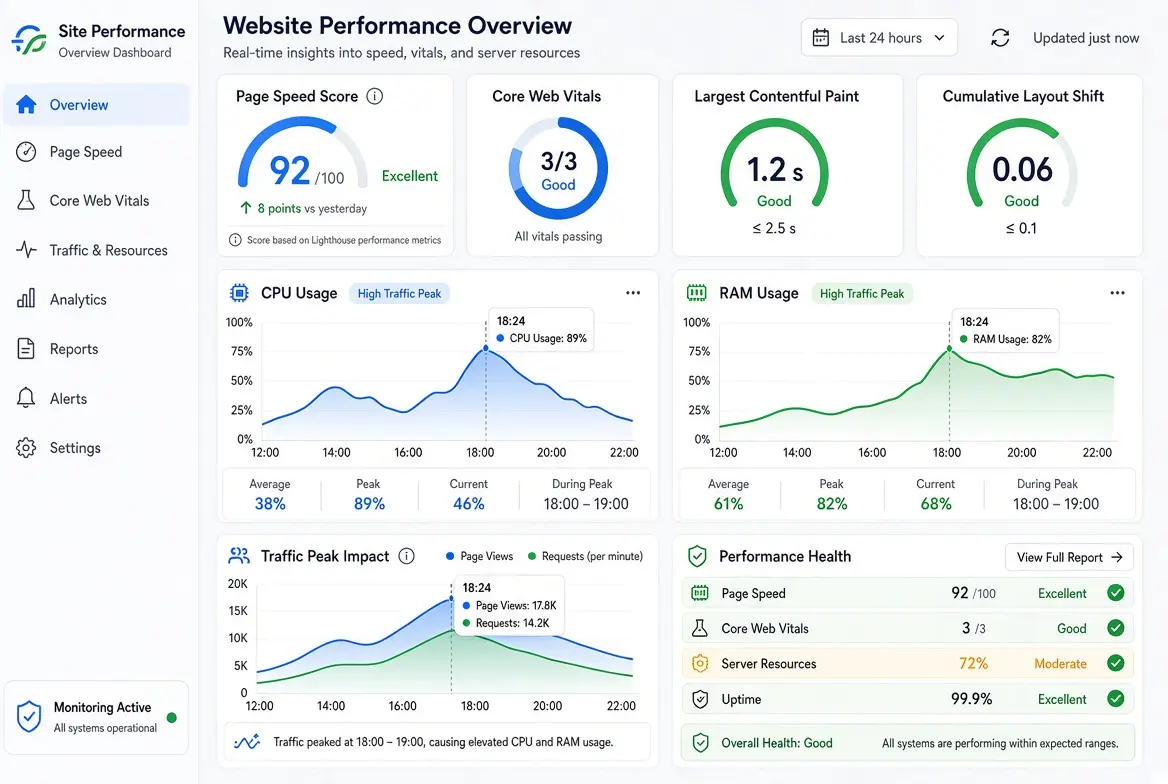
Your hosting should provide enough resources for your website to load quickly and remain responsive.
You can use tools such as Google PageSpeed Insights and GTmetrix to check page speed, responsiveness, and Core Web Vitals. These tools can also show issues caused by large images, unnecessary scripts, plugins, caching, and other parts of the website.
If your website remains slow after basic improvements such as image compression, caching, and removing unnecessary plugins, your hosting environment may be contributing to the problem. Moving to a plan with more CPU, RAM, or faster storage can help, but hosting is only one part of website performance.
d) Security
Security requirements increase when your website handles payments, customer accounts, or personal information.
Shared hosting can still provide security features such as SSL certificates, backups, malware protection, and server-level security. However, you have less control over the server environment because multiple websites use the same server.
A VPS gives you greater isolation and more control over server configuration. This can be useful for websites with stricter security requirements or applications that need specific security settings.
Regardless of the hosting type, you should also keep your CMS, plugins, themes, and other software updated and use strong authentication.
e) Control and Flexibility
Shared hosting works well when you want a hosting environment that is already configured for you. You usually do not need to manage the operating system or configure server software yourself.
However, you may need more control as your website or application becomes more technical.
A VPS or cloud server is more suitable if you need things such as:
- Root or administrator access
- Custom server configurations
- Node.js or other specific software
- Redis or other caching services
- Custom PHP or database settings
- Applications that are not supported by standard shared hosting
If you need these features, upgrading to a VPS is often more practical than trying to work around shared hosting restrictions.
f) Business Needs
For a personal blog, occasional downtime may not have a major impact. For a business website, the consequences can be different.
If your website receives orders, bookings, leads, or payments, downtime can mean lost revenue and missed opportunities. Slow performance can also affect how visitors interact with the site.
When choosing hosting, consider your current needs as well as planned growth. Think about upcoming advertising campaigns, product launches, sales, and seasonal periods when traffic may increase.
You do not necessarily need an expensive server from day one. The goal is to have enough resources for your current workload while having a clear upgrade path as the business grows.
g) Budget
Cost is another important factor, especially for a new website.
- Shared hosting: Usually the most affordable option and suitable for many small websites.
- VPS hosting: Costs more but gives you dedicated resources and greater control.
- Cloud hosting: Pricing varies depending on the resources and services you use, but it can be useful for websites that need to scale.
Do not compare hosting plans using the introductory price alone. Check the renewal price, billing period, included resources, backup costs, SSL charges, migration fees, and any other additional charges.
The cheapest plan is not always the cheapest option in the long run if you quickly outgrow it and need to upgrade.
When Basic Hosting Is Enough
Basic hosting is probably still the right call if:
- Your site has low or moderate traffic.
- Pages load quickly and consistently.
- You rarely, if ever, hit resource limits.
- Visitors aren’t complaining about speed or downtime.
- You don’t need advanced server settings or custom software.
Signs You Need to Upgrade
On the other hand, it’s time to consider a move if:
- Your site regularly slows down, especially during busy periods.
- You’re receiving CPU, RAM, or other resource-limit warnings from your host.
- You’re experiencing frequent downtime.
- Your online store is seeing more orders and more concurrent visitors.
- Many users need to access the site simultaneously without a drop in performance.
- You need custom software or server-level configuration.
- Your traffic has outgrown what your current plan can comfortably support.
Bottom line: don’t upgrade just because your website is growing; upgrade when your current hosting can no longer provide the speed, resources, reliability, or control your website actually needs. Growth alone isn’t the trigger; strain is.
Hosting Alternatives and When to Consider Them
Once shared hosting stops being enough, the next step depends on what specifically is straining: traffic volume, resource needs, control requirements, or all three.
Quick Comparison
| Hosting option | Best for | Main advantage | Main drawback |
| Higher-tier shared | Growing blogs and WordPress sites | Easy and affordable | Still shares resources |
| VPS | Growing sites and custom apps | More resources and control | Can require technical skills |
| Cloud | Spiky or unpredictable traffic | Easy to scale | Costs can vary |
| Dedicated | High-traffic and demanding sites | Full server resources | More expensive |
| Serverless/edge/SaaS | Modern apps and simple websites | Little server management | Less infrastructure control |
1) Higher-Tier Shared or Managed WordPress Hosting
This is the simplest upgrade path for growing WordPress sites: more resources, better caching, and stronger performance, while server management stays mostly hands-off.
It’s a good fit if your main problem is speed rather than control or customization.
2) VPS Hosting
VPS hosting gives your site dedicated resources instead of a shared pool, along with more control over the server and software stack. It suits growing websites, online stores, and custom applications well.
Managed VPS keeps day-to-day maintenance off your plate; unmanaged VPS gives you full control but assumes more technical know-how on your end.
3) Cloud Hosting
Cloud hosting scales resources up as traffic rises, which makes it a strong match for sites with unpredictable or seasonal demand, think flash sales, viral posts, or holiday traffic.
The trade-off is variable cost: pricing moves with usage, storage, and traffic, so budgeting takes more attention.
4) Dedicated Servers
A dedicated server gives you an entire physical machine to yourself, with maximum resources and control.
It’s the right choice for high-traffic websites, resource-intensive applications, or businesses that need strong isolation for compliance or security reasons, at a correspondingly higher price point.
5) Serverless, Edge Platforms, and SaaS
These options offload most server management to the platform itself. They suit modern web applications and teams that want simplicity over granular control, though that convenience comes with less infrastructure-level flexibility than traditional hosting models.
The main point: you don’t always need to jump straight to a VPS or dedicated server. Choose the next hosting level based on the specific problem your current plan is struggling with; traffic spikes call for a different fix than a need for custom software.
Is Basic Hosting Enough in 2026?
For most blogs, portfolios, and small business sites, yes, shared hosting is still a solid, cost-effective foundation. But as traffic, complexity, or business responsibility grows, the signs of outgrowing it are usually clear: slow load times, resource warnings, downtime, and a need for more control than a shared environment allows.
The best approach isn’t to upgrade too early or wait until something breaks. Check your site against the signs above periodically, and move to the tier that solves your actual bottleneck, not more capacity than you need yet.
Not sure which plan fits where your site is right now? Check hosting plans at Truehost and find the right fit for your traffic, budget, and growth.