Domain SearchInstantly check and register your perfect .pk or international domain
 Web HostingGet a .pk domain for as low as PKR 467
 cPanel HostingUser-friendly hosting powered by cPanel
 Reseller HostingLaunch your own hosting business with minimal technical requirements
 Windows HostingOptimized for Windows-based applications and websites
 Affiliate ProgramEarn referral commissions by promoting our services
 WordPress HostingFast & Reliable WordPress Hosting
 Domain TransferMigrate your existing domain seamlessly with zero downtime.
 All DomainsAccess 324+ top-level domains (TLDs) worldwide from a single platform
 Whois LookupIdentify the owner of any domain using our whois and rdap lookup tool
 Managed VPS Hosting
 AI Website BuilderCreate beautiful websites effortlessly using intuitive drag-and-drop features
 Online ShopLaunch a professional online shop with no technical skills required
 BlogDiscover expert guides on hosting, websites, SEO, and digital growth strategies
 ContactGet instant assistance via live chat or email
 SupportAccess help articles, tutorials, and service documentation
 SSL CertificatesEncrypt data, build trust, and boost SEO.
Choosing an IP type looks small. Until it breaks your DNS, email, SSH, or inbound connections.
Here’s the real question: does your VPS need to be reachable reliably, every time, by users, apps, or other systems?
If yes, this decision is worth getting right.
The short answer: static wins for Dynamic IP vs Static IP for VPS Hosting decisions. Dynamic IPs work fine for home use. They also suit a few specialized, outbound-only setups.
Most VPS plans already include a dedicated static IP. Ours do too. Every plan at Truehost VPS Hosting ships with one, at no extra cost.
Let’s define terms first.
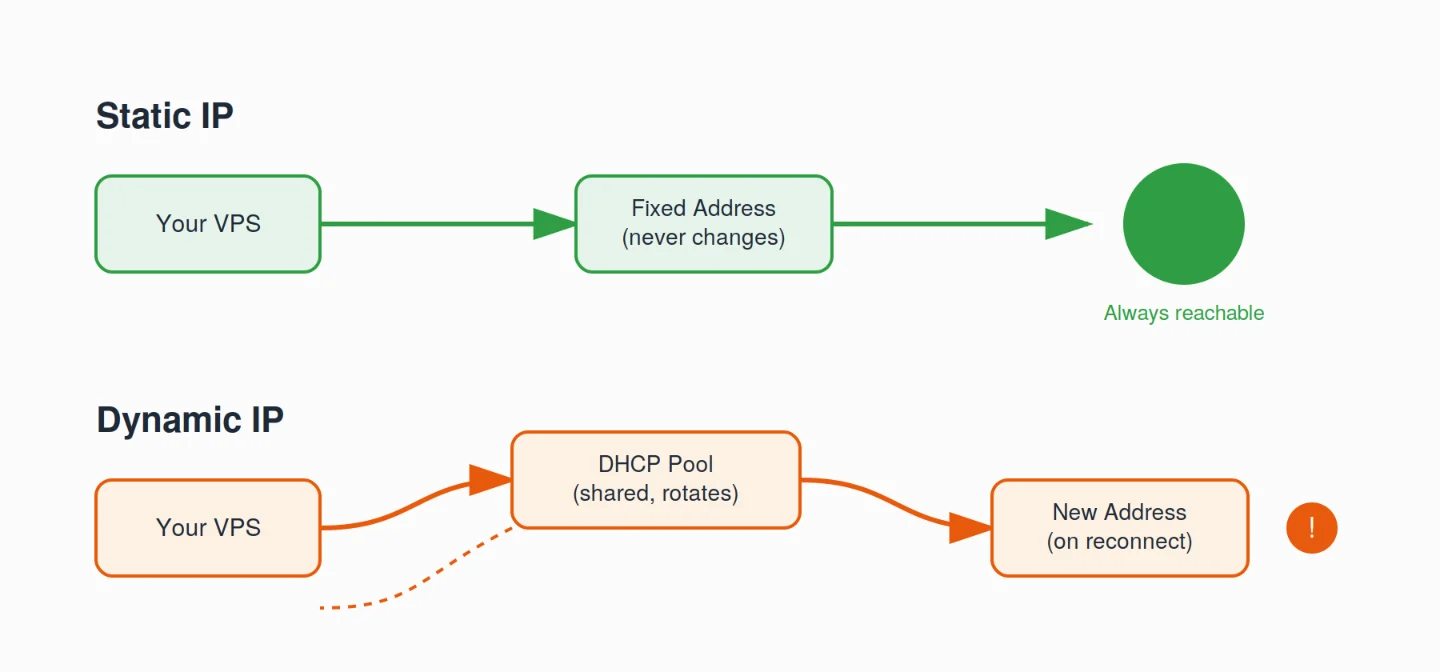
Static IP: A fixed address assigned to your server permanently. It stays the same through reboots, reconnects, and lease renewals — unless you deliberately change it.
Dynamic IP: An address pulled from a shared pool, usually through DHCP. It can change on reconnect, on lease expiry, or when your provider rotates it.
A quick note before we go further. Static vs dynamic is related to, but different from, three other pairs:
- Dedicated vs shared IP
- Public vs private IP
- IPv4 vs IPv6
This guide stays focused on one thing: static vs dynamic for your VPS’s public address.
Side-by-Side Comparison Table
Here’s the full picture in one place.
| Dimension | Static IP | Dynamic IP |
|---|---|---|
| Stability | Never changes | Changes periodically or on reconnect |
| DNS compatibility | Simple, set-and-forget A/AAAA records | Needs DDNS; propagation delays and downtime risk |
| Inbound hosting | Fully reliable | Unreliable without workarounds |
| Email deliverability | Excellent (supports proper PTR, reputation) | Poor (often blacklisted or flagged) |
| Reverse DNS (PTR) | Fully configurable and stable | Cannot be reliably maintained |
| Firewall / allowlisting | Simple and stable | Rules must be updated on every change |
| Remote access (SSH/RDP) | Predictable and reliable | Requires tracking the new address |
| IP reputation | Yours alone; you build it | May inherit the prior tenant’s history |
| Security profile | Predictable target (mitigate with hardening) | Minor “obscurity” benefit |
| Cost (VPS context) | Usually included in standard plans | Cheaper for consumer ISP plans; not ideal for servers |
| Management overhead | Low once configured | Higher (DDNS, rule updates, troubleshooting) |
That table tells most of the story. Now let’s look closer.
Why Static IP Wins for VPS Hosting
1) Assignment and Configuration
A static IP is permanently assigned to your VPS at setup. It belongs only to your server. It never gets shared.
It stays the same unless you ask us to change it.
A dynamic IP works differently. DHCP hands it out from a shared pool. When the lease ends – hours, days, or weeks later – the address can change without warning.
Many customers often draw from the same pool. That adds even more unpredictability.
2) Permanence and Stability
A static address never changes. That stability is what keeps DNS, email, SSH, and every connected service running without interruption.
Dynamic IPs change less often on a VPS than on home broadband. But even occasional changes are enough to break DNS records, firewall rules, and email delivery. Any system expecting a fixed address will fail when it moves.
3) DNS Compatibility
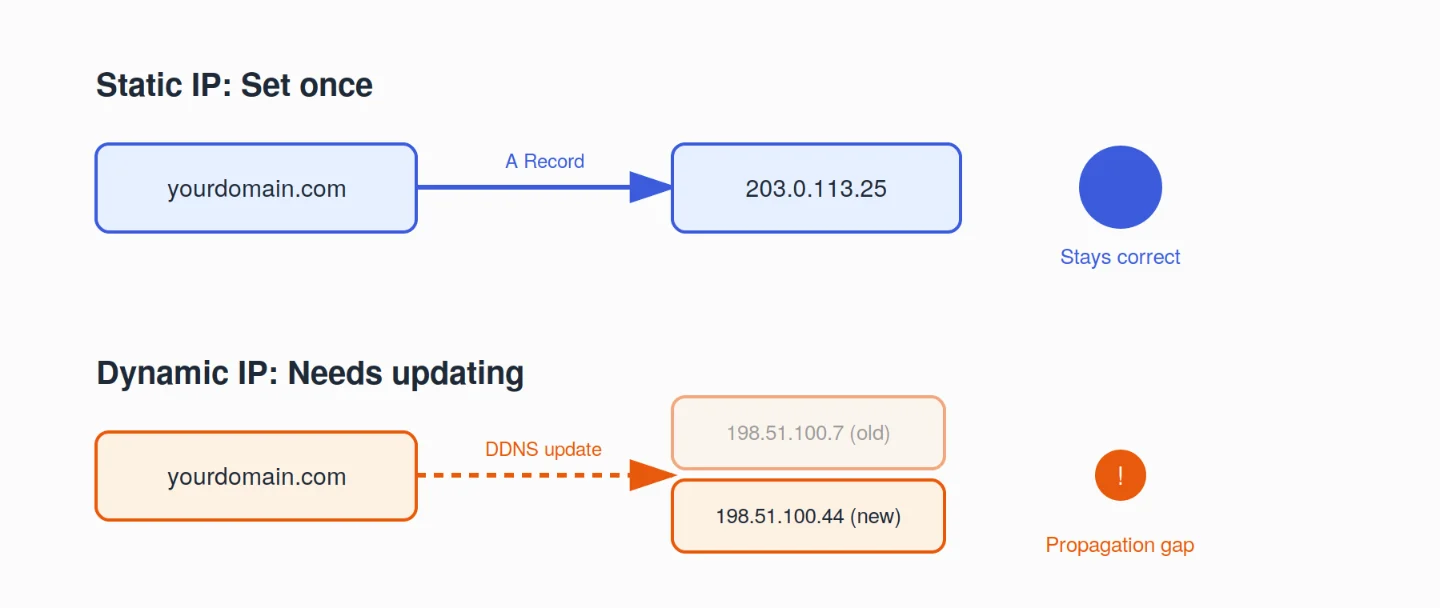
With a static IP, you set the A/AAAA record once. It stays correct forever.
With a dynamic IP, every address change makes your existing DNS record wrong. Dynamic DNS (DDNS) can update it automatically. But there’s still a gap during propagation.
That gap is not acceptable for a production website or business service.
4) Reliability for Inbound Connections
Static IPs keep your services reachable at the same address, indefinitely. Websites, game servers, SSH, and VPNs all depend on this.
A dynamic IP change can cause minutes, sometimes hours, of downtime. Clients and DNS need time to catch up.
For live production traffic, that’s simply too risky.
5) Email Deliverability and Reverse DNS
This is where the gap between static and dynamic gets serious.
Static IP gives you:
- A proper PTR record (IP → hostname)
- Full control over your sending reputation
- Consistent SPF, DKIM, and DMARC behavior
Dynamic IP leaves you with:
- No reliable way to maintain a PTR record
- Ranges that are often already blacklisted, tied to residential and spam activity
- Rotating addresses that create authentication gaps and hurt sender reputation over time
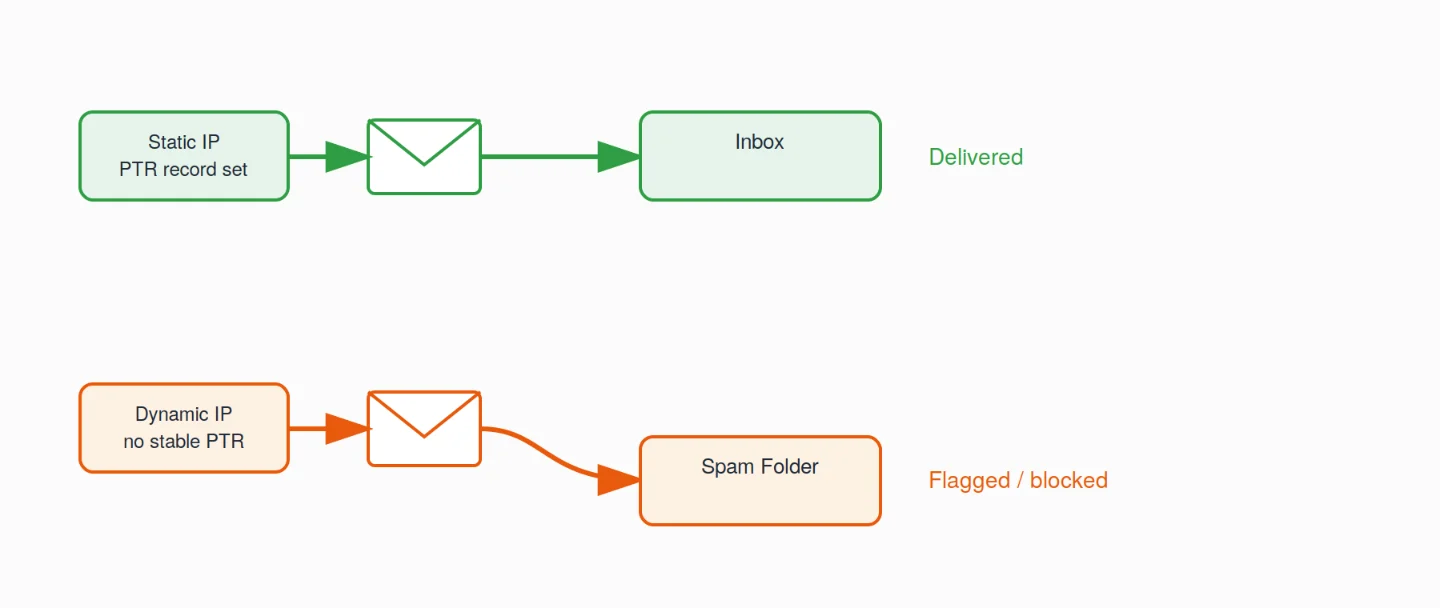
This isn’t a minor detail anymore. Bulk sender rules from Google and Yahoo that took effect in February 2024 explicitly require a working PTR record with matching forward and reverse DNS.
Microsoft’s Outlook and Hotmail followed with similar enforcement, announced in April 2025 and applied from May 5, 2025.
Bottom line: a static IP is effectively required if you want to run a mail server or send transactional email cleanly.
6) Security Profile
Static strengths: Firewall rules, allowlists, and access controls for SSH, admin panels, and APIs are set once. They stay valid. Traffic is easy to audit and monitor.
Static trade-off: The address is predictable. Scanners can keep targeting it.
Dynamic strength: A changing address can briefly disrupt automated attacks. This is “security through obscurity.”
Realistic view: That obscurity benefit is small and temporary. The daily operational advantage of a stable static IP, reliable rules, and reliable access is worth far more.
7) IP Reputation and Blacklisting
With a static IP, your reputation belongs entirely to you. You start clean. You build it through your own activity.
With a dynamic IP, you can inherit spam, malware, or abuse history left behind by a previous user of that same address. That can cause immediate deliverability or access problems, through no fault of your own.
8) Geolocation Accuracy
A static IP keeps location data consistent because the address is permanently tied to one place. This helps with CDN routing, geo-restrictions, analytics, and compliance checks.
A dynamic IP can jump around a shared pool. That creates problems for geo-based content, regional pricing, or location-dependent rules.
9) Cost
On home internet, a static IP is often an expensive add-on.
VPS hosting works differently. Most plans, including every Truehost Pakistan VPS plan, already include a dedicated static IPv4 at no extra charge. You can add more IPs later, for separate projects or a mail server.
Ready to lock in a stable address for your project? Check out Truehost VPS Hosting and see what’s included.
10) Management Overhead
With a static IP, you note the address once. Then you use it for DNS, firewalls, and remote access. Overhead stays low and predictable.
With a dynamic IP, you’re constantly managing DDNS, updating firewall rules after every change, and troubleshooting connections broken by surprise rotations. For production use, that reactive work usually outweighs the effort of managing a static IP.
CDN / Reverse-Proxy Caveat
If your whole site sits behind a CDN or reverse proxy, Cloudflare, for example, a dynamic origin IP are less important for pure web traffic.
But that shield doesn’t cover everything.
Email, direct SSH or RDP access, custom services, and any non-proxied endpoint still work far more reliably behind a static IP.
When Dynamic IPs Are Used and Why They Fail for VPS
Dynamic IPs aren’t useless. They just fit different jobs.
Typical legitimate uses:
- Home and consumer broadband
- Temporary testing or dev environments
- Purely outbound workloads
- Intentional rotating proxies or anonymization services
- Cost-sensitive, non-production setups
Why they break VPS workloads:
- Frequent or unpredictable downtime for inbound traffic
- Broken or lagging DNS mapping
- Email deliverability problems and blacklisting risk
- Firewall and remote-access friction
- Inherited reputation issues
- Extra complexity from DDNS, monitoring scripts, and constant rule updates
DDNS is a band-aid. It’s not a production-grade solution. Propagation delays and single points of failure remain.
There are rare edge cases where dynamic addressing is fine, short-lived test VMs with no inbound requirements, or specialized proxy and exit-node setups built around rotation on purpose.
If you’re experimenting with automation or scraping workflows at that scale, a purpose-built setup like OpenClaw Hosting or our N8n Hosting can handle the outbound side while your production services stay on a stable static address.
Security Considerations
Static: More predictable attack surface. Attackers can target it consistently. Mitigate with firewalls, fail2ban, key-based authentication, rate limiting, regular updates, and monitoring. Operational stability usually outweighs the minor obscurity of a dynamic address.
Dynamic: Offers a slight “moving target” benefit. But determined attackers rescan quickly. The reliability cost rarely justifies it for a server.
This gets more serious every year. Cloudflare’s Q4 2025 DDoS Threat Report recorded a 121% year-over-year jump in attack volume, totaling 47.1 million incidents in 2025, more than double the count from 2024.
The report also documented a record 31.4 Tbps attack, a 700% increase in peak attack size compared to late 2024.
Scanners and bots aren’t slowing down. Proper hardening on a stable, static address beats relying on address rotation as your main defense.
Get Reliable VPS Hosting with Truehost
We at Truehost build our infrastructure to keep your applications fast, secure, and online.
Features:
- Dedicated resources: guaranteed vCPUs and RAM, no noisy neighbors
- Ultra-fast NVMe SSD storage, up to 7x faster than traditional SSDs
- Managed security: automated patching, malware scanning, firewall management
- Daily backups with 30-day retention and one-click restore
- Full root access
- 24/7 expert support from real Linux engineers, average response under 3 minutes
- Strong DDoS protection, up to 10 Tbps
- One-click scaling for CPU, RAM, and storage independently, with no downtime
- Optional add-ons: JetBackUp / Cloudoon Vault, KernelCare + Imunify360, CXS, SSL, WHM/cPanel, Softaculous, Plesk, and additional IPs
Ideal for: ecommerce stores, SaaS apps, creative agencies, enterprise websites, and CRM or ERP systems. If you’re building AI-driven tools, our AI Workers and N8n Hosting plans pair well with a static-IP VPS for stable API endpoints and webhooks. For heavier workloads, our dedicated servers are a natural next step.
Simple pricing: Cloud VPS Elite starts at an affordable monthly rate when billed annually, 1 vCPU, 1 GB RAM, 25 GB SSD, 1 TB transfer, hosted in Europe or the USA, on Linux. No hidden fees. Higher plans are ready when you grow.
Every plan includes your own static IP. No DDNS, no workarounds, no guesswork.
Dynamic IP vs Static IP for VPS Hosting FAQs
Do most VPS plans include a static IP?
Yes. Most reputable VPS providers, including Truehost, bundle a dedicated static IPv4 address with every plan at no extra cost.
Can I host a website or email server on a dynamic IP?
Technically yes, but it’s not reliable. DNS mapping breaks on rotation, and email delivery suffers badly without a stable PTR record.
Does a static IP improve email deliverability?
Yes, significantly. It lets you set a proper PTR record, build a clean sender reputation, and keep SPF, DKIM, and DMARC working consistently.
Is a static IP more expensive on VPS hosting?
Usually not. On VPS plans it’s normally included by default, unlike consumer broadband where it’s often a paid add-on.
When is a dynamic IP acceptable?
For short-lived test environments, purely outbound workloads, or intentional rotating-proxy setups where reachability isn’t the goal.
How do I check if my current IP is static or dynamic?
Check your hosting control panel or ask your provider. On a VPS, your IP is almost always static by default unless stated otherwise.
Does Truehost include a static IP with VPS plans?
Yes. Every Truehost Pakistan VPS plan comes with a dedicated static IP included, with no extra charge.
Can I upgrade or add more static IPs later?
Yes. You can add extra static IPs to your VPS as your project grows or if you need to run a separate mail server.