Domain SearchInstantly check and register your perfect .pk or international domain
 Web HostingGet a .pk domain for as low as PKR 467
 cPanel HostingUser-friendly hosting powered by cPanel
 Reseller HostingLaunch your own hosting business with minimal technical requirements
 Windows HostingOptimized for Windows-based applications and websites
 Affiliate ProgramEarn referral commissions by promoting our services
 WordPress HostingFast & Reliable WordPress Hosting
 Domain TransferMigrate your existing domain seamlessly with zero downtime.
 All DomainsAccess 324+ top-level domains (TLDs) worldwide from a single platform
 Whois LookupIdentify the owner of any domain using our whois and rdap lookup tool
 Managed VPS Hosting
 AI Website BuilderCreate beautiful websites effortlessly using intuitive drag-and-drop features
 Online ShopLaunch a professional online shop with no technical skills required
 BlogDiscover expert guides on hosting, websites, SEO, and digital growth strategies
 ContactGet instant assistance via live chat or email
 SupportAccess help articles, tutorials, and service documentation
 SSL CertificatesEncrypt data, build trust, and boost SEO.
You have a domain, you’re ready to build a website, and next in line is web hosting. So who hosts your website, and how do they do it?
A web hosting company stores your website’s files on a powerful, always-on computer called a server, so anyone in the world can visit your site at any time.
A simple way to look at this is your website as your shop. Your website files are everything inside the shop, from the products to the shelves and furniture. The server is the building where the shop operates.
The web hosting company is the landlord that keeps the building powered, connected, maintained, and protected.
You could technically host a website from your own laptop or desktop, but that quickly becomes impractical.
Your computer would need to remain switched on and connected to the internet around the clock. It also isn’t designed to handle large numbers of visitors, and you’d have to take care of security, maintenance, backups, and other server tasks yourself.
Web hosting companies take care of that infrastructure for you.
Depending on the hosting plan you choose, you may also get services such as SSL certificates, backups, professional email, a control panel, databases, application installers, website migration, and technical support.
At Truehost, we are a great example of a web hosting company, providing the infrastructure for businesses, bloggers, developers, freelancers, and individuals who want to put their websites online without running their own servers.
How Do Web Hosting Companies Work?
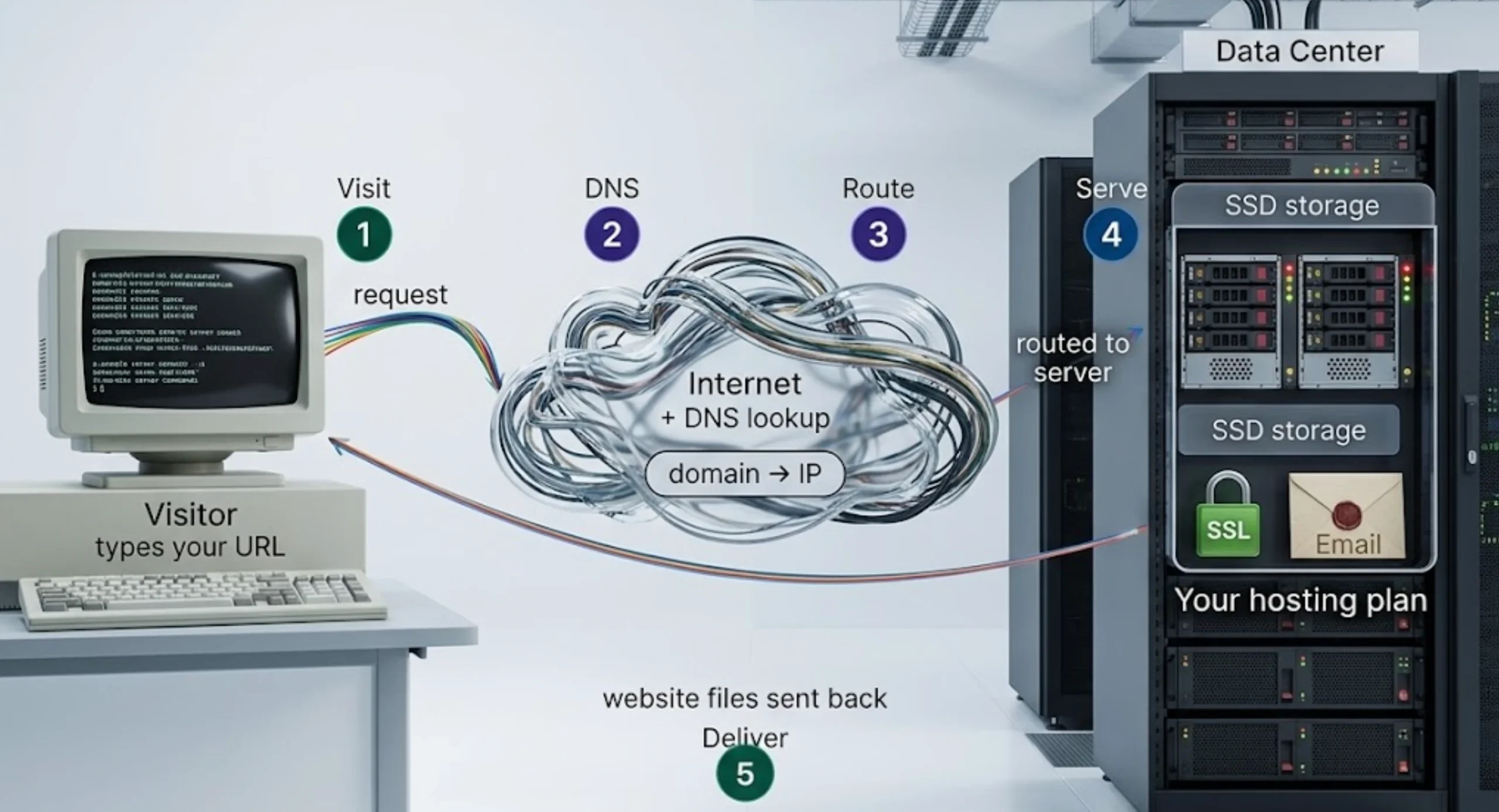
When a visitor arrives on your website, a lot happens in the background and fast. Here’s the full sequence, from the moment they type your address to the moment your page loads on their screen.
Step 1: A Visitor Requests Your Website
The visitor enters your domain name into a browser or clicks a link to your site. That single action sets everything else in motion.
Step 2: DNS Finds the Server
The browser doesn’t yet know where your website lives. So it consults the Domain Name System (DNS), which functions like the internet’s phone book.
DNS translates your human-readable domain name into the numerical IP address of the server hosting your files.
The domain is the name listed in the phone book; the IP address tells the browser exactly where to find it.
Step 3: The Request Reaches the Server
Armed with the IP address, the browser sends a request across the internet to the appropriate server, which is the one physically holding your website’s files.
Step 4: The Server Finds the Required Data
The server processes the request and retrieves whatever files or data are needed to generate the page being asked for.
For a WordPress site, this also means pulling records from your database.
Step 5: The Server Sends the Data Back
Once the required files and data have been gathered, the server sends them back to the visitor’s browser.
The information travels across the internet to the device that requested it.
Step 6: The Browser Displays the Website
The browser receives the returned files and processes them. It then displays the page with its text, images, menus, buttons, forms, and other elements.
From the visitor’s point of view, this can feel almost instant.
The full exchange usually happens in less than a few seconds, although the actual speed depends on factors such as the website itself, the visitor’s connection, server performance, and the distance between the visitor and the server.
What Services Do Web Hosting Companies Provide?
Hosting companies can provide an entire set of services around running a website, although what’s included depends on the provider and plan.
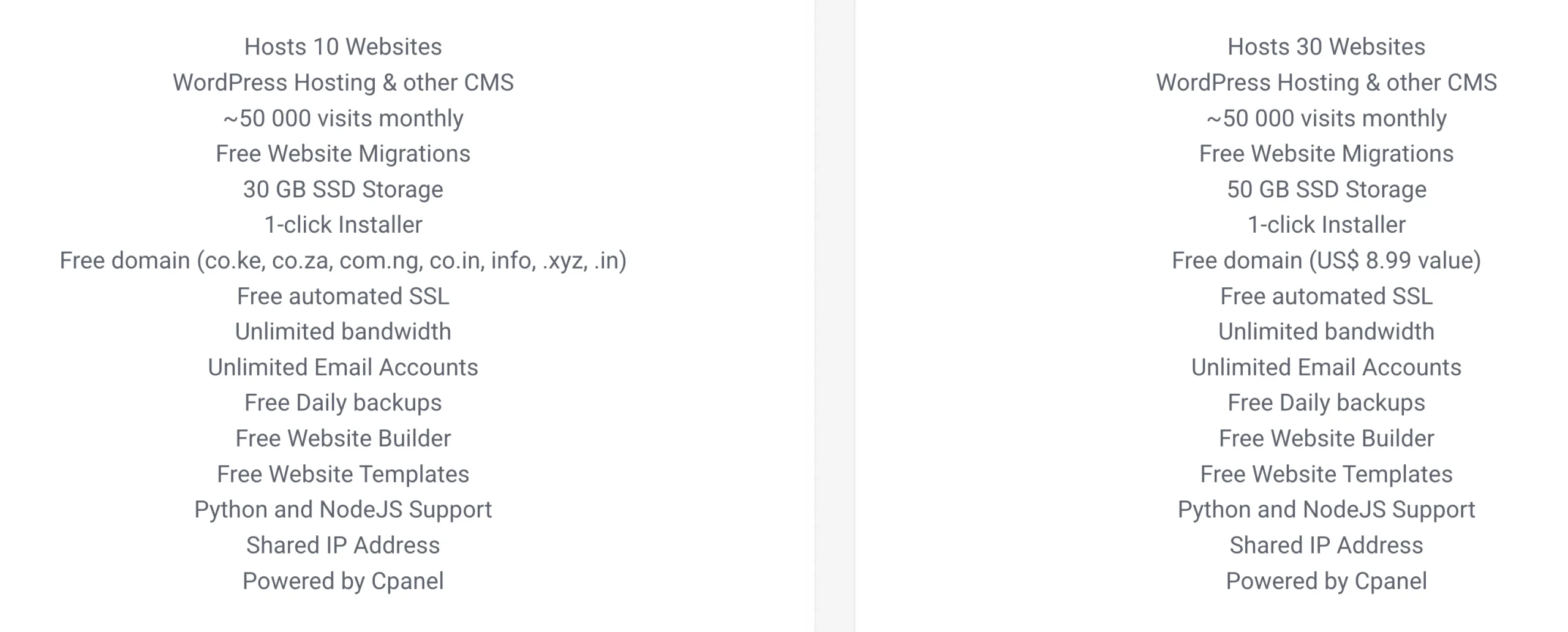
Here’s what a solid hosting package generally covers:
1) Server Storage
Your website needs somewhere to store its files, and that is one of the main jobs of a hosting server.
These files can include HTML pages, images, videos, scripts, documents, and other website content. Websites that use databases also need server space for their database files.
Many modern hosting plans use SSD storage rather than traditional HDD storage. SSDs can read and write data faster, which can contribute to faster website performance.
2) Domain Registration
Your domain is the address people use to find your website, such as yourbusiness.pk.
Some web hosting companies also provide domain registration, allowing you to purchase your domain and hosting from the same provider. This can make managing your website easier because your domain and hosting account are kept together.
Depending on the provider, you may be able to register different domain extensions, including country-code domains such as .pk and other extensions such as .com, .net, and .org.
When registering a domain, check the registration price as well as the renewal cost. A promotional first-year price may not be the amount you’ll pay in subsequent years.
3) Website Builder
You don’t always need to know how to code before you can create a website.
Many hosting companies provide website builders that let you create pages using visual editing tools. You can select a template, add sections, upload images, edit text, and arrange content without writing HTML or CSS yourself. You can also build with AI if provided.
A website builder can be useful for small businesses, portfolios, personal websites, and other projects where you want to get online without building the entire site from scratch.
4) Website Migrations
Already have a website hosted somewhere else?
A hosting company may help you move it to a new server through a website migration service.
A migration can involve transferring your website files, databases, email accounts, and other hosting settings from the old provider to the new one.
Migration support can be particularly useful if you’re moving an established website because transferring everything manually can involve several technical steps.
Before switching providers, check if migration is included with the hosting plan or charged separately. Some hosting companies, including Truehost, offer free website migration with selected hosting plans.
5) SSL Certificates
SSL/TLS technology helps encrypt information exchanged between a visitor’s browser and your website.
That encrypted connection is represented by HTTPS and the padlock symbol shown in modern browsers.
This is particularly important for websites that handle information such as login details, contact forms, customer information, or payment-related data.
Many hosting plans include an SSL certificate at no additional cost, so you don’t have to purchase one separately just to secure your website connection.
6) Backups
Websites can run into problems for many reasons.
An update can cause an error. A file can be deleted accidentally. A plugin can conflict with another plugin. A website can also be affected by security incidents or other technical problems.
Backups give you a copy of your website that can be restored if something goes wrong.
The frequency varies between hosting plans. Some providers offer weekly backups, while others provide daily or more frequent backups.
Before choosing a plan, check how often backups are taken, how long they are retained, and how restoration works.
7) Business Email
A hosting company may also provide professional email accounts using your domain.
For example, instead of communicating with customers through [email protected], you could use an address such as [email protected].
This lets your website and business email use the same domain.
Depending on the hosting provider, you may be able to access your email through webmail or connect it to applications such as Gmail or Outlook.
8) Control Panel
Managing a website server through command-line instructions can be intimidating if you’re not a technical user.
Tools like cPanel provide a graphical interface for managing common hosting tasks.
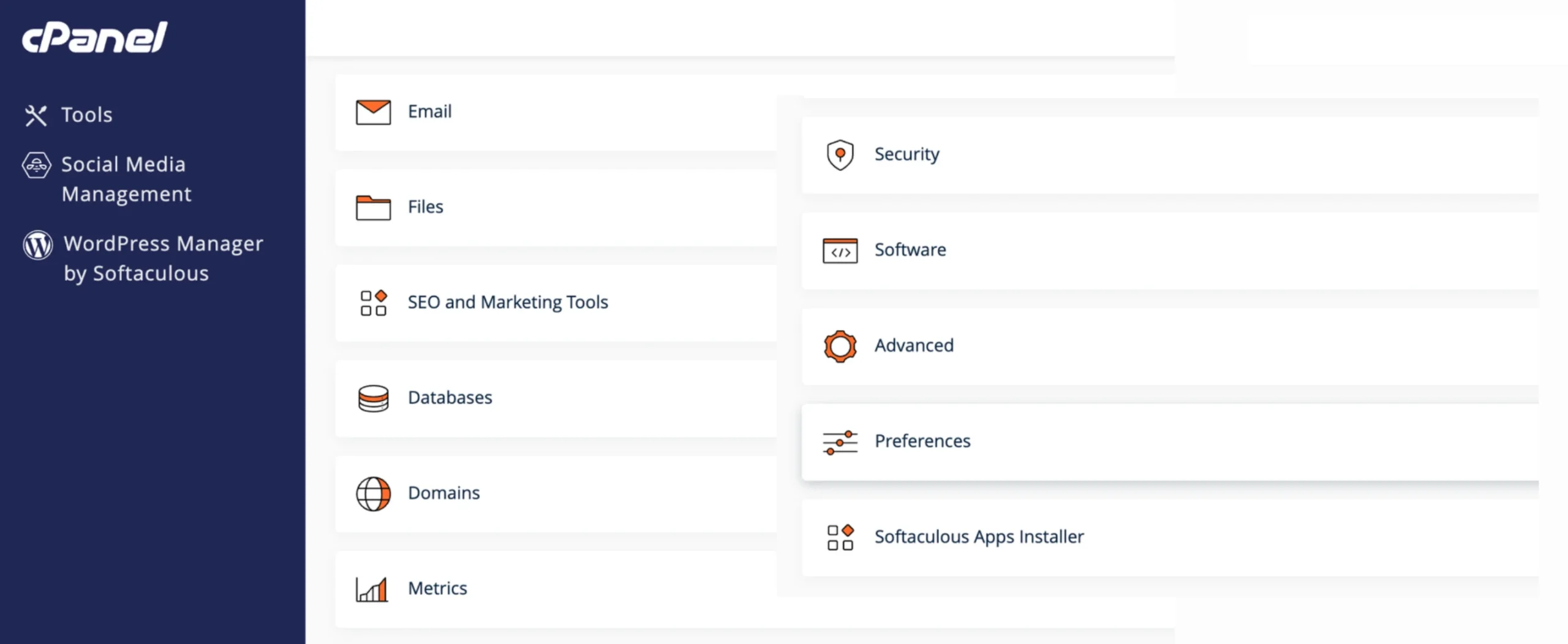
You can use the panel to manage files, databases, domains, email accounts, security settings, applications, and other parts of your hosting account without having to perform every task from the command line.
9) One-Click Applications
Application installers take the technical friction out of setting up platforms like WordPress, WooCommerce, Joomla, and others.
Instead of manual configuration, a few clicks handle the setup, so you can get to building your site rather than wrestling with installation steps.
10) Customer Support
Even a well-maintained website can develop a technical problem. You may need help connecting a domain, setting up an email account, restoring a backup, installing an application, or troubleshooting an issue with your hosting account.
Customer support gives you somewhere to turn when you run into those problems.
This can be particularly useful for beginners and businesses that don’t have an in-house technical team.
What Types of Web Hosting Do Companies Offer?
A personal blog doesn’t need the same server resources as a busy online store. That’s why hosting companies offer several types of hosting.
| Hosting Type | Best For | Key Benefit |
|---|---|---|
| Shared Hosting | Beginners, blogs, small business sites | Affordable and easy to manage |
| VPS Hosting | Growing sites, developers | Dedicated resources and greater control |
| Dedicated Server | High-traffic websites and enterprises | Full server resources and maximum control |
| Cloud Hosting | Businesses that need scalable infrastructure | Resources can scale as requirements change |
| WordPress Hosting | Bloggers and WordPress websites | Hosting configured around WordPress |
| Reseller Hosting | Freelancers and web agencies | Allows you to sell hosting to your own clients |
For most Pakistani small businesses, bloggers, and freelancers starting out, shared hosting is often the simplest place to begin. As the website grows, you can move to a hosting plan with more resources and control.
How to Choose the Right Web Hosting Company in Pakistan
Before you commit to a plan, run through this checklist. Each point directly affects how your site performs and how painless it is to manage:
- Uptime guarantee: Look for 99.9% or higher. A website that regularly goes offline can mean missed enquiries, sales, or visitors.
- SSD storage: SSD storage can provide faster data access than traditional HDD storage and can contribute to better website performance.
- Free SSL: Check if SSL is included in your hosting plan rather than sold separately.
- Local or regional support: A provider familiar with the Pakistani market can make things easier when you need help with local domains, payments, hosting configurations, or other regional requirements.
- Transparent renewal pricing: A low introductory price can look attractive, but check what you’ll pay when the first billing period ends. Your renewal price is the figure you’ll need to budget for long term.
- Scalability: Your website may start small and grow later. Check if you can move from shared hosting to VPS or another plan without having to rebuild your website from scratch.
- Included email accounts: If you need professional business email, check how many accounts are included and if there are additional charges.
- Automated backups: Look for regular automated backups and check the retention period.
At Truehost, we offer these features across our hosting options, with plans designed for different website sizes and requirements.
Your website needs a home. We provide the server space and hosting infrastructure that keeps it available to visitors while giving you the tools to manage it.