Domain SearchInstantly check and register your perfect .pk or international domain
 Web HostingGet a .pk domain for as low as PKR 467
 cPanel HostingUser-friendly hosting powered by cPanel
 Reseller HostingLaunch your own hosting business with minimal technical requirements
 Windows HostingOptimized for Windows-based applications and websites
 Affiliate ProgramEarn referral commissions by promoting our services
 WordPress HostingFast & Reliable WordPress Hosting
 Domain TransferMigrate your existing domain seamlessly with zero downtime.
 All DomainsAccess 324+ top-level domains (TLDs) worldwide from a single platform
 Whois LookupIdentify the owner of any domain using our whois and rdap lookup tool
 Managed VPS Hosting
 AI Website BuilderCreate beautiful websites effortlessly using intuitive drag-and-drop features
 Online ShopLaunch a professional online shop with no technical skills required
 BlogDiscover expert guides on hosting, websites, SEO, and digital growth strategies
 ContactGet instant assistance via live chat or email
 SupportAccess help articles, tutorials, and service documentation
 SSL CertificatesEncrypt data, build trust, and boost SEO.
A domain name is your website’s unique address on the internet.
Something like yourbusiness.pk or example.com.
Web hosting is the server space that stores your website’s files, images, databases, and code.
It’s what makes your site accessible 24/7.
You need both for a working website.
The domain tells people where to go. Hosting is where the site actually lives.
That’s the core of the domain vs hosting question. Confusing the two is the most common reason new site owners get stuck at setup.
Domain = the street address or shop signboard.
Hosting = the building or shop that holds everything visitors see.
Without the address, no one finds you.
Without the building, the address points to an empty plot.
Here’s each piece broken down, with real numbers.
What Is a Domain Name?
A domain name is the human-readable address people type into a browser.
It replaces long, hard-to-remember IP addresses like 192.0.2.1.
Instead, you type something memorable. Something like truehost.pk or yourshop.com.
Purpose
A domain acts as a friendly label.
The Domain Name System (DNS) translates that label into the correct server IP address.
DNS runs on several record types, each with a job:
- A record: points your domain to an IPv4 server address.
- CNAME record: points a subdomain to another domain.
- MX record: routes email to your mail server.
- TXT record: verifies ownership and stores SPF/DKIM data for email authentication.
Without these records set correctly, browsers can’t find your site, and email can silently fail to deliver.
Components of a Domain Name
Every domain has two core parts.
- Second-Level Domain (SLD): the main name you choose. “Example” in example.com.
- Top-Level Domain (TLD): the extension after the dot.
.com,.net,.org,.pk,.com.pk.
TLDs fall into two categories. Generic TLDs (.com, .net, .org) work globally. Country-code TLDs (ccTLDs) like .pk or .com.pk tie a site to one country.
Country-code TLDs signal a Pakistan connection.
This builds local trust with Pakistani visitors. It can also help with search visibility among local users, since search engines use ccTLDs as one geo-targeting signal.
How Domain Registration Works
You register a domain through an accredited registrar.
For .pk domains, that means a PKNIC-accredited registrar. PKNIC has run the .pk registry since 1992, operating the root servers and shared registry system for the country’s namespace.
You don’t own a domain forever. You rent exclusive use of it for a set period.
Most global extensions run on a 1-year cycle. .pk domains carry a minimum 2-year registration, and PKNIC allows prepayment up to 10 years at a time.PKNIC charges its domestic registration fee on a biennial basis and allows prepayment for up to a maximum of ten years
Every registration is tied to a WHOIS record, showing the registrant, registrar, and expiry date. This is how ownership disputes and renewals get tracked.
Renew on time, or you risk losing the name to someone else.
Auto-renewal removes that risk. We recommend turning it on.
Cost context for Pakistan
Global domains typically cost $10–20 per year.
.pk pricing works differently, with two layers worth knowing.
- PKNIC’s own registry fee: Rs. 2,100 per year for registrants based in Pakistan, and $15.99 per year for registrants located outside Pakistan, billed in two-year blocks.PKNIC charges domestic registrants a domain fee of Rs. 2100 per year, and $15.99 per domain per year for registrants located outside Pakistan, billed on a biennial basis
- International registrar pricing for .pk: Typically $35–$60 per year through most non-Pakistani registrars. A few higher-end providers charge $150–$170+. The cheapest options start around $16.
A realistic budget for a .pk domain sits between Rs. 2,100 and Rs. 4,500 per year through a local, PKR-billing registrar.
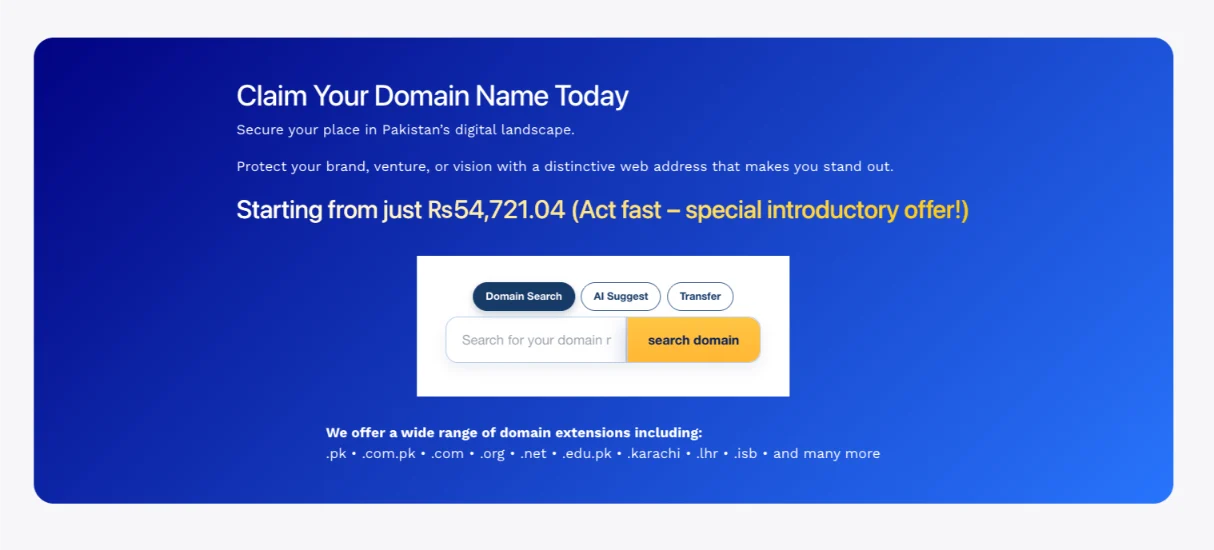
At Truehost, .pk / .com.pk domains start from ₨54,721.04 ₨53,166.47.
Billing in PKR avoids exchange-rate surprises on renewal, which is more important than it sounds given how much international registrar pricing swings with the dollar-to-rupee rate.
You can search and register your .pk domain with us directly in rupees.
What Is Web Hosting?
Web hosting is the service that stores all your website’s content.
That includes HTML/PHP files, images, videos, databases, and scripts.
It lives on a server that stays connected to the internet permanently.
When someone types your domain, the hosting server delivers those files to their browser.
Purpose
Hosting provides the infrastructure. That means four resources:
- Storage: disk space for files, images, and databases.
- Processing power (CPU/RAM): how fast pages generate and how many visitors you can handle at once.
- Bandwidth: the data transferred between your server and visitors each month.
- Uptime: how consistently the server stays online.
Uptime is usually sold as an SLA percentage. Here’s what each tier allows in downtime per year:
| Uptime SLA | Downtime per year | Downtime per month |
|---|---|---|
| 99% | ~3.65 days (87.6 hrs) | ~7.3 hours |
| 99.9% (industry standard) | ~8.76 hours | ~43.8 minutes |
| 99.95% | ~4.38 hours | ~21.9 minutes |
| 99.99% | ~52.6 minutes | ~4.3 minutes |
| 99.999% | ~5.3 minutes | ~26 seconds |
99.9% is the tier most shared and business hosting plans advertise as standard.99.9% uptime, the “three nines,” is generally considered the industry standard, translating to about 8.76 hours of downtime a year.
A serious e-commerce or SaaS site typically needs 99.95% or higher, which usually means VPS or dedicated infrastructure.
Analogy reinforcement
If the domain is the address, hosting is the building.
It holds the rooms, the furniture, and the products your visitors came to see.
Cost & Billing
Hosting is a recurring subscription. You pay monthly or yearly.
Price depends on storage, bandwidth, traffic capacity, and features.
Globally, shared hosting plans typically run $3–15 a month, making them the cheapest entry point.
Shared hosting typically costs between $3 to $15 per month VPS plans usually start higher, since you get dedicated CPU and RAM instead of shared resources, and dedicated servers cost more again, since you’re renting the entire physical machine.
Annual billing is almost always cheaper per month than monthly billing, since providers discount for locked-in terms.
Types of Web Hosting
Not all hosting is built the same. Here’s how the main types differ, and where each fits.
1) Shared Hosting
Many websites share one server’s resources: CPU, RAM, and storage are pooled and split across every account on the machine.
Best for: business profile sites, portfolios, basic blogs, small sites with predictable traffic.
Why beginners choose it: lowest cost, simple management (often with cPanel), one-click WordPress install.
Shared hosting still holds the largest share of the global hosting market by usage, at roughly 34–38% of total hosting revenue, ahead of every other hosting type.
Shared hosting is the most common type of web hosting, holding 37.64% market share globally
The trade-off: since resources are shared, a traffic spike on another account on the same server can slow yours down.
Most Pakistani starters should begin here.
2) VPS Hosting (Virtual Private Server)
You get a virtual slice of a server, with dedicated resources and more control. Your CPU and RAM allocation is guaranteed, not shared.
Best for: growing sites that need steadier performance, multiple websites, custom configurations, or staging environments.
This is the natural upgrade path once shared hosting starts to feel limited, typically when a site sees consistent traffic spikes or needs specific software configurations shared servers don’t allow.
Our VPS plans give you that dedicated headroom without the full cost of a physical server.
3) Dedicated Hosting
You rent an entire physical server. Nothing is shared with any other customer.
Best for: high-traffic sites or projects that need maximum control, privacy, and resources.
This is the most expensive tier, but it also removes the “noisy neighbor” problem entirely, since no other account can compete for your server’s resources.
We also offer dedicated server options for businesses that outgrow shared and VPS environments entirely.
4) Cloud Hosting
Cloud hosting uses a network of servers instead of one machine.
Best for: flexibility and handling sudden traffic spikes.
If one physical server in the cloud network fails, your site shifts to another automatically. That redundancy is why cloud hosting has grown fast, driven largely by demand for elastic capacity during traffic surges.
5) Managed WordPress Hosting
This is hosting optimized specifically for WordPress sites.
It often includes automatic updates, enhanced security, caching, and performance tuning built around WordPress’s specific architecture.
For teams running automation on top of WordPress, we also support specialized setups like OpenClaw hosting, AI Workers, and n8n hosting for workflow automation, alongside standard managed WordPress plans.
Guidance for most beginners
Start with shared hosting.
Move to VPS later, if traffic grows significantly or you need more resources.
Many sites run successfully on shared hosting for years without ever needing to upgrade. The switch usually happens because of resource limits, not because shared hosting stops working.
Key Differences Between Domain and Hosting
Here’s the domain vs hosting comparison side by side.
| Aspect | Domain | Hosting |
|---|---|---|
| Definition | Name/address — how people find your site | Storage + server resources — where your site runs |
| Function | Points to a location on the internet | Provides the location and serves the website files |
| Purchased From | Domain registrar | Hosting provider |
| Payment Model | Typically yearly (or multi-year) | Typically monthly or yearly, depending on plan |
| Without the Other | Can be bought alone just to reserve the name | Site only reachable via a numeric IP (impractical) |
a) Function
Domain: points to a location on the internet.
Hosting: provides that location and serves the website files.
Neither works as a website alone. A domain with no hosting is just a reservation. Hosting with no domain is just a numeric address nobody types.
b) Purchase / Registration
Domain: registered through a domain registrar, and tracked via a public WHOIS record tied to your name and expiry date.
Hosting: purchased from a hosting provider, and tied to a service plan, not a public registry.
c) Payment Model
Domain: typically paid yearly, or in multi-year blocks. .pk specifically runs on 2-year minimum cycles.
Hosting: typically paid monthly or yearly, depending on the plan you pick, with annual billing usually cheaper per month.
Can You Have Domain Without Hosting?
Yes. You can buy a domain without hosting.
That works fine if you just want to reserve the name before you’re ready to build.
But you can’t have a working website without hosting. The files need somewhere to live.
Hosting without a domain still leaves your site technically reachable, just at a numeric IP address.
That’s impractical for real visitors. No one memorizes IP strings, and most browsers today flag bare IP addresses as untrustworthy.
You can buy domain and hosting separately, or from the same company.
Buying both from one provider, like us at Truehost, simplifies DNS setup, billing (one PKR invoice instead of two), renewals, and support, since you’re not coordinating between two separate account systems.
How Domains and Hosting Work Together
Your domain is the “address” people type.
Your hosting is where the website content is stored and delivered from.
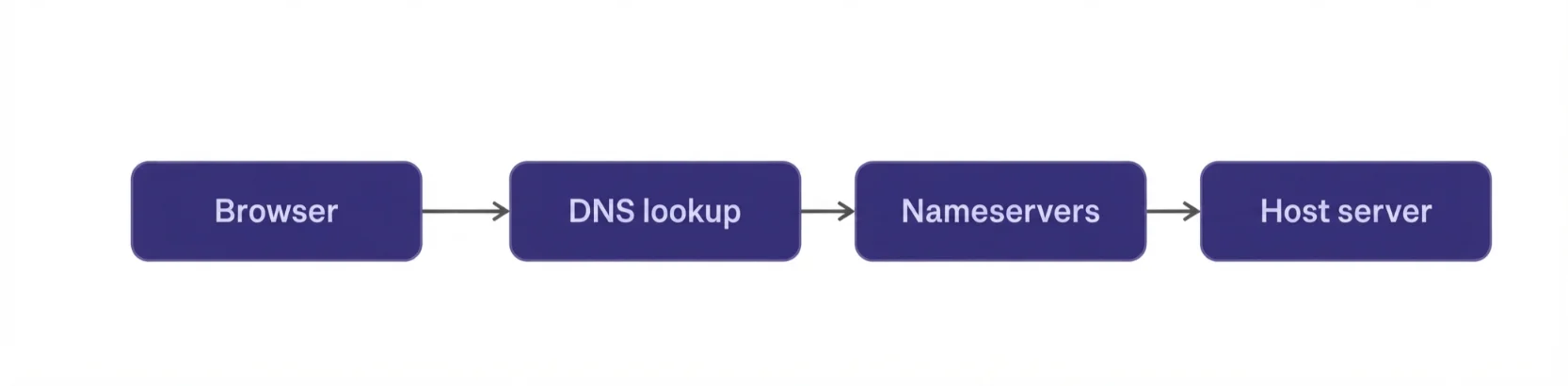
Here’s what happens when someone visits your domain:
- The browser queries the Domain Name System (DNS).
- DNS looks up the nameservers (or A records) linked to your domain.
- Those records point to your hosting server’s IP address.
- The hosting server delivers the website files to the visitor’s browser.
DNS is the bridge between the two.
If nameservers are set incorrectly, the domain won’t resolve to your site, even if both services are active and paid for.
DNS changes don’t take effect instantly. Propagation timelines vary by record type:
- A record or CNAME changes: 30 minutes to 24 hours.
- MX, TXT, or SPF updates: 1 to 24 hours.
- Nameserver changes: up to 48 hours globally.DNS propagation typically takes 24 to 48 hours to complete worldwide, though many users see changes within a few hours
The wait time is controlled by TTL (Time To Live), the cache duration set on each DNS record. Lowering TTL to 300 seconds a day before a planned change speeds up propagation significantly.
A few things to keep in mind:
- If the domain expires, visitors can’t reach the site by name.
- If hosting expires, the domain points to nothing useful.
- Both must stay active and correctly connected.
How To Get Started With A Domain And Hosting Plan
Getting online comes down to four steps.
- Register your domain. Search availability and register it. Prefer
.pkor.com.pkfor local businesses, since ccTLDs signal local trust and support local currency billing. - Choose a hosting plan. Shared hosting is the right starting point for most people, with room to move to VPS as traffic grows.
- Point the domain to your hosting. Update DNS records, usually nameservers. This step is often automatic when you buy both from the same provider, and can take up to 48 hours to fully propagate worldwide.
- Publish your website. Upload files, use a website builder, or install WordPress with one click.
Buying domain and hosting together removes the most common beginner friction: manual DNS configuration and mismatched nameserver records between two providers.
It also keeps everything under one login, one PKR invoice, and one support team.
You now know the real answer to domain vs hosting.
They’re two different services, sold by two different types of provider, that only work as a website when connected correctly through DNS.
Search for your domain name and choose a hosting plan today.
Get your .pk domain with Truehost and pair it with a hosting plan built for your traffic level, shared, VPS, or dedicated.
Your website can be live quickly once both pieces are in place.