 Domain SearchInstantly check and register your perfect .pk or international domain
 Web HostingGet a .pk domain for as low as PKR 467
 cPanel HostingUser-friendly hosting powered by cPanel
 Reseller HostingLaunch your own hosting business with minimal technical requirements
 Windows HostingOptimized for Windows-based applications and websites
 Affiliate ProgramEarn referral commissions by promoting our services
 WordPress HostingFast & Reliable WordPress Hosting
 Domain TransferMigrate your existing domain seamlessly with zero downtime.
 All DomainsAccess 324+ top-level domains (TLDs) worldwide from a single platform
 Whois LookupIdentify the owner of any domain using our whois and rdap lookup tool
 Managed VPS Hosting
 AI Website BuilderCreate beautiful websites effortlessly using intuitive drag-and-drop features
 Online ShopLaunch a professional online shop with no technical skills required
 BlogDiscover expert guides on hosting, websites, SEO, and digital growth strategies
 ContactGet instant assistance via live chat or email
 SupportAccess help articles, tutorials, and service documentation
 SSL CertificatesEncrypt data, build trust, and boost SEO.
Running more than one website used to mean paying for more than one hosting plan.
That is no longer true.
Pakistan had about 117 million internet users at the end of 2025, according to DataReportal. Freelancers alone contributed more than $1.1 billion to IT exports in FY2025-26, says PSEB.
Many of them manage client sites, blogs, and side projects at the same time. Freelancers, agencies, bloggers, small businesses, and developers all face the same question.
If that sounds like you, learning how to host multiple websites on one account can save you real money and time.
Here is why it works in 2026:
- Lower cost. One plan replaces many.
- One place to manage everything. Files, emails, databases, and backups sit in one control panel.
- Better than basic free builders. You get your own domain, your own files, and full control.
- Faster sites help SEO. Google recommends good Core Web Vitals for success in Search. Its target is a Largest Contentful Paint within 2.5 seconds.
Only 48% of mobile sites passed all three Core Web Vitals checks in 2025, per the HTTP Archive Web Almanac. Speed is an easy way to stand out.
Prerequisites / what you need:
Get these basics right before you start.
- A reliable hosting plan. It must support addon domains or unlimited websites.
- Domains pointed correctly. You will use nameservers or A records. Step 2 covers both.
- The right hosting type. Shared hosting works well for most users. You do not need root access. A VPS or dedicated server suits high-traffic sites or many advanced projects.
- Enough resources. Server speed affects Google rankings and your visitors in Pakistan. We host on servers in Asia. We also list about 50,000 visits per month on our Starter and Pro plans, so plan around that.
- A plan that fits your site count. At Truehost, Starter hosts up to about 10 sites. Pro hosts up to about 30. Unlimited has no fixed ceiling.
Every plan includes free SSL, daily backups, cPanel, one-click installs, and local PKR pricing.
Step 1: Choose the Right Hosting Plan for Multiple Sites
Your plan decides how many sites you can run and how well they perform.
Shared hosting is the easiest starting point for most Pakistani users. It costs less. The host also handles server upkeep, so you only manage your sites.
What to look for in 2026
- SSD or NVMe storage
- LiteSpeed or an equally fast web server
- Free SSL on every domain
- Automatic backups
- Email accounts for each domain
- Easy addon domain support in cPanel
Our plans at a glance
| Plan | Websites | Storage | Best for | Price per month (annual billing) |
|---|---|---|---|---|
| Starter | Up to ~10 | 30 GB SSD | New sites, portfolios, blogs | ₨282.65 |
| Pro | Up to ~30 | 50 GB SSD | Small businesses, company sites | ₨847.95 |
| Unlimited | No fixed ceiling | Unlimited SSD space | Agencies, developers, online stores | ₨4,149.77 |
Every plan also includes free SSL, free daily backups, unlimited email accounts, and one-click installs through Softaculous.
Ten separate hosting plans mean ten bills. One Starter plan can host up to ten sites.
Keep one tradeoff in mind. “Unlimited” still means a shared server. Heavy sites use more CPU than light ones. Start with the plan that matches your site count, then upgrade as you grow.
Step 2: Set Up Your Hosting Account and Point Domains
Your plan is only half the setup. Next, connect your domains.
- Sign up and activate your plan. Activation is instant with us. Card payments giving you trouble?
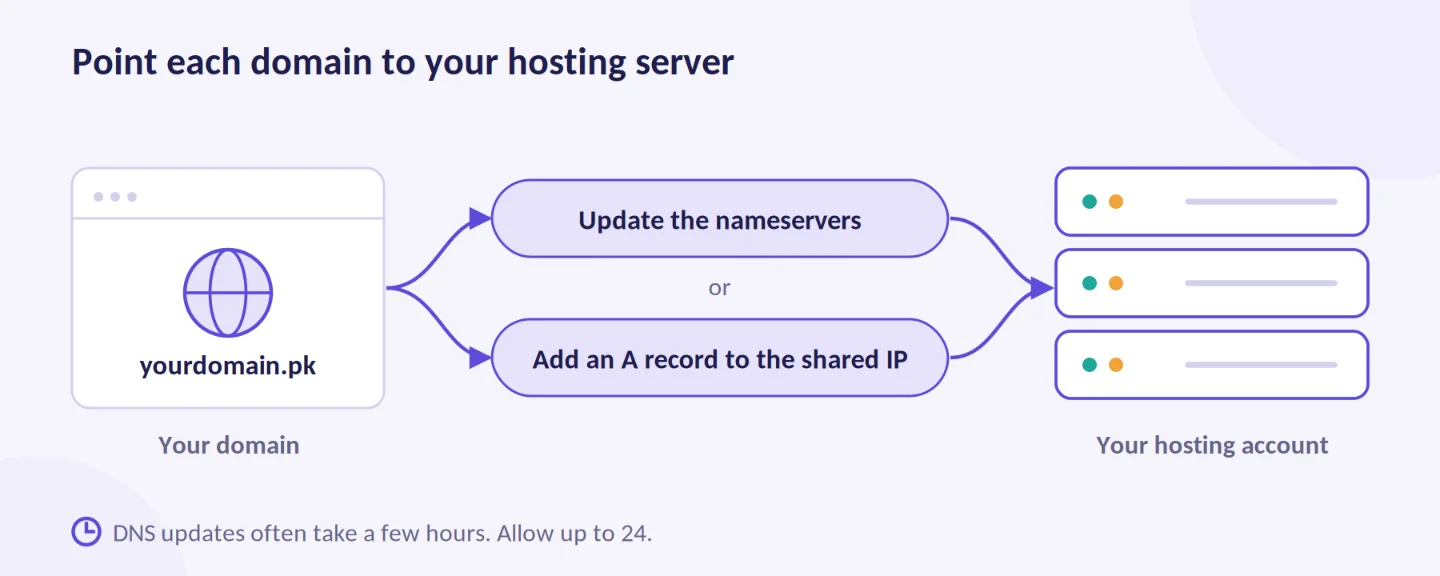
- Point each domain to the server. Update the nameservers to the ones in your welcome email. Or add an A record that points to the shared IP address shown in cPanel.
- Wait for DNS to update. It often takes a few hours. Allow up to 24 hours.
- Open cPanel. Log in from your client area. cPanel is the control panel on our shared plans.
Quick tip: Changing nameservers moves all your DNS records. If your email runs elsewhere, copy your MX records first. Or use an A record and leave everything else alone.
Need a new domain? Eligible annual plans include a free domain where available. You can also open a domain with us and register a .pk name in minutes.
Step 3: Add Your First (and Additional) Websites
Now add your sites. Here is how to host multiple websites in cPanel, one domain at a time.
- Open Domains in cPanel. On older themes, it is called Addon Domains.
- Click Create A New Domain and type the domain name.
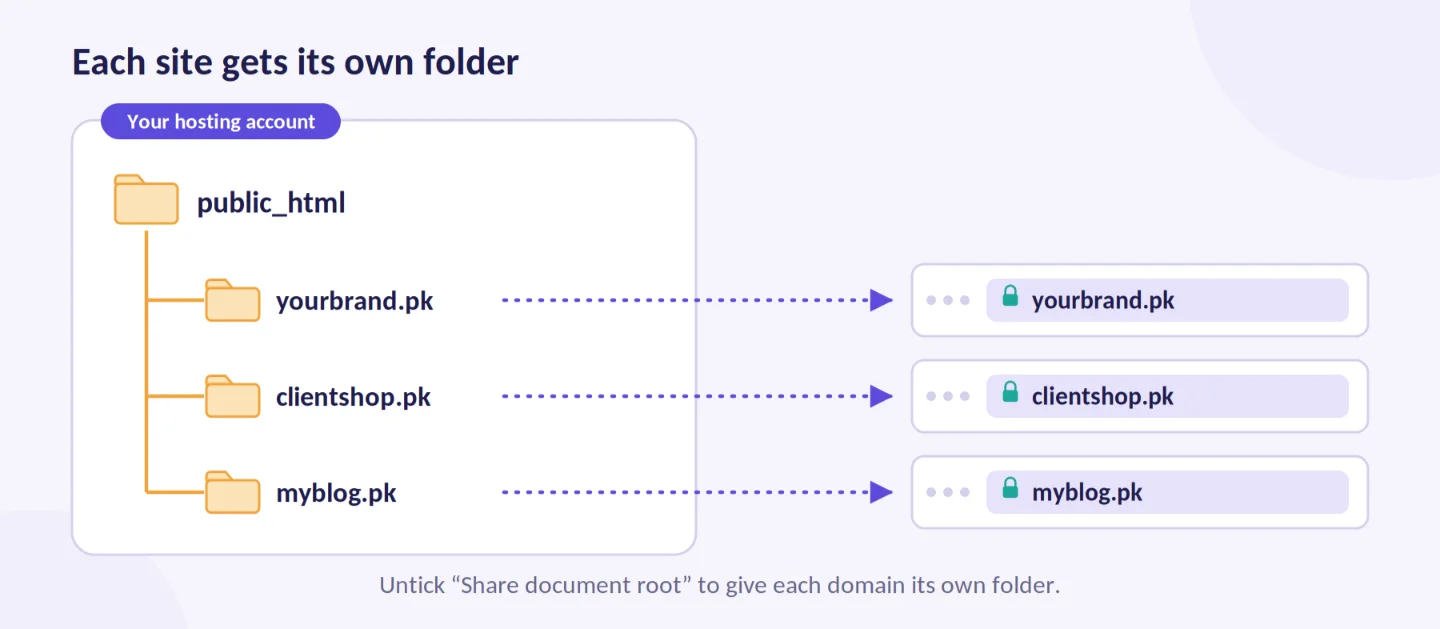
- Untick Share document root. This gives the site its own folder. That folder must sit inside public_html.
- Accept the suggested folder name. A custom name is optional.
- Click Submit.
- Turn on free Let’s Encrypt SSL. cPanel requests a certificate for new domains when AutoSSL is active. Open SSL/TLS Status to check each domain. Run AutoSSL if one has no padlock.
- Install WordPress if you need it. Open Softaculous Apps Installer and pick WordPress. Choose the domain and leave the directory field empty.
WordPress runs on 41.1% of all websites, W3Techs reported in August 2026. That makes it a safe default for most projects.
Repeat these steps for every domain. The process is quick. It works until you reach your plan’s limit, and our shared hosting plans list those limits clearly.
Watch your resources as you add sites. Check storage, traffic, and CPU in cPanel. Look for Resource Usage under Metrics. Each new site adds load.
Step 4: Manage Multiple Websites from One Dashboard
Once your sites are live, cPanel becomes your control room.
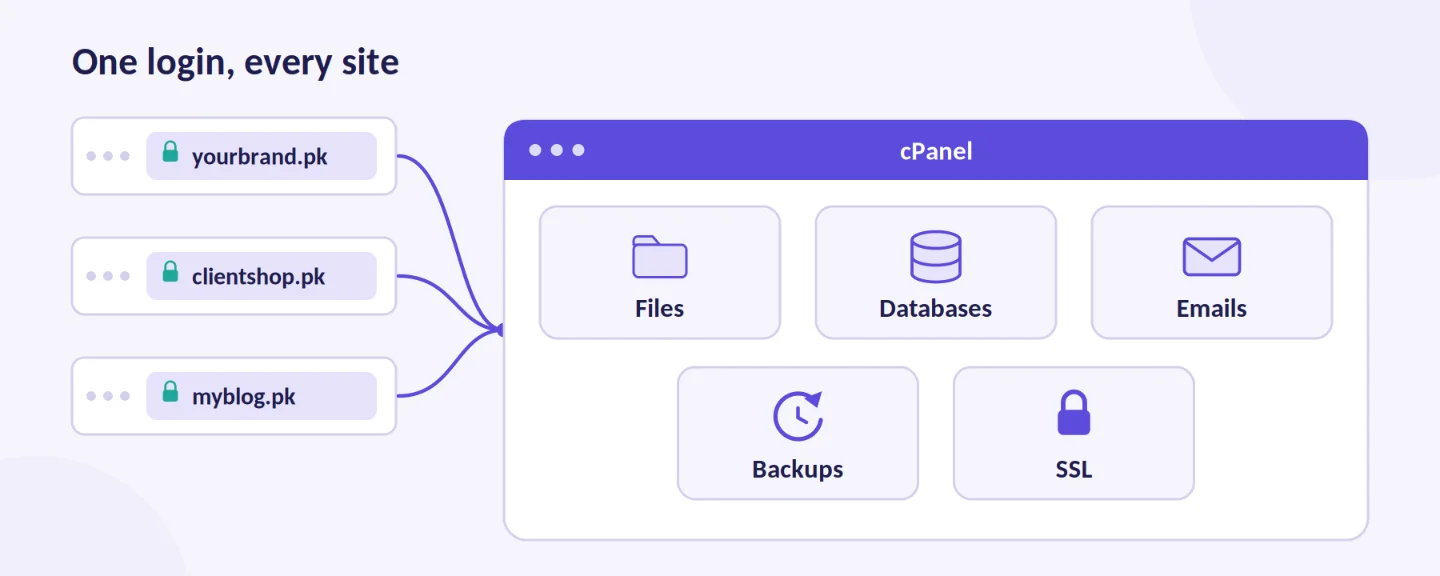
The Domains page lists every site and its folder. From one login, you can manage:
- Files, through File Manager or FTP
- Databases, through MySQL Databases and phpMyAdmin
- Emails, with a separate set for each domain
- Backups and SSL certificates
Useful features
- File Manager and FTP. Edit files quickly or upload large themes.
- Email accounts per domain. Create addresses like
[email protected]. - PHP version selection. Set a PHP version for each site. PHP 8.2 gets security fixes only until 31 December 2026, per php.net. PHP 8.3 and 8.4 stay supported longer. Test before you switch.
- Backups. Download or restore copies when you need them.
- Security tools. Use password-protected directories and IP blocking.
Tips for organization
- Give each site its own folder. Name it after the domain.
- Name each database after its site.
- Use staging when it is available. Our plans list staging environments and Git access for developers.
- Check resource usage once a week.
- Store all logins in a password manager.
Step 5: Optimize Performance, Security & Backups for Multiple Sites
Your sites share one pool of resources. A few habits keep them all healthy.
Speed
- Enable caching on every site. We list server-level caching for WordPress on our plans.
- Compress images before you upload them.
- Keep WordPress, themes, and plugins updated.
- Use free SSL on every site.
- Test each site with PageSpeed Insights. Aim for a Largest Contentful Paint under 2.5 seconds.
Security
Patchstack counted 11,334 new WordPress vulnerabilities in 2025. That was up 42% on 2024. About 91% of them were in plugins.
So plugins are your biggest risk. Protect every site:
- Use a strong, unique password on each one.
- Delete plugins and themes you do not use.
- Install only the plugins each site truly needs.
- Update quickly when a fix is released.
- Watch for resource hogs. One overloaded or infected site can slow the others.
Daily backups and restores
Our plans include free daily automatic backups. On Unlimited, we list 5-day incremental backups.
Each site has its own folder and database. That makes a single-site restore simple:
- Open the backup tool in cPanel, or ask our support team to help.
- Restore the folder of the affected site.
- Restore that site’s database.
- Clear the cache and test the site.
Host backups are a safety net, not your only copy. Download a copy of your key sites each month.
When to upgrade
Watch for these signs:
- You hit CPU or memory limits often.
- Admin dashboards feel slow on several sites.
- Traffic passes what your plan lists.
- You need root access, custom software, or a dedicated IP.
- Client sites need to stay isolated from each other.
A VPS gives you dedicated resources and full root access. With our managed option, we handle updates, security, and backups.
For very large projects, our dedicated servers give you a full physical machine.
Need more than websites? We also offer:
- n8n hosting for workflow automation on your own server
- OpenClaw hosting, with a pre-configured environment for the open-source AI agent
- AI Workers you can deploy in your business to handle repeat tasks
Is Hosting Multiple Websites a Smart Move in 2026?
For most people, yes. It depends on your projects, so weigh both sides.
Benefits:
- Lower cost than separate hosting accounts.
- Centralized control of files, emails, databases, and backups.
- Better performance and scalability than free website builders.
- Flexibility to grow. Add sites easily and upgrade your plan later.
- A strong fit for agencies, freelancers managing client sites, multi-brand businesses, and content creators in Pakistan. The Asian Development Bank estimates about 2.37 million full-time and part-time freelancers in the country.
Potential drawbacks & risks:
- One account or server issue can affect all your sites. Good backups and a reliable host reduce this risk.
- Resources are shared. A busy site can slow the others if your plan is too small.
- You carry slightly more responsibility than on a managed single-site plan. Shared hosting keeps it simple.
When it makes sense:
It fits 2 to 20+ sites. It also suits you if you want more speed and control than basic shared hosting or free builders give you. Agencies and portfolio owners gain the most. This is where knowing how to host multiple websites pays off.
When to avoid or start smaller:
Skip it if you run one simple site and have no interest in the technical side. Our AI website builder may fit you better.
Not sure yet? Start with Starter and add sites as you go.
Host Multiple Websites with Truehost Today
The process is simple on modern shared hosting:
- Pick a plan that fits your number of sites.
- Point your domains with nameservers or A records.
- Add each site through the Domains tool in cPanel.
- Manage everything from one dashboard.
- Keep your sites fast, secure, and backed up. Move to a VPS when you outgrow shared hosting.
Here is why Pakistani users choose us:
- Affordable PKR pricing
- Multi-website support, even on our entry plan
- Free SSL and daily backups
- Easy cPanel management
- Free migrations from your current host
- 24/7 local support
- Fast setup, often live in about 30 minutes
Ready to begin? Choose a plan that fits your number of websites.
Start with one or two sites. Monitor your resources. Keep your backups fresh. Scale as your projects grow.
We at Truehost will be ready when you are.




