Domain SearchInstantly check and register your perfect .pk or international domain
 Web HostingGet a .pk domain for as low as PKR 467
 cPanel HostingUser-friendly hosting powered by cPanel
 Reseller HostingLaunch your own hosting business with minimal technical requirements
 Windows HostingOptimized for Windows-based applications and websites
 Affiliate ProgramEarn referral commissions by promoting our services
 WordPress HostingFast & Reliable WordPress Hosting
 Domain TransferMigrate your existing domain seamlessly with zero downtime.
 All DomainsAccess 324+ top-level domains (TLDs) worldwide from a single platform
 Whois LookupIdentify the owner of any domain using our whois and rdap lookup tool
 Managed VPS Hosting
 AI Website BuilderCreate beautiful websites effortlessly using intuitive drag-and-drop features
 Online ShopLaunch a professional online shop with no technical skills required
 BlogDiscover expert guides on hosting, websites, SEO, and digital growth strategies
 ContactGet instant assistance via live chat or email
 SupportAccess help articles, tutorials, and service documentation
 SSL CertificatesEncrypt data, build trust, and boost SEO.
You need to find the registrar for a domain. Maybe you want to transfer it. Or renew it. Update contacts. Fix ownership issues. Check status. Or troubleshoot problems.
This happens more often than you think. Domains change hands. Old emails get lost. Accounts expire. Knowing the registrar unlocks the next step.
Note the evolution of the system: Traditional WHOIS (port 43) was officially sunset by ICANN as the mandatory requirement for generic top-level domains (gTLDs) on January 28, 2025.
RDAP is now the definitive source for registration data on those domains.
Many tools still call the process “WHOIS,” but the underlying protocol is RDAP for gTLDs.
The primary recommended method is ICANN Lookup at lookup.icann.org. It is the official free tool from ICANN. It uses RDAP (with WHOIS failover if needed). It returns real-time data directly from registries and registrars.
Other trusted public tools include Whois.com, DomainTools, or registrar-provided lookup pages. You can also check original registration or billing emails and invoices for the registrar name. That works as a quick non-tool method when records still exist.
This guide shows you how to find a domain registrar using WHOIS and RDAP tools. You will learn the steps, what details are important, limitations, and a simple option from Truehost.
How to Perform a WHOIS / RDAP Search
This is the core process for how to find a domain registrar using WHOIS. Most lookups take under a minute.
1) Choose a lookup tool
Start with the official option: go to lookup.icann.org.
Or use a trusted alternative like Whois.com or a similar directory site.
2) Enter the domain name
Type the full domain. For example: example.com or example.com.pk.
Skip the “www” and “https://”, just the domain name itself.
3) Complete any verification
Some tools ask for a quick CAPTCHA or security check.
This happens more often on failover WHOIS queries, so don’t be surprised if you see one.
4) Locate the registrar field
Scan the results for a field labeled Registrar, Sponsoring Registrar, Registrar Name, or Registrar Information.
Also note the Registrar IANA ID. This is a unique number that identifies the registrar, along with its official URL if the tool shows one.
5) (Optional advanced) Check for reseller information
Sometimes the listed registrar doesn’t match the company you log in with.
That’s often because you bought the domain through a reseller. Check the raw RDAP or WHOIS response for reseller details if this happens to you.
Here’s what this looks like in practice.
Say you’re checking a .com domain through ICANN Lookup. You type the domain, hit search, and the results load in a couple of seconds. The Registrar field shows the company name. Right below it, you’ll usually see the Registrar IANA ID, a short number like “146” or “1068” that uniquely identifies that registrar in ICANN’s records.
That number is important more than it looks. Company names change. IANA IDs don’t.
Once you have the registrar name, you’re most of the way there.
Helpful Details to Look For in the Results
The registrar name is the headline. But the rest of the record tells you more.
Here’s what’s worth noting:
- Registrar contact info: official support email, website, abuse contact, or phone number
- Important dates: creation/registration date, last updated date, and expiration/renewal date
- Privacy protection notes: if WHOIS privacy or proxy is enabled, personal registrant details are redacted, which is common after GDPR
- Domain status codes: like clientTransferProhibited, which tells you if the domain is locked
- Nameservers: these identify which company hosts the domain’s DNS
- DNSSEC status: shows whether the domain uses extra security for its DNS records
One thing stays true across almost every lookup.
Registrar information is almost always public, even when personal data is hidden.
The commercial registrar managing a domain remains visible. Privacy protection hides the person, not the company.
Here’s a example of what that looks like:
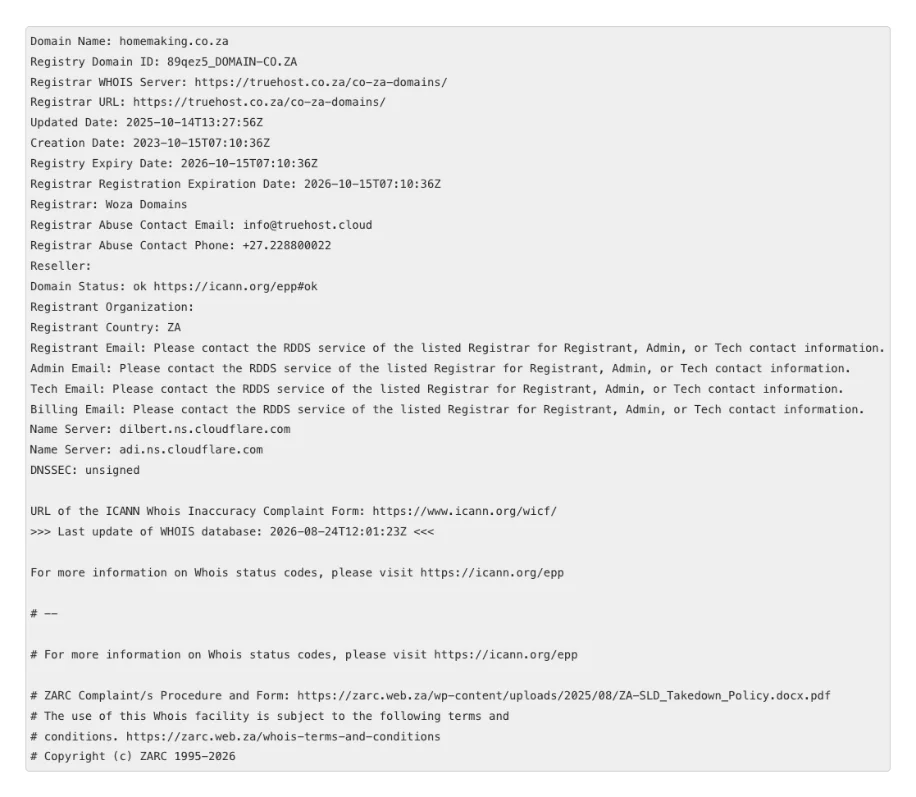
That’s the pattern you’ll see almost everywhere now. The company stays in view. The person doesn’t, unless they choose to show it.
Recommended Easy Option: Truehost WHOIS Lookup Tool
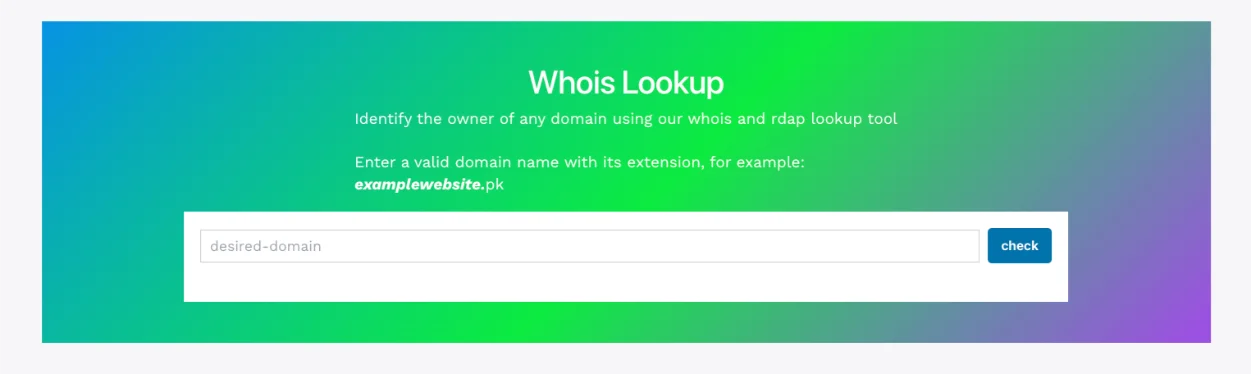
If you want the fastest route, we at Truehost built a free WHOIS and RDAP lookup tool for this.
It works for Pakistani domains, .pk, .com.pk, and similar, as well as global domains like .com and .net.
How to use the Truehost WHOIS tool
- Go to the Truehost WHOIS lookup page.
- Type the domain name (
example.com.pkorexample.com). - Click “Search Now.”
- Get complete RDAP results instantly.
That’s the whole process. No account, no waiting.
Why use Truehost WHOIS?
- Instant results with real-time data
- Works worldwide, including Pakistani domains
- No registration required
- Truly unlimited free searches
- Completely free, with no hidden costs
We’re based in Pakistan, and our pricing runs in PKR, no surprise currency conversion fees.
If your lookup shows your own domain with exposed personal details, we also offer Domain Privacy Protection from PKR 850/year. It’s a small add-on that hides your name, email, and phone number from public view.
Beyond privacy, we handle domain registration, transfers, and related services too. Handy if the lookup shows you need to move a domain or lock down its details.
If you’re building on top of that domain, our hosting options can save you a second search later. We run managed VPS hosting for sites that outgrow shared plans, plus specialised hosting for OpenClaw AI agents,
AI Workers, and n8n automation if your project needs more than a static website. Finding the registrar is usually step one of a bigger project, worth planning the rest while you’re at it.
What are the Possible Limitations?
WHOIS and RDAP lookups are reliable. But they’re not unlimited.
- Results are generally accurate and updated in real time, but privacy redaction is now standard for most domains.
- If you need non-public data for a legitimate reason (like a legal dispute), ICANN’s Registration Data Request Service (RDRS) is the next step after a public lookup comes up short.
- Once you find the registrar, visit its website directly to log in, contact support, or start a transfer.
- Cross-check critical details, especially the IANA ID, against official records if the stakes are high.
- Coverage isn’t universal. Country-code domains outside ICANN’s authority, think .fr, .de, or .ru, set their own rules on WHOIS and RDAP, so results can vary by extension.
There’s also a bigger structural point worth knowing.
According to APNIC, WHOIS query volume across gTLDs fell from around 122 billion a month in January 2025 to about 49 billion by August 2025, a drop of roughly 60%. Some registries have stopped running WHOIS entirely.
By September 2025, 374 gTLDs had switched it off, based on tracking from the TLD RDAP Monitor.
The practical takeaway: don’t rely on old WHOIS bookmarks or command-line habits. If a lookup fails, that’s often why. Switch to an RDAP-based tool instead.
This process fits a few common situations:
- Domain recovery: you lost access and need to know who to contact
- Transfer preparation: you’re moving a domain and need the current registrar’s release process
- Brand monitoring: you’re tracking domains that look like yours
- Ownership confirmation: you just want to know who’s behind a site
Each of these starts the same way: a simple lookup.
Find a Domain Registrar with Truehost Whois Lookup
Finding your domain registrar doesn’t need to be complicated.
It’s quick, free, and works through public RDAP and WHOIS tools built for this job.
Start with ICANN Lookup if you want the most authoritative source. Or use the Truehost WHOIS tool if you want speed and local convenience, especially for .pk domains.
Either way, you’ll have your answer in seconds, not hours.
Try the Truehost WHOIS lookup tool now. And if you find you need to register, transfer, or protect a domain once you have your answer, our domain services team is ready to help.
To recap the process for finding a domain registrar using WHOIS:
- Pick a lookup tool: ICANN Lookup or Truehost’s WHOIS tool both work well.
- Enter the domain name, no “www” or “https://” needed.
- Locate the Registrar field and note the IANA ID.
- Check the extra details, dates, status codes, and privacy notes for full context.
- Visit the registrar’s site directly for any next steps, like a transfer or ownership update.
Five steps. A couple of minutes. That’s really all it takes.
Find a Domain Registrar FAQs
What is the difference between WHOIS and RDAP?
WHOIS is the older protocol. It sends plain text over port 43, with no standard format.
RDAP is the modern replacement. It uses HTTPS, returns structured JSON data, and supports better privacy controls. ICANN made RDAP the required standard for gTLDs on January 28, 2025.
Why can’t I see the domain owner’s personal details?
Most registrars apply WHOIS privacy or proxy protection by default now. This is largely a response to GDPR and similar privacy laws.
Personal details like name, email, and phone number get redacted or replaced with proxy contact info. The registrar itself, though, almost always stays visible.
Is the Truehost PK WHOIS tool free?
Yes. It’s completely free, with unlimited searches and no registration required.
Does Truehost PK’s tool work for .pk domains as well as .com?
Yes. It works for Pakistani domains like .pk and .com.pk, plus global domains including .com, .net, and others.
What should I do after I find the registrar?
Visit the registrar’s official website. From there, you can log in, contact their support team, or start a domain transfer if that’s your goal.
Can I still use the old WHOIS command-line tool?
In many cases, yes, some registries and registrars still run WHOIS servers for backward compatibility. But it’s no longer a requirement, and more registries are shutting these down over time. RDAP is the safer long-term option.
What if the registrar listed is a reseller?
This happens when you bought your domain through a company that resells another registrar’s services.
Check the raw RDAP or WHOIS response for a “Reseller” field. It should clarify who you actually manage the domain through day to day.
How can I hide my own domain information from WHOIS?
Enable WHOIS Privacy Protection, sometimes called Domain Privacy, through your registrar. With Truehost, this is available from PKR 850/year and hides your name, email, phone number, and address from the public record.