Domain SearchInstantly check and register your perfect .pk or international domain
 Web HostingGet a .pk domain for as low as PKR 467
 cPanel HostingUser-friendly hosting powered by cPanel
 Reseller HostingLaunch your own hosting business with minimal technical requirements
 Windows HostingOptimized for Windows-based applications and websites
 Affiliate ProgramEarn referral commissions by promoting our services
 WordPress HostingFast & Reliable WordPress Hosting
 Domain TransferMigrate your existing domain seamlessly with zero downtime.
 All DomainsAccess 324+ top-level domains (TLDs) worldwide from a single platform
 Whois LookupIdentify the owner of any domain using our whois and rdap lookup tool
 Managed VPS Hosting
 AI Website BuilderCreate beautiful websites effortlessly using intuitive drag-and-drop features
 Online ShopLaunch a professional online shop with no technical skills required
 BlogDiscover expert guides on hosting, websites, SEO, and digital growth strategies
 ContactGet instant assistance via live chat or email
 SupportAccess help articles, tutorials, and service documentation
 SSL CertificatesEncrypt data, build trust, and boost SEO.
Most domain owners never think about WHOIS data verification. That’s the problem.
It sounds like admin busywork. Something you can skip.
But ignore it, and your domain can be suspended in as little as 15 days. Your website goes offline. Your emails bounce. Customers can’t reach you.
WHOIS data verification simply confirms that the contact details tied to your domain, your name, email, and business information, are accurate and current. It sounds small. It isn’t.
Every year, registrars around the world suspend domains over this exact issue. Not because the owners did anything wrong. They just missed one email.
For Pakistani business owners, the stakes are even higher. A suspended domain means lost revenue, frustrated customers, and in worst cases, permanent loss of the domain name itself.
This guide breaks down how missed verification puts your domain at risk. You’ll also learn how to verify quickly, so your website never goes dark.
Here’s what we’ll cover:
- Why the 15-day rule exists, and who it applies to
- What happens once that window closes
- The exact steps to verify your WHOIS data today
- How .pk domains differ from .com, .net, and .org
Let’s start with the rule itself.
The Domain 15-Day Rule
ICANN sets the rules for most of the world’s domains.
Under ICANN’s Registrar Accreditation Agreement, registrars must validate and verify your contact details within 15 calendar days of certain events. This isn’t a Truehost rule. It’s an internet-wide policy every accredited registrar must follow.
The rule comes from ICANN’s WHOIS Accuracy Program, part of the 2013 Registrar Accreditation Agreement. It became enforceable in 2014, and it still governs every gTLD registration today. If your domain ends in .com, .net, .org, or almost any other generic extension, this rule applies to you.
Three things trigger this 15-day clock:
- You register a new domain
- You update your registrant information
- Your domain is transferred in from another registrar
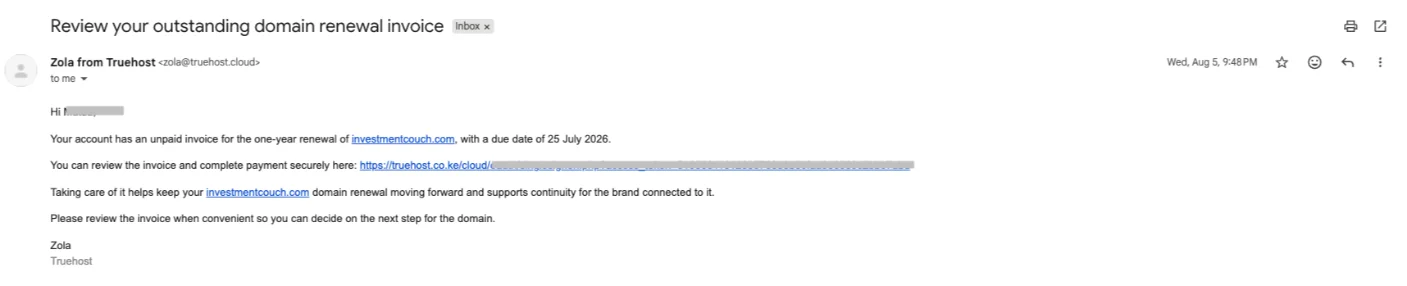
Once the clock starts, you’ll typically get reminder emails around the 10-day and 5-day mark before your deadline. Some registrars send a final notice too, right before the cutoff. There’s no automatic extension. Miss the window, and your domain moves toward suspension.
It’s worth repeating: this isn’t optional, and it isn’t negotiable. ICANN requires registrars to place non-compliant domains on hold, or suspend them outright, once the 15 days pass. We at Truehost follow this process as required, which is why we send you multiple reminders before anything happens to your domain.
Here is an example of a reminder from Truehost:
Here’s a natural question: does this apply to your .pk domain?
Not in the same way.
.pk domains are managed by PKNIC, not ICANN. PKNIC runs its own registration system, and it comes with its own paperwork.
Individuals need a valid CNIC. Businesses need documents like an NTN certificate or business registration papers, depending on the domain category. Overseas Pakistanis can use a NICOP or passport instead.
PKNIC doesn’t run the strict 15-day ICANN clock. But don’t relax completely. Inaccurate registrant information can still trigger disputes or suspension at the PKNIC level, especially if your submitted documents don’t match your registrant details.
Business registrants face extra scrutiny. If your company name on the domain application doesn’t match your NTN certificate or business registration documents character for character, PKNIC can flag it.
That means delays, and sometimes a formal affidavit before the mismatch is resolved.
This is why accuracy is important just as much for .pk owners as it does for .com owners. The enforcement mechanism looks different. The consequence, a domain you can’t fully control, looks the same.
One more thing to flag: if you register a .com, .net, or .org through us at Truehost, that domain still falls under ICANN’s full 15-day rule, even though you bought it from a Pakistani registrar.
The gTLD, not the seller, decides which rules apply. You can check your domain options at Truehost.pk domains if you’re unsure which extension fits your business.
What Happens If You Ignore WHOIS Verification for 15 Days?
Here’s what the countdown looks like once your registrar sends that first email.
| Timeline | What Happens |
| Day 0 | Verification email sent to your registrant address |
| Day 5–10 | Reminder emails sent |
| Day 15+ | Domain placed on ClientHold, suspension begins |
| Beyond 15 days | Risk of lock, cancellation, or deletion |
Once suspension kicks in, the damage is immediate.
Your site stops resolving. Visitors see an error page instead of your homepage.
Your email stops working too. Every message sent to your domain bounces back.
For a business, this isn’t just inconvenient. It’s costly.
Think about an online store that can’t process orders because its domain is down. Or a booking platform where customers can’t reach the confirmation page. Every hour offline is an hour of lost trust and lost sales.
If your website runs on a VPS or dedicated server with automation tools like n8n workflows or an OpenClaw AI agent handling customer queries, a suspended domain cuts all of that off too. The server keeps running. Nobody can reach it.
The good news? Recovery is usually possible. Once you complete verification through your client area, most domains reactivate quickly.
The catch is timing. The longer you wait past the 15-day mark, the more likely you are to face extra fees, or land in the redemption period, a costly, slower path back to owning your domain.
There’s a specific ICANN policy for this scenario. If a domain gets deleted for false contact data or non-response, and the owner later restores it during the redemption grace period, ICANN requires the registrar to place it on hold again until the owner provides accurate, updated WHOIS information.
In other words, skipping verification twice doesn’t get easier the second time. It gets stricter.
This is one more reason not to let a verification email sit unread. A five-minute task early on beats a multi-step recovery process later.
How to Complete WHOIS Verification
Good news: fixing this takes minutes, not hours.
- Check your inbox and your spam or junk folder for the verification email.
- Click the secure link, but only from the official email. Never trust a link from an unfamiliar sender claiming to be your registrar.
- Log in to your Truehost.pk client area to review your registrant contact information.
- Confirm the details are correct, then screenshot the success message for your records.
That’s it. Four steps, and your domain stays active.
Tips for Pakistani domain owners:
- Use an email address you check often when you register your domain
- Whitelist Truehost’s sender domain so verification emails don’t land in spam
- Enable auto-renewal, so payment issues don’t compound with verification issues
- For .pk domains specifically, make sure your submitted documents match your registrant details; mismatches are one of the most common causes of delays
- Didn’t receive the email at all? Most client areas let you resend the verification link in a couple of clicks
One more point worth flagging for new .pk registrants specifically: verification of your PKNIC documents is separate from your ICANN-style WHOIS check. If you register a .com through Truehost alongside your .pk domain, expect two different confirmation processes, not one combined step. Handle both, and you’re fully covered.
Best Practices to Avoid Losing Your Domain
Verification is a one-time task, but staying compliant is ongoing. Here’s how to stay ahead of it.
- Keep your WHOIS details accurate and current. Update them the moment your email, phone, or business address changes.
- Check your inbox and registrar dashboard regularly. A missed email is still a missed deadline.
- Set an annual reminder to review your domain information. ICANN itself requires registrars to prompt this once a year, treat it as a real task, not spam.
- Choose a registrar with strong local support. At Truehost, our team understands both ICANN’s global rules and PKNIC’s local requirements, so you’re not left guessing which one applies to you.
- Use domain privacy, but don’t rely on it blindly. It protects your public data. It does not exempt you from verification.
WHOIS Privacy vs. Verification: They Are Not the Same
This mix-up trips up a lot of domain owners.
WHOIS privacy hides your public contact details behind proxy information. It stops random people from seeing your name, email, and address in a WHOIS lookup.
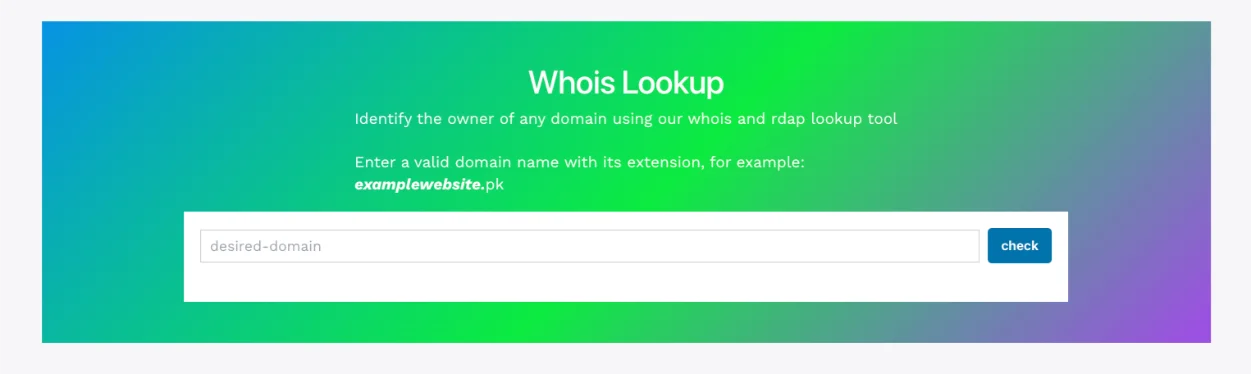
WHOIS verification is different. It’s your registrar confirming that you are the real, legitimate owner of the domain.
You can have both enabled at once. Privacy hides your data from the public. Verification still checks that data behind the scenes.
Turning on privacy does not exempt you from verification. Skip verification, and your domain gets suspended, privacy protection or not.
Privacy controls who sees your data. Verification controls whether your domain stays active at all. They solve two completely different problems, and you need both handled properly to run a website worry-free.
Don’t Risk Your Domain, Act Now
Fifteen days sounds like plenty of time. Until it isn’t.
Verification takes a few minutes. Suspension can cost you days of downtime, lost customers, and extra fees to recover your domain.
If you haven’t checked your registrant details recently, do it today. Log into your Truehost client area and confirm your WHOIS information is current.
It’s a small step that protects your entire online presence, your website, your email, and everything built on top of it.
You can also transfer your doamin or get a new domain with us.
Whois Data Verification FAQs
Is WHOIS verification a one-time thing?
Not quite. You verify once when you register or transfer a domain, and again whenever you change your registrant contact information. Beyond that, ICANN also requires an annual reminder from your registrar to review your details.
Does this apply to domains registered years ago?
Yes, if anything changes. The 15-day verification clock only restarts when you update your registrant name, organization, or email, or transfer the domain. An old domain with unchanged, already-verified details doesn’t need re-verification.
Do .pk domains follow the same 15-day rule as .com?
No. .pk domains are managed by PKNIC, not ICANN, so the strict 15-day suspension clock doesn’t apply the same way. But PKNIC still requires accurate registrant documentation, and mismatched details can cause delays or disputes. If you register a .com, .net, or .org through us at Truehost, that domain does fall under ICANN’s full 15-day rule.
Does Truehost.pk send reminder emails?
Yes. We send verification and reminder emails to keep your domain compliant and active, in line with ICANN’s requirements for gTLDs. Make sure your registrant email is one you check regularly, and whitelist our sender domain so nothing lands in spam.