 Domain SearchInstantly check and register your perfect .pk or international domain
 Web HostingGet a .pk domain for as low as PKR 467
 cPanel HostingUser-friendly hosting powered by cPanel
 Reseller HostingLaunch your own hosting business with minimal technical requirements
 Windows HostingOptimized for Windows-based applications and websites
 Affiliate ProgramEarn referral commissions by promoting our services
 WordPress HostingFast & Reliable WordPress Hosting
 Domain TransferMigrate your existing domain seamlessly with zero downtime.
 All DomainsAccess 324+ top-level domains (TLDs) worldwide from a single platform
 Whois LookupIdentify the owner of any domain using our whois and rdap lookup tool
 Managed VPS Hosting
 AI Website BuilderCreate beautiful websites effortlessly using intuitive drag-and-drop features
 Online ShopLaunch a professional online shop with no technical skills required
 BlogDiscover expert guides on hosting, websites, SEO, and digital growth strategies
 ContactGet instant assistance via live chat or email
 SupportAccess help articles, tutorials, and service documentation
 SSL CertificatesEncrypt data, build trust, and boost SEO.
Website speed is a confirmed Google ranking factor. Slow hosting undermines even excellent content, especially in markets where mobile data and variable connections dominate.
Fast web hosting improves SEO rankings by delivering superior server infrastructure that improves site speed, stability, crawl efficiency, Core Web Vitals, and user behavioral signals.
Page speed has been a ranking signal since 2010 on desktop and 2018 on mobile.
Core Web Vitals formalized this further. Hosting is the foundation. Time to First Byte (TTFB) sets the ceiling for everything else.
Here are the five main mechanisms that show how fast hosting can boost your SEO rankings.
1) Superior Core Web Vitals
Hosting is the primary lever behind your Core Web Vitals, especially Largest Contentful Paint (LCP). These metrics form part of Google’s page experience ranking signals.
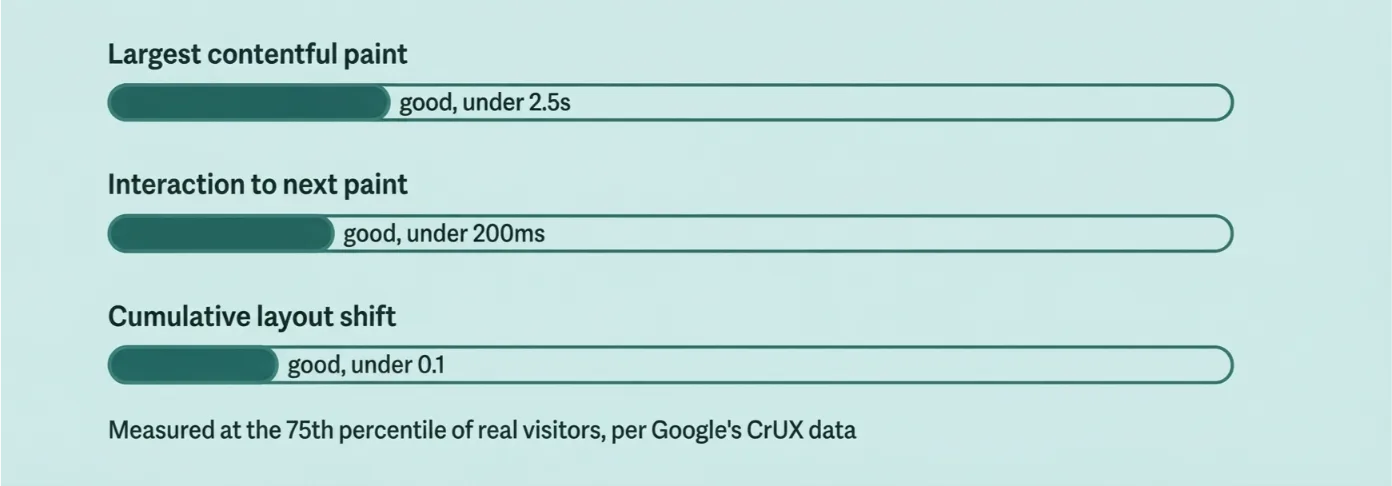
Let’s define the three metrics first.
- LCP (Largest Contentful Paint): Time until your main content becomes visible. Good is 2.5 seconds or less.
- INP (Interaction to Next Paint): How responsive your page feels to clicks and taps. Good is 200 milliseconds or less.
- CLS (Cumulative Layout Shift): How visually stable your page stays while loading. Good is 0.1 or less.
Your hosting shapes all three, starting with TTFB.
TTFB is the first delay in the LCP chain. Shared hosting often runs at 400–800 milliseconds. That delay cascades into poor LCP, no matter how well you’ve optimized your front end.
Fast hosting changes this. NVMe or SSD storage, dedicated resources, efficient server software, and caching bring TTFB down to under 200 milliseconds. That’s the ideal range.
Stronger CPU and RAM are also important. They reduce the long processing tasks that hurt your INP score. And reliable infrastructure, properly configured, keeps your whole site stable under load.
According to the 2025 Web Almanac, only 48% of mobile pages pass all three Core Web Vitals. LCP is the hardest to hit, just 62% of mobile pages meet the 2.5-second target.
Sites with good scores tend to rank better when other ranking factors are roughly equal.
There’s a practical wrinkle here too. Shared hosting suffers from “noisy neighbor” issues. One overloaded site on the same server slows everyone down.
VPS, cloud, or dedicated hosting with modern storage and a server location close to your visitors gives you far more consistency.
No amount of image compression or CDN caching fully fixes a chronically slow origin server. If your TTFB is broken, fix that first.
Google itself recommends strong TTFB performance. And it leans on real-user data from the Chrome User Experience Report (CrUX), not just lab tests, when judging your site.
2) Lower Bounce Rates
Speed is one of the biggest drivers of bounce rate. A high bounce rate tells Google your page delivers a poor experience.
A bounce happens when a visitor leaves without interacting further. Consistently high bounce rates, especially on mobile, signal dissatisfaction.
The data here is striking:
- Bounce probability rises by 32% as load time goes from 1 to 3 seconds
- It rises by 90% at 5 seconds
- Pages loading within 2 seconds average a 9% bounce rate; that climbs to 38% by 5 seconds
Example: A blog post that loads in 1.5 seconds keeps far more readers scrolling than the same post taking 4 seconds on a slow shared plan. The content is identical. Only the hosting changed.
Fast hosting removes server-side delay so your content appears almost instantly. Visitors stay. They scroll. They click your internal links. That means lower bounce, more pages per session, and longer dwell time.
These behavioral signals compound over time. Longer engagement and lower abandonment reinforce your rankings, session after session.
Mobile makes this worse if you ignore it. Variable networks and data costs amplify every extra second of TTFB. A slow host hurts your mobile visitors twice, once on speed, once on their data bill.
The outcome is simple. Reduced bounce supports better rankings and higher conversion potential at the same time.
3) Faster Crawl Budget Efficiency
Google allocates limited crawl resources to every site. Slow servers waste that budget. Fast servers let Google crawl and index more of your pages per visit.
Crawl budget comes from two things: your crawl capacity limit (how much Google can crawl without overloading your server) and crawl demand (how much Google wants to crawl your pages).
Google’s own guidance confirms it directly. Crawl capacity rises when your site responds quickly and consistently. It drops with slow responses, high latency, or server errors.
Here’s how hosting speed changes the math:
- Slow TTFB (1–2 seconds) means Googlebot waits longer per request, so it crawls fewer pages
- Fast response times (under 200–500 milliseconds) let Google crawl more aggressively and re-crawl more often
- Better uptime and fewer server errors prevent Google from throttling your crawl rate
Larger sites feel this most, e-commerce catalogs, blogs with hundreds of posts, and directories. Small brochure sites are less affected, but they still benefit from faster indexing of new pages.
The practical result: more pages indexed faster. New or updated content shows up in search results sooner. Your overall site coverage improves.
Improving server response time is one of the highest-impact technical fixes available for crawl efficiency. And it starts with your host, not your content management system.
4) Better Mobile Rankings
Google uses mobile-first indexing. That means Google evaluates your mobile version primarily, not your desktop one, for ranking and indexing.
This is more important than most site owners realize. Mobile users are less patient. They’re often on slower or more variable cellular connections than desktop users on fixed broadband.
Your hosting feeds directly into mobile performance:
- Low TTFB and fast origin response improve mobile LCP and overall load feel
- Consistent performance under load and strong uptime are important more on mobile, where a single slow request feels far worse
- A server location closer to your users cuts network latency before your content even starts loading
Responsive design and optimized assets help. But they cannot fully overcome a sluggish server underneath them.
The outcome: stronger mobile Core Web Vitals and lower mobile bounce rates translate directly into better mobile visibility and rankings.
This is especially relevant in Pakistan. Data from DataReportal shows 116 million internet users in the country as of early 2025, with mobile broadband carrying the overwhelming majority of that traffic.
Average mobile download speeds still trail fixed broadband, which means every millisecond your server saves is important even more for Pakistani visitors on 4G connections.
5) Higher Conversions, Better Behavioural Signals, and Indirect Authority
Speed drives conversions and positive user behavior. Together, these create stronger engagement signals and real business results.
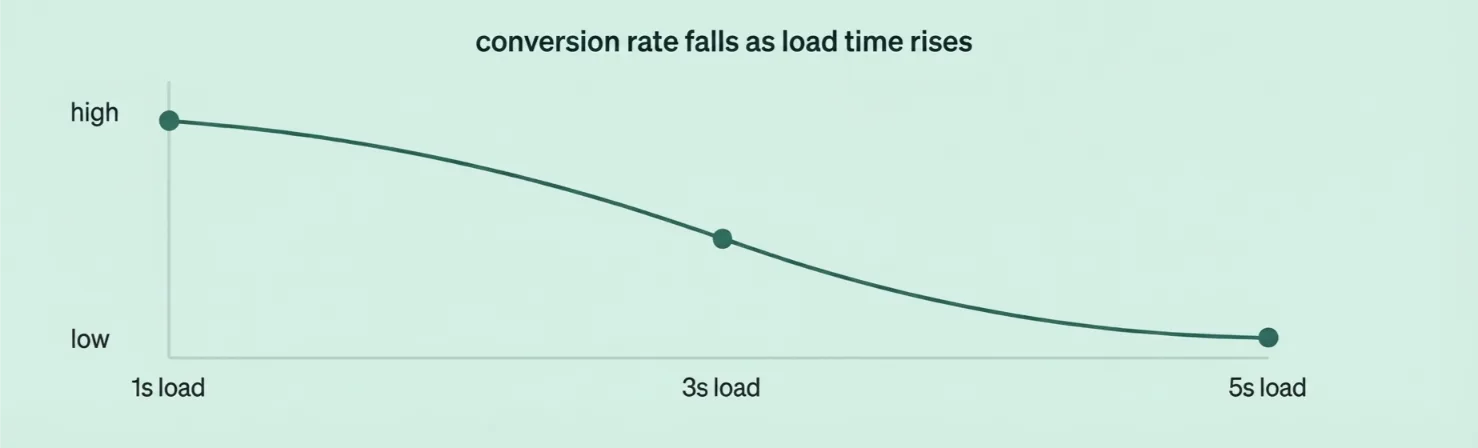
The conversion data is hard to ignore:
- Amazon’s internal testing found that every 100 milliseconds of added latency reduced sales by 1%
- Google and Deloitte’s “Milliseconds Make Millions” study, based on 37 brands, found that a 0.1-second mobile speed improvement lifted retail conversions by 8.4% and average order value by 9.2%
- A site that loads in 1 second can convert roughly three times more visitors than one that takes 5 seconds, according to industry conversion benchmarking
These numbers aren’t direct ranking factors like relevance or backlinks. But they build a behavioral chain that Google notices.
Here’s how that chain works:
- A user clicks your search result.
- Your page loads fast, so they stay, read, and interact.
- Positive signals build up, dwell time, pages per session, return visits, lower bounce.
- Over time, these signals support trust and ranking strength.
There’s an indirect authority effect too. Better engagement and higher conversions lead to more branded searches, more natural backlinks, and stronger overall domain signals.
Speed even helps your paid search. Faster landing pages improve your Quality Score, which lowers your cost-per-click and improves your ad positions.
That generates more traffic and more data, which further supports your organic growth.
And there’s brand perception to consider. Speed is part of how users judge if your business feels professional and trustworthy, especially in competitive markets where buyers have plenty of alternatives one tap away.
Why VPS Hosting Is the Ideal Upgrade for Speed and SEO
VPS sits in the performance sweet spot for most growing sites. It offers far better isolation and consistency than shared hosting, at a more accessible cost than a dedicated server.
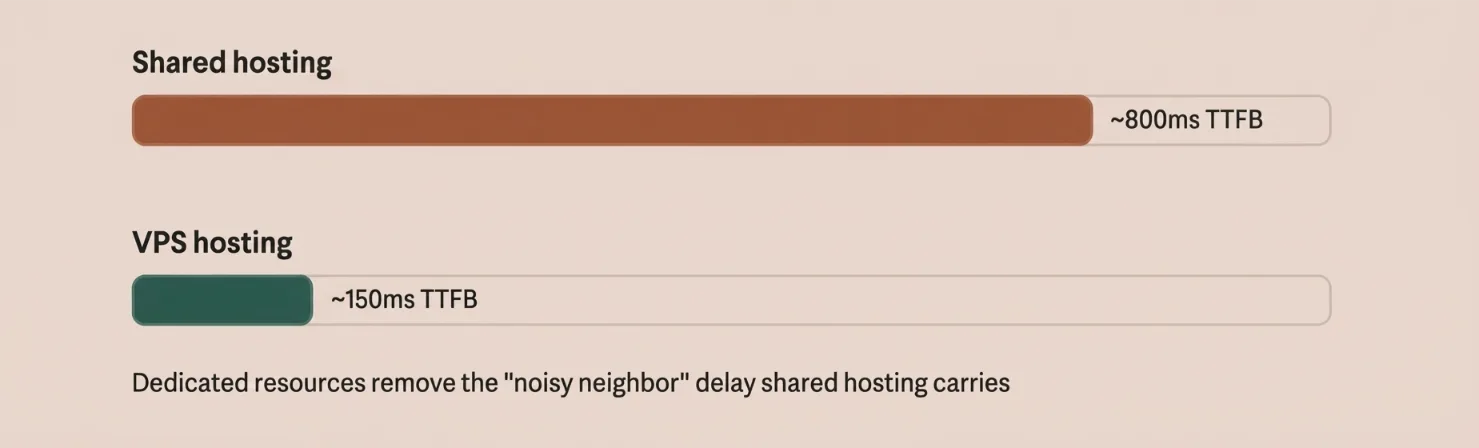
Here’s the contrast:
- Shared hosting: Multiple sites compete for the same CPU, RAM, and disk. A traffic spike on one account, or a poorly coded neighbor, slows everyone down. Typical TTFB often runs 400–800 milliseconds or more.
- VPS hosting: You get a dedicated slice of resources- CPU cores, RAM, storage- through virtualization. Your performance stays independent of other accounts on the same physical machine.
VPS gives you several concrete SEO advantages:
- Consistently lower, more stable TTFB, commonly 150–400 milliseconds, often under 200 milliseconds with good configuration
- Better Core Web Vitals scores and reliability under traffic spikes or heavy Googlebot crawling
- Higher uptime and fewer server errors, which protects your crawl capacity and indexing
- Root access, so you can add caching layers like Redis, tune your server software, and enable modern protocols like HTTP/3
VPS also scales easily. You can add RAM or CPU as your traffic grows, without a full site migration.
We at Truehost see this pattern constantly across our Pakistani customers. Business sites, online stores, and content sites with growing traffic all benefit from moving to VPS hosting once shared hosting starts showing high TTFB or performance variance.
If you’d rather not manage a server yourself, our managed VPS plans handle updates, security patches, and basic optimization for you.
One realistic note: VPS removes the hosting bottleneck, but frontend optimization, caching, and a CDN are still needed for the biggest gains.
How to Get Started with Fast Hosting for SEO Wins
Follow these practical steps.
a) Audit your current performance
Run Google PageSpeed Insights, GTmetrix, and WebPageTest. Check TTFB, LCP, INP, and CLS using both lab and field (CrUX) data. In Google Search Console review the Core Web Vitals report and Crawl Stats for average response time and errors.
Red flags include TTFB consistently above 400–600 ms, high variance under load, or frequent crawl issues.
b) Decide on the right upgrade path
If traffic is still low and metrics look good, optimize the current setup first with caching, image work, and a CDN. If you see high TTFB or resource contention, move to quality VPS or managed cloud/VPS.
Prioritize NVMe or SSD storage, a modern server stack (LiteSpeed or NGINX), HTTP/3 plus Brotli support, data-center location near your audience, solid uptime SLA (≥99.9%), free SSL, daily backups, and easy CDN integration.
c) Choose and migrate
Select a provider that offers managed options if needed. Prefer hosts with free or assisted migration. Keep the same domain, preserve HTTPS, and avoid URL changes. Test thoroughly on a staging environment before going live. Update DNS carefully and monitor Search Console for crawl errors during the transition.
Truehost provides managed VPS and related options including OpenClaw hosting, AI Workers, and N8n Hosting so you can scale without managing every technical detail yourself.
d) Layer on quick complementary wins (post-migration)
Enable full-page and object caching. Optimize images and use modern formats. Implement a CDN. Minimize unnecessary plugins and scripts. Keep software updated.
e) Measure and iterate
Re-test Core Web Vitals and TTFB after 1–2 weeks. Monitor rankings, organic traffic, bounce rate, and conversions over 28–56 days (the CrUX data window). Technical improvements appear relatively quickly. Ranking gains compound as Google re-evaluates page experience and behavioral signals.
Start with a performance baseline so you can clearly attribute gains to the hosting change.
Boost Your SEO Rankings with a Fast Realiable Provider
Start with a performance baseline before you migrate. That way, you can clearly attribute any gains to the hosting change itself, rather than guessing.
If your current host is holding your rankings back, it’s time for a change. We at Truehost build our plans around the fundamentals this article covers, NVMe SSD storage, free SSL, daily backups, and reliable, fast infrastructure from the ground up.
Running WordPress, WooCommerce, or a custom app? Check our hosting plans and see which tier fits your traffic.
Open a domain with us, get your site live in minutes, and let your hosting start working for your SEO instead of against it.
Start hosting with Truehost and give your rankings the foundation they need.
Why Fast Hosting Can Boost Your SEO Rankings FAQs
What TTFB should I aim for?
Aim for under 200 milliseconds where possible. Up to 500 milliseconds is generally acceptable for dynamic sites. Anything consistently above 600–800 milliseconds needs attention.
Is shared hosting always bad for SEO?
Not always. For small, low-traffic sites with light content, shared hosting can work fine. Problems start when traffic grows, your neighbors on the server get busy, or your TTFB creeps past 400–600 milliseconds.
Will switching hosts hurt my rankings?
A well-planned migration shouldn’t hurt your rankings. Keep your domain and URLs unchanged, preserve HTTPS, test on staging first, and monitor Search Console closely during the switch.
How long until I see SEO benefits after upgrading?
Technical improvements like TTFB and Core Web Vitals often improve within days. Ranking and traffic changes typically take 28–56 days to show clearly, as Google re-evaluates your page experience signals.
Do I still need a CDN if I upgrade to fast VPS hosting?
Yes, especially if your visitors are spread across different regions. A CDN handles static assets from locations near your users, while your VPS handles dynamic content and database queries fast.
Is managed VPS worth the extra cost?
If you don’t have server management experience, yes. Managed VPS handles security patches, updates, and basic optimization, so you get the performance benefits without the technical overhead.
Can frontend optimization alone fix slow hosting?
No. Image compression, minified code, and caching plugins help, but they can’t overcome a slow origin server. If your TTFB is high, hosting is usually the root cause, and the first thing to fix.




