 Domain SearchInstantly check and register your perfect .pk or international domain
 Web HostingGet a .pk domain for as low as PKR 467
 cPanel HostingUser-friendly hosting powered by cPanel
 Reseller HostingLaunch your own hosting business with minimal technical requirements
 Windows HostingOptimized for Windows-based applications and websites
 Affiliate ProgramEarn referral commissions by promoting our services
 WordPress HostingFast & Reliable WordPress Hosting
 Domain TransferMigrate your existing domain seamlessly with zero downtime.
 All DomainsAccess 324+ top-level domains (TLDs) worldwide from a single platform
 Whois LookupIdentify the owner of any domain using our whois and rdap lookup tool
 Managed VPS Hosting
 AI Website BuilderCreate beautiful websites effortlessly using intuitive drag-and-drop features
 Online ShopLaunch a professional online shop with no technical skills required
 BlogDiscover expert guides on hosting, websites, SEO, and digital growth strategies
 ContactGet instant assistance via live chat or email
 SupportAccess help articles, tutorials, and service documentation
 SSL CertificatesEncrypt data, build trust, and boost SEO.
“Unlimited” hosting can sound like you get unlimited storage, bandwidth, or websites. On shared hosting, that is not quite how it works.
It usually means the provider does not set a fixed limit on things like storage or bandwidth for normal use. The server itself still has limited CPU, RAM, disk speed, and network capacity, which are shared between many accounts.
This means your account still has limits. You may face limits on CPU, memory, processes, and the number of files you can store. Providers may also step in if one website uses too many resources and affects other users.
This article looks at what unlimited hosting really includes, the limits you still need to know, and when it makes sense for your website.
What “Unlimited” Usually Covers (and What It Doesn’t)
Usually Included
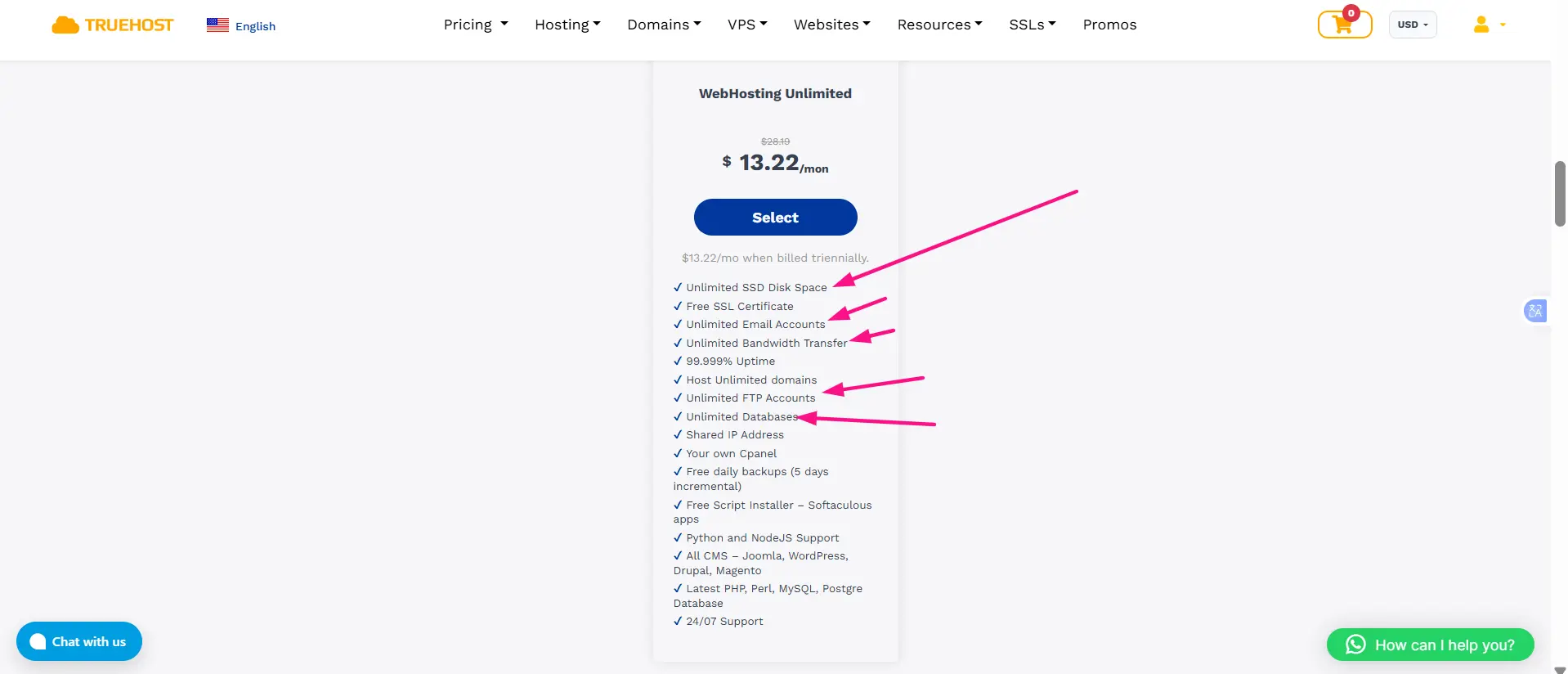
- Storage: Space for website files, images, and databases, within normal use.
- Bandwidth: Data transfer between your website and visitors, usually without extra charges.
- Websites: Multiple websites, domains, and subdomains on many plans. ICANN explains how domain names connect to websites and other online services
- Email: Multiple email accounts using your domain, depending on the plan.
- Databases and FTP accounts: Often no fixed limit on the number, but size and usage can still be limited.
Still Limited
- CPU: How much processing power your websites can use.
- RAM: How much memory your account can use.
- Entry processes: How many PHP requests can run at the same time.
- Processes: How many tasks your account can run at once.
- Disk I/O: How quickly your account can read and write data.
- Inodes: How many files and folders you can store.
- Databases: The number may be unlimited, but database size and usage can still have limits.
- Email sending: Providers often set hourly or daily email limits.

Hidden Limits You Should Know About
“Unlimited” hosting still has limits. On shared hosting, providers usually limit how much CPU, RAM, disk I/O, and other resources each account can use.
i) Inodes
Every file and folder on your account uses one inode. A WordPress site can quickly create thousands of files from plugins, cache files, emails, and backups.
You can reach the inode limit even when you still have plenty of storage space. For example, thousands of small cache files can use little disk space but many inodes.
Once you reach the limit, you may not be able to upload files, install plugins, receive emails, or create backups.
ii) CPU and RAM
A heavy theme, a poorly optimised plugin, or a complex database query can use a lot of CPU and RAM.
When you reach the CPU limit, your site may simply become slower. If you run out of memory or processes, visitors may see errors such as 500 or 503.
iii) Entry Processes
Entry processes control how many concurrent dynamic requests your site can handle.
For example, if your account allows 20 entry processes and more than 20 people request PHP pages at the same time, some requests may be delayed or rejected. This can result in a 508 Resource Limit Is Reached error.
Good caching can help because cached pages require fewer server resources than pages that run PHP each time.
iv) Disk I/O
Disk I/O controls how quickly your account can read and write data.
Large media files, busy databases, backups, and frequent logging can use a lot of disk I/O. When you reach the limit, your site may become noticeably slower.
v) Other Limits
Shared hosting can also have limits on:
- Database size
- Cron jobs
- PHP execution time
- PHP memory
- Maximum file upload size
- Outgoing emails per hour
What Happens When You Reach a Limit?
Depending on the provider and the situation, they may:
- Slow down your account
- Send you a warning
- Ask you to optimise your website
- Suspend the account temporarily
- Ask you to upgrade to a higher plan or VPS
So, “unlimited” usually refers to storage or bandwidth marketing, not unlimited access to all server resources. The actual CPU, RAM, inode, process, and I/O limits are what determine how much your website can handle.
Unlimited Hosting Providers With Prices
| Provider | Price |
| Truehost PK | ₨134,510.31 |
| eHostPK | From Rs 584/month |
| HostGator PK | From Rs 300/month |
| HosterPK | From Rs 11,810/year |
Fair Use Policies
Almost every unlimited plan is governed by a fair use or acceptable use policy. This is not fine print designed to trick you. It is the mechanism that makes unlimited pricing possible at all: the provider is betting that typical websites use a small fraction of the server, and the policy is how it handles the accounts that do not.
You may face restrictions if you:
- Use very high CPU, RAM, or disk I/O for sustained periods rather than in short bursts.
- Store large volumes of files that your website does not serve to visitors.
- Use the account for offsite backups, archiving, or file sharing.
- Host a video or large media library streamed to many viewers.
- Send bulk email or run a mailing list from the hosting account.
- Run resource-heavy applications such as crawlers, cryptocurrency miners, proxies, or game servers.
Before buying, read the provider’s policy for its actual numbers on CPU, RAM, inodes, entry processes, and disk usage. A host that publishes those figures is being straightforward with you. A host that only says “unlimited” is asking you to find out later.
Pros and Cons of Unlimited Hosting
Pros
- Affordable for small and medium websites, often cheaper per site than metered plans.
- No need to monitor storage or bandwidth quotas, and no surprise overage charges.
- Well suited to blogs, portfolios, and small business websites.
- One account can host several smaller sites, which is useful for freelancers and agencies.
- Usually includes cPanel, free SSL, email, daily backups, and one-click installers such as Softaculous.
- Generally the highest-resourced tier of a provider’s shared hosting range, so you get more CPU and RAM than entry plans even if you never fill the storage.
Cons
- CPU, RAM, and entry processes are still capped, and those are what actually determine performance.
- Traffic spikes can trigger 508 errors or slowdowns despite “unlimited bandwidth.”
- Inode and process limits become a real constraint on large or file-heavy sites.
- Resources are shared, so a noisy neighbour on the same server can still affect you.
- Some providers do not publish their limits clearly, which makes plans hard to compare.
- Renewal prices are often significantly higher than the advertised first-term price.
Who Should Choose Unlimited Hosting?
Good fit:
- Personal websites and portfolios
- Blogs and content sites with moderate traffic
- Small business and brochure websites
- Small to medium WordPress sites
- Several low-traffic websites managed from one account
- Freelancers and small agencies hosting client sites
Less suitable:
- High-traffic websites with sustained concurrent visitors
- Large online stores, especially with many uncached logged-in sessions
- Video streaming or large media platforms
- File-sharing or backup services
- Resource-heavy applications and custom software
- Any site expecting rapid, sustained traffic growth
If your website needs consistent, guaranteed CPU and RAM rather than a share of a busy server, VPS or cloud hosting is the better structure, even at a higher monthly price.
How to Check an Unlimited Hosting Plan
Before you sign up:
i) Read the terms of service and fair-use policy. Look specifically for the resource section, not just the feature list.
ii) Find the numbers. CPU cores, RAM, entry processes, inodes, I/O speed, and database limits. If they are not published, ask support directly and keep the reply.
iii) Ask what happens during a traffic spike. Does the site throttle, return a 508, or get suspended? The answer tells you a lot about how the host is configured.
iv) Check the renewal price, not the introductory price. A three-year term at a low rate may renew at several times that figure.
v) Check the upgrade path. Moving from shared to VPS with the same provider should be simple and ideally handled for you.
vi) Check what is included. Free SSL, daily backups, free migration, and a control panel you already know are worth real money.
vii) Prefer providers that explain their limits. Transparency about constraints is a better signal of quality than a bigger number on the pricing page.
The main point: do not judge a hosting plan by the word “unlimited.” Judge it by the resources and restrictions behind the offer.
After you sign up
You can monitor your own usage. In cPanel, open the Metrics section and click Resource Usage. The graphs show your CPU, memory, entry process, and I/O consumption against your plan’s limits.
Anything sitting near 100 per cent regularly is the thing to fix or upgrade, and checking this occasionally is far better than discovering it during a traffic spike.
When Unlimited Hosting Is No Longer Enough
Move up when your site consistently hits its limits rather than occasionally brushing them. Recurring 508 errors, slow admin pages, or backup failures from inode exhaustion are the usual signals.
- VPS hosting. Dedicated CPU and RAM allocations plus root access. The normal next step for a growing site.
- Cloud hosting. Resources that scale up and down, useful when traffic is unpredictable or seasonal.
- Dedicated server. An entire physical machine, for large or compliance-sensitive workloads.
- Managed WordPress hosting. Hosting tuned specifically for WordPress, with caching and updates handled for you.
- CDN and external storage. Often the cheapest fix. Offloading images, video, and static files to a CDN or object storage removes a large share of both bandwidth and disk I/O from your hosting account, and can keep you comfortably inside a shared plan for much longer.
That last option is worth trying first. Many sites that appear to have outgrown shared hosting have simply put too much media in the wrong place.
Choose Unlimited Hosting
So “unlimited” is not a promise of infinite resources. It is a pricing model that removes the storage and bandwidth meters and replaces them with limits on CPU, RAM, entry processes, and inodes.
For the sites these plans were built for, that trade works well: blogs, portfolios, small business websites, and a few WordPress installs that do not need dedicated resources.
The plans worth buying are the ones that tell you where the boundaries sit.
Ask for the CPU, RAM, inode, and process numbers before you order, check the renewal price and not just the first-term price, and make sure there is a clear path to VPS or cloud hosting for the day your site outgrows a shared server.
If you are hosting in Pakistan, Truehost publishes its plan resources up front, bills in PKR, and includes cPanel, free SSL, daily backups, and free migration on its unlimited plan, with 24/7 local support if you need help deciding.




