Domain SearchInstantly check and register your perfect .pk or international domain
 Web HostingGet a .pk domain for as low as PKR 467
 cPanel HostingUser-friendly hosting powered by cPanel
 Reseller HostingLaunch your own hosting business with minimal technical requirements
 Windows HostingOptimized for Windows-based applications and websites
 Affiliate ProgramEarn referral commissions by promoting our services
 WordPress HostingFast & Reliable WordPress Hosting
 Domain TransferMigrate your existing domain seamlessly with zero downtime.
 All DomainsAccess 324+ top-level domains (TLDs) worldwide from a single platform
 Whois LookupIdentify the owner of any domain using our whois and rdap lookup tool
 Managed VPS Hosting
 AI Website BuilderCreate beautiful websites effortlessly using intuitive drag-and-drop features
 Online ShopLaunch a professional online shop with no technical skills required
 BlogDiscover expert guides on hosting, websites, SEO, and digital growth strategies
 ContactGet instant assistance via live chat or email
 SupportAccess help articles, tutorials, and service documentation
 SSL CertificatesEncrypt data, build trust, and boost SEO.
Web hosting performance depends largely on how well a server handles traffic and uses its resources. A website may load quickly with a few visitors but slow down when many people visit at the same time.
Traditional hosting panels like cPanel and older Plesk setups mainly use Apache. Newer panels such as CyberPanel, CloudPanel, HPanel, and NGINX-based Plesk setups rely more on NGINX.
The main difference is how they handle server resources. NGINX can handle many connections with less overhead and is efficient at serving static files. These benefits may not be obvious on a small website, but they become more noticeable as traffic, websites, and server workloads increase.
1) Lower Resource Use
The biggest architectural difference between the two web servers lies in how they handle incoming connections.
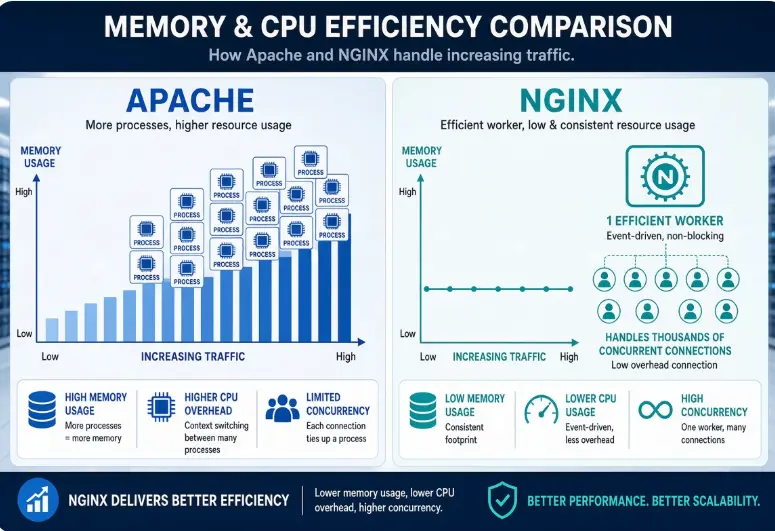
Apache, in its traditional worker and prefork configurations, typically creates a new process or thread for every connection it handles. Each of those processes or threads consumes its own slice of memory and CPU time. This model works fine at low traffic levels, but as the number of simultaneous visitors climbs, the server has to juggle more and more processes, and memory use climbs along with it.
NGINX takes a different approach. It was built from the ground up using an event-driven, asynchronous architecture, meaning a single worker process can handle thousands of connections at once without spawning a new process or thread for each one. Instead of waiting on each connection individually, processes events as they occur, which keeps memory and CPU overhead comparatively low even as traffic increases.
For hosting providers running dozens or hundreds of websites on a single server, which is the everyday reality of shared and reseller hosting, this efficiency has a compounding effect.
Every megabyte of RAM and every CPU cycle that isn’t tied up managing connections is available for the things that actually count to site performance: PHP execution, database queries, caching layers, and background services.
In practice, this often means an NGINX-based panel can comfortably serve more websites, or handle a bigger traffic spike, on the same hardware that would leave an Apache-only setup under noticeable strain.
2) Faster Static Content
Most websites, regardless of platform, still rely heavily on static files, images, CSS stylesheets, JavaScript bundles, fonts, and plain HTML. How quickly a server can hand off these files has a direct effect on page load times.
NGINX is particularly efficient at this task. It can serve static assets directly from disk with very little processing overhead, largely because its lightweight, event-driven design doesn’t need to allocate a dedicated worker for each file request.
Apache can absolutely serve static content too, and does so reliably for millions of sites. However, Apache’s flexibility comes at a cost: features like .htaccess files are evaluated on every relevant request, which adds a layer of processing that NGINX generally avoids (NGINX does not support .htaccess and handles equivalent configuration at the server level instead).
On a low-traffic site, this difference is barely noticeable. On a busy website with a large volume of static assets, a media-heavy blog, an image gallery, or an online store with hundreds of product photos, that extra processing per request can add up, making NGINX’s simpler, more direct approach noticeably faster.
3) Handling Dynamic Websites
Static files are only part of the story. Most modern websites, WordPress sites, e-commerce stores, and custom web applications are dynamic, meaning pages are generated on the fly using PHP and a database.
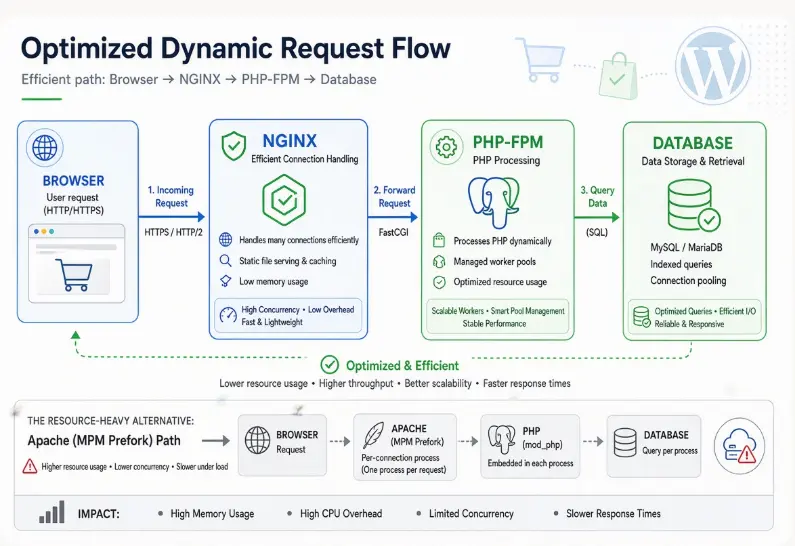
Here, the performance gap between NGINX and Apache narrows considerably. Both web servers can use PHP-FPM (FastCGI Process Manager) to process PHP requests, and both can be tuned to perform well with database-driven applications. In this respect, a well-configured Apache setup and a well-configured NGINX setup aren’t dramatically different in raw PHP execution speed; PHP-FPM does the heavy lifting either way.
Where NGINX still tends to pull ahead is in how efficiently it handles the surrounding connection management before a request ever reaches PHP-FPM. Because it isn’t spending resources spinning up processes or threads for every visitor, NGINX can pass requests along to PHP-FPM with less overhead, which helps keep response times more consistent as concurrent traffic increases.
The practical effect is that a dynamic website on an NGINX-based panel often holds up a bit better during traffic spikes than the same site would on a purely Apache-based setup, even though the difference at low traffic levels may be barely perceptible.
4) Better Performance Under Heavy Traffic
This is where NGINX’s design advantages become most visible. Its event-driven architecture is specifically well suited to handling large numbers of simultaneous visitors, the exact scenario where process-based servers like Apache start to show strain.
NGINX also frequently plays a second role: reverse proxy. In this setup, NGINX sits in front of the server, receiving all incoming traffic first. It handles connection management and serves static content directly, while forwarding dynamic requests to Apache (or another backend) only when necessary.
This “NGINX in front, Apache behind” arrangement is common precisely because it plays to each server’s strengths. NGINX manages the high-volume, resource-intensive task of handling connections and static files, while Apache is reserved for the dynamic requests that benefit from its broad compatibility with legacy configurations, .htaccess rules, and modules that some older applications still depend on.
The result is a hosting environment that can absorb traffic surges more gracefully than an Apache-only stack, without sacrificing the compatibility that some websites still require.
NGINX Panels Faster Than Apache Panels: FAQs
What are the disadvantages of NGINX?
NGINX’s efficiency comes with some trade-offs. It doesn’t support .htaccess files, so per-directory configuration changes that Apache users are accustomed to making on the fly typically require editing the main server configuration and reloading NGINX instead, a bigger adjustment for less technical users.
Its module ecosystem, while capable, is also smaller and less mature than Apache’s decades-old library of modules, which can occasionally make it harder to support very old or highly specialized applications.
Finally, because many hosting panels and tutorials were written with Apache in mind, some legacy documentation and rewrite rules need to be translated into NGINX’s syntax, which adds a learning curve for administrators used to Apache.
Where Apache Still Has an Advantage
Apache’s biggest strength is flexibility. Its support for .htaccess files allows configuration changes to be made per directory without touching the main server config or restarting the server, useful for shared hosting environments where individual users need to make their own adjustments.
Apache also has an enormous, mature ecosystem of modules built up over more than two decades, which means it can support a wide range of legacy applications and edge-case configurations that newer servers may not handle as smoothly.
For websites or agencies with deep, long-standing Apache-specific configurations, sticking with Apache or a hybrid Apache-behind-NGINX setup can be the more practical choice.
Why does NGINX use less memory?
NGINX uses an asynchronous, event-driven model in which a small number of worker processes handle many connections concurrently, rather than creating a new process or thread for every incoming request.
Because each worker can multiplex thousands of connections instead of one process per connection, memory overhead stays comparatively flat even as the number of simultaneous visitors grows.
Apache’s traditional prefork and worker models, by contrast, allocate memory per process or thread, so memory use tends to climb more directly with the number of concurrent connections.
What’s better than NGINX?
There isn’t a single web server that’s objectively “better” than NGINX; the right choice depends on the workload. LiteSpeed, for example, is a commercial alternative that’s also event-driven and is often benchmarked as faster than both NGINX and Apache for certain PHP and WordPress workloads, particularly when paired with its own caching layer. HAProxy is frequently preferred specifically for load balancing at scale. For general-purpose website hosting, though, NGINX remains one of the most widely used and well-supported options, and it’s the backbone of most modern high-performance hosting panels for good reason.
Get Faster Hosting Today with Truehost
Server architecture isn’t something most website owners think about day-to-day, but it quietly shapes how fast your site loads, how well it holds up under traffic, and how much it costs to keep everything running smoothly. If your current host is still running on an Apache-only stack and your site starts to feel sluggish the moment traffic picks up, that’s usually a sign your hosting foundation needs a closer look.
Truehost builds its hosting plans on modern, NGINX-optimized infrastructure, designed to deliver faster page loads, more efficient resource use, and more room to grow as your traffic scales, all without asking you to become a server administrator yourself. Whether you’re running a single WordPress site or managing hosting for multiple clients, a faster, better-architected server makes a difference you can actually see.
Ready to feel the difference? Check out Truehost’s hosting plans and give your website the speed advantage it deserves.