Domain SearchInstantly check and register your perfect .pk or international domain
 Web HostingGet a .pk domain for as low as PKR 467
 cPanel HostingUser-friendly hosting powered by cPanel
 Reseller HostingLaunch your own hosting business with minimal technical requirements
 Windows HostingOptimized for Windows-based applications and websites
 Affiliate ProgramEarn referral commissions by promoting our services
 WordPress HostingFast & Reliable WordPress Hosting
 Domain TransferMigrate your existing domain seamlessly with zero downtime.
 All DomainsAccess 324+ top-level domains (TLDs) worldwide from a single platform
 Whois LookupIdentify the owner of any domain using our whois and rdap lookup tool
 Managed VPS Hosting
 AI Website BuilderCreate beautiful websites effortlessly using intuitive drag-and-drop features
 Online ShopLaunch a professional online shop with no technical skills required
 BlogDiscover expert guides on hosting, websites, SEO, and digital growth strategies
 ContactGet instant assistance via live chat or email
 SupportAccess help articles, tutorials, and service documentation
 SSL CertificatesEncrypt data, build trust, and boost SEO.
When you type a domain name into your browser, you expect the website to appear within seconds. Computers, though, do not work with domain names the way people do. They use IP addresses, strings of numbers, to identify and connect to servers.
DNS, or Domain Name System, is the system that translates domain names into IP addresses so your browser can find the correct server and load the website you asked for. DNS meaning, in plain terms: it is a directory that matches easy-to-remember names to the numerical addresses computers actually use.
DNS works quietly in the background every time you visit a website, send an email, or use any online service tied to a domain. Without it, you would need to memorize numerical IP addresses instead of typing a simple website name. ICANN describes DNS as the addressing system that connects domain names to the IP addresses computers use to find each other.
This article covers the benefits of DNS, how DNS works, the different types of DNS servers, what happens during a DNS lookup, the most common DNS records, and mistakes to avoid when managing your DNS settings.
Already know you need a domain? Search for your domain name now
Benefits of DNS?
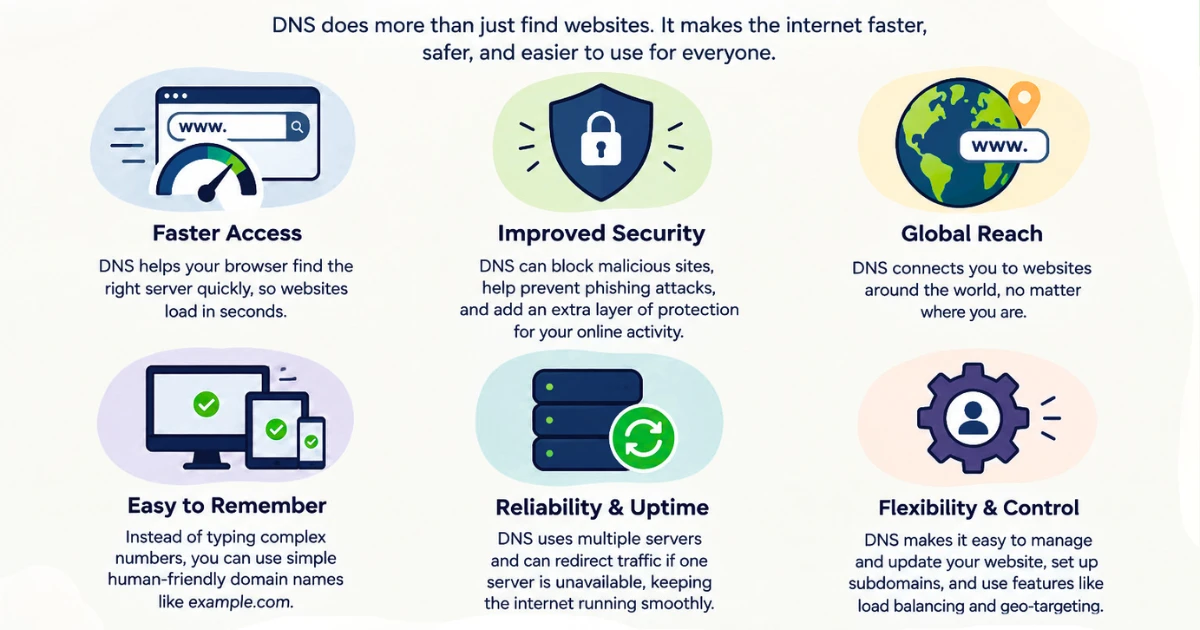
DNS does more than let you type words instead of numbers. Here is what it actually does for a website owner.
- It makes websites easier to reach. Nobody wants to memorize a string like
192.0.2.14for every site they visit. A domain name is memorable, brandable, and easy to share, and DNS handles the translation behind the scenes. - It connects your domain to the server hosting your website. When you set up hosting, DNS is what links your domain name to that specific server, so visitors land on your content rather than a blank page or someone else’s site.
- It helps email reach the right destination. Mail servers rely on DNS to figure out where messages sent to your domain should go. Without correctly configured DNS, email for your domain simply will not arrive.
- It allows you to use subdomains. Addresses like
blog.example.comorshop.example.comexist because DNS lets you create and point subdomains independently, often to different servers or services than your main site. This is especially useful if you run a WordPress site alongside a separate blog or store. - It makes switching servers easier. If you move your website to a new host, you update your DNS records rather than asking every visitor to learn a new address. The domain name stays the same even though the underlying server changes, which is exactly what happens when you move to a new hosting plan.
- It lets multiple services share one domain. A single domain can point to a website, a mail provider, and a third-party tool like a verification or marketing platform, all at once, because DNS records can be set up separately for each purpose.
- It gives you a structured way to manage where things point. Instead of a single fixed connection, DNS records let you direct different parts of your domain (the main site, subdomains, email, verification services) to exactly where each one needs to go.
How Does DNS Work?
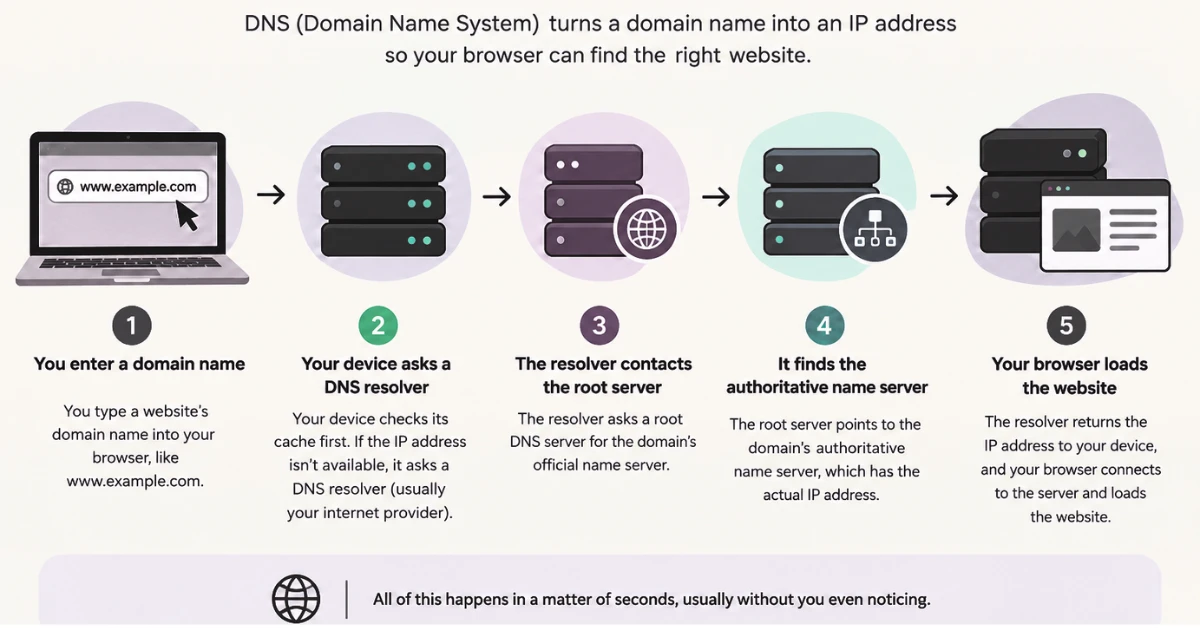
At a basic level, DNS follows a short chain of steps every time someone tries to reach your website.
- A user types a domain name into their browser.
- The browser needs to find the IP address linked to that domain.
- A DNS resolver, a server designed to look up this information, receives the request.
- The resolver searches for the domain’s DNS records.
- The correct DNS record supplies the IP address that matches the domain.
- That IP address is sent back to the user’s device.
- The browser uses the IP address to connect to the correct server.
- The website loads.
In short: example.com → DNS finds the IP address → browser connects to the server → website loads.
That is the whole idea in a sentence. The domain name never changes, but the lookup behind it happens every time someone tries to visit, usually in a fraction of a second and without the visitor noticing anything happened at all.
Different Types of DNS Servers?
A single DNS lookup usually involves more than one type of server, each with a distinct job. Here is how they fit together.
1) DNS Resolver
The resolver is the first stop for a DNS request. It receives the query from a user’s device, checks whether it already has the answer stored in its cache, and if not, goes looking for it elsewhere in the DNS system.
Think of the resolver as the go-between. It does not necessarily know the answer itself. Instead, it acts as an intermediary between your device and the rest of the DNS hierarchy, gathering the information needed and returning the final result to you.
2) Root DNS Servers
Root servers sit at the top of the DNS hierarchy. They are not where the final IP address for your website is stored. Their job is narrower: when a resolver asks a root server about a domain, the root server points it toward the correct top-level domain (TLD) server based on the domain’s extension.
You can see the current list of root server operators maintained by IANA if you want to explore this layer further.
3) TLD DNS Servers
TLD stands for top-level domain, referring to the part of a domain name after the final dot, such as .com, .org, or .pk. TLD servers manage information for every domain registered under that specific extension.
When a root server directs a resolver to the right TLD server, that server does not provide the final IP address either. Instead, it points the resolver toward the authoritative DNS server responsible for the exact domain being requested.
4) Authoritative DNS Servers
This is where the actual answer lives. Authoritative DNS servers store the DNS records for a domain and provide the specific information the resolver asked for, whether that is the IP address for the website, the mail server for email, or another record type entirely.
The distinction matters: a resolver is a middleman that fetches answers, while an authoritative server is the source that actually holds and provides those answers. Everything before the authoritative server exists to help the resolver find it.
What Happens During a DNS Lookup?
The basic process above skips a few steps that happen on longer, uncached lookups. Here is the fuller sequence.
- You enter a domain name into your browser.
- The browser checks whether it already has the domain’s IP address stored in its own cache.
- If not, your device checks its local DNS information.
- If the answer still is not available, the request goes to a DNS resolver.
- The resolver checks its own cache first.
- If the resolver has no cached answer, it contacts a root DNS server.
- The root server directs the resolver to the appropriate TLD server.
- The TLD server identifies the authoritative DNS server for the domain.
- The authoritative server returns the requested DNS record.
- The resolver sends that result back to your device.
- Your browser uses the IP address to connect to the web server.
- The web server sends back the requested website.
Not every step happens on every visit. If a resolver, browser, or device already has a domain’s information cached from a recent lookup, several of the steps above are skipped entirely, and the answer comes back almost immediately.
That caching is what makes repeat visits to a site noticeably quicker than the very first one. A cached record has a time-to-live (TTL) value attached to it, which determines how long that stored answer is considered valid before a fresh lookup is required. Once the TTL expires, the resolver goes through the process again to confirm the current answer. Cloudflare’s DNS documentation covers how these records and lookups work together in more depth if you want to explore the technical side further.
DNS Records?
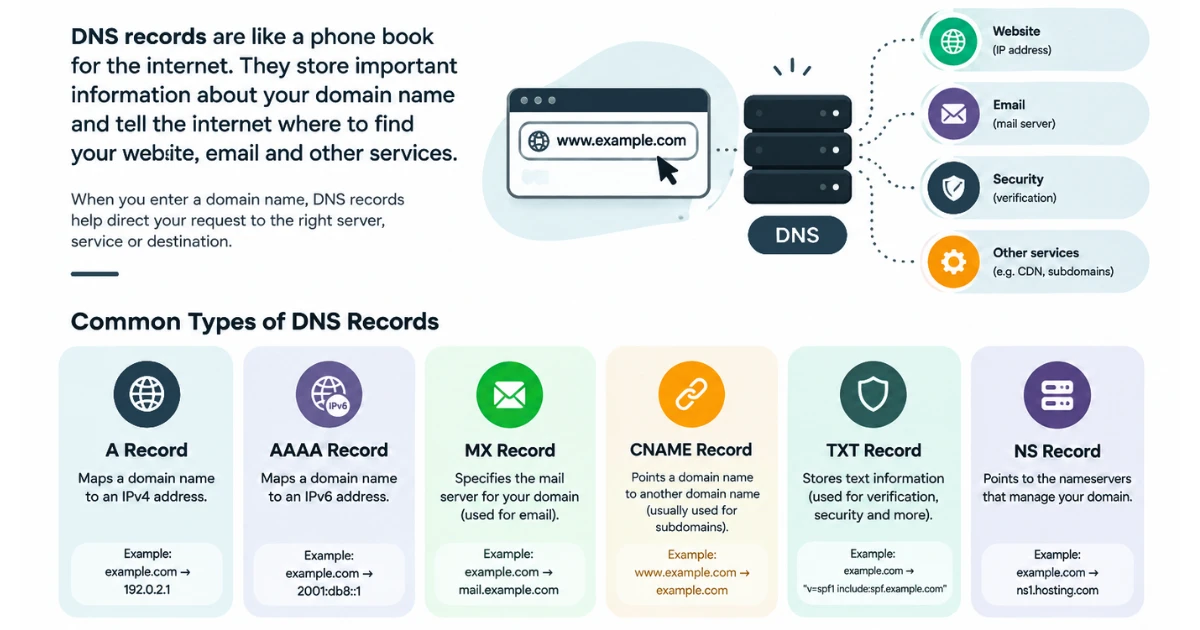
DNS records are entries stored on a domain’s authoritative server that tell computers where to find a domain’s website, email service, or other connected services. Each record type serves a different purpose.
| DNS Record | What It Does |
|---|---|
A | Points a domain to an IPv4 address |
AAAA | Points a domain to an IPv6 address |
CNAME | Points a domain or subdomain to another hostname |
MX | Specifies the mail servers responsible for receiving email |
TXT | Stores text information used for verification and other purposes |
NS | Identifies the authoritative nameservers for a domain |
These records are not interchangeable, even though they can look similar at a glance. An A record connects example.com directly to an IPv4 address, which is typically where the website itself is hosted.
An MX record, by contrast, has nothing to do with the website. It tells email systems which server should handle messages sent to that domain. You could have a correctly configured A record and a broken MX record at the same time, meaning the website loads fine while email quietly fails.
A CNAME record works differently again. Rather than pointing to an IP address, it points one hostname to another, which is useful for subdomains that should follow whatever address a different hostname resolves to.
NS records, meanwhile, are not about where content lives at all. They identify which servers are authoritative for the domain in the first place, which is the starting point every other record depends on.
The exact format and behavior of these records is defined in RFC 1035, the technical standard that specifies how DNS is implemented.
Need help pointing your domain’s records correctly? Get DNS setup support from Truehost PK
Common DNS Mistakes to Avoid
Small errors in DNS configuration can cause outsized problems, and most of them are avoidable with a bit of care.
- Entering the wrong IP address in an A or AAAA record, which sends visitors to the wrong server or nowhere at all.
- Using incorrect nameservers, which can disconnect a domain from its DNS records entirely.
- Deleting important DNS records without realizing another service depends on them.
- Pointing a domain to the wrong server, often after a hosting migration that was not fully updated.
- Entering an incorrect CNAME record, which can break a subdomain or a connected third-party service.
- Entering incorrect MX records, which stops email from reaching the domain’s real mail server.
- Creating conflicting DNS records, such as two records that give contradictory instructions for the same name.
- Forgetting to configure records for a subdomain, leaving it unreachable even though the main domain works fine.
- Changing DNS settings without keeping a copy of the original configuration, which makes it hard to undo a mistake.
- Assuming DNS changes take effect immediately, when caching and TTL settings can delay how quickly a change is visible everywhere.
- Changing several records at once without understanding what each one does, which makes it difficult to identify the cause if something breaks.
These mistakes tend to show up in predictable ways: a website that will not load, a subdomain that stops working, emails that never arrive, or other domain-connected services becoming unreachable.
The practical fix is mostly patience and documentation. Change one record at a time when possible, note down the original values before editing anything, and give changes time to propagate before assuming something is broken. If you are unsure what a record does, look it up before removing or editing it rather than guessing.
If your email keeps bouncing or a subdomain will not load, incorrect MX or CNAME records are a common cause. Set up email hosting correctly with Truehost Pakistan today ad get all your issues fixed
FAQs
Can I change my DNS records?
Domain owners or authorized administrators can typically change DNS records through the DNS management interface provided by their domain registrar or DNS provider. Access and available options vary depending on where the domain is registered and where its DNS is managed.
How long does a DNS lookup take?
A single DNS lookup usually takes a fraction of a second, though the exact time depends on factors like server response times and network conditions. Cached results are typically returned faster than lookups that need to go through the full resolver-to-authoritative-server chain, since fewer steps are involved.
Can DNS affect website speed?
DNS lookup time is one factor in how quickly a page starts loading, but it is only the first step. Once the browser has the IP address, the actual page load depends on server response time, file sizes, and other performance factors unrelated to DNS. Caching reduces how often the full lookup process needs to happen, which can make repeat visits feel quicker.
Can DNS affect email?
Yes. MX records tell email systems which server is responsible for receiving messages sent to a domain, and other DNS settings, such as certain TXT records, can also play a role in supporting email delivery and verification. If these records are missing or incorrect, messages sent to that domain may fail to arrive.
What happens if DNS stops working?
If DNS for a domain stops working correctly, browsers will not be able to resolve the domain name to an IP address, which means the website becomes unreachable. Email and other services tied to that domain, such as subdomains or connected apps, can be affected as well, since they rely on the same underlying DNS records.
Can one domain have multiple DNS records?
Yes. A domain typically has several different record types at once, such as an A record for the website and an MX record for email, each serving a different purpose. Depending on the setup, a domain can also have multiple records of the same type, for example when a service requires several TXT records for different verification purposes.
Ready to Set Up Your Domain and Hosting?
DNS connects your domain name to the website, email service, and other online services associated with it. Understanding how it works makes it easier to connect a domain to hosting, configure email correctly, manage subdomains, and troubleshoot problems when something does not load as expected.
If you are looking for a domain or hosting plan, Truehost PK gives you the tools to register your domain and host your website in one place, with local support to help you get your DNS configured correctly from the start.