Domain SearchInstantly check and register your perfect .pk or international domain
 Web HostingGet a .pk domain for as low as PKR 467
 cPanel HostingUser-friendly hosting powered by cPanel
 Reseller HostingLaunch your own hosting business with minimal technical requirements
 Windows HostingOptimized for Windows-based applications and websites
 Affiliate ProgramEarn referral commissions by promoting our services
 WordPress HostingFast & Reliable WordPress Hosting
 Domain TransferMigrate your existing domain seamlessly with zero downtime.
 All DomainsAccess 324+ top-level domains (TLDs) worldwide from a single platform
 Whois LookupIdentify the owner of any domain using our whois and rdap lookup tool
 Managed VPS Hosting
 AI Website BuilderCreate beautiful websites effortlessly using intuitive drag-and-drop features
 Online ShopLaunch a professional online shop with no technical skills required
 BlogDiscover expert guides on hosting, websites, SEO, and digital growth strategies
 ContactGet instant assistance via live chat or email
 SupportAccess help articles, tutorials, and service documentation
 SSL CertificatesEncrypt data, build trust, and boost SEO.
Web hosting uptime is the measure of how consistently a website remains available to visitors.
It is expressed as the percentage of time a website and its hosting infrastructure remain available over a specific period.
Downtime is the period when visitors cannot access the website or one of its essential services. When that happens, customers may be unable to place orders, send inquiries, make bookings, or access information from your site.
Uptime is calculated using this formula:
Uptime = (Total time − Downtime) ÷ Total time × 100
For example, a 30-day month contains 43,200 minutes. At 99.9% uptime, your website could be unavailable for roughly 43 minutes during that month.
Scheduled maintenance can be excluded from an uptime calculation under a Service Level Agreement (SLA), provided the hosting provider gives customers the required advance notice.
So, an uptime percentage is more than a number displayed on a hosting page. It tells you how much room there is for unexpected downtime.
Let’s look at it in detail to understand how it affects your website.
What Do Uptime Percentages Really Mean?
A difference that looks tiny on paper can represent a significant amount of downtime over a year.
| Uptime | Approx. Monthly Downtime | Approx. Annual Downtime |
|---|---|---|
| 99% | 7 hours 18 minutes | 3 days 15 hours |
| 99.9% | 43 minutes | 8 hours 46 minutes |
| 99.97% | 13 minutes | 2 hours 38 minutes |
| 99.99% | 4 minutes 23 seconds | 52 minutes 34 seconds |
The difference between 99% and 99.9% may look small, but the practical difference is very significant. At 99% uptime, a website could be unavailable for more than three and a half days over a year. At 99.9%, that drops to less than nine hours.
The gap becomes smaller again as you move toward 99.99%. That level leaves much less room for unexpected downtime.
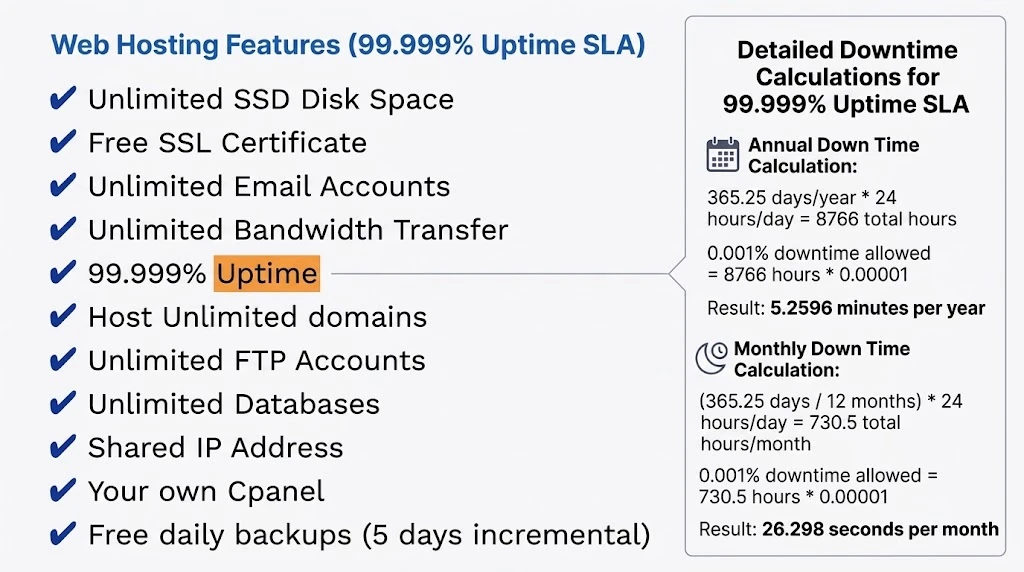
A claim of 100% uptime deserves scrutiny since hardware, networks, maintenance, software, and other failures can never realistically be eliminated.
A useful uptime guarantee should also come with an SLA that explains how availability is measured, which types of downtime are excluded, and what happens if the provider fails to meet the stated target.
What Does Uptime Change for Your Pakistani Business?
1) Lost Revenue
For an e-commerce store, every minute of downtime can mean missed orders.
The same applies to freelancers receiving inquiries through their websites, restaurants accepting online orders, service businesses collecting leads, and businesses using websites to support physical sales.
A website cannot generate inquiries or sales while customers cannot reach it.
The timing can also make a difference. An outage during a product promotion, busy shopping period, or social media campaign can prevent visitors from completing the action that brought them to your website in the first place.
2) Search Visibility
Search engines need to access your website to crawl and index its content.
A short outage does not automatically remove a website from search results. However, repeated or prolonged availability problems can interfere with crawling and prevent visitors from accessing pages when they arrive through search.
For a business that depends on organic search traffic, keeping your website available gives search engines a better chance of accessing its pages and gives visitors a working destination when they click your results.
3) Customer Trust
A visitor who repeatedly encounters an error page may question if the business is active or reliable.
For newer online businesses, consistent availability helps create a more dependable customer experience. Someone visiting your website to check your services or contact your business expects the site to be accessible when they need it.
If the website is repeatedly unavailable, that visitor may simply look elsewhere.
4) Local Infrastructure
Power interruptions and connectivity issues can affect businesses locally.
Professional hosting facilities use infrastructure designed to maintain server availability during individual power or network failures.
Redundant power, network connectivity, monitoring, and backup systems can reduce the risk of a single infrastructure failure taking a website offline.
Your website’s uptime depends on much more than the hosting package name or monthly price. The infrastructure behind that package is important too.
What Affects Web Hosting Uptime?
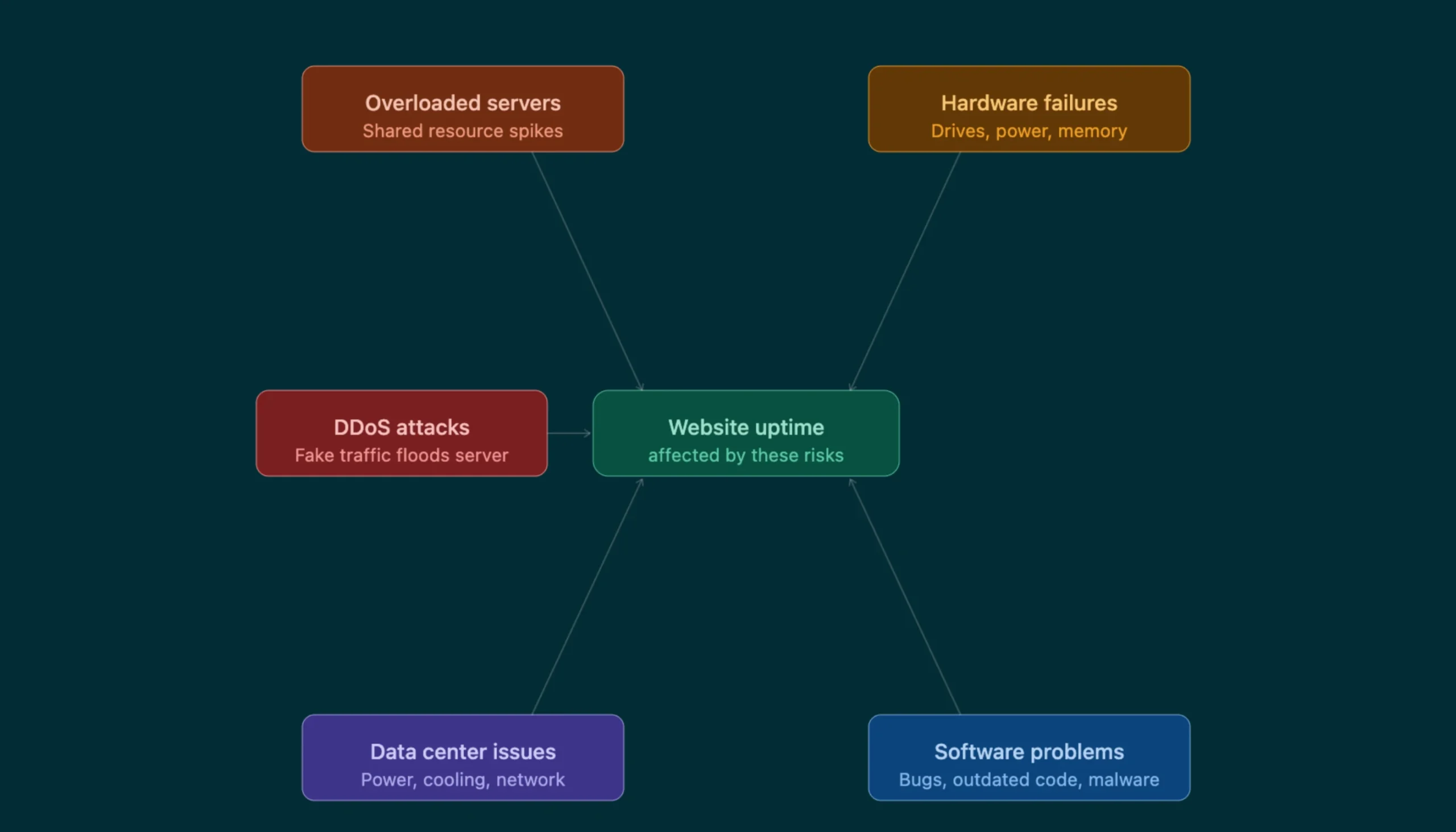
1. Overloaded Servers: On poorly managed shared hosting, excessive resource usage can affect other websites on the same server. A sudden increase in traffic or resource consumption from one website can place additional pressure on shared server resources.
2. Hardware Failures: Servers rely on components such as storage drives, memory, power supplies, and network equipment. Hardware failures can cause interruptions if there is no adequate redundancy to keep services running while the failed component is replaced or isolated.
3. DDoS Attacks: A distributed denial-of-service attack can send large volumes of traffic toward a website or server, potentially making services unavailable without appropriate protection. DDoS protection can help identify and filter malicious traffic before it overwhelms the available infrastructure.
4. Data Center or Network Problems: Power failures, cooling problems, network outages, and upstream connectivity issues can all affect availability. Redundant systems and multiple network connections can reduce the risk of a single infrastructure problem taking an entire service offline.
5. Software and Security Problems: Outdated software, configuration errors, failed updates, or security incidents can cause applications or servers to become unavailable. Regular updates, security monitoring, careful configuration, and reliable backups can help reduce these risks.
How To Monitor Your Web Hosting Uptime
Don’t take a hosting provider’s word for it. Use an independent uptime monitor, for instance, tools like UptimeRobot and Pingdom, which periodically check if your website responds and record any outages automatically.
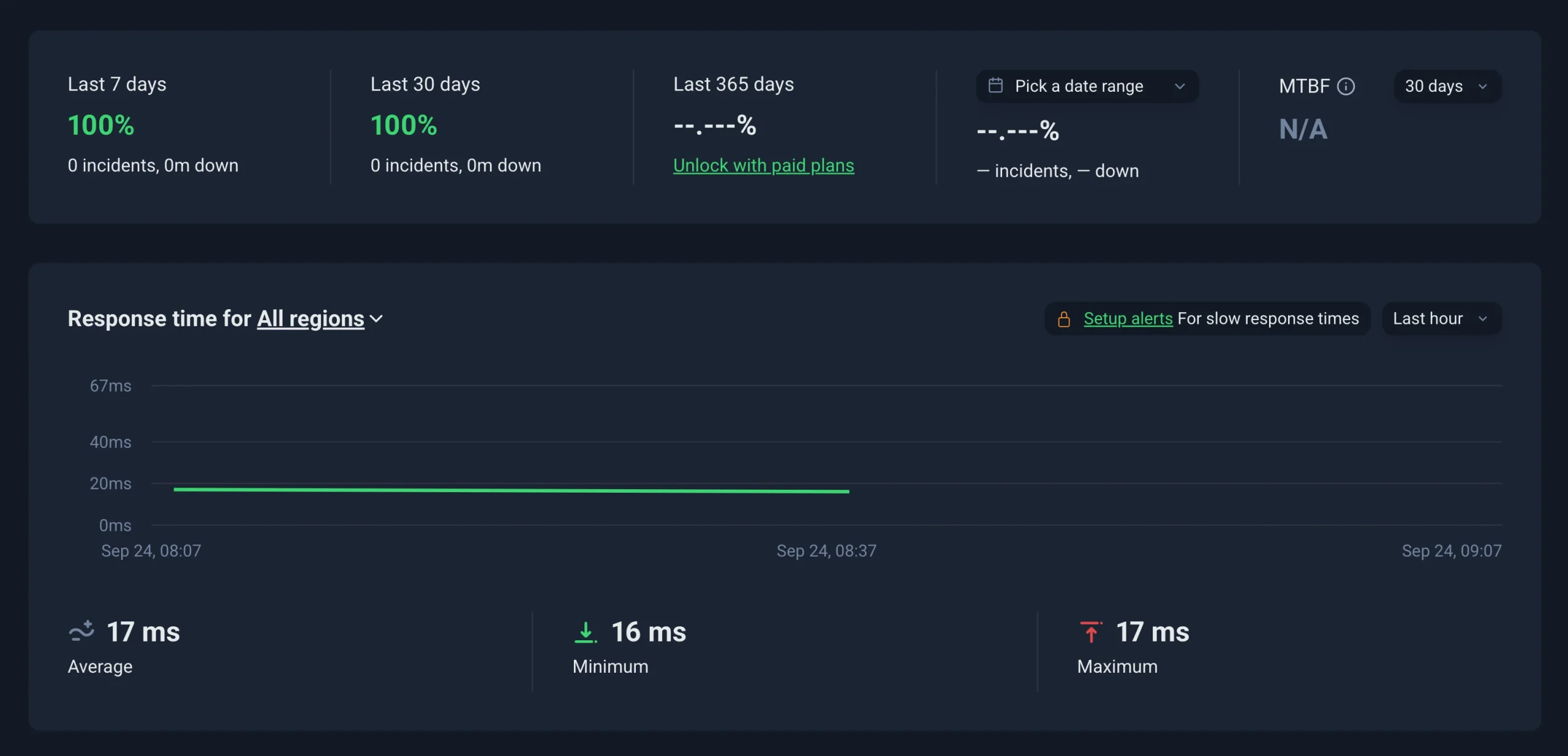
Setting up monitoring takes less than five minutes:
- Create an account with an uptime-monitoring service.
- Add your website URL.
- Enable email or other available outage alerts.
Once monitoring is active, allow it to collect data over time. A single week may not give you enough information to judge your hosting service, so checking the reports over several months gives you a more useful record.
Once it’s running, here’s how to read what you get back:
- Check uptime over several months rather than judging from one week.
- Record the date and duration of outages.
- Compare measured downtime with the provider’s published SLA.
- Check the SLA’s exclusions before deciding if an outage qualifies for compensation.
This gives you your own record of website availability and makes it easier to compare actual performance with the uptime commitment attached to your hosting plan.
Choosing Web Hosting with Uptime You Can Count On
Don’t choose a host because it advertises the biggest uptime number.
Look at the guarantee, SLA, infrastructure, monitoring, support, backups, and the provider’s ability to respond when something goes wrong.
A high uptime figure is useful, but you also need to know what supports that figure. Reliable infrastructure, redundancy, monitoring, backups, and responsive support can all help reduce the effect of failures when they occur.
At Truehost, we offer hosting with features such as SSD storage, free SSL, and automated backups. Plus, you get a 99.999% uptime guarantee on the Unlimited plan.
That leaves very little permitted downtime and helps keep your website available around the clock, throughout the year.