 Domain SearchInstantly check and register your perfect .pk or international domain
 Web HostingGet a .pk domain for as low as PKR 467
 cPanel HostingUser-friendly hosting powered by cPanel
 Reseller HostingLaunch your own hosting business with minimal technical requirements
 Windows HostingOptimized for Windows-based applications and websites
 Affiliate ProgramEarn referral commissions by promoting our services
 WordPress HostingFast & Reliable WordPress Hosting
 Domain TransferMigrate your existing domain seamlessly with zero downtime.
 All DomainsAccess 324+ top-level domains (TLDs) worldwide from a single platform
 Whois LookupIdentify the owner of any domain using our whois and rdap lookup tool
 Managed VPS Hosting
 AI Website BuilderCreate beautiful websites effortlessly using intuitive drag-and-drop features
 Online ShopLaunch a professional online shop with no technical skills required
 BlogDiscover expert guides on hosting, websites, SEO, and digital growth strategies
 ContactGet instant assistance via live chat or email
 SupportAccess help articles, tutorials, and service documentation
 SSL CertificatesEncrypt data, build trust, and boost SEO.
Choosing the right web hosting plan is important for your business. Good hosting helps your website stay fast, secure, and available to visitors.
Many businesses choose the cheapest plan without checking renewal prices, features, or whether the plan can support future growth.
Before choosing a plan, look at your website’s needs, hosting features, security, support, and total cost. This will help you choose a plan that works for your business now and as it grows.
Factors to Consider
1) Pricing and Renewal Costs
| Item | Price |
| Starter | ₨282.65 /month |
| Pro | ₨296.78 /month |
| Unlimited | ₨4,149.77 /month |
| .com Domain; Renewal | ₨3,357.88 |
| Workplace Email | ₨3,391.80 |
Hosting providers often advertise a low introductory rate to win your business, then move you to a much higher standard rate once that term ends. That gap between the “new customer” price and the renewal price is where many businesses end up overpaying without realizing it.
- Don’t look only at the introductory price.
- Check how much the plan will cost when it renews.
- Include the cost of domains, backups, security features, email, and other extras.
- Compare the total cost before choosing a plan.
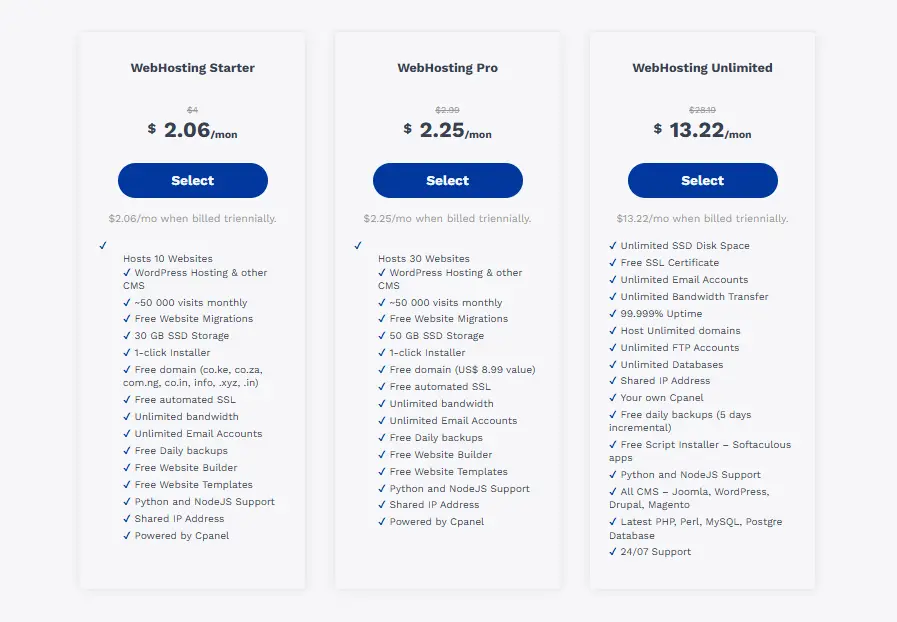
A plan that looks cheapest on the surface can end up costing more than a mid-tier plan once you add domain renewal, mailbox fees, backup add-ons, and the higher renewal rate. Ask for (or calculate) the second-year cost before you commit, not just the first-year promotional price.
2) Traffic and Business Growth
- Estimate how many visitors your website gets now and may get in the future.
- Choose a plan that allows you to upgrade as your business grows.
- High-traffic websites, online stores, media-heavy sites, and sites with seasonal traffic may need more resources from the start.
A brochure-style site for a local service business has very different traffic patterns than an online store running a holiday sale or a media site publishing daily content. If your traffic is likely to spike- a product launch, a press mention, a seasonal promotion- pick a plan (or provider) that lets you scale up quickly rather than one that forces a full migration under pressure.
3) Website Speed and Performance
- A slow website can affect user experience, SEO, and sales.
- Look at the CPU and RAM available, not just the amount of storage.
- Features such as NVMe storage, caching, and CDN support can help improve speed.
- Check the host’s server performance before signing up.
Speed isn’t a nice-to-have; it’s a revenue factor. Research on page-load behavior consistently finds that conversion rates drop by an average of around 4.42% for each additional second of load time within the first five seconds, and mobile users are especially unforgiving, with 53% abandoning a site that takes longer than three seconds to load.
On top of that, Google has found that bounce rate increases by 123% when load time goes from one second to ten, which can also hurt your search rankings over time.
Storage space gets most of the attention in hosting ads, but it’s rarely the bottleneck. CPU and RAM determine how many visitors your site can serve at once before it slows down or crashes, and features like NVMe drives, server-side caching, and a content delivery network (CDN) are usually what separates a hosting plan that “just works” from one that buckles under real traffic.
4) Uptime and Reliability
- Look for a hosting provider that offers at least 99.9% uptime.
- Check customer reviews and uptime records rather than relying solely on the provider’s claims.
- Downtime can cost your business visitors and sales, especially during busy periods or promotions.
99.9% uptime still allows for roughly 8.7 hours of downtime a year, and independent monitoring has found that many hosts fall short of their own promises: one industry study that purchased shared hosting plans from 32 providers and monitored them for a year found the average website was down about three hours a month.
That gap is why it’s worth checking third-party monitoring reports and reviews rather than taking a provider’s advertised uptime figure at face value.
The financial impact of downtime scales with your business, but even small sites feel it. Downtime for a typical small-business website is estimated at $100 to $1,000 per hour, and that’s often before accounting for wasted ad spend, lost search visibility, or customers who simply don’t come back.
If your traffic is seasonal or promotion-driven, an outage during your busiest hours can cost disproportionately more than the same outage on an ordinary day.
5) Security
- Look for free SSL, malware protection, firewalls, and other security features.
- Make sure the provider offers automatic backups and easy website restoration.
- Businesses that handle customer information or online payments should also check their security and compliance needs.
Security features that used to be paid add-ons- free SSL certificates, malware scanning, web application firewalls- are now standard on most reputable hosting plans, so treat their absence as a red flag rather than something you should have to pay extra for.
Automatic, easily restorable backups count just as much as prevention: if something does go wrong (a bad plugin update, a hack, human error), the speed at which you can roll back to a working version of your site determines how much downtime and lost business you actually experience.
If your business processes payments or stores customer data, confirm the host’s compliance posture and review the PCI Security Standards Council’s official PCI DSS resources for applicable payment-security requirements before signing up.
6) Storage and Resource Limits
- Choose storage based on your website size and needs.
- A simple business website needs less space than an online store or a website hosting many sites.
- Check CPU, RAM, and other resource limits because these can affect website performance.
A simple brochure or portfolio site with a handful of pages needs very little storage. An online store with a large product catalog, high-resolution images, and order history, or an account hosting multiple websites, needs considerably more, along with higher CPU and RAM allowances to keep pages loading quickly as that data grows.
“Unlimited” storage plans are common in hosting marketing, but they usually come with fair-use limits on CPU and RAM that count more to real-world performance than the storage number itself.
7) Customer Support
- Check if support is available 24/7.
- Look for live chat, tickets, phone, or other support options.
- Good support can save time when your website has a problem.
- Support becomes even more important as your website becomes more complex.
Website problems rarely happen at convenient times. A host offering only email support with a 24-48 hour response window can turn a minor issue into a day or more of lost business, while 24/7 live chat or phone support can get the same issue resolved in minutes.
As your site grows to include more plugins, integrations, or e-commerce functionality, the odds of running into something you can’t fix yourself increase, making responsive, knowledgeable support less of a convenience and more of a business necessity.
8) Business Email and Domain
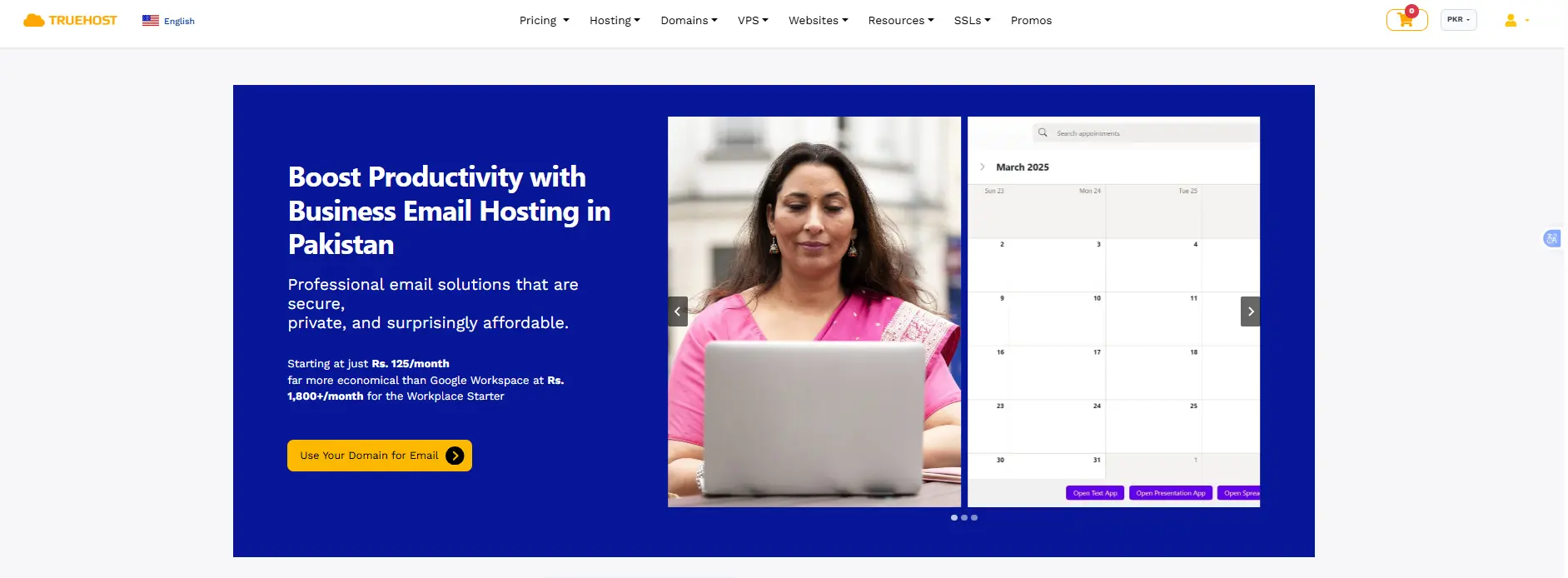
- Check if the plan includes professional email addresses using your domain.
- Look at the number of email accounts and storage provided.
- Check domain registration, renewal prices, and management options.
A professional email address at your own domain, [email protected] rather than a free webmail address) builds trust with customers and partners. Check how many mailboxes are included, how much storage each one gets, and whether email is bundled into your hosting plan or billed separately, as it often is.
On the domain side, pay attention to renewal pricing specifically. ICANN’s domain renewal information explains that domain registrations generally need to be renewed before expiration if you want to keep using the domain and its associated services.
For businesses using a .pk domain, you can also check the official PKNIC domain registration policy for information about.PK domain registration and related requirements.
Also confirm you’ll retain full control to manage or transfer the domain later. ICANN’s transfer policy sets requirements for transferring domain names between registrars, including authorization by the registered name holder.
9) Scalability and Migration
- Choose a provider that makes it easy to upgrade your hosting plan.
- Check if you can move your website and data to another provider when needed.
- Avoid hosting plans that make it difficult or expensive to move your website later.
Your hosting needs today won’t necessarily match your needs in a year. Look for a provider that lets you move up to a higher-tier plan (or a different plan type entirely, such as from shared to VPS hosting) without a disruptive migration. Just as important is your exit path: confirm you can export your files, databases, and email without excessive fees or proprietary lock-in, so you’re never stuck with a provider purely because leaving would be too costly or complicated.
Which Hosting Plan Should You Choose?
There’s no single “best” hosting plan; the right one depends on your website’s size, your traffic, and how fast you expect to grow.
- If you’re starting with a simple business website and modest traffic, a Starter plan gives you what you need without paying for resources you won’t use yet.
- If your business is growing- more visitors, an online store, more content- a Pro plan gives you the extra speed, storage, and support to keep up.
- If you’re running multiple sites, high-traffic content, or resource-heavy applications, an Unlimited plan gives you the room to scale without hitting limits.
Whichever tier fits, judge it by the real renewal cost, performance, uptime, security, support, and how easily you can scale or migrate later, not just the sticker price.
Compare Truehost hosting plans and find the one that fits your business today and as it grows.




