Domain SearchInstantly check and register your perfect .pk or international domain
 Web HostingGet a .pk domain for as low as PKR 467
 cPanel HostingUser-friendly hosting powered by cPanel
 Reseller HostingLaunch your own hosting business with minimal technical requirements
 Windows HostingOptimized for Windows-based applications and websites
 Affiliate ProgramEarn referral commissions by promoting our services
 WordPress HostingFast & Reliable WordPress Hosting
 Domain TransferMigrate your existing domain seamlessly with zero downtime.
 All DomainsAccess 324+ top-level domains (TLDs) worldwide from a single platform
 Whois LookupIdentify the owner of any domain using our whois and rdap lookup tool
 Managed VPS Hosting
 AI Website BuilderCreate beautiful websites effortlessly using intuitive drag-and-drop features
 Online ShopLaunch a professional online shop with no technical skills required
 BlogDiscover expert guides on hosting, websites, SEO, and digital growth strategies
 ContactGet instant assistance via live chat or email
 SupportAccess help articles, tutorials, and service documentation
 SSL CertificatesEncrypt data, build trust, and boost SEO.
OpenClaw VPS hosting means running OpenClaw, a self-hosted AI assistant, on a virtual private server (VPS) instead of on your own computer. The VPS keeps OpenClaw running 24/7, even when your laptop is closed, asleep, or switched off entirely.
That counts more than it does for most software, because of what OpenClaw actually is. It isn’t a chat window you open and close. It’s a long-running background service that listens for your messages, remembers your context, runs scheduled jobs, and executes real tasks on your behalf. An assistant that only exists while your laptop lid is open isn’t really an assistant; it’s an app.
Unlike a laptop or shared hosting, a VPS gives OpenClaw its own CPU, RAM, and storage, plus the root access it needs to install dependencies and run a persistent daemon. Shared web hosting can’t do this at all: it doesn’t allow persistent background processes, Docker, or the memory headroom the agent needs. A VPS is, for most people, the smallest piece of infrastructure that genuinely fits the job.
How OpenClaw Works on a VPS
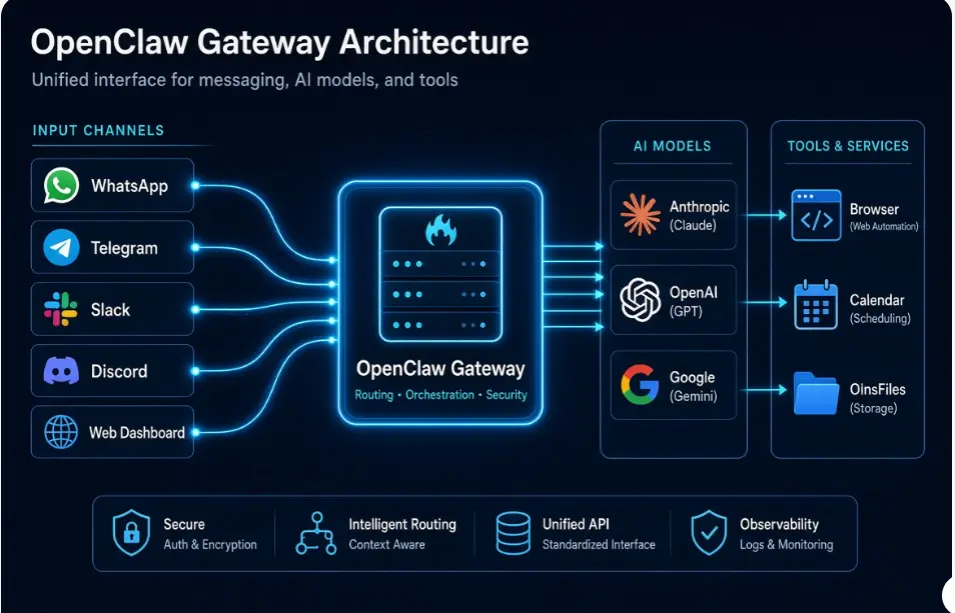
OpenClaw runs through its Gateway, which is the main part of the system. It stays running on your VPS and manages messages, settings, tasks, memory, and connected tools.
The Gateway can run continuously and restart automatically if the server reboots or the service stops.
You can use OpenClaw through:
- Telegram
- Slack
- Discord
- Control UI (web dashboard)
The process is simple:
i) You send a message through one of your connected apps.
ii) The Gateway receives the message.
iii) It sends the request to your chosen AI model.
iv) The AI decides what needs to be done.
v) OpenClaw uses its connected tools to complete the task.
vi) The result is sent back to you.
The AI processing does not need to happen on the VPS. OpenClaw can use models from providers such as Anthropic, OpenAI, or Google. The VPS mainly manages the connections, tasks, tools, and automations.
This means you usually don’t need a GPU for OpenClaw. RAM and reliable uptime are more important when choosing a VPS.
Your VPS keeps OpenClaw running in the background, including scheduled tasks, automations, memory, and integrations.
Why You Need OpenClaw VPS Hosting
1) 24/7 Availability
A VPS stays online even when your laptop is off, asleep, or disconnected from the network. OpenClaw can keep handling incoming messages, cron-scheduled tasks, and multi-step automations without interruption.
This is the single biggest functional difference. Proactive behaviour an assistant that messages you when something happens, runs a morning briefing, or monitors something on a schedule only works if the process is genuinely always running. On a laptop, every lid close is an outage.
2) Better Performance
A VPS gives OpenClaw its own CPU and RAM, which means consistent performance instead of competing with your browser tabs, video calls, and IDE.
The difference shows up most clearly with browser automation. Each headless browser instance consumes roughly 200–400 MB of RAM and is CPU-hungry while rendering pages.
That’s why the practical guidance is a real step up from the bare minimum: the Gateway will technically start on 2 GB, but a comfortable always-on deployment usually means around 4 GB for text-only work and closer to 8 GB once browser automation is in play. Under-provisioning is the number one cause of “OpenClaw keeps crashing” reports: containers restarting, browser sessions dying, and the Linux OOM killer stepping in.
3) Better Privacy and Control
Your OpenClaw data, settings, workspace files, memory, and API keys stay on a server you control. You choose who can access them, how the server is secured, and where the data is stored.
However, self-hosting also means you are responsible for security. This includes:
- Securing SSH access
- Setting up a firewall
- Protecting API keys and other secrets
- Installing updates
- Creating backups
- Monitoring the server
Thousands of OpenClaw instances have reportedly been exposed to the public internet because of poor security settings. OpenClaw also recommends treating a Gateway as a personal assistant for one operator, not as a shared system for users who do not trust each other.
For better security, keep the Gateway private, use token authentication, access it through SSH or a private network, and use a reverse proxy with TLS if public access is necessary. Also, protect secret files and give OpenClaw only the permissions it needs.
4) Easy to Scale
You can increase the VPS resources as your OpenClaw use grows, which is useful when you add more integrations, more scheduled workflows, more concurrent browser sessions, or more users.
Scaling is usually a resize rather than a migration. It’s also fairly predictable: running a second agent on the same server means a second Gateway process with its own configuration, memory, and session state, so budget a couple of GB of RAM per additional agent rather than hoping the existing headroom absorbs it.
5) Access From Anywhere
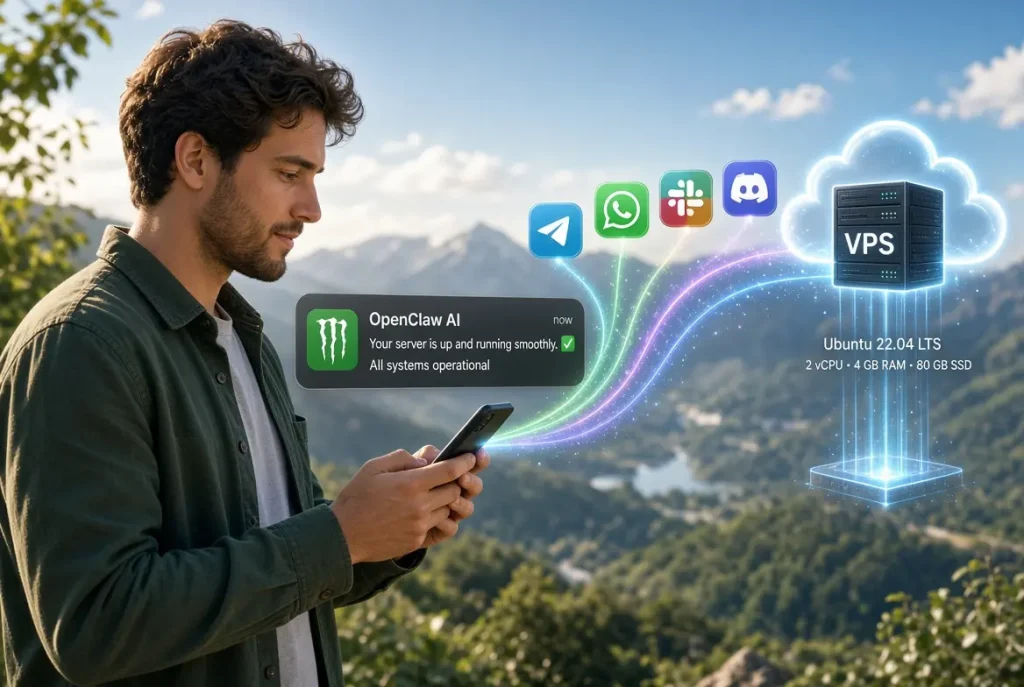
You can use OpenClaw from your phone, your laptop, a work machine, or a tablet without keeping a computer running at home. Because you’re talking to it through Telegram, WhatsApp, Slack, or Discord, there’s no special client to install; the assistant reaches you wherever those apps already do.
6) Less Server Management
Managed OpenClaw hosting, or a one-click template, can handle a lot of the infrastructure work for you: OS updates, monitoring, backups, and a sane security baseline out of the box. Several providers now ship OpenClaw templates that automatically generate a gateway token, avoid exposing the dashboard on a predictable port, and configure authentication before you ever log in.
That reduces the most common failure mode for new self-hosters, which isn’t an exotic exploit; it’s an unhardened default. Managed hosting doesn’t remove your responsibilities entirely: you still control which tools the agent can use, which accounts it connects to, and what it’s allowed to do without approval. But it meaningfully shrinks the surface area you have to get right.
7) Lower Cost for Long-Term Use
For regular, always-on use, a VPS is more practical than leaving a powerful computer running day and night and cheaper than the electricity, wear, and disruption that involves.
The realistic range for OpenClaw hosting in 2026 runs from roughly $4 to $50+ per month, depending on specs and how much management you’re paying for. Budget self-managed plans with around 8 GB of RAM sit in the region of $4–$7/month, while managed options generally start higher.
One number deserves emphasis, because it surprises people: your model API costs will often exceed your hosting bill. Moderate usage typically adds something like $20–$60/month in LLM tokens on top of the server. When you’re budgeting, the VPS is usually the smaller line item.
Ready to Run Your Own OpenClaw Assistant?]
Everything OpenClaw needs to run well- root access, dedicated RAM, SSD storage, and a server that never sleeps- comes down to picking the right VPS. You don’t need the biggest plan on the page; you need one sized for an always-on Gateway rather than a static website.
Truehost VPS Hosting gives you that foundation: full root access to install Node or Docker your way, SSD-backed plans with room to grow as you add channels and automations, and the resources to keep your Gateway online 24/7 without competing with anything else on the box. Start on an entry-level plan while you’re testing the onboarding flow, then resize once browser automation or extra integrations push your RAM needs up, no migration required.
Get your OpenClaw-ready VPS from Truehost →
OpenClaw VPS Hosting FAQs
Which VPS provider is best for hosting OpenClaw?
There is no single best VPS provider. Your choice depends on your budget, location, and how much setup you want to handle yourself.
Some providers offer good prices, while others make setup easier with one-click OpenClaw options.
For OpenClaw, look for:
At least 4 GB RAM
8 GB RAM if you plan to use browser automation
SSD or NVMe storage
Full root access
An option to upgrade your VPS later
Is it possible to host OpenClaw for free?
You can use a free cloud server if you qualify for a provider’s free tier. You can also run OpenClaw on an old laptop, mini PC, or home server you already own.
However, free hosting does not mean everything is free. You may still pay for:
- AI model API usage
- Backups
- Internet and electricity for home servers
- Your time spent managing the server
Free VPS plans may also have limited support and resources.
How much does OpenClaw VPS hosting cost?
A capable self-managed VPS usually costs around $4–$7 per month. Managed hosting can cost more because the provider handles setup, updates, and security.
You should also consider other costs, such as AI model API usage, backups, and server maintenance.
What is better than a VPS for OpenClaw?
It depends on what you need.
- Managed OpenClaw hosting: Good if you don’t want to manage server security and updates.
- Home server or mini PC: Useful if you already have the hardware and want to avoid monthly hosting costs.
- Dedicated server: Better for many agents, heavy browser automation, or larger deployments.
- GPU server: Needed if you want to run a large AI model locally instead of using an API.
For most people using OpenClaw with a cloud AI model, a small VPS is enough.
How do you run OpenClaw on a VPS?
The basic process is:
- Get a VPS: Choose a Linux VPS with at least 4 GB RAM and SSD or NVMe storage.
- Secure the server: Create a non-root user, use SSH keys, disable password login, and enable a firewall.
- Install OpenClaw: Install the required software or use Docker.
- Complete the setup: Enter your AI provider and API key and set up the OpenClaw Gateway.
- Connect your apps: Connect Telegram, WhatsApp, Slack, Discord, or other supported channels.
- Access the Control UI safely: Keep it private and use an SSH tunnel, or protect public access with a reverse proxy and TLS.
- Back up your data: Protect your API keys, restrict permissions, and create regular backups.
If this setup feels too technical, a one-click OpenClaw template or managed VPS can make things easier.