Domain SearchInstantly check and register your perfect .pk or international domain
 Web HostingGet a .pk domain for as low as PKR 467
 cPanel HostingUser-friendly hosting powered by cPanel
 Reseller HostingLaunch your own hosting business with minimal technical requirements
 Windows HostingOptimized for Windows-based applications and websites
 Affiliate ProgramEarn referral commissions by promoting our services
 WordPress HostingFast & Reliable WordPress Hosting
 Domain TransferMigrate your existing domain seamlessly with zero downtime.
 All DomainsAccess 324+ top-level domains (TLDs) worldwide from a single platform
 Whois LookupIdentify the owner of any domain using our whois and rdap lookup tool
 Managed VPS Hosting
 AI Website BuilderCreate beautiful websites effortlessly using intuitive drag-and-drop features
 Online ShopLaunch a professional online shop with no technical skills required
 BlogDiscover expert guides on hosting, websites, SEO, and digital growth strategies
 ContactGet instant assistance via live chat or email
 SupportAccess help articles, tutorials, and service documentation
 SSL CertificatesEncrypt data, build trust, and boost SEO.
Application hosting means running and storing software on remote servers so users can reach it over the internet.
The main infrastructure categories are shared, VPS, dedicated, cloud, and PaaS.
As you read, weigh five decision factors: scalability, uptime reliability, security strength, deployment ease, and cost control.
What is application hosting in practice? It is the foundation that keeps your code, data, and users connected around the clock.
Without it your app stays local and unreachable. With the right setup it becomes fast, secure, and ready to grow.
What are the Core Components of Application Hosting
Every hosted application runs on the same basic building blocks.
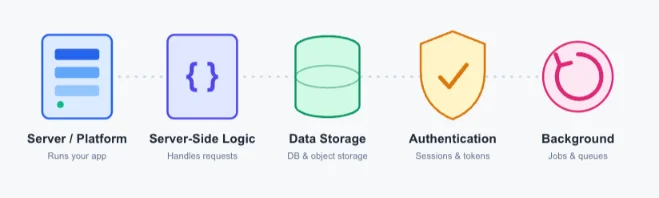
- Server/platform: the physical or virtual machine that runs your app
- Server-side logic: handles requests, calculations, and business rules
- Data storage: holds user info, settings, and history (databases for structured data, object storage for files and media)
- Authentication: verifies who your users are and manages their sessions or tokens
- Background processing: handles notifications, file uploads, scheduled jobs, and queues
These five pieces have to work together, reliably, every time.
When they don’t, your app feels slow or becomes insecure. That’s why hosting is bigger than “just a server.” It’s the whole system behind your app.
Types of Application Hosting
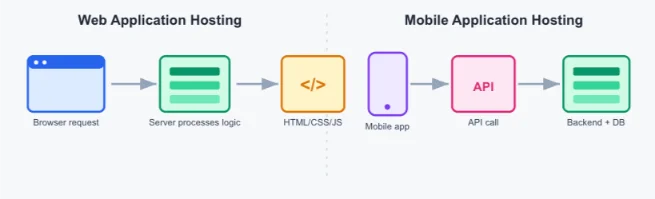
Web application hosting
Web apps run in a browser. Your users don’t install anything.
Here’s the flow: your browser sends a request, the server processes the logic and data, then sends back HTML, CSS, and JS to render the page.
A few common language and framework pairings:
- Node.js with Express
- Python with Django
- PHP with Laravel
Web hosting works best for e-commerce stores, SaaS tools, dashboards, and content systems.
Your priorities here: fast page loads, secure logins, and a stable backend.
Mobile application hosting
Your mobile app lives on the user’s phone. But it almost always talks to a hosted backend.
The flow looks like this: the app sends an API call, the backend handles logic, authentication, and database work, then a JSON response comes back to the app.
Common backend pairings for iOS and Android:
- Firebase
- AWS Amplify
- A custom REST or GraphQL API
Mobile hosting fits social apps, fintech apps, delivery platforms, and messaging apps well.
Your priorities: fast API responses, strong data protection, scalability, and real-time features like websockets and push notifications.
Hosting Infrastructure Types & Their Security Risks
Each infrastructure type carries its own risk level.
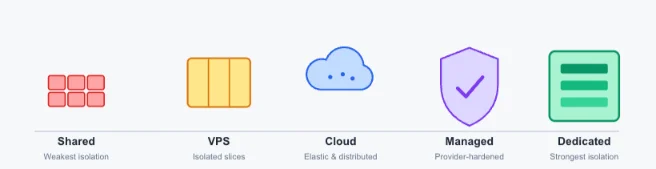
- Shared hosting: many sites and apps sit on one server. It’s the cheapest option, but risk is high. One compromised site can affect others, and isolation between accounts is limited.
- VPS hosting: you get an isolated virtual environment with dedicated resources on shared hardware. Risk is medium. You get more control, but you still depend on the underlying physical machine.
- Dedicated hosting: one physical server runs one application. Risk is low. You get full control with no shared exposure, but you pay more and take on more admin work.
- Cloud hosting: your app runs on distributed, elastic resources across a provider’s infrastructure. Risk is low when it’s configured properly, thanks to strong built-in redundancy. But misconfiguration, an open storage bucket, a weak access rule, is the real danger here.
- Managed hosting: your provider handles updates, monitoring, patching, and security. Operational risk is very low for teams without dedicated ops staff, though you pay a premium for that peace of mind.
How App Hosting Works
Getting an app live and keeping it running follows a clear lifecycle.
- Build the application in a development environment.
- Select a hosting provider or platform that fits your app’s needs.
- Deploy your code, connect your databases, and prepare production.
- Configure storage, authentication, processing, security, and scaling rules.
- Connect a domain or your APIs and go live.
- Monitor performance, apply updates, and manage the system ongoing.
Skip any of these stages, and it rarely causes an immediate problem.
Instead, it shows up weeks later as a slow app or a security gap. That’s why teams underestimate how long hosting setup really takes.
Which App Hosting Options Can Suit You
Your use case should drive your infrastructure choice.
a) E-commerce: needs to survive traffic spikes during sales events.
A flash sale or holiday campaign can push traffic 5–10x above normal in minutes. Go with cloud or managed hosting. Auto-scaling absorbs the spike, and you avoid the lost sales that come with a crashed checkout page.
b) Banking and fintech: needs compliance and data isolation.
Financial apps handle regulated data under frameworks like PCI DSS. Go with dedicated or tightly configured cloud hosting. You get the isolation regulators expect, with an audit trail you control.
c) Healthcare: needs data privacy and regulatory storage.
Patient records fall under strict data protection rules in most markets. Go with dedicated or managed hosting that carries compliance certifications. This keeps sensitive records isolated and easier to audit.
d) Education platforms: face concurrent load during exams and enrollment.
Thousands of students may log in within the same hour. Cloud hosting gives you the elasticity you need. It scales up for exam week, then back down once the rush passes, so you’re not paying for capacity you don’t use year-round.
e) Social and messaging apps: need real-time performance and scalability.
Users expect messages and notifications to arrive instantly, at any scale. Cloud hosting fits best. It supports the websocket connections and rapid horizontal scaling these apps depend on.
f) ERP and CRM tools: need data consistency and uptime for business-critical work.
A CRM outage stalls sales teams and support desks at once. Dedicated or managed hosting works well. Fewer neighbors mean fewer surprises, and you get predictable performance for daily operations.
g) Streaming and media: need bandwidth and CDN performance.
Video and large media files strain a single server fast. Choose cloud hosting with a CDN layer. Content gets cached closer to your users, so playback stays smooth wherever they’re watching from.
h) Mobile backends: need low API latency.
A slow API call feels like a broken app to your users. Choose cloud hosting that’s geographically distributed. Requests route to the nearest region, keeping response times tight worldwide.
i) IoT and smart-device apps: need constant, low-latency connections at scale.
Sensors and devices send small amounts of data continuously, often from thousands of endpoints at once. Cloud hosting is the fit. It handles that steady, high-volume connection load without buckling under device count.
Why Hosting Choice is Important for Security
Your hosting choice affects more than uptime. It shapes your entire security posture.
Weak isolation on shared environments widens your attack surface for injection attacks.
Cross-tenant contamination is a real risk too. In plain terms: one compromised account or app on a shared server can affect everyone else on it.
Insufficient isolation also leads to data exposure you didn’t plan for.
Downtime under load isn’t just a performance issue, it’s a security and availability issue.
A 2025 survey of IT and engineering professionals found that high-impact outages carry a median cost of $2 million per hour.
The median annual cost of these outages for affected businesses reaches $76 million.
Compliance failures are important too, especially around data residency rules.
The pattern is consistent: shared environments open more attack surfaces, while VPS, cloud, and dedicated setups give you stronger isolation and more controlled access.
How to Choose the Right Hosting Infrastructure
Before you commit to a hosting plan, run through these questions.
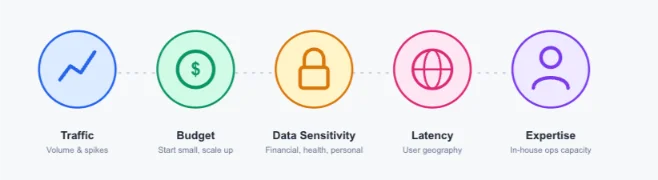
1) What’s your expected traffic volume, and how spiky is it likely to get?
Steady, predictable traffic suits fixed-resource options like VPS or dedicated hosting well. Spiky, unpredictable traffic, sales events, viral moments, seasonal enrollment, needs cloud hosting’s auto-scaling instead. Map out your busiest day of the year, not just your average day, before you decide.
2) What’s your budget? It’s usually smarter to start small and scale than to over-provision on day one.
Over-provisioning locks up money in capacity you may not need for months. A pay-as-you-go cloud plan, or an entry-level VPS, lets you grow into higher tiers as real usage demands it. Treat your first hosting plan as a starting point, not a permanent decision.
3) How sensitive is your data? Financial, health, and personal data all demand a lower risk tolerance than the infrastructure type you pick.
The more sensitive your data, the less risk you can afford from shared environments. Financial and health data usually call for dedicated hosting or managed hosting with compliance certifications. General personal data can often run safely on a well-configured cloud or VPS setup.
4) What are your performance and latency needs, based on where your users are located?
A single server in one region works fine if your users are local. A geographically spread user base needs infrastructure that reduces distance, like cloud hosting with regional deployment or a CDN layer. Slow load times drive users away faster than almost any other issue.
5) What in-house technical expertise do you have to manage the environment day to day?
A dedicated server or self-managed cloud setup demands ongoing admin time, patching, monitoring, scaling decisions. If you don’t have that expertise on your team, managed hosting shifts that workload to your provider. Be honest about your team’s bandwidth before you pick a hands-on option.
The cheapest option rarely stays the best fit. Once data sensitivity or traffic growth enters the picture, that changes fast.
App Hosting Options Side by Side
| Feature | Shared | VPS | Cloud | Managed | Dedicated |
| Scalability | Low | Medium | High | High | Low–Medium |
| Cost model | Lowest | Low–Mid | Pay-as-you-go | Mid–High | Highest fixed |
| Control level | Minimal | Moderate | High (config-dependent) | Low (provider-managed) | Full |
| Maintenance burden | Provider | Shared | User (unless managed) | Provider | User |
| Security posture | Weakest | Moderate | Strong if configured | Strong (provider-hardened) | Strongest (isolated) |
| Best fit | Small/static sites | Growing apps, dev/test | Variable-traffic apps | Teams without ops staff | High-compliance, stable-load apps |
What is the Cost of Application Hosting?
Several factors drive what you’ll pay.
a) Hosting type: shared plans cost the least; dedicated and high-security setups cost the most.
Shared hosting sits at the bottom of the price range because you split server costs with many other accounts. VPS and cloud plans sit in the middle, priced by the resources you reserve or consume. Dedicated and managed hosting sit at the top, since you’re paying for exclusive hardware or a provider’s hands-on management.
b) Traffic and resource usage.
More visitors mean more CPU, memory, and bandwidth consumed. Cloud plans usually bill by usage, so a traffic spike raises your bill that month. Fixed plans like VPS or dedicated hosting charge a flat rate regardless of traffic, which can work in your favor once volume grows.
c) Storage needs.
Apps that handle images, video, or large datasets need more storage than a simple text-based app. Object storage for media files is often priced separately from your core hosting plan. Databases that grow quickly can also push you into a higher tier faster than expected.
d) Security and compliance requirements.
Certifications, isolated environments, and dedicated firewalls all add cost. A fintech or healthcare app carrying compliance requirements will cost more to host than a general content site, purely because of the extra safeguards required.
e) Support level.
Basic plans usually include ticket-based support with standard response times. Managed hosting and higher-tier plans include priority or 24/7 support, often with a dedicated contact. That support layer is reflected in the price.
f) Scalability features.
Auto-scaling, load balancing, and elastic resources cost more than a fixed-capacity server. You’re paying for the infrastructure to expand automatically, without you manually upgrading your plan every time traffic grows.
g) Optional add-ons: backups, monitoring, CDN.
Automated backups protect you from data loss but add a recurring fee. Monitoring tools that alert you to downtime or performance issues are often priced as an add-on too. A CDN layer speeds up global load times and is usually billed by bandwidth used.
Simple apps can run on a low monthly fee. Large, high-security systems cost significantly more.
Budget for where your app will be in 12 months, not just where it is today.
If you’re weighing VPS against dedicated resources for a growing project, our VPS plans give you room to scale without jumping straight to a dedicated server cost.
Choose your Provider
Hosting is the foundation that keeps your software available, performant, and protected.
Your choice here affects reliability, security, user experience, and your long-term costs.
It pays to match your infrastructure to your needs, not to whatever’s cheapest or most familiar.
We at Truehost offer managed and cloud plans built around this decision framework, easy setup, real support, and plans that scale as you grow.
If you’ve worked through the questions above and you’re ready to move, take a look at our hosting plans and open an account with us.
What Is Application Hosting FAQs
Do mobile apps need hosting?
Yes. Even though the app itself lives on the user’s device, it almost always calls a hosted backend for data, authentication, and logic.
Can one backend serve both web and mobile?
Yes. A well-built API layer can serve a web frontend and a mobile app at the same time, as long as it’s designed for both.
How does hosting improve security beyond basic encryption?
Your hosting infrastructure controls isolation, access management, monitoring, and patching, all of which are as important as encryption for keeping data safe.
What happens during sudden traffic spikes?
Without enough scalability, your app slows down or goes offline. Cloud hosting with auto-scaling handles spikes far better than fixed-resource setups like shared or dedicated hosting.
Are there good starting options for startups or small apps?
Yes. VPS or entry-level cloud plans give you a good balance of cost and control, with room to scale as you grow.
How does hosting affect performance for global users?
Hosting location is crucial. A geographically distributed cloud setup, or one with a CDN layer, keeps load times fast for users far from your main server.
Can non-technical teams run hosted applications effectively?
Managed hosting is built for this. Your provider handles updates, monitoring, and security, so you don’t need in-house ops expertise.