 Domain SearchInstantly check and register your perfect .pk or international domain
 Web HostingGet a .pk domain for as low as PKR 467
 cPanel HostingUser-friendly hosting powered by cPanel
 Reseller HostingLaunch your own hosting business with minimal technical requirements
 Windows HostingOptimized for Windows-based applications and websites
 Affiliate ProgramEarn referral commissions by promoting our services
 WordPress HostingFast & Reliable WordPress Hosting
 Domain TransferMigrate your existing domain seamlessly with zero downtime.
 All DomainsAccess 324+ top-level domains (TLDs) worldwide from a single platform
 Whois LookupIdentify the owner of any domain using our whois and rdap lookup tool
 Managed VPS Hosting
 AI Website BuilderCreate beautiful websites effortlessly using intuitive drag-and-drop features
 Online ShopLaunch a professional online shop with no technical skills required
 BlogDiscover expert guides on hosting, websites, SEO, and digital growth strategies
 ContactGet instant assistance via live chat or email
 SupportAccess help articles, tutorials, and service documentation
 SSL CertificatesEncrypt data, build trust, and boost SEO.
Your hosting does more than store your website files. It affects your site’s speed, security, search rankings, and ability to turn visitors into customers.
Security threats are also growing, while visitors expect websites to load quickly and work without problems. Search engines also consider page experience when ranking websites. In 2026, having a fast and reliable website is essential.
The good news is that many hosting problems can be avoided by choosing the right features from the start. Here are seven important web hosting features to look for when choosing a hosting plan.
1) High Uptime Guarantee and Reliability
Choose hosting with at least a 99.9% uptime guarantee. That number has become the industry’s baseline promise, and it’s worth knowing exactly what it means: 99.9% uptime allows for roughly 8 hours and 45 minutes of downtime per year.
That may sound small, but the gap between tiers adds up quickly. A host offering only 99% uptime could leave your site unreachable for more than three and a half days a year, while a 99.99% (“four nines”) guarantee reduces that to under an hour.
Downtime isn’t just an inconvenience. Industry cost estimates vary widely depending on business size, but even conservative figures put small-business downtime losses in the hundreds of dollars per minute once lost sales, support overhead, and customer trust are factored in.
For an online store or lead-generation site, a few hours of downtime during a busy period can mean real, measurable revenue lost.
When comparing providers, don’t just take the advertised percentage at face value:
- Look for a clear, written uptime guarantee with a stated service level agreement (SLA), not just a marketing claim.
- Check what compensation you’re entitled to if the host misses its guarantee, and how that credit is calculated.
- Understand what counts as “downtime” in the SLA; some exclude scheduled maintenance or issues caused by resource limits rather than outright outages, which can make real-world reliability lower than the headline number suggests.
- Where possible, check independent, third-party monitoring data rather than relying solely on a provider’s own reporting.
2) Fast Performance

Speed is no longer just a user-experience nicety; it’s directly tied to revenue and rankings. Studies analyzing large volumes of web traffic have found that pages loading in about one second can see meaningfully higher conversion rates than pages that take three, five, or ten seconds, and that bounce rates climb sharply as load times increase. On mobile in particular, a one-second delay has been linked to conversion drops of up to 20%.
To keep your pages fast, look for hosting that includes:
- SSD or NVMe storage. Solid-state drives read and write data far faster than older mechanical hard drives, which speeds up everything from page rendering to database queries.
- Caching. Server-side or built-in caching stores a ready-to-serve version of your pages so they don’t have to be rebuilt from scratch for every visitor.
- CDN (Content Delivery Network) support. A CDN stores copies of your site’s static content on servers around the world, so visitors load pages from a server that’s geographically close to them rather than one on the other side of the planet.
- Adequate server resources. Even the best caching and CDN setup can’t fully compensate for a plan with too little CPU or RAM for your site’s traffic.
Fast websites aren’t just more pleasant to use; search engines factor page-loading metrics like Largest Contentful Paint into how pages rank, so speed improvements can pay off in both conversions and visibility.
3) Good Security

Security threats aimed at ordinary websites have grown sharply in scale and frequency. DDoS attacks, floods of traffic designed to knock a site offline, have more than doubled year over year according to recent industry threat reports, and smaller sites are often hit precisely because they tend to have weaker defenses than large enterprises. Small businesses that suffer a cyberattack can face recovery costs well into six figures, and a meaningful share never fully recover.
Good hosting should include, at minimum:
- Free SSL/TLS certificates, so data between your site and its visitors is encrypted (this also affects how browsers display your site and can influence search rankings).
- Protection against malware and DDoS attacks, ideally with automated detection and mitigation rather than manual, after-the-fact responses.
- Regular security patching of the server software, operating system, and control panel; outdated software is one of the most common ways sites get compromised.
- Firewalls and malware scanning that actively monitor for suspicious activity rather than only reacting once something has gone wrong.
Good security protects more than your uptime; it protects your visitors’ data, your reputation, and your search rankings, since search engines can flag or de-index sites found to be compromised.
4) Automatic Backups
No security setup is perfect, which is why backups count just as much as prevention. Choose hosting that offers regular, automatic backups covering both your website files and your database, a backup of one without the other can leave you unable to fully restore your site.
Key things to check:
- Frequency. Daily backups are far more useful than weekly ones if something goes wrong between backup cycles.
- Retention. How many previous backup versions are kept, and for how long?
- Ease of restoration. Can you restore a backup yourself with a few clicks, or does it require contacting support and waiting?
- Off-server storage. Backups stored only on the same server they’re protecting can be lost along with everything else in certain failure scenarios.
Backups are your safety net after hacks, accidental deletions, botched plugin updates, or failed migrations. Without them, a single mistake can mean rebuilding a site from scratch.
5) Scalability and Resource Flexibility
Websites rarely stay the same size forever. A blog that starts small can grow into a high-traffic publication; a simple online store can expand into a much larger catalog with far more visitors. Your hosting should be able to grow with you.
Look for:
- Straightforward upgrade paths that let you add storage, RAM, CPU, or bandwidth without migrating to an entirely new hosting environment or provider.
- Transparent resource limits. “Unlimited” plans almost always have practical ceilings buried in the fine print, usage policies that cap CPU seconds, concurrent processes, or inode counts, for example.
- A range of plan tiers, from shared hosting up through VPS (virtual private server) and dedicated or cloud hosting, so there’s a natural next step when you outgrow your current plan.
Checking the actual limits of a plan, not just its marketing name, will save you from an unpleasant surprise the day your traffic spikes.
6) Good Customer Support
Even the most reliable hosting occasionally runs into issues, and how quickly and effectively support responds can make the difference between a five-minute fix and a multi-hour outage.
Look for:
- 24/7 availability, since website problems don’t wait for business hours.
- Live chat, which tends to resolve time-sensitive issues faster than email-only support.
- Support staff who can actually solve hosting-specific problems, server configuration, DNS, email, and security issues, rather than only generic troubleshooting.
- A track record, visible in independent reviews, of support that follows through rather than just closing tickets.
Good support doesn’t just fix problems after they happen; it can help you avoid downtime altogether by catching configuration issues early.
7) User-Friendly Management Tools and Essential Extras
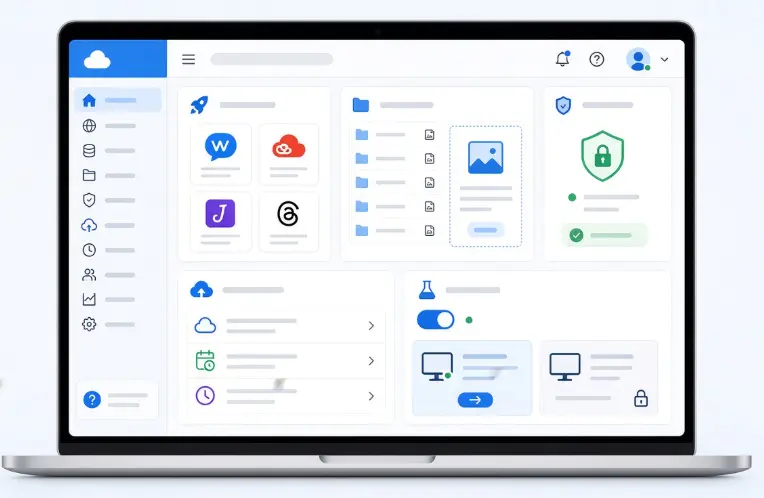
Finally, day-to-day usability counts. An easy-to-use control panel (such as cPanel, Plesk, or a provider’s custom dashboard) makes it far easier to manage your site without needing to be a server administrator.
Useful extras to check for include:
- One-click WordPress (or other CMS) installation
- Email hosting tied to your domain
- File management tools for uploading and editing files directly through the browser
- SSL management that’s automated rather than requiring manual certificate renewal
- Website migration tools, especially useful if you’re moving from another host
- Staging environments, which let you test changes safely before pushing them to your live site
Some of these extras are included by default; others are bundled as paid add-ons. It’s worth checking exactly which features come standard on a plan versus which ones will show up as extra line items later.
If you’re registering a .pk domain, PKNIC is responsible for administering the.PK domain name space, including the registration and maintenance of .pk domain names and operation of the DNS root servers for.PK domains.
For general information about how the Domain Name System works, ICANN’s DNS resources explain how domain names connect users to Internet addresses.
How to Evaluate These Features
Not every website needs every feature at the same level of intensity. How you weigh these seven elements should depend on what kind of site you’re running.
i) Choose features based on your type of website.
- Blog → basic hosting may be enough, with modest speed and storage needs.
- Business website → focus on speed, security, and support, since this is often a potential customer’s first impression of your business.
- Online store → prioritize speed, security, backups, and scalability, since downtime or a slow checkout directly costs sales.
- High-traffic site → consider VPS or cloud hosting, which offer dedicated resources that shared hosting plans typically can’t match.
ii) Compare different providers before buying. Don’t default to the first option you find, pricing, performance, and support quality vary significantly between hosts.
iii) Check real uptime and speed reviews, ideally from independent monitoring services rather than the provider’s own claims.
iv) Read recent customer reviews. Hosting quality can change over time as companies grow, get acquired, or shift priorities, so look for reviews from the last several months rather than several years ago.
v) Compare what each plan includes, feature by feature, rather than comparing price alone.
vi) Use a trial or money-back period when available, so you can test real-world performance and support responsiveness before fully committing.
Common Mistakes to Avoid
- Choosing based only on the introductory price. Many hosts advertise steep first-term discounts that don’t reflect what you’ll actually pay ongoing.
- Forgetting to check the renewal price. Renewal rates can be two to three times higher than the introductory offer, read the fine print before you sign up.
- Ignoring limits on CPU, RAM, storage, or bandwidth. A plan that looks generous on paper can throttle your site during traffic spikes if the underlying resource caps are tight.
- Assuming “unlimited” means there are no limits. Nearly every “unlimited” hosting plan is governed by a fair-use or acceptable-use policy that caps real resource consumption, it’s worth reading before you rely on it.
Choose Hosting That Supports Your Website’s Next Stage
Hosting isn’t just about where your files live, it’s about whether your website can handle whatever comes next, from a traffic spike to a security threat to sudden growth. The seven features in this guide give you a practical checklist: verified uptime, real performance, solid security, dependable backups, room to scale, support you can rely on, and tools that make daily management simple.
Before you commit to a provider, weigh these features against what your site actually needs today and where you expect it to be in a year. Compare plans line by line, read recent reviews, and take advantage of a trial or money-back period to see how a host performs in practice, not just on paper.
Ready to put this checklist into action? Check Truehost’s hosting plans and find one built to support your website at every stage of its growth.




