 Domain SearchInstantly check and register your perfect .pk or international domain
 Web HostingGet a .pk domain for as low as PKR 467
 cPanel HostingUser-friendly hosting powered by cPanel
 Reseller HostingLaunch your own hosting business with minimal technical requirements
 Windows HostingOptimized for Windows-based applications and websites
 Affiliate ProgramEarn referral commissions by promoting our services
 WordPress HostingFast & Reliable WordPress Hosting
 Domain TransferMigrate your existing domain seamlessly with zero downtime.
 All DomainsAccess 324+ top-level domains (TLDs) worldwide from a single platform
 Whois LookupIdentify the owner of any domain using our whois and rdap lookup tool
 Managed VPS Hosting
 AI Website BuilderCreate beautiful websites effortlessly using intuitive drag-and-drop features
 Online ShopLaunch a professional online shop with no technical skills required
 BlogDiscover expert guides on hosting, websites, SEO, and digital growth strategies
 ContactGet instant assistance via live chat or email
 SupportAccess help articles, tutorials, and service documentation
 SSL CertificatesEncrypt data, build trust, and boost SEO.
You can save money on web hosting without settling for a slow, weak, or unreliable site.
Speed, security, and uptime do not need a big budget.
Most first-time builders overspend in three ways. Intro prices jump at renewal. Add-ons pile up at checkout. And the plan is bigger than the site needs.
We at Truehost see these mistakes often. Each one is avoidable with a little planning around plans, billing cycles, and features.
Here are 7 ways to save money on web hosting. Let’s start with the plan itself.
1) Start with Shared Hosting for Most Websites
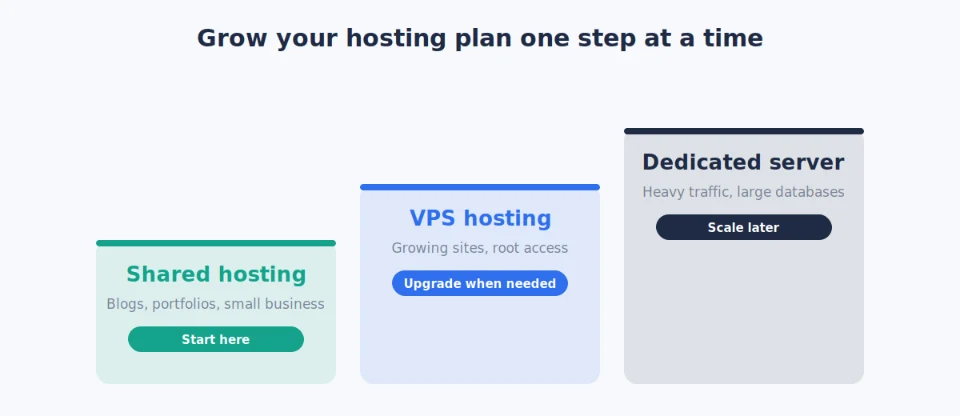
Shared hosting is the most cost-effective option for most new sites. It suits blogs, portfolios, student projects, brochure sites, and small businesses.
It stays comfortable up to roughly 25,000–50,000 visits a month.
Why does it save money? Many sites share one server’s resources. You pay a fraction of what a VPS or dedicated server costs.
You still get the basics on a solid provider:
- SSD storage
- A cPanel control panel
- Unlimited bandwidth and email
- One-click installs for WordPress and other CMSs
When to stay, and when to upgrade. Stay on shared while your pages load well and you sit inside plan limits. Upgrade later if traffic grows, you hit resource warnings, or you need root access.
The tradeoff: you share a server, so a busy neighbour can occasionally affect speed.
Our Starter plan costs ₨282.65 per month on annual billing. It includes:
- 30 GB SSD storage
- Free SSL
- Free daily backups
- Free migrations
- Unlimited email accounts
- A free
.pkdomain on annual plans - WordPress and other CMS support
That is a practical entry point. You do not pay for power you will not use.
Once you pick a plan, the next saving is how you pay for it.
2) Choose Longer Billing Cycles
Monthly payments look flexible. Over time, they cost more.
Switching to annual or triennial (3-year) billing is one of the simplest ways to cut hosting costs. Take our Starter plan:
- Paying monthly costs ₨282.65 per month.
- Annual billing brings the effective rate down to ₨282.65 per month.
- The triennial option gives you the lowest rate, currently ₨282.65 when billed for three years.
Our plans page currently shows three-year discounts of 48% on Starter, 24% on Pro, and 53% on Unlimited.
Over three years, that gap adds up. The same pattern applies to our Pro plan (₨847.95 effective monthly on annual billing) and our Unlimited plan.
Check the renewal rate, too. The intro rate ends with your first term. Here is what one large global host published in September 2026:
| Plan (36-month term) | Intro rate | Renewal rate |
|---|---|---|
| Web Hosting Starter | $3.99/month | $9.99/month |
| Web Hosting Business | $6.99/month | $13.99/month |
Do the math on the Starter row. Three years at $3.99 costs $143.64. Year four alone costs $119.88, about 83% of that three-year total.
This is not unusual. Forbes Advisor’s ranges, as summarised by that host, put entry plans near $2 a month at intro and $10–$20 a month at renewal.
Costs may keep drifting up. Hetzner raised cloud and dedicated server prices on April 1, 2026, and OVHcloud confirmed 5–10% increases between April and September 2026.
The tradeoff: longer terms mean paying more upfront and staying with one host. Pick a provider you trust before you commit.
We keep our renewal pricing competitive, and loyalty credit can reduce your next bill. Always check both numbers before you pay.
3) Take Full Advantage of Free Bundled Features
Many “extra” costs come from paying separately for things your plan already includes.
Look for these free items and use them:
- Free domain. Many hosts include one for the first year, or for certain extensions. Eligible annual plans with us include a free .pk domain.
- Free SSL. It is essential for HTTPS, SEO, and visitor trust. Let’s Encrypt now secures 64.2% of all websites, according to W3Techs in September 2026. Skip paid certificates unless you truly need one.
- Free WHOIS privacy. Some hosts treat it as a $9.99-a-year extra. Check whether your registrar includes it.
- Free email, migrations, backups, and a site builder. Each one you pay for separately adds to your bill.
Quick check: before you buy any add-on, search your plan page for the same feature.
Our plans routinely include automated SSL, daily backups, free migrations, unlimited email, and a free domain on eligible plans. Together, they remove the need for several separate paid services.
If you later need a specific certificate type, see our SSL certificates.
Free features cut your bill at signup. Your checkout habits protect it.
4) Skip Unnecessary Add-ons at Checkout
Hosts often pre-select or push add-ons. Common ones include premium security suites, extra backup storage, SEO tools, SiteLock-style scanners, and paid SSL upgrades.
Each looks small. Together, they inflate your total.
Build one habit. Slow down at checkout. Uncheck everything you do not need right now.
Most new and small sites run fine without paid extras. You can add one later if a real need appears.
Free alternatives cover the basics:
- Backups: the free UpdraftPlus plugin
- Basic security: the free Wordfence plugin
- CDN and DDoS protection: Cloudflare’s Free plan includes free SSL, a CDN, and DDoS protection.
- SSL: Let’s Encrypt, often included by your host
Here is the potential saving. Pricing trackers list SiteLock’s entry plan at $19.99 a month. That is about $240 a year. Cloudflare’s free plan and a free security plugin cost $0.
The risk: free is not effort-free. In June 2026, a flaw in UpdraftPlus put more than 3 million WordPress sites at risk, and a patch followed in version 1.26.5.
So keep plugins updated. Our free daily backups add a second safety net.
Free add-ons only work if the tools behind them are solid, and the open-source ones are.
5) Use Free and Open-Source Tools
You do not need expensive proprietary software for most websites.
Your core stack:
- WordPress, with a one-click install
- Joomla
- Drupal
All three are free and well supported. Our hosting panel’s one-click installer covers 400+ apps.
WordPress leads by a wide margin. W3Techs data from September 2026 shows it powers 40.2% of all websites and 58.8% of sites with a known CMS.
It is also actively maintained. Version 7 already runs on 62.2% of WordPress sites.
Stores are covered as well. About one in five WordPress sites runs WooCommerce, and the core plugin is free.
Performance and security at no extra cost:
- Cloudflare’s free tier for CDN and basic protection
- Let’s Encrypt SSL
- Free website builders and templates
- Free caching and security plugins
Our Starter plan includes a free website builder and templates.
The tradeoff: support is mostly community-based, and you handle updates. For most blogs, small businesses, and portfolios, that is a fair price for zero licence fees.
Free tools cut costs. Good timing cuts them further.
6) Time Your Purchase Around Promotions
Hosting prices drop sharply during major sales. Think Black Friday and Cyber Monday, New Year, and seasonal campaigns.
The discounts can be large. TechRadar’s Black Friday 2025 roundup listed shared hosting at up to 75% off at one provider and up to 85% off at Hostinger.
Also watch for limited-time promos, free migration bonuses, and loyalty credits.
A warning: TechRadar’s editor found checkout prices that differed from advertised ones at one provider. Confirm the final price before you pay.
Your strategy. If your timing is flexible, wait for a promotion. Then lock in a longer billing cycle at the discounted rate. This year’s Black Friday falls on 27 November 2026.
The tradeoff: do not delay a launch for months to save a little. A live site can earn more than the discount.
We regularly run promotions that make our already competitive plans cheaper. We also offer free migration, which removes the friction of switching.
Once you are on the right plan at the right price, you only need to keep it that way.
7) Monitor Your Usage, Scale Gradually, and Review Regularly
Start small. Do not buy a large plan “just in case.”
Upgrade only when traffic, storage, or performance data shows a real need.
Free tools make that easy:
- Google Analytics for visitors and traffic sources
- Your control panel stats for bandwidth and resource use
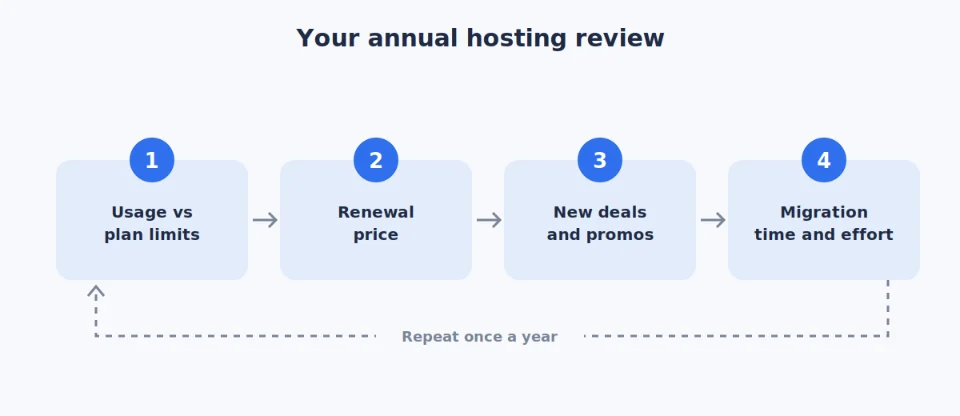
Build an annual review habit.
- Compare your current usage with your plan limits.
- Check your renewal price.
- Look for better deals or new promotions.
- Count the time and effort of migrating before you switch.
The benefit is simple. You pay only for what your site needs at each stage.
When growth arrives, you have options:
- Managed VPS: dedicated resources, with plans from Rs. 1,999 a month. See our VPS hosting.
- Dedicated servers: for heavy traffic or large databases.
- n8n hosting, OpenClaw hosting, and AI Workers: for automation-heavy or AI-driven projects. See our n8n hosting.
Most sites will not need these for a long time. That is the point of scaling gradually.
Get Web Hosting with the Most Affordable Provider
You now have the strategies. Here is how we at Truehost help you apply them and keep costs low long term.
- Competitive starter pricing with deep multi-year discounts
- Generous free inclusions: a
.pkdomain on annual plans, SSL, daily backups, migrations, unlimited email, cPanel, and one-click installs - Affordable renewal rates and loyalty credit
- Free website migration, so switching carries little risk
- Pakistan-focused setup: your site can go live in about 30 minutes, on servers in Asia
- Room to grow: WooCommerce-ready plans, plus SSH, Git, and staging for developers
- Local support for businesses, available 24/7 by phone, chat, and email
To save money on web hosting, start on shared hosting and pick a longer billing cycle. Use every free feature, skip the extras, and time your purchase. Then review your plan once a year.
Do one thing today. Check your renewal date and price.
Save Money on Web Hosting FAQs
How much does reliable web hosting cost in Pakistan in 2026?
Entry-level shared hosting starts around PKR 3,500–4,500 a year. GoDaddy’s Asia guide says shared hosting can start as low as PKR 3,500 per year. Hostedium’s April 2026 survey puts entry plans between PKR 375 and about PKR 900 a month.
Our Starter plan costs ₨282.65 per month on annual billing. Always compare renewal prices before you decide.
Is shared hosting safe and fast enough for most Pakistani websites/blogs/small businesses?
Yes, for most of them. Our Starter plan suits about 50,000 visits a month, with free SSL, daily backups, and SSD storage.
Add caching and Cloudflare’s free plan for extra speed. Move up only if traffic or resource limits demand it.
Does Truehost include a free domain and SSL?
Yes. Free SSL comes with our hosting plans. Eligible annual plans also include a free .pk domain. See our hosting plans for current details.
What’s the best way to avoid high renewal prices?
Check the renewal rate before you buy. Then take these steps:
- Ask about loyalty credit.
- Choose a longer billing term.
- Set a reminder a month before renewal.
- Compare deals each year.
Can I migrate my existing site to Truehost for free?
Yes. Our team migrates your files, databases, emails, and DNS settings at no cost.
When should I move from shared hosting to VPS?
Consider a move when you pass roughly 50,000 monthly visits or keep hitting resource limits. You may also need root access or a dedicated IP.
Our managed VPS plans start at Rs. 1,999 a month, deploy in about 10 minutes, and include free migration.




