 Domain SearchInstantly check and register your perfect .pk or international domain
 Web HostingGet a .pk domain for as low as PKR 467
 cPanel HostingUser-friendly hosting powered by cPanel
 Reseller HostingLaunch your own hosting business with minimal technical requirements
 Windows HostingOptimized for Windows-based applications and websites
 Affiliate ProgramEarn referral commissions by promoting our services
 WordPress HostingFast & Reliable WordPress Hosting
 Domain TransferMigrate your existing domain seamlessly with zero downtime.
 All DomainsAccess 324+ top-level domains (TLDs) worldwide from a single platform
 Whois LookupIdentify the owner of any domain using our whois and rdap lookup tool
 Managed VPS Hosting
 AI Website BuilderCreate beautiful websites effortlessly using intuitive drag-and-drop features
 Online ShopLaunch a professional online shop with no technical skills required
 BlogDiscover expert guides on hosting, websites, SEO, and digital growth strategies
 ContactGet instant assistance via live chat or email
 SupportAccess help articles, tutorials, and service documentation
 SSL CertificatesEncrypt data, build trust, and boost SEO.
International credit cards often fail for Pakistani users. High FX fees eat into every payment. PayPal remains limited or unavailable for many.
Most people prefer simple PKR billing with local methods such as bank transfer.
Truehost makes this process straightforward. Our plans use transparent PKR pricing. Eligible annual plans include a free .pk domain.
Setup usually takes about 30 minutes. You get free SSL, daily backups, free migrations, cPanel, and 24/7 support.
The process to pay for web hosting in Pakistan is clear: choose a plan, add or register a domain, complete checkout so an invoice generates in PKR, pay with a local method, and go live.
Starter plans often start around Rs 500–600 per month equivalent (or lower on multi-year billing).
Exact figures can change, so always check the current rates. Invoices stay in PKR with no surprise dollar conversions.
Step 1: Choose a Local Provider
Start with where your money goes and how it gets there.
Why a local provider helps in Pakistan:
- PKR billing. You know the total upfront. There is no card conversion to guess at.
- Local payment options. You can pay from your own bank account.
- Support that knows your context. Our team works around Pakistani time zones and ISPs.
- Features for local sites. That means .pk domains, DNS management, and local visitors in mind.
Pakistan’s buyers and sellers are already online. Digital channels handled 92% of retail payments in January to March 2026. Mobile banking apps carried 78% of digital payments.
Merchants are following. E-commerce merchants grew 92% in a year, reaching 17,554. DataReportal counted 117 million internet users in Pakistan at the end of 2025.
Your host should be as easy to pay as any of them.
Key Truehost advantages:
- High-speed SSD/LiteSpeed hosting
- WordPress and CMS-ready, with 1-click Softaculous installs
- Unlimited email accounts on most plans
- Free daily backups
- Free SSL
- Free website migration from other hosts
- Loyalty credits and renewal discounts
The 1-click installs save real time. W3Techs put WordPress at 41.5% of all websites in July 2026.
Quick plan overview. These are the live prices on our hosting page, excluding VAT:
| Plan | Monthly | Annual | Storage | Websites | Best for |
|---|---|---|---|---|---|
| Starter | ₨282.65 | ₨3,391.80 | 30 GB SSD | 10 | New sites, portfolios, blogs, students |
| Pro | ₨845.12 | ₨10,175.40 | 50 GB SSD | 30 | Small businesses, growing sites |
| Unlimited | ₨7,967.90 | ₨49,797.28 | Unlimited SSD | Unlimited | Agencies, eCommerce, multiple sites |
Starter suits lighter traffic. Pro gives you more storage and room for more sites.
Unlimited has no cap on domains, FTP accounts, or databases. That fits agencies and stores.
Tip: Start with shared or WordPress hosting. Upgrade to VPS hosting later if your traffic outgrows it. Annual or multi-year billing unlocks the free .pk domain and the biggest savings.
Next, let’s pick the plan that fits your site.
Step 2: Select Your Hosting Plan
Visit our page and compare the plans side by side. Look at storage, bandwidth, visit capacity, and features.
Ask yourself three questions first:
- How many sites will you run?
- Is it a brochure site, a blog, or an online store?
- Will you stay for a year or more?
Decide your billing cycle. Monthly billing works for testing. Annual or triennial billing gives the lowest effective monthly rate and free domain eligibility.
Over 12 months, the difference looks like this:
- Starter: ₨3,391.80 annual.
- Pro: ₨10,175.40 annual.
- Unlimited: ₨49,797.28 annual.
That is our math from the live prices, excluding VAT. On Starter, the real prize is the free .pk domain. On Unlimited, the discount is the prize.
Add-ons to consider:
- Extra domains
- A dedicated IP, if you need one
- Managed services
Shared plans use a shared IP. A VPS gives you your own.
Confirm what is included:
- Free SSL
- Daily backups
- cPanel
- 1-click apps
- Unlimited bandwidth on many plans
- Free migrations
Pro tip: Match the plan to your needs. Starter is enough for a brochure site or blog. A WooCommerce store needs a higher plan.
Ready to compare? Choose the plan that fits your site, then move on to your domain.
Step 3: Add or Register a Domain
Your domain is your address. You have three routes.
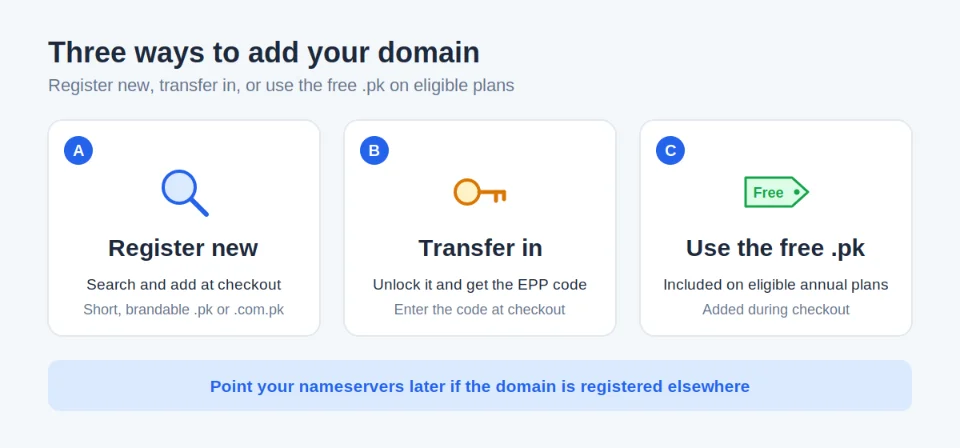
Option A: Register a new domain during checkout. We offer competitive prices on .pk and other TLDs. Our site lists .pk domains from as low as ₨54,721.04, and a free .pk is often bundled with annual hosting.
Option B: Transfer an existing domain. Get the EPP/auth code from your current registrar. We support transfers with renewal included.
Prepare like this:
- Ask your current registrar to unlock the domain.
- Request the EPP/auth code.
- Check that the owner email on the domain still works.
- Enter the code when you add the transfer at checkout.
A registrar must give you the auth code within five calendar days of your request. Ask early. Also note that .pk transfers follow PKNIC rules, so allow extra time.
Option C: Use a free or bundled .pk domain. This applies if your plan qualifies.
Best practices:
- Pick a short, brandable name you can say out loud.
- Avoid hyphens and numbers where you can.
- Choose
.pkor.com.pkfor local trust and SEO. - Know the difference. A
.pkis open to anyone, while a .com.pk is for commercial entities registered in Pakistan. - Point nameservers later if you are transferring.
One risk to know. Our terms do not offer refunds on registered or transferred domains. Double-check the spelling before you pay.
Domain protection and DNS management are available in your dashboard.
Step 4: Proceed to Checkout and Create Your Account
Checkout takes a few minutes. Follow these steps:
- Click “Select” or “Add to Cart” on your chosen plan.
- Fill in your name, email, phone, and address on our billing portal.
- Review the order summary: hosting, domain (if any), and billing cycle.
- Confirm the invoice. It generates instantly in PKR, excluding any applicable tax or VAT.
- Create your client area login.
You will then get an order confirmation and an unpaid invoice by email.
A few small habits help here:
- Use an email address you check daily.
- Use a phone number you can answer.
- Choose a strong, unique password.
Tip: Double-check your inbox for the invoice link. Check spam if it is missing. You can also log in and go to Client Area → Billing → Invoices to view or pay anytime.
Your invoice is ready. Now you choose how to pay it.
Step 5: Choose and Complete Local Payment
At the payment screen, or on your unpaid invoice in the client area, select one of the available methods. We at Truehost currently support three options.
| Method | Activation | Best for | Watch out for |
|---|---|---|---|
| Bank Transfer | After manual verification | Larger or annual payments | Wrong reference, missing proof |
| Credit/Debit Card | Usually immediate | Fast launches | Bank fees, OTP, annual cap |
| Stripe | Usually quick | Secure online card payment | Same bank rules as cards |
1) Bank Transfer
Bank transfer works well for larger or annual payments. It suits Pakistani bank accounts.
- Choose bank transfer to see the account details on your invoice.
- Transfer the full invoice amount.
- Put your invoice number in the payment reference.
- Upload or email the payment proof with your invoice number.
Take a screenshot of the confirmation screen right after you pay. Our billing team then verifies the payment and activates your account.
2) Credit/Debit Card
Select the card option. Enter your Visa or Mastercard details securely. Payment is processed immediately in most cases.
3) Stripe
Use the Stripe gateway for a secure online card payment. Follow the on-screen prompts to finish.
A note on cards. Cards can cost more than they seem. If your bank treats the charge as international, a foreign transaction fee may apply. HBL, for example, says such charges follow its foreign-currency conversion rules, and the rate can differ from the day you paid.
Quick math: at a 3% fee, a Rs 6,479.60 Starter annual payment costs about Rs 194 extra. The USD 30,000 cap is shared across all your cards, and online purchases from international sites count.
Ask your bank before paying. If you want to pay for web hosting in Pakistan without card conversion charges, bank transfer is the simpler route.
After successful payment:
- Card or Stripe: The invoice usually updates to “Paid” quickly. Activation follows.
- Bank transfer: It needs manual verification once you submit proof. Reply to the invoice email or open a support ticket with the transaction details.
Keep your transaction ID or receipt until the confirmation emails arrive. They contain your cPanel login and nameservers.
If payment does not reflect promptly, contact our 24/7 support by chat or ticket.
Step 6: Confirm Activation and Launch Your Site
Once your payment is confirmed, you are close to live.
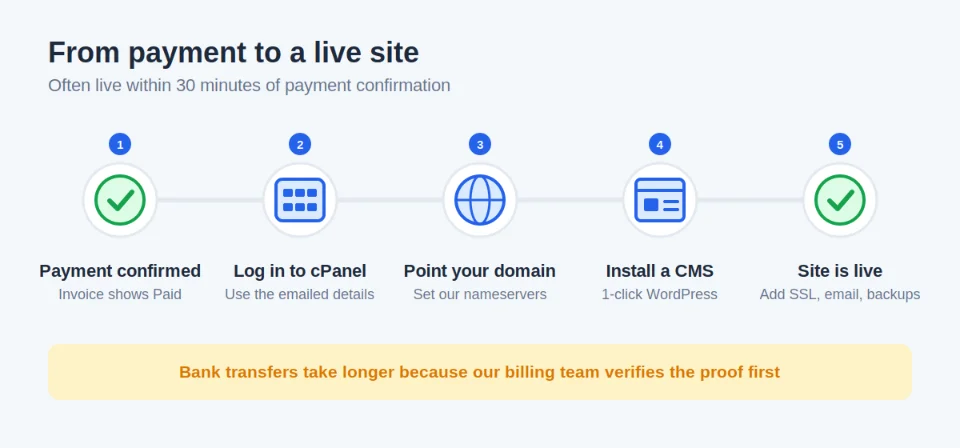
- Log in to the client area for your cPanel login, nameservers, and email setup.
- Point your domain to our nameservers if it is registered elsewhere.
- Use the 1-click installer for WordPress or another CMS. A free website builder and templates come with many plans.
- Set up free SSL, your
@yourdomain.pkemails, and backups. - Ask for free migration help if you are moving from another host.
In your first hour, create your @yourdomain.pk email, install a security plugin such as Wordfence, and confirm your backups run.
Developers get extra tools. That includes Git integration, SSH and SFTP access, cron jobs, and staging environments. Laravel, Node.js, and Python are supported.
Expected timeline: Your site is often live within 30 minutes of successful payment confirmation. Bank transfers take longer because of manual verification. Nameserver changes can also take several hours to spread.
Additional Tips for Pakistani Users
A few habits will save you money and time.
- Cost control: Multi-year billing, a free domain, and low renewals give the best value. Watch for loyalty credits.
- Renewals: We email a renewal invoice 60 days before expiry, then reminders at 30 and 10 days. Pay before expiry to avoid suspension.
- Security and performance: Free SSL, daily backups, and SSD/LiteSpeed hosting keep your site fast and safe for local visitors.
- Your part: Our terms ask you to keep scripts and plugins updated and use strong passwords.
- Backups: We advise you to store backups outside our servers. Keep your own copy.
- Support: Use live chat or a ticket for payment or setup help. Our team knows local payment preferences.
- Refund window: Our refund policy offers a 30-day money-back guarantee on hosting plans. Read it before you buy.
Before you pay, check:
- The invoice number and total
- The billing cycle
- The domain spelling
- The email address on your account
Common pitfalls to avoid:
- Paying without the invoice number as the reference
- Choosing international hosts that force USD and cards
- Ignoring free domain eligibility
- Filing a card chargeback before contacting support. Valid chargebacks can lead to service interruption and reconnection fees.
Next steps after payment: Install WordPress, add your content, and monitor your site in cPanel.
Get Web Hosting with the Most Affordable Provider
Paying for hosting in Pakistan does not need to be hard. Here is the whole process in one line:
Local provider → plan → domain → PKR invoice → Stripe, credit card, or bank transfer.
The main points to remember:
- Cards can fail, carry fees, and count toward your USD 30,000 annual cap.
- Bank transfer avoids card conversion and works with local accounts.
- Annual or multi-year billing unlocks the free .pk domain and bigger savings.
- Your invoice number is your most important payment detail.
If you are ready, pick your plan, add your domain, and pay in PKR. If you get stuck, our support team is available 24/7.
How to Pay for Web Hosting FAQs
What should I do if my bank transfer is delayed or the invoice stays unpaid?
First, confirm with your bank that the transfer left your account. Then send the payment proof and your invoice number to our billing team. Reply to the invoice email or open a support ticket.
Keep the transaction ID handy. It lets our team trace the payment faster.
Can I pay for multiple years of hosting in one transaction?
Yes. Choose annual or triennial billing at checkout. Your invoice covers the full term, so you pay once.
For a large amount, check your bank’s daily transfer limit first. Card payments may count toward your annual cap if your bank treats them as international.
Is there any extra fee when paying by credit card or Stripe?
Check the amount on the payment screen before you confirm. Your bank is the other source of cost. It may add a foreign transaction fee if it treats the charge as international.
If you want to avoid card conversion, use bank transfer.
What happens if I enter the wrong amount or reference on a bank transfer?
A wrong reference is easy to fix. Send your proof of payment with the correct invoice number, and billing will match it.
If you overpay, our terms allow refunds for overpayments and incorrect transactions. If you underpay, send the balance and share both receipts.
Can I change the payment method after the invoice has been generated?
Yes. Open the unpaid invoice in your client area and select another method. If you have already started a bank transfer, do not pay a second time.
Contact support first. We will confirm what has been received.
How do I get a receipt or tax invoice after paying?
Log in and go to Billing → Invoices. Open the paid invoice to view or print it. You also get confirmation emails after payment.
If you need business details on the invoice, contact support before you pay.
What if my credit card or Stripe payment fails at checkout?
Start with your bank. Many cards need a one-time international activation, and OTP checks apply above a bank-set limit. Also check your balance and your annual cap.
Then retry once. If it still fails, switch to bank transfer or contact our support team.




