Domain SearchInstantly check and register your perfect .pk or international domain
 Web HostingGet a .pk domain for as low as PKR 467
 cPanel HostingUser-friendly hosting powered by cPanel
 Reseller HostingLaunch your own hosting business with minimal technical requirements
 Windows HostingOptimized for Windows-based applications and websites
 Affiliate ProgramEarn referral commissions by promoting our services
 WordPress HostingFast & Reliable WordPress Hosting
 Domain TransferMigrate your existing domain seamlessly with zero downtime.
 All DomainsAccess 324+ top-level domains (TLDs) worldwide from a single platform
 Whois LookupIdentify the owner of any domain using our whois and rdap lookup tool
 Managed VPS Hosting
 AI Website BuilderCreate beautiful websites effortlessly using intuitive drag-and-drop features
 Online ShopLaunch a professional online shop with no technical skills required
 BlogDiscover expert guides on hosting, websites, SEO, and digital growth strategies
 ContactGet instant assistance via live chat or email
 SupportAccess help articles, tutorials, and service documentation
 SSL CertificatesEncrypt data, build trust, and boost SEO.
If you run multiple websites, you know that managing separate hosting accounts for each one can get expensive and quickly become a logistical headache.
However, a simpler approach is built right into your cPanel hosting plan, letting you host several domains without paying for extra plans.
An addon domain lets you host a completely separate website under a different domain name, all within a single hosting account.
It’s perfect for business owners, freelancers, or anyone managing multiple projects or clients under one roof.
Instead of purchasing a new hosting package every time you launch a new idea, you can simply attach it to your existing account and get to work.
Once you know where to click and what to fill in, you can get a new domain up and running in just a few minutes.
Let’s get you started with how to create an add-on domain.
Requirements Before You Start
Before you get to the setup, make sure you have the following in place:
- Active hosting: You must have an active hosting plan with cPanel access.
- Registered domain name: You need a domain that you already own and can manage.
- Nameserver settings: The domain’s nameservers must point to your hosting provider so the internet knows where to find the site.
- No existing account: The domain should not already exist in your cPanel, whether as a parked domain, alias, or addon.
5 Steps to Create an Addon Domain
1) Log in to cPanel Account
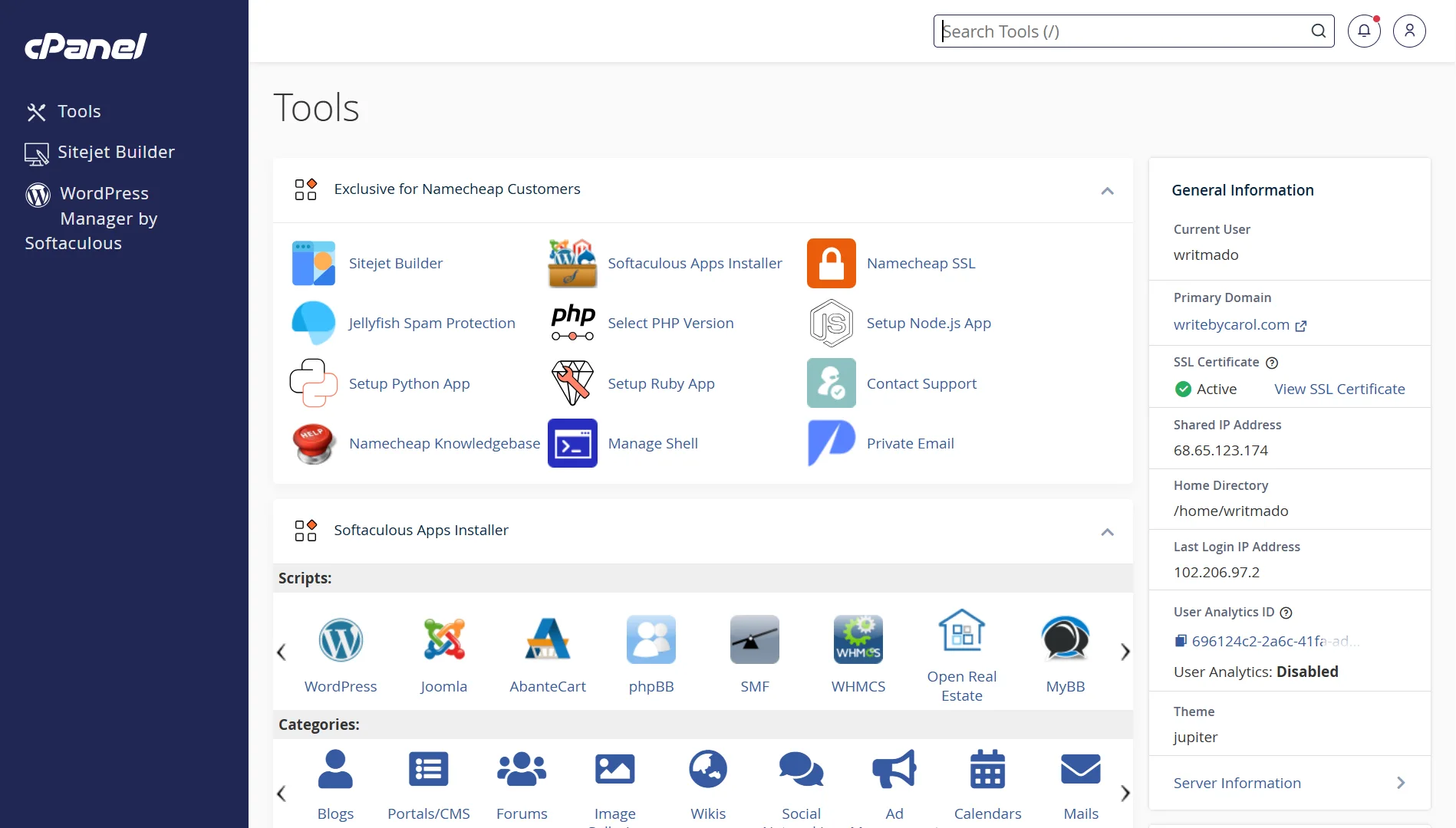
First, log in to your cPanel account. You can usually access it by adding /cpanel or :2083 to your domain name, or by logging in through your hosting provider’s client area.
2) Navigate to the Domains Menu
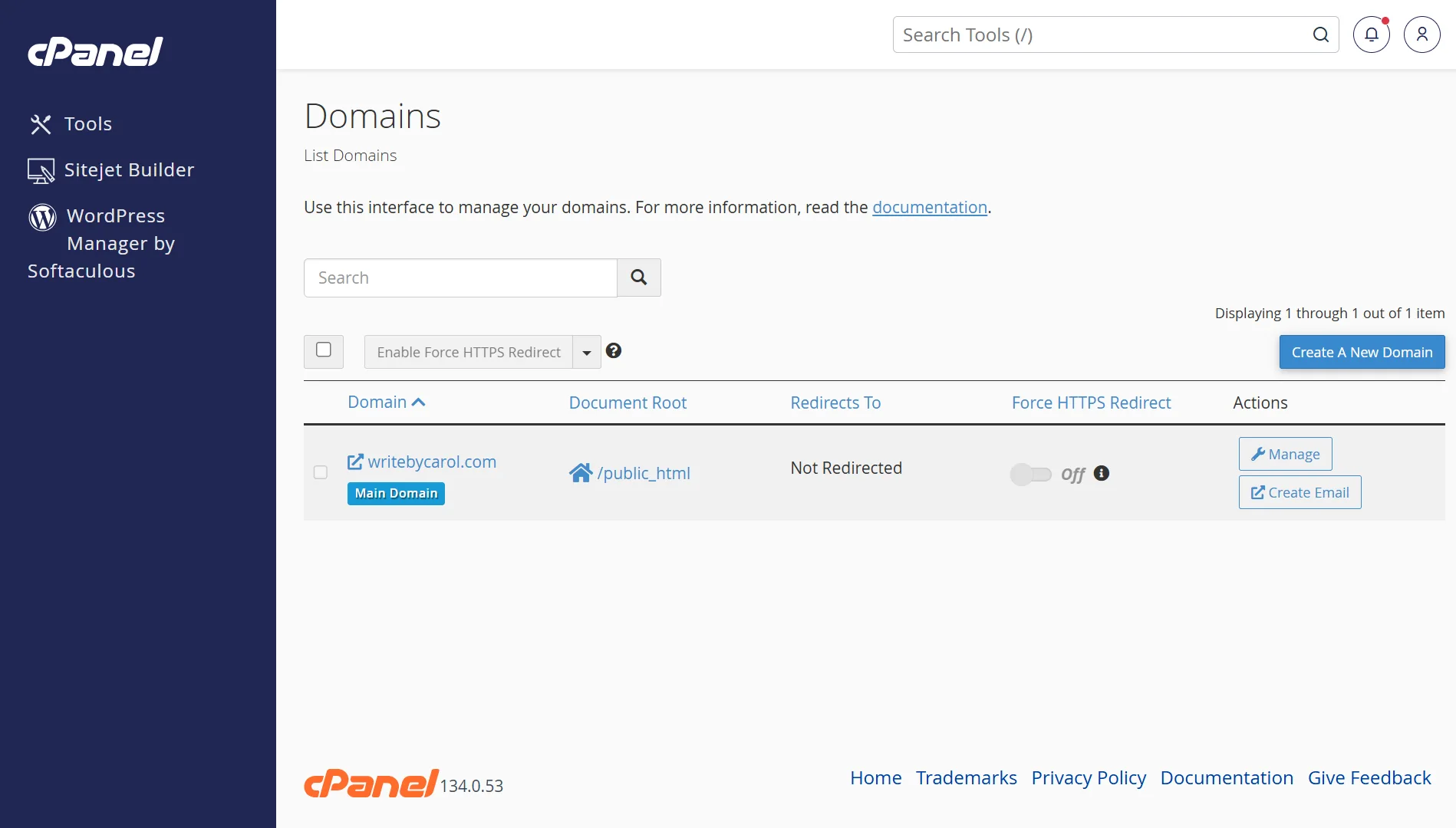
Once logged in, find the Domains section on the main cPanel dashboard. It is usually under the “Domains” heading. Click on the “Domains” icon to open the domain management interface.
3) Click on Submit a New Domain
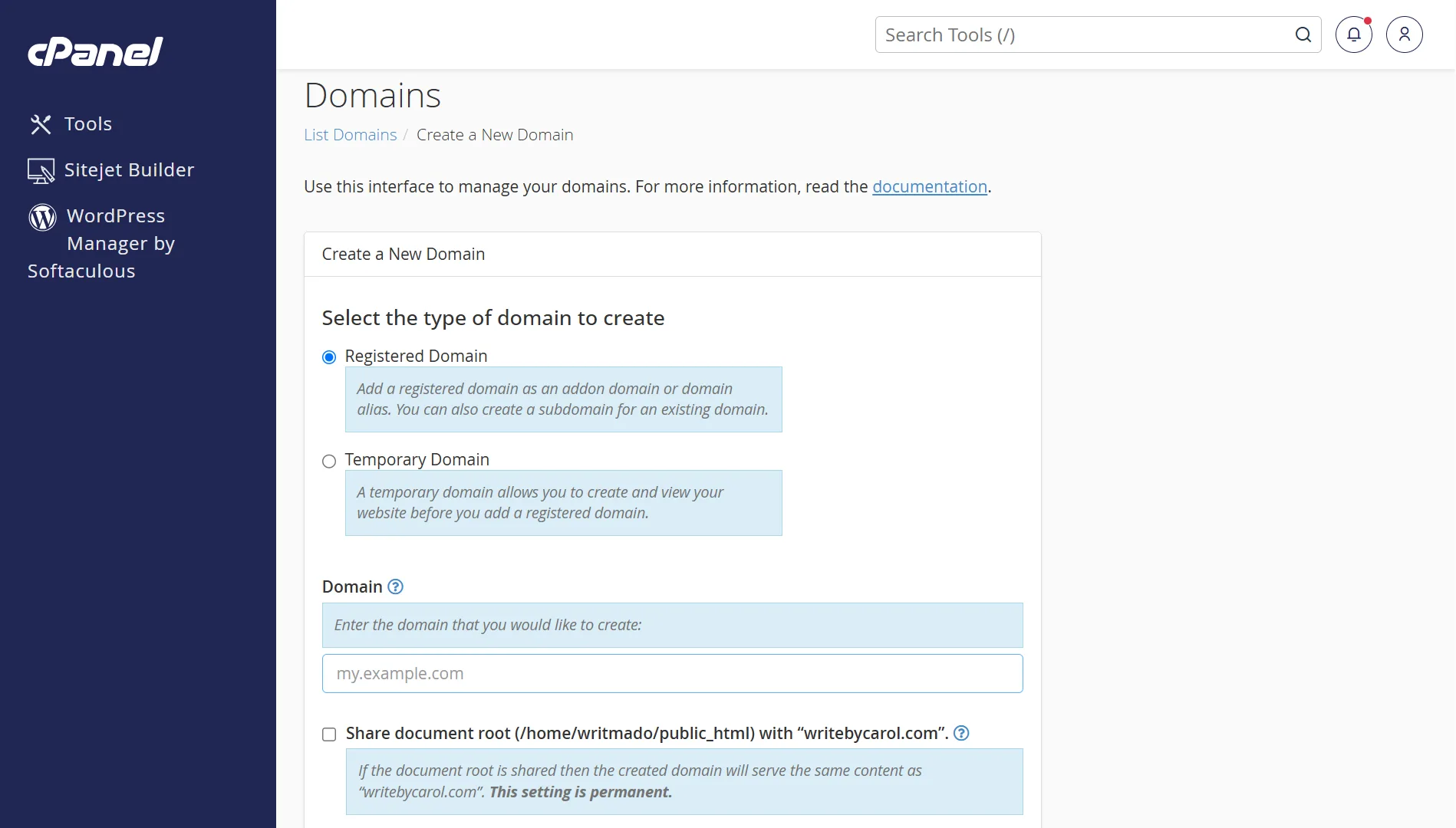
In the Domains interface, you will see a button labeled Create a New Domain. Click on it to start the setup process for your addon domain.
4) Add Domain Details and Submit
A new form will appear. Enter your new domain name in the “Domain” text box.
Then, you need to uncheck or turn off the option that says “Share document root (/home/username/public_html)”.
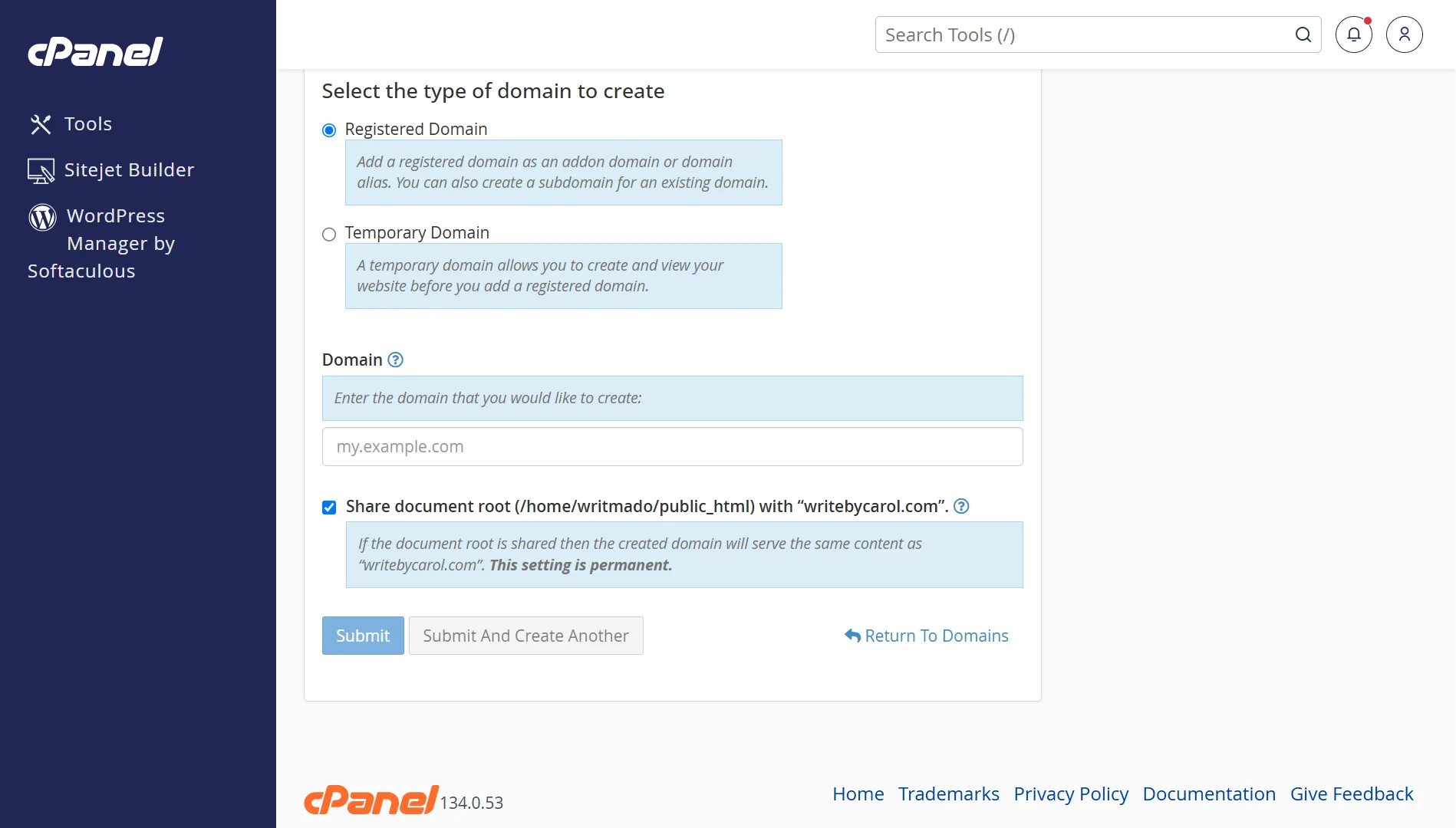
This ensures your new site gets its own separate folder and is completely independent, rather than just showing the same content as your main website.
Once you uncheck that box, cPanel will automatically fill in the “Document Root” folder and “Subdomain” fields.
You can keep the default values or edit the folder name to something you prefer. Once you are satisfied, click Submit.
5) Wait for Confirmation
After submitting, cPanel will process the request. You will see a confirmation message that the addon domain has been created.
The system will also set up the necessary file structure and subdomain so it works.
Benefits of an Addon Domain
- It’s cost-efficient: You can host multiple websites on a single hosting plan, so you pay for one plan instead of several.
- You Can Manage Everything from One Dashboard: You handle all your domains, emails, and files from one cPanel account. It centralizes management, making it much easier than logging into different accounts for each website.
- Good for Branding and SEO: You can host multiple branded websites, each with its own unique domain. This is excellent for different business ventures or client projects. For SEO, search engines treat each add-on domain as a separate website.
- Easy Migration: Managing everything in one place makes it simpler to back up and migrate your websites.
- Scalability: As your projects grow, you can easily expand or upgrade an addon domain within your existing hosting plan.
Troubleshooting Common Issues
| Issue | Fix |
| Domain already exists | Remove the domain from Parked/Alias list first, then retry. |
| Nameserver error | Update domain’s NS records at your registrar to point to your host. |
| Subfolder already in use | Choose a different directory name or delete the existing folder. |
| Site shows “404” or blank | Upload index.html/index.php to the subfolder. |
| Site not loading (24+ hrs) | Check DNS propagation status; wait or contact support. |
Start Hosting Multiple Domains with Truehost Today
Managing multiple websites should be simple and reliable. That is exactly what we offer at Truehost.
Our cPanel hosting is built for performance. We have optimized our platform specifically for Pakistani businesses, so your sites load quickly for your local audience.
We value security and ease of use. Every account comes with free SSL certificates, and you can install popular applications like WordPress and Joomla with just one click.
You also get full file and database management tools through cPanel. No setup fees, and your account activates instantly after signup.
Ready to get started?
Check out our hosting plans today and take control of your digital presence without the usual hassle.