Domain SearchInstantly check and register your perfect .pk or international domain
 Web HostingGet a .pk domain for as low as PKR 467
 cPanel HostingUser-friendly hosting powered by cPanel
 Reseller HostingLaunch your own hosting business with minimal technical requirements
 Windows HostingOptimized for Windows-based applications and websites
 Affiliate ProgramEarn referral commissions by promoting our services
 WordPress HostingFast & Reliable WordPress Hosting
 Domain TransferMigrate your existing domain seamlessly with zero downtime.
 All DomainsAccess 324+ top-level domains (TLDs) worldwide from a single platform
 Whois LookupIdentify the owner of any domain using our whois and rdap lookup tool
 Managed VPS Hosting
 AI Website BuilderCreate beautiful websites effortlessly using intuitive drag-and-drop features
 Online ShopLaunch a professional online shop with no technical skills required
 BlogDiscover expert guides on hosting, websites, SEO, and digital growth strategies
 ContactGet instant assistance via live chat or email
 SupportAccess help articles, tutorials, and service documentation
 SSL CertificatesEncrypt data, build trust, and boost SEO.
Building a website takes more than picking a domain name and putting a few pages online. You also need to think about how the site looks, how visitors move through it, and what happens behind the scenes when someone submits a form, buys a product, or creates an account.
That mix of appearance and function is why web design and web development are both part of almost every website project. They work closely together, but they are not the same job. Web design is mostly about how a site looks and how people use it. Web development is about making the site actually work.
Knowing the difference between web design and web development helps you figure out what kind of help your project needs, and where your budget should go.
Web Design vs Web Development: Quick Comparison
| Feature | Web Design | Web Development |
|---|---|---|
| Main focus | Appearance and user experience | Functionality and technical performance |
| Main tasks | Layouts, colours, typography, navigation | Coding, databases, integrations, functionality |
| User sees it? | Mostly yes | Mostly behind the scenes |
| Common tools | Figma, Adobe XD, design software | HTML, CSS, JavaScript, PHP, databases |
| Main goal | Make the website attractive and easy to use | Make the website work correctly |
| Best suited for | Visual and UX improvements | Technical and functional improvements |
A designer shapes what visitors see and how they experience a site. A developer builds the systems that let it respond, process information, and function correctly. Most projects need both, just in different amounts depending on what you’re building.
Web Design vs Web Development: Key Differences
1) Purpose and Main Focus
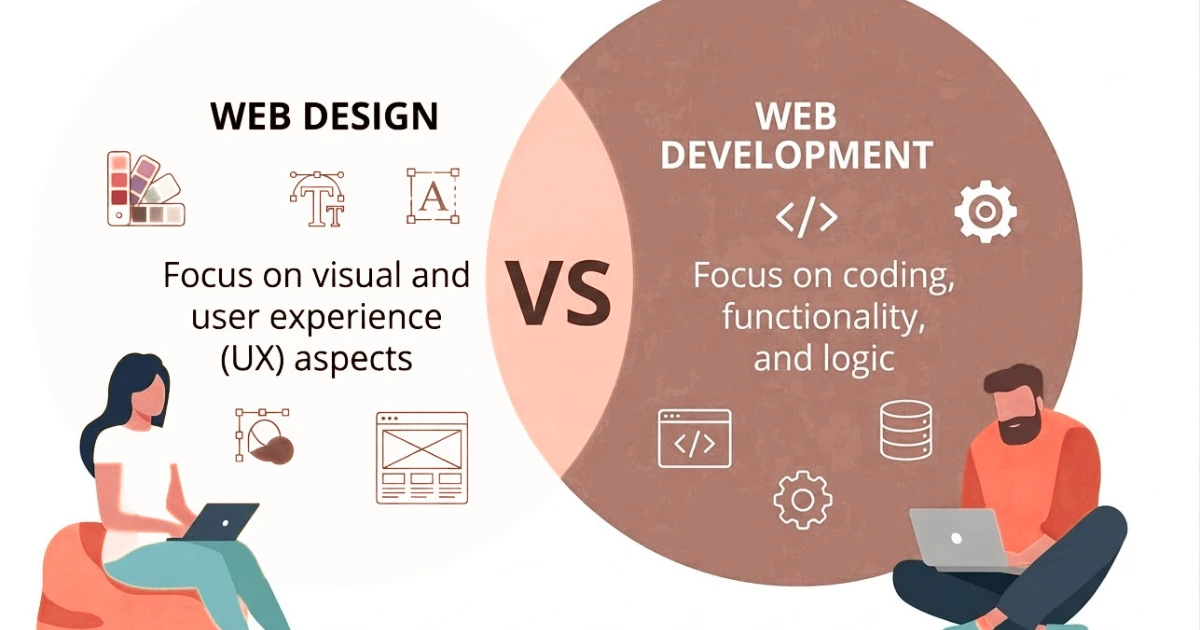
Design is concerned with how a website looks and how easy it is to use. Development is concerned with making it function correctly, from a contact form submitting properly to an online store processing payments.
2) Visual Appearance
A designer’s work includes page layouts, colours, typography, images, spacing, and visual hierarchy. These choices shape branding too, since fonts, colours, and imagery affect how a business is perceived. A cluttered page with mismatched fonts feels less trustworthy than one with clear, consistent styling.
3) User Experience
Design also shapes user experience (UX): navigation, page structure, readability, mobile usability, calls to action, and how easily visitors find what they came for. A well-organised menu groups related pages together so a visitor looking for pricing doesn’t have to hunt for it. A poorly placed contact button can be the difference between an enquiry and a lost visitor.
4) Website Functionality
Development handles the technical features that let a site perform tasks: forms, user accounts, ecommerce functionality, search, booking systems, payment processing, databases, APIs, and third-party integrations. Visitors mostly notice this only when it doesn’t work.
5) Tools and Technologies
Designers commonly use tools like Figma and Adobe XD to plan layouts before a site is built. Developers work with HTML, CSS, JavaScript, PHP, databases, and APIs to turn those plans into a functioning website.
6) Skills Required
Designers typically need skills in visual design, UX, typography, branding, layout, and responsive design. Developers typically need programming, database, API, and troubleshooting skills. These sets aren’t always split between two people: some professionals work comfortably across both, though larger projects usually benefit from separate specialists.
7) Typical Responsibilities
A designer typically owns visual direction, layout, and wireframes. A developer typically owns turning designs into a working site, building features, and testing that everything works.
8) How the Two Roles Differ on a Website Project
An example of an ecommerce site. The designer decides how product pages look and how the checkout should feel. The developer builds the functionality that lets customers browse products, add items to a cart, and complete payment securely. A beautifully designed checkout is useless if payments don’t process, and a functional one is useless if visitors can’t figure out how to use it. The two roles pull in the same direction with different responsibilities.
What Does a Web Designer Do?
- Layout and structure. Designers organise content and sections so visitors understand a site and move through it without confusion, deciding what appears above the fold and how much space each element gets.
- Colours and typography. Consistent use of a palette and a small set of fonts helps a site feel put together rather than assembled from mismatched parts.
- Images and visual elements. Photos, icons, graphics, buttons, and banners should support a page’s message rather than distract from it.
- Navigation. Designers plan menus, page hierarchy, and the paths visitors take between pages, so people rarely feel lost or unsure where to click next.
- Mobile-friendly layouts. Since visitors use phones, tablets, and desktops, designers plan layouts that adapt across screen sizes, often called responsive web design.
- Wireframes and mockups. Designers often sketch wireframes and mockups so everyone agrees on direction before development starts, saving rework later.
- Branding and consistency. Keeping colours, fonts, and layout consistent across pages helps visitors recognise and trust a site, wherever they land on it.
- Calls to action. Designers position buttons, sign-up forms, and product information where visitors are likely to notice and use them, usually with input from business owners, marketers, and developers rather than the designer alone.
What Does a Web Developer Do?

Development is not just writing code. It covers a broad set of tasks that keep a website functional, secure, and reliable over time.
- Writing and managing code. Developers turn designs and requirements into functioning pages and features, translating a static mockup into something interactive.
- Building functionality. This includes forms, search, user accounts, ecommerce features, booking systems, and content management functionality that lets a business update its own site.
- Working with databases. Databases store and retrieve information such as customer accounts, orders, products, and website content. Without one, features like logins or product catalogues simply wouldn’t work.
- Forms and interactive features. Designers plan how a form looks, but developers make it actually capture, validate, and send or store submitted information.
- Payment and third-party integrations. Developers connect payment gateways, email tools, analytics, and booking platforms, and the specific integrations needed depend on what the site is meant to do.
- APIs. An API lets one piece of software communicate with another, such as pulling live shipping rates or syncing data with accounting software.
- Fixing technical issues. Developers troubleshoot broken functionality, errors, compatibility problems, and integration issues.
- Improving performance. Beyond new features, developers can improve page speed, code efficiency, database queries, and overall responsiveness.
- Maintenance and updates. Development work often continues after launch through updates, bug fixes, security patches, and feature improvements.
Front-End Development
Front-end development deals with the parts of a site visitors interact with directly in their browser: HTML, CSS, and JavaScript, responsive layouts, and interactive elements. Front-end developers turn a designer’s layout into a page that responds to clicks, scrolls, and screen sizes. These languages aren’t the only technologies involved; many front-end developers also use frameworks that speed things up.
Back-End Development
Back-end development handles server-side processes and data: servers, databases, application logic, user accounts, payment processing, and APIs. When a customer logs in or places an order, the back end processes that request, checks the database, and stores or retrieves the relevant information without the visitor seeing any of it happen.
Mistakes to Avoid When Hiring a Web Designer or Developer
- Choosing based only on the lowest quote. The cheapest quote may skip the scope, quality, or support that a higher one includes, so compare what’s actually on offer.
- Hiring a designer when you need custom development. An attractive design doesn’t automatically come with custom functionality like booking systems or membership areas.
- Hiring a developer without considering user experience. A site can be technically functional and still be confusing to navigate, so it helps to involve someone who thinks about layout and usability too.
- Assuming a template can handle every requirement. Website builders work well for many straightforward projects but can fall short on custom functionality, unique design, or complex integrations.
- Not explaining your goals before work begins. Clarify your business goals, audience, required features, and expected functionality upfront, since a vague brief tends to produce results that miss the mark.
- Failing to check relevant portfolios. Look for work relevant to your type of website rather than judging on general polish alone.
- Not confirming ownership and account access. Make sure your business keeps proper access to your domain, hosting, CMS, files, analytics, and any connected third-party services, so you can switch providers if you ever need to.
- Not agreeing on scope and deliverables. Settle pages, features, revisions, timeline, testing, and launch responsibilities in advance to avoid misunderstandings later.
- Forgetting ongoing maintenance. A website is rarely a one-time project; plan for updates, security patches, and fixes as it ages.
- Starting development before requirements are clear. Jumping in before structure and requirements are settled tends to cause delays and rework once changes are requested mid-build.
FAQs
Is web design easier than web development?
Neither is inherently easier. They require different skills, and difficulty depends on the complexity of the specific work. A simple layout and a simple contact form are both straightforward; complex custom designs and complex applications are both demanding. It usually comes down to project scope and the experience of the person doing the work.
Can one person handle both web design and web development?
Yes, some professionals work across both, which suits smaller sites since it removes coordination between two people. Larger or more complex projects often do better with separate specialists, since each can focus deeply on their own area.
Do website builders replace web designers and developers?
Website builders can simplify many common projects, particularly simple business sites, portfolios, or basic online stores. They don’t eliminate the need for design or development expertise in every case. Custom functionality, complex integrations, and unique designs often need more than a builder offers out of the box.
Can I redesign my website without rebuilding it?
It depends on your current platform, theme, structure, and how extensive the changes need to be. A visual redesign, like updating colours and layout, can often happen without touching the underlying structure. Structural or functional changes need more development work, and a full rebuild is usually only necessary when the platform can’t support what you need going forward.
How do web designers and developers work together?
A typical flow: the business defines goals, the designer plans structure and visual experience, the developer builds functionality, both review the result together, the site is tested, it launches, and improvements continue afterward. That review step matters, since it catches mismatches between the intended design and the built result before visitors ever see them.
How much do web design and web development cost?
Costs vary based on website size, page count, design complexity, custom functionality, integrations, and the experience level of the developer or agency, with ongoing maintenance as a separate cost to plan for. It’s worth getting a quote based on your specific requirements rather than assuming a fixed price applies across every project.
Ready to Build or Improve Your Website?
Not every website project needs a complete redesign and a large development budget. Sometimes the problem is simply an outdated layout, poor navigation, or a site that doesn’t work well on mobile devices. Other times, what you need is new functionality or custom development work.
Start by identifying what your website is missing, whether that’s a visual refresh, better usability, or new technical features, then choose the right service or professional for that job.
If you also need reliable hosting for your website, explore Truehost hosting plans.