Domain SearchInstantly check and register your perfect .pk or international domain
 Web HostingGet a .pk domain for as low as PKR 467
 cPanel HostingUser-friendly hosting powered by cPanel
 Reseller HostingLaunch your own hosting business with minimal technical requirements
 Windows HostingOptimized for Windows-based applications and websites
 Affiliate ProgramEarn referral commissions by promoting our services
 WordPress HostingFast & Reliable WordPress Hosting
 Domain TransferMigrate your existing domain seamlessly with zero downtime.
 All DomainsAccess 324+ top-level domains (TLDs) worldwide from a single platform
 Whois LookupIdentify the owner of any domain using our whois and rdap lookup tool
 Managed VPS Hosting
 AI Website BuilderCreate beautiful websites effortlessly using intuitive drag-and-drop features
 Online ShopLaunch a professional online shop with no technical skills required
 BlogDiscover expert guides on hosting, websites, SEO, and digital growth strategies
 ContactGet instant assistance via live chat or email
 SupportAccess help articles, tutorials, and service documentation
 SSL CertificatesEncrypt data, build trust, and boost SEO.
When you compare web hosting plans, you run into the same handful of terms again and again: storage, bandwidth, uptime, and server resources. Bandwidth is one of the easiest to misunderstand, and it can catch website owners off guard when a site grows.
Website bandwidth in hosting is the amount of data your website can transfer between its hosting server and your visitors over a set period, usually a month. Every time someone opens a page, loads an image, plays a video, or downloads a file, your website uses bandwidth.
Understanding this helps you pick a plan that fits, avoid surprise limits, and prepare for growth. This article covers how bandwidth works, how it differs from storage, how much a website may need, and how to manage your usage.
Ready to find a plan that fits your website? Compare your options and match them to your real traffic as you read.
How Bandwidth Works
The process behind bandwidth usage is simple:
- Your website files live on a hosting server.
- When someone visits your site, the server sends those files to their browser.
- Every file sent to a visitor uses bandwidth.
- Text, images, videos, audio, scripts, and downloads all count.
- Larger files use more bandwidth than smaller ones.
- More visitors generally means more data transferred.
- Repeat visits and repeated page loads add up over the month.
A site with many large files can use a lot of bandwidth even without huge traffic. For example, if a 2 MB image is loaded 1,000 times, that single image transfers about 2 GB of data. Now imagine a page with ten such images.
One clarification: in hosting, bandwidth means the volume of data transferred, not the speed of anyone’s internet connection. The word is also used for connection capacity in networking, but plan limits are about how much data your site sends over time.
Bandwidth vs Storage: What Is the Difference?
Bandwidth and storage are separate hosting resources, and mixing them up leads to poor plan choices.
| Feature | Website Bandwidth | Website Storage |
|---|---|---|
| What it measures | Data transferred | Data stored |
| Used when | Visitors access your website | Files are stored on the server |
| Affected by | Traffic and file sizes | Number and size of files |
| Example | Loading a 2 MB image | Keeping a 2 MB image on the server |
| Main concern | How much data visitors consume | How much content your website stores |
Think of storage as a warehouse and bandwidth as the delivery trucks. A big warehouse full of products does not use delivery capacity until customers start ordering. Likewise, a 2 MB image takes up 2 MB of storage once, but uses 2 MB of bandwidth every time a visitor loads it.
How Much Bandwidth Does a Pakistani Website Need?
Bandwidth needs depend on the type of website, its traffic, page size, and content, not on where the site is based. A website in Lahore and one in London with the same pages and visitors will use similar amounts. These common website types show how much the content matters.
1) Small Business Websites
A basic company site with a few pages, optimized images, contact details, and moderate traffic generally uses less bandwidth than sites heavy on media or downloads.
2) Personal Websites and Blogs
Blogs tend to use more bandwidth over time as they publish more articles, images, and videos and attract more readers.
Running your blog on WordPress? Explore WordPress Hosting with Truehost Pakistan
3) Ecommerce Websites
Online stores load product images, category pages, descriptions, cart pages, and checkout resources as shoppers browse. A visitor who views many products before buying can transfer far more data than someone reading a single page.
4) News and Content-Heavy Websites
Sites that publish often and draw large audiences move a lot of data through articles, photos, videos, and embedded resources.
5) Photography and Portfolio Websites
High-resolution photos, design work, and galleries are relatively large files. A portfolio with many big images can use more bandwidth than a text-based site with far more visitors.
6) Websites With Videos or Large Downloads
Videos, audio files, PDFs, brochures, reports, and catalogues can push bandwidth up sharply. Every download or media request transfers data to the visitor, so ten downloads of a 50 MB file means 500 MB used.
7) High-Traffic Websites
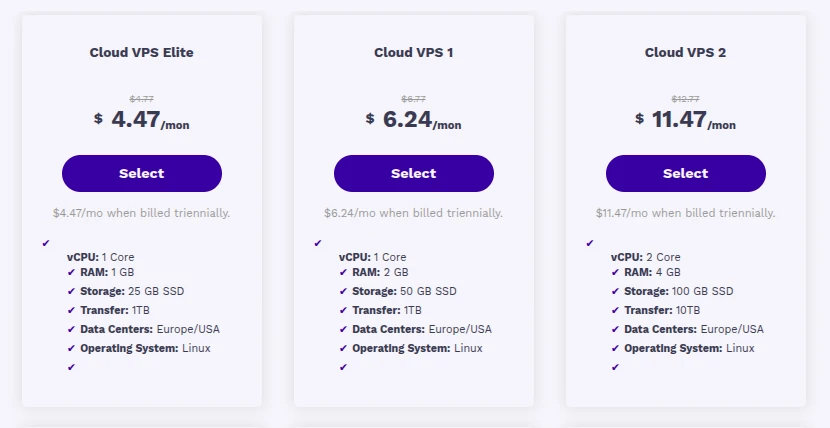
Sites with thousands or millions of monthly visitors need enough bandwidth to handle heavy transfer without interruption. At that level, resources beyond bandwidth matter too, since a VPS plan can offer more dedicated resources than a basic shared plan.
Expecting heavy traffic? Explore VPS Hosting with Truehost Pakistan
What Should You Consider When Estimating Bandwidth?
Look at these factors:
- Monthly visitors
- Average pages viewed per visitor
- Average page size
- Image sizes
- Video and audio content
- Downloadable files
- Expected traffic growth
- Traffic spikes
- Caching and CDN usage
You can use this basic formula:
Estimated monthly bandwidth = Visitors × Pages viewed per visitor × Average page size
For example, 10,000 visitors viewing 3 pages each, at an average page size of 2 MB, comes to 60,000 MB, or roughly 60 GB per month.
Treat this as a starting estimate only. Real usage varies because of caching, media files, downloads, traffic spikes, bots, and other factors. A sensible approach is to estimate, then check your actual usage once the site is live.
Unlimited Bandwidth Hosting: What Does “Unlimited” Really Mean?
Hosting providers that advertise unlimited bandwidth generally mean they do not set a fixed monthly cap on data transfer for that plan. That does not mean there are no limits at all.
- Fair-use or acceptable-use policies usually apply. If your usage is far beyond what the provider considers normal for the plan, they may ask you to reduce it or move to a different plan.
- Server resources still limit performance. Unlimited bandwidth does not mean unlimited CPU, RAM, storage, or server performance. A busy site can still slow down or hit resource limits.
- Traffic and usage restrictions may apply, such as limits on certain file types or on using the account mainly for file distribution.
Before choosing an unlimited or unmetered plan, read the provider’s terms. Bandwidth is only one piece of the resource picture, and “unlimited” describes the data-transfer allowance, not the whole server.
Factors That Increase Your Bandwidth Usage
1) High Website Traffic
More visitors and page views mean more data leaves your server.
2) Large Images
High-resolution, uncompressed images use significant bandwidth every time they load.
3) Videos and Audio
Media files are often far larger than ordinary web files and can drive usage up quickly.
4) File Downloads
PDFs, software files, brochures, and reports consume bandwidth whenever someone downloads them.
5) Large Web Pages
Pages packed with images, scripts, and embedded content need more data to load.
6) Traffic Spikes
A promotion, a viral post, news coverage, or a social media surge can increase usage fast.
7) Hotlinking
Hotlinking happens when another website displays your images or files directly from your server. Their visitors use your bandwidth, and you get no traffic in return.
How to Choose the Right Hosting Bandwidth
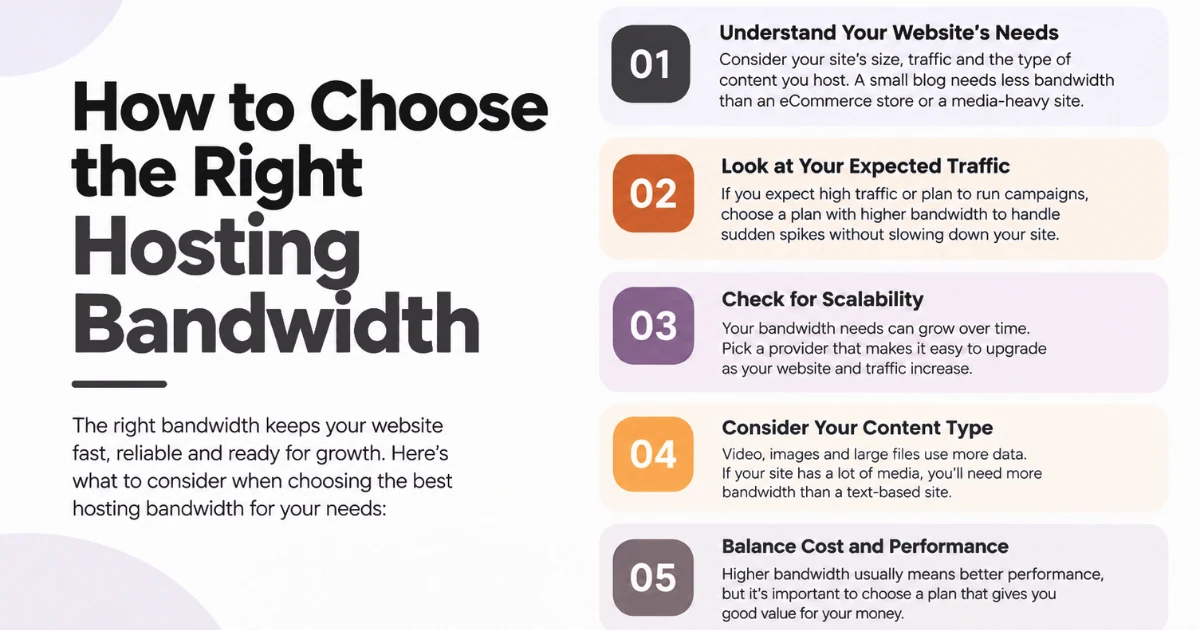
Choosing a plan should involve more than finding the biggest bandwidth number. Match the plan to how your site actually uses data.
1) Consider Your Current Traffic
Monthly visitors and page views give you a starting point for estimating how much data your site transfers.
2) Consider Your Average Page Size
Larger pages use more bandwidth on every load. Check how big your typical pages and media files really are.
3) Consider Your Website Type
- Simple business websites usually need the least.
- Ecommerce stores need more, because of product images and frequent browsing.
- Photography portfolios depend on how large and numerous the images are.
- News websites need more as publishing volume and readership grow.
- Media-heavy websites need the most, since video and audio dominate the transfer.
4) Consider Media and Downloads
If you host videos, audio, PDFs, software, or other large files, include them in your estimate. They often account for most of a site’s bandwidth.
5) Plan for Traffic Growth
Choose a plan that can handle expected growth, not only today’s traffic. Look at what upgrade options your provider offers.
6) Check Other Hosting Resources
Bandwidth is one part of hosting performance. Also compare:
- Storage
- CPU
- RAM
- Server performance
- Uptime
- Security
- Backups
- Support
- Upgrade options
More bandwidth does not automatically make a website faster, because speed depends on all of these together with how well the site itself is built.
7) Check Whether Bandwidth Is Metered or Unmetered
With metered bandwidth, your plan includes a set amount of data transfer. Providers may charge extra, restrict, or slow a site that goes over, depending on their terms. With unmetered bandwidth, data transfer is not counted against a fixed monthly cap, though fair-use terms and other resource limits can still apply. Always check what happens when usage gets high.
Ready to compare plans against your estimate? Explore Hosting Plans with Truehost Pakistan
How to Monitor and Reduce Your Bandwidth Usage
How to Monitor Bandwidth
- Check the bandwidth and resource reports in your hosting control panel.
- Track your monthly bandwidth usage.
- Watch for sudden jumps in data transfer.
- Identify large files that use a lot of bandwidth.
- Compare current usage with your plan’s limits or allocation.
- Look at traffic patterns to see when usage rises.
How to Reduce Bandwidth Usage
- Compress Images. Reduce file sizes without noticeably lowering quality. Images are often the biggest part of a page’s weight.
- Use Browser and Website Caching. MDN’s guide to HTTP caching explains how reusing stored responses reduces network traffic, so returning visitors do not download the same files repeatedly.
- Optimize Videos. Compress videos, or use an external video platform instead of hosting large video files on your own server.
- Compress Website Files. Minify and compress CSS, JavaScript, and HTML where possible. Google’s web.dev performance course covers these techniques in detail.
- Use a CDN. A content delivery network stores copies of your content on servers around the world and serves them from a location close to each visitor. Cloudflare notes that its CDN can reduce requests to the origin server and minimize bandwidth usage, and other CDN providers work in a similar way.
- Prevent Hotlinking. Configure your server or CDN to block other sites from loading your files directly.
- Remove Unnecessary Large Files. Delete unused media, old downloads, and backup files that sit in publicly accessible folders.
Common Website Bandwidth Mistakes to Avoid
- Confusing Bandwidth With Storage. Bandwidth measures data transferred to and from your website. Storage measures files kept on the server.
- Choosing a Hosting Plan Based Only on Bandwidth. Storage, CPU, RAM, performance, security, uptime, and support all affect how well your site runs.
- Ignoring Large Media Files. Images, videos, audio, and downloads can quickly become your biggest source of bandwidth use.
- Not Planning for Traffic Growth. A plan that works today may fall short once your site attracts more visitors.
- Assuming Unlimited Means Unlimited Resources. Unlimited bandwidth does not mean unlimited server resources or unrestricted use.
- Failing to Monitor Usage. Regular checks help you spot unusual traffic, oversized files, and resource problems before they affect your site.
FAQs
Does Website Bandwidth Affect SEO?
Not directly. Bandwidth is not a ranking factor. But if a site runs out of bandwidth or resources, pages may load slowly or become unavailable, which hurts visitors and can make it harder for search engines to access your content. Keeping usage within your plan protects the experience search engines and users rely on.
Can Two Websites With the Same Number of Visitors Use Different Amounts of Bandwidth?
Yes. Page size, images, video, downloads, pages viewed per visit, caching, and bot traffic all change the total. A text-based blog and a photo portfolio can have identical visitor counts and very different bandwidth use.
Does Using a CDN Change How Much Bandwidth My Hosting Account Uses?
Often, yes. A CDN serves cached copies of your files from its own network, so fewer requests reach your hosting server and your hosting bandwidth use can drop. Results depend on your setup. Dynamic content still comes from your server, and a CDN provider may have its own usage terms.
Can Images From Other Websites Affect My Bandwidth?
Only if those sites load images from your server. That is hotlinking, and it uses your bandwidth. Images you embed from another site use that site’s bandwidth, not yours.
What Is the Difference Between Metered and Unmetered Bandwidth?
Metered bandwidth gives you a set amount of data transfer, with possible charges or restrictions past it. Unmetered bandwidth does not count transfer against a fixed cap, but fair-use terms and other resource limits can still apply. Read the plan terms for the details.
Can a Website Use Too Much Bandwidth Even With Low Traffic?
Yes. Large video files, big downloads, uncompressed images, bots, scrapers, and hotlinking can all use heavy bandwidth without many real visitors. Your control panel reports can help you find the cause.
Should I Upgrade My Hosting Plan Before Reaching My Bandwidth Limit?
It is wise to plan ahead. If your usage keeps climbing toward your allowance, first try optimizing images, caching, and a CDN. If usage remains high after that, upgrading before you hit the limit helps you avoid slowdowns, overage charges, or suspension, depending on your provider’s policy. If you need to change hosts, our website migration guide explains how to move safely.
Ready to Choose the Right Hosting Bandwidth?
Choosing the right website bandwidth in hosting starts with understanding how your site uses data. A small business website with optimized pages may need far less than an ecommerce store, a media-heavy site, or a site with large downloads.
Consider your current traffic, page sizes, media content, and expected growth, along with storage, CPU, RAM, security, uptime, and support. The goal is to have enough bandwidth to serve visitors reliably without paying for resources your website does not need.
Explore Hosting Plans with Truehost Pakistan