Domain SearchInstantly check and register your perfect .pk or international domain
 Web HostingGet a .pk domain for as low as PKR 467
 cPanel HostingUser-friendly hosting powered by cPanel
 Reseller HostingLaunch your own hosting business with minimal technical requirements
 Windows HostingOptimized for Windows-based applications and websites
 Affiliate ProgramEarn referral commissions by promoting our services
 WordPress HostingFast & Reliable WordPress Hosting
 Domain TransferMigrate your existing domain seamlessly with zero downtime.
 All DomainsAccess 324+ top-level domains (TLDs) worldwide from a single platform
 Whois LookupIdentify the owner of any domain using our whois and rdap lookup tool
 Managed VPS Hosting
 AI Website BuilderCreate beautiful websites effortlessly using intuitive drag-and-drop features
 Online ShopLaunch a professional online shop with no technical skills required
 BlogDiscover expert guides on hosting, websites, SEO, and digital growth strategies
 ContactGet instant assistance via live chat or email
 SupportAccess help articles, tutorials, and service documentation
 SSL CertificatesEncrypt data, build trust, and boost SEO.
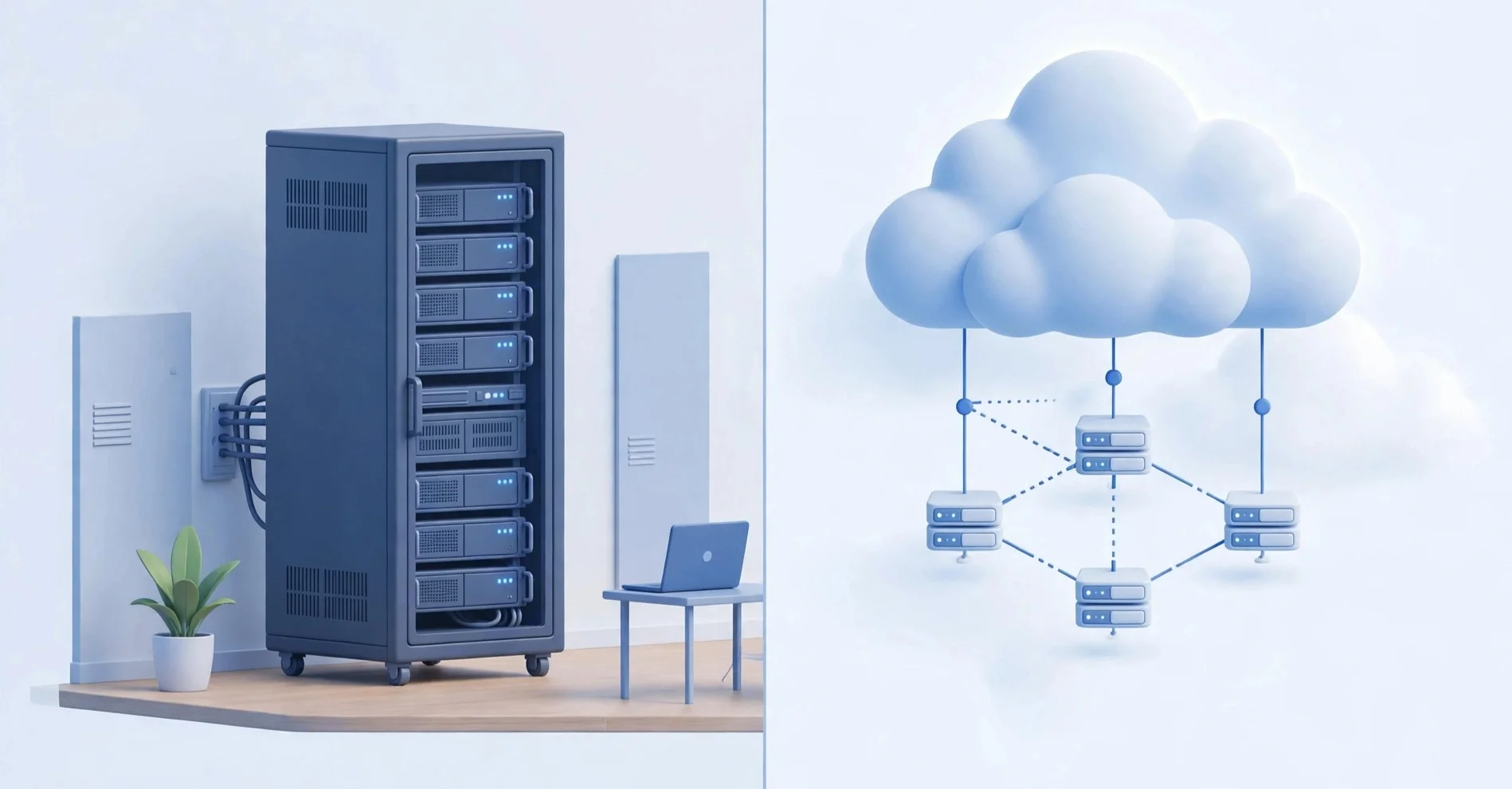
An in-house server is a physical machine you own and keep on your premises. It sits in your office, your server room, or wherever you can keep it powered and cool.
You buy the hardware, install the software, and manage everything yourself. Your data stays on that machine, and your team accesses it through your local network or a private connection.
Cloud hosting is different. Instead of owning hardware, you rent computing resources from a provider.
Your website, applications, and data live on servers managed by that company. You access everything over the internet. When you need more power, you ask for it. When you need less, you scale down.
The difference between these two approaches affects your budget, your daily operations, and the level of control you have over your own infrastructure.
Knowing which model fits your situation is the first step toward making a decision you won’t regret later.
Which One Is Right For You: Key Decision Factors
| Factor | In-House Server | Cloud Hosting |
| Budget | High upfront cost (From PKR 172,000 to start) | Low upfront cost, pay monthly: ₨282.65 /month for shared cloud at Truehost |
| Technical Expertise | Needs IT skills | Easy to use |
| Security & Compliance | You control everything | Provider manages it |
| Scalability | Hard to scale; you need to upgrade equipment | Easy to scale |
| Accessibility | Mostly office/network only | Access anywhere online |
| Control & Customization | Full control | Restricted to provider’s offerings and settings |
| Internet Reliability | Works without internet | Needs internet |
| Business Size & Type | Big, regulated companies | Startups, SMBs, remote teams |
a) Budget
With an in-house server, the cost comes upfront. You buy the hardware, pay for software licenses, set up a server room, and handle installation.
You need at least PKR 172,000 for a Dell PowerEdge R620
(Starter).
After that, your ongoing costs are lower because you’re not paying monthly fees to anyone. But that first payment is substantial because you’re building an environment where that computer can run reliably.
Cloud hosting flips this. You pay monthly or yearly, and the initial cost is minimal. You don’t buy hardware, and you don’t build a server room.
And, there are different plans to choose from, depending on what you require at the moment.
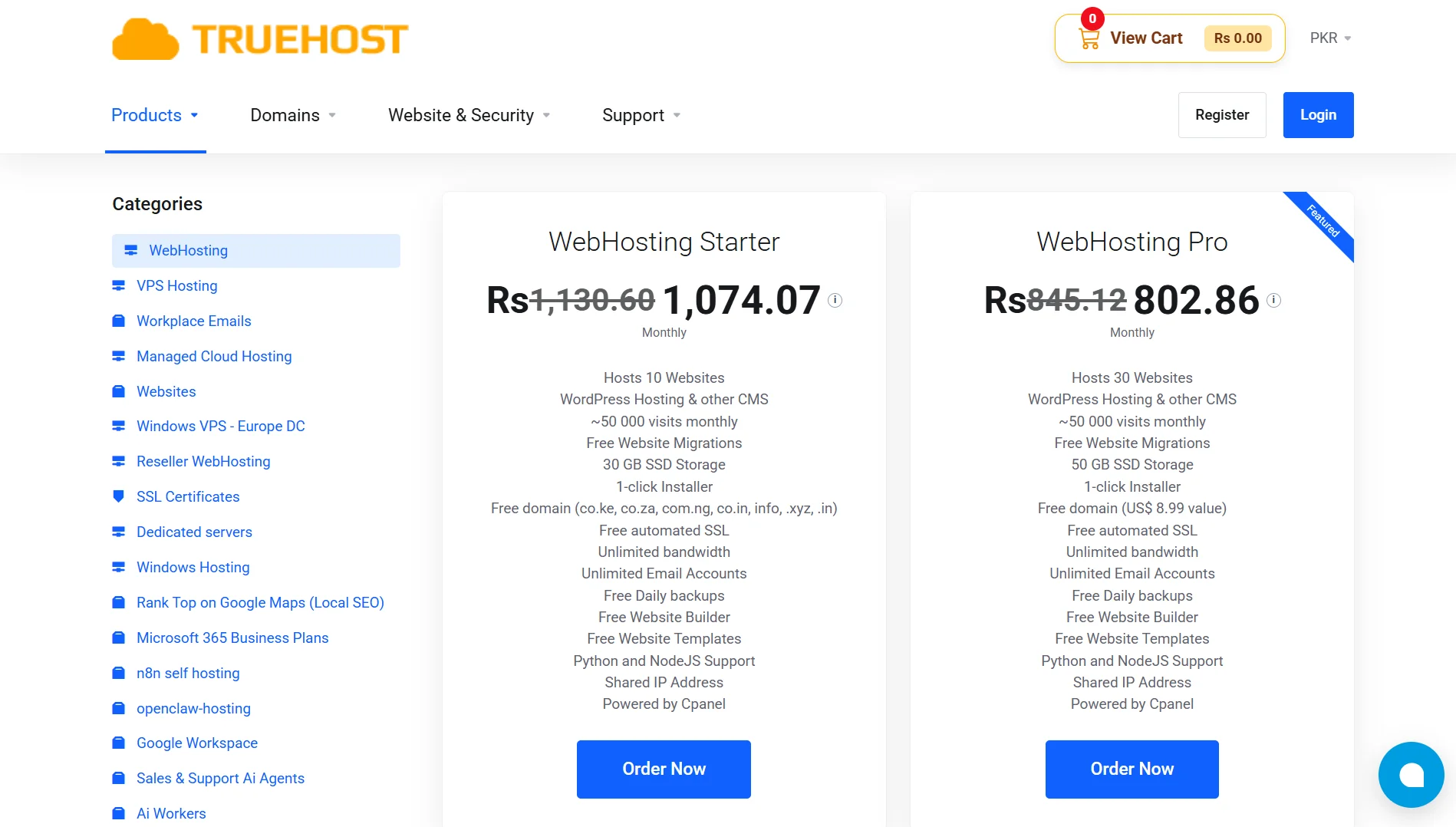
For example, you can start with our shared hosting starter plan for only ₨282.65/mont.
If you require more, you can easily upgrade to our pro plan for only ₨296.78/month.
With cloud hosting, there is a plan for every budget.
For a startup or a small business the trade-off is that those monthly payments add up over time.
b) Technical Expertise
Running an in-house server requires someone who knows what they’re doing. You need people who can install operating systems, apply security patches, troubleshoot hardware failures, and manage backups.
If you don’t have that person on staff, you’re either hiring one or spending your own time learning things you didn’t plan to learn.
Cloud hosting is much simpler on your end. The provider handles the technical work. You log in, use the tools they give you, and that’s it.
This doesn’t mean cloud hosting is always effortless, but it removes the burden of managing physical infrastructure from your plate.
c) Security & Compliance
When your server is in your building, you control everything. You decide who has physical access, you set your own security protocols, and you can prove to auditors that your data never leaves your premises.
For businesses in regulated industries, this can be a requirement rather than a preference.
With cloud hosting, your provider manages security at the infrastructure level. They handle firewalls, monitoring, and physical security of their data centers.
But your data lives on someone else’s hardware.
If your industry has strict rules about where data can be stored or who can access it, you need to check whether your chosen provider meets those requirements.
d) Scalability Needs
Scaling an in-house server means buying more hardware. If you need more storage, you buy drives.
If you need more processing power, you buy a new server. That takes time, money, and planning. You can’t scale instantly, and you can’t easily scale down either.
Cloud hosting makes scaling simple. You adjust your plan, and the resources are there. Need more space for a busy season? Upgrade.
Traffic dropped after the holidays? Downgrade. You only pay for what you use, and the changes happen quickly.
e) Accessibility Requirements
An in-house server is primarily accessible from your office network. If you want to access it from outside, you need to set up a VPN or some other secure connection.
This works fine if everyone who needs access is in the same building, but it becomes a problem when people work remotely or from different locations.
Cloud hosting is accessible from anywhere with an internet connection. Your team can work from home, from a coffee shop, or from another city.
They log in, and everything is there. For businesses with remote workers or multiple branches, this is a significant advantage.
f) Control & Customization
With your own server, you choose the hardware, operating system, software, and configurations. If you need something specific, you can build it exactly the way you want.
Cloud hosting comes with limits. You work within the provider’s environment, and you can only customize what they allow.
For most businesses, this is fine. But for businesses with very specific technical requirements, it can be frustrating.
g) Internet Reliability
An in-house server keeps working even when your internet goes down. Your local network still connects, and your team can still access files and applications. It is perfect for areas where the network is inconsistent.
Cloud hosting depends entirely on your internet connection.
If your connection drops, you lose access to everything. This is the biggest practical risk of cloud hosting for businesses in locations with unreliable internet.
h) Business Size & Type
Large companies with regulatory requirements, existing IT teams, and a need for complete control often lean toward in-house servers. They have the budget, the staff, and the reasons.
Startups, small businesses, and remote teams tend to choose cloud hosting.
They don’t have IT staff, they don’t want to spend money on hardware, and they need the flexibility to grow or change quickly.
Pros and Cons of In-House Server
Pros
- Total Control – You have complete control over your hardware, software, and security. You decide how everything is configured, and no one else has a say.
- Data Security & Privacy – Your data stays on your premises. You control physical access, and you can demonstrate compliance more easily because you know exactly where everything is.
- Predictable Costs – After the initial purchase, your costs are mostly fixed. You’re not paying monthly fees that increase over time. You know what you spent, and you know what you’ll spend on maintenance.
- Performance & Latency – Local network access is fast. Files transfer quickly, and applications run without the delay caused by sending data over the internet. If your internet goes down, your internal systems keep running.
- Customization – You build the server to your exact specifications. If you need specific hardware or software configurations, you can make them happen.
Cons
- High Upfront Cost – Hardware, software, and facility setup add up quickly. You’re paying for everything before you get any value from it.
- Maintenance Burden – Someone has to handle updates, repairs, and troubleshooting. That’s either a dedicated IT person or time taken away from other work.
- Scalability Limits – Expanding means buying new hardware. You can’t scale up or down quickly, and you can’t easily match your capacity to changing demand.
- Physical Risks – Your server is vulnerable to power outages, fires, floods, and theft.
Pros and Cons of Cloud Hosting
Pros
- Low Upfront Cost – You start with minimal investment. No hardware to buy, no server room to build; you pay as you go.
- High Scalability – You can scale up or down instantly. If your needs change, your hosting changes with them.
- Accessibility – Your team can access everything from anywhere with an internet connection. Remote work becomes simple.
- No Maintenance – The provider handles updates, patches, and hardware issues. You don’t think about the infrastructure because it’s not yours.
- Reliability & Redundancy – Your data is backed up across multiple servers. If one fails, another takes over. Uptime is typically very high.
Cons
- Ongoing Costs – Monthly fees never stop. Over years, they can exceed what you would have spent on your own hardware.
- Less Control – You work within the provider’s system. You can’t change things they don’t allow you to change.
- Internet Dependency – If your internet goes down, you lose access. This is the biggest practical weakness for businesses in areas with unreliable connectivity.
- Security & Compliance Concerns – Your data lives on someone else’s servers. You trust the provider to keep it safe, and you need to verify that their practices meet your requirements.
- Vendor Lock-In – Moving from one provider to another can be difficult and expensive. Your setup may be built around tools and configurations that don’t transfer easily.
In-House Server vs Cloud Hosting FAQs
Can I use my home server as cloud storage?
You can set up a home server to function like cloud storage for your own use. You’d install software that lets you access files over the internet, and you’d manage the security and uptime yourself. But it won’t have the redundancy or reliability of a real cloud provider.
Can a NAS be used as cloud storage?
A NAS, or Network Attached Storage, can serve as your own private cloud. You can configure it to be accessible over the internet and set up syncing and sharing. It works well for personal use or small teams. But like any in-house solution, it depends on your local power and internet staying on.
How much does 100 TB of cloud storage cost?
Prices vary widely by provider. For enterprise-level storage on major platforms, you could pay even thousands of dollars per month. For smaller providers or object storage services, it can be significantly less. The cost depends on how often you access the data and how much redundancy you need.
Can I buy cloud storage permanently?
No. Cloud storage is a rental model. You pay for access, not ownership. When you stop paying, you lose access. You can’t buy a permanent slice of someone else’s data center the way you can buy a physical hard drive.
Which is better, a server or a host?
These terms describe different things. A server is the physical or virtual machine that stores your data and runs your applications. A host is the company or service that provides that server. You can have a server without a host if you own the hardware yourself. You can have a host without a server if you’re renting space on someone else’s infrastructure.
Can I switch from in-house to cloud hosting later?
Yes, but it takes planning. You need to migrate your data, reconfigure your applications, and test everything in the new environment. A simple file server migrates easily. A complex application with custom configurations takes more work. Start by moving non-critical systems first, and keep your in-house setup running until you’re confident the cloud version works.
Ready to Make the Right Choice?
If you’ve read this far and you’re leaning toward cloud hosting, you’ve probably realized that the right provider makes all the difference.
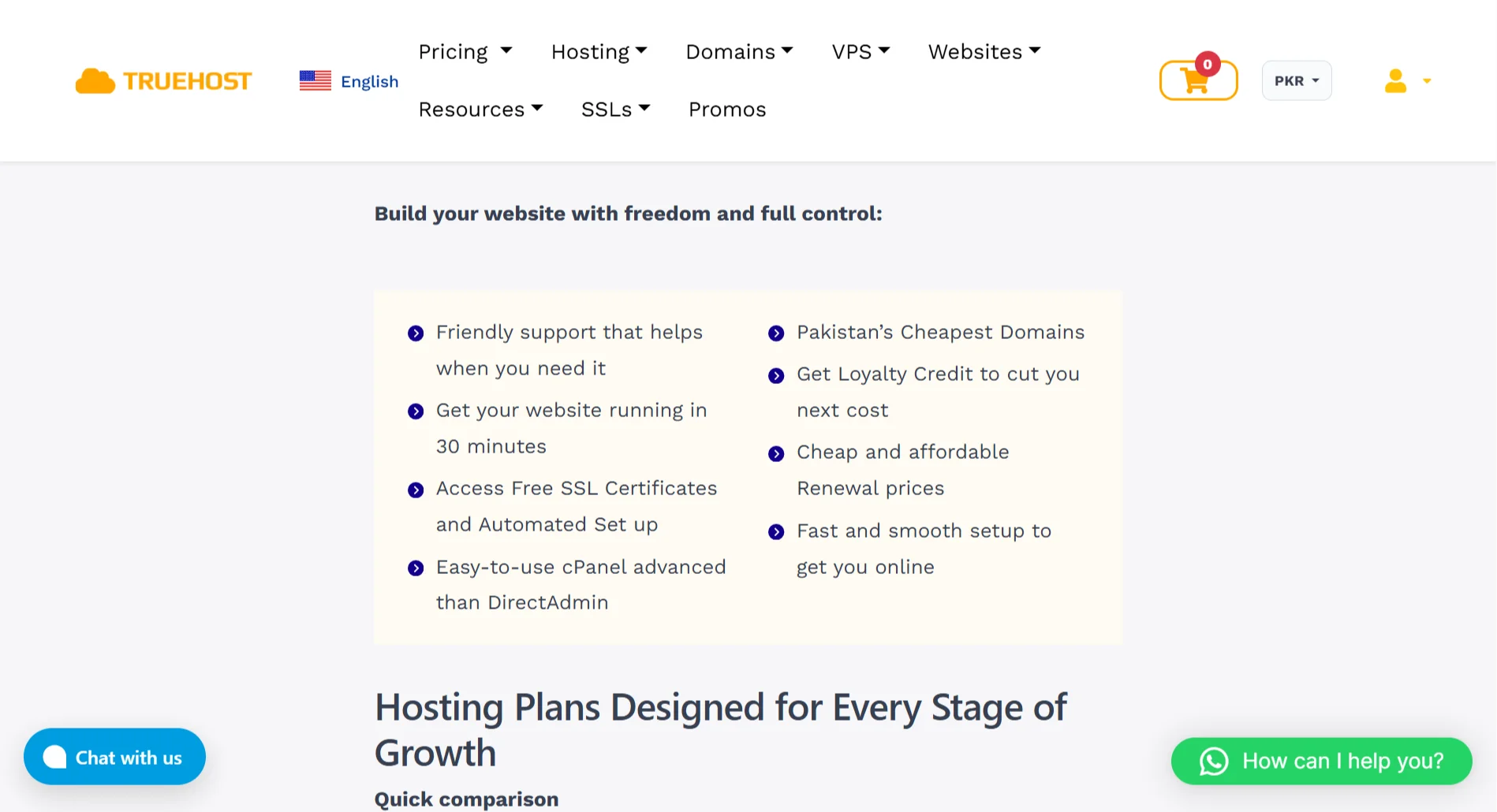
At Truehost, we’ve built our hosting around what Pakistani businesses actually need. We offer web hosting that gets your site live in just 30 minutes.
When you host with us, you get friendly support that actually helps. You get free SSL certificates and automated setup. You get cPanel access that’s easier to use than DirectAdmin.
And you get some of the cheapest domains in Pakistan, with loyalty credit that cuts your next bill.
Our plans fit every stage of growth. The Starter plan at ₨282.65 per month is perfect for new websites, portfolios, and blogs.
The Pro plan at ₨296.78 monthly works for small businesses and company sites. And the Unlimited plan at ₨4,149.77 monthly handles agencies, developers, and eCommerce stores.
Every plan includes high-speed SSD storage, free daily backups, unlimited email accounts, and one-click installs for WordPress, Joomla, and Drupal.
You get a free domain on select plans. Plus, you get website migration for free if you’re moving from another host.
We’re optimized for Pakistani online stores. WooCommerce works seamlessly. Built-in SEO tools help you get found. And if you’re a beginner, you can use our drag-and-drop builder; if you’re a developer needing Git integration and SSH access, we’ve got you covered.