Domain SearchInstantly check and register your perfect .pk or international domain
 Web HostingGet a .pk domain for as low as PKR 467
 cPanel HostingUser-friendly hosting powered by cPanel
 Reseller HostingLaunch your own hosting business with minimal technical requirements
 Windows HostingOptimized for Windows-based applications and websites
 Affiliate ProgramEarn referral commissions by promoting our services
 WordPress HostingFast & Reliable WordPress Hosting
 Domain TransferMigrate your existing domain seamlessly with zero downtime.
 All DomainsAccess 324+ top-level domains (TLDs) worldwide from a single platform
 Whois LookupIdentify the owner of any domain using our whois and rdap lookup tool
 Managed VPS Hosting
 AI Website BuilderCreate beautiful websites effortlessly using intuitive drag-and-drop features
 Online ShopLaunch a professional online shop with no technical skills required
 BlogDiscover expert guides on hosting, websites, SEO, and digital growth strategies
 ContactGet instant assistance via live chat or email
 SupportAccess help articles, tutorials, and service documentation
 SSL CertificatesEncrypt data, build trust, and boost SEO.
Not every website needs a database, a complex backend, or a content management system. If a site mainly displays fixed information, such as what a business does, who runs it, and how to get in touch, a static website can be a practical option.
A static website delivers pre-built files such as HTML, CSS, JavaScript, images, and other assets to visitors. The content is generally prepared before a visitor requests the page, rather than being generated by a server for every request.
A basic static website can work without a database or a server-side application. JavaScript can still add interactive features in the visitor’s browser.
Static does not have to mean hand-edited. Modern static websites can be built with HTML, CSS, JavaScript, static site generators, and headless CMS platforms. You do not need to edit every HTML file by hand.
To put any site online, you need a domain name, a web hosting plan to store your files, and an SSL certificate for a secure connection. This guide covers how static websites work, how they differ from dynamic ones, how to build and publish one, and when the approach is a good fit.
Ready to get started? Search for your domain name and review the available hosting plans, then follow the steps below to build and publish your site.
Static Website vs Dynamic Website: What’s the Difference?
| Feature | Static Website | Dynamic Website |
|---|---|---|
| Content | Mostly pre-built | Can be generated or changed dynamically |
| Database | Usually not required | Often used |
| Server-side processing | Limited or unnecessary | Common |
| Performance | Often very fast | Depends on server processing and setup |
| Maintenance | Generally simple | Can be more complex |
| Best for | Simple websites and informational pages | Applications, stores, portals, and content-heavy websites |
A static page is like a printed brochure. It is finished before anyone asks for it, and every visitor receives the same version. A dynamic page is more like a waiter taking a custom order. The server assembles the page for each request, perhaps using a logged-in user’s details or the latest products in a database.
Speed is not a simple contest. A well-built dynamic website with good caching can load quickly. A static website weighed down by huge images and heavy scripts can load slowly. Performance depends on the implementation, hosting, assets, caching, and other factors.
Dynamic websites also do not always need a traditional database. Some pull data from APIs or other sources. The right choice depends on what the site needs to do.
How Does a Static Website Work?
Here is what happens when someone visits a basic static website:
1) A visitor enters the website’s URL.
The visitor types the website address into a browser, such as Chrome, Firefox, or Safari, and requests a specific webpage.
2) The browser sends a request to the server.
The browser sends a request to the web server asking for the files needed to display the requested webpage.
3) The server finds the requested HTML file.
The server locates the HTML file stored on it. Since a static website uses pre-built files, the page is already created and ready to be delivered.
4) The server sends the file to the visitor’s browser.
The server sends the requested HTML file back to the browser. It may also send other files the page needs, such as CSS stylesheets, JavaScript files, images, fonts, and videos.
5) The browser loads the website files.
The browser processes the HTML and uses the CSS, JavaScript, images, and other assets to determine how the webpage should look and function.
6) The visitor sees the completed webpage.
Once the browser has loaded and processed the required files, it displays the webpage to the visitor.
The key point is that the page files already exist. The server does not need to run application logic or generate the page from a database each time someone visits it. Instead, it mainly delivers the pre-built files to the visitor’s browser.
How Static Site Generators Work
Not every static website uses a generator, but many larger ones do. A static site generator takes your content, templates, and configuration files, then produces the final HTML files before the site is published.
Imagine a site with fifty pages that all share the same header and footer. With a generator, you write the header once in a template, and it is applied to every page during the build. Visitors still receive plain pre-built pages. Jekyll is one well-known example, and its official documentation explains the workflow.
How Headless CMS Platforms Can Work With Static Websites
A headless CMS manages content separately from the front end. Editors work in a friendly dashboard, while the public website is built elsewhere. The workflow usually looks like this:
- Content is managed through the CMS.
- A static site generator retrieves the content.
- The generator creates the website’s pages.
- The resulting files are deployed to the hosting environment.
- Visitors receive the pre-built pages.
The CMS is used to manage content. What visitors receive is the static front end. This suits teams that want static delivery without asking writers to edit code.
How to Create a Static Website Step by Step

Step 1: Decide What Your Website Will Do
Planning comes before code. Define the purpose of the site, who it is for, and what information visitors need. Then list the pages and features required.
Also ask whether the site needs server-side functionality, such as user accounts or a checkout. If it does, a static setup may need extra services or may not be the best fit.
Step 2: Plan Your Website Pages
Sketch a simple structure based on your goals. A small business might use:
- Home
- About
- Services
- Portfolio
- Contact
Connect these pages through a clear navigation menu, and add internal links where they help. For example, a service description can link to the contact page.
Step 3: Create Your HTML Files
HTML provides the structure of each page. You use it for headings, paragraphs, images, links, buttons, and other content elements.
Give each page one clear purpose. Write a meaningful page title, use clear headings in a logical order, and link related pages together. You do not need advanced skills to start. The MDN Learn web development guide is a solid free resource for beginners.
Step 4: Add CSS for the Design
CSS controls how the site looks, including fonts, spacing, colors, layout, navigation menus, buttons, and images.
It also controls mobile responsiveness. Many visitors will open your site on a phone, so the layout must adapt to different screen sizes instead of forcing people to pinch and zoom.
Step 5: Add JavaScript Where Needed
JavaScript adds interactivity in the browser. Common examples include:
- Mobile navigation menus
- Image sliders
- Interactive buttons
- Form validation
- Calculators
- Simple animations
A basic static website works fine without JavaScript if you do not need these features. Unnecessary scripts add complexity and can hurt performance, so add only what serves a purpose.
Step 6: Test Your Website
Before publishing, check that:
- All pages open correctly.
- Links work.
- Images load properly.
- The site works on mobile devices.
- Text is easy to read.
- Navigation is clear.
- Forms and interactive features work as expected.
- Pages load quickly.
Where practical, test in more than one browser and on different screen sizes.
Step 7: Choose a Hosting Provider
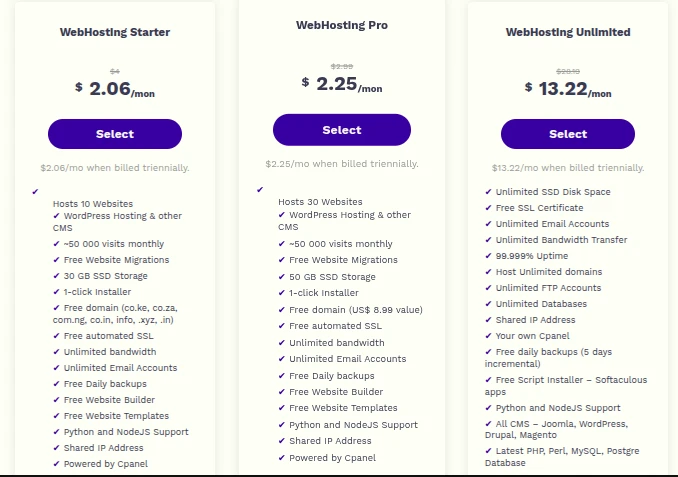
Choose hosting based on what your site needs. Compare storage, bandwidth, SSL support, performance, uptime, security, technical support, and pricing.
A simple static website usually does not need a high-resource plan, but the cheapest option is not automatically right. Traffic, file sizes, and build tools all affect requirements.
Next step: Compare the web hosting plans from Truehost Pakistan against your storage, bandwidth, and support needs. Check that a plan suits your setup before you buy.
Step 8: Upload Your Website Files
Upload your HTML, CSS, JavaScript, images, and other assets to your hosting account. A control panel such as cPanel lets you manage files through a dashboard.
Place your homepage file, usually named index.html, in the site’s document root. That is the folder the server serves when someone visits your domain. If the file sits in the wrong folder, visitors may see an error or a blank directory.
Step 9: Connect Your Domain
Your domain must point to the hosting environment where your files are stored. Once the two are connected, visitors can reach your site by typing the domain name.
DNS changes can take some time to propagate, and the exact steps depend on your provider.
Step 10: Maintain and Update Your Website
Static does not mean maintenance-free. Plan to:
- Update outdated information.
- Replace broken links.
- Add new content.
- Keep dependencies updated when applicable.
- Check website performance.
- Renew your domain and hosting.
- Back up your website files.
Benefits of a Static Website?
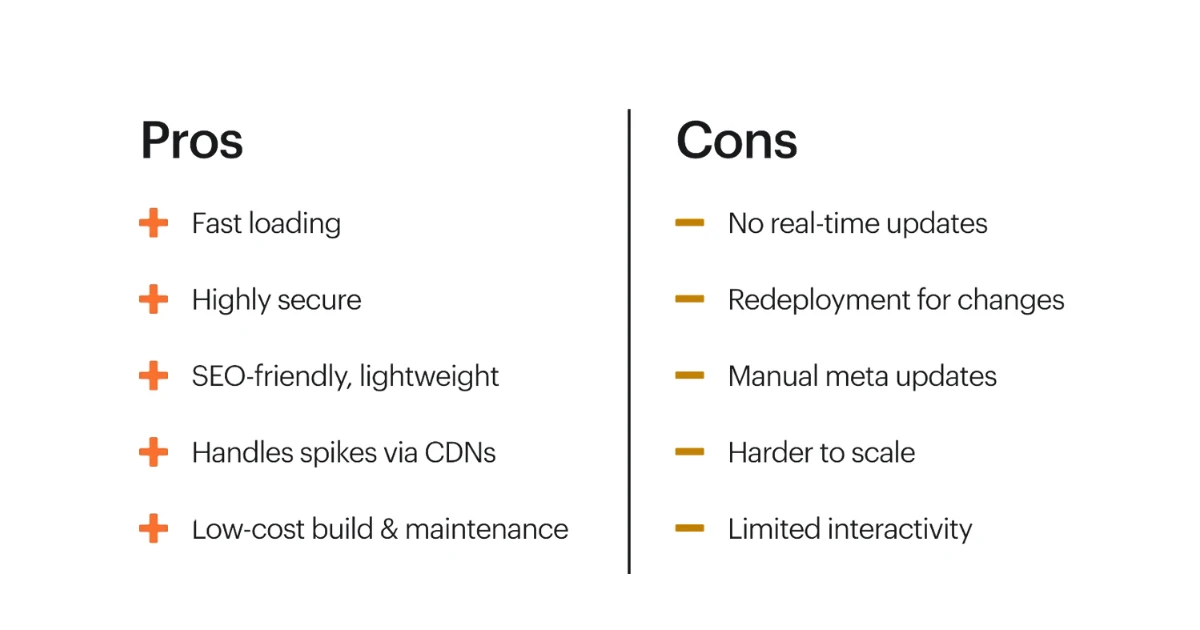
- Fast Loading: Pre-built pages can be delivered efficiently because the server does not need to generate content for every request. Speed also depends on image sizes, scripts, hosting, and caching.
- Simple to Host: A basic static website does not need a database or complex server-side application, so it can run on relatively simple hosting.
- Lower Maintenance: Fewer server-side components can mean fewer systems to update, manage, and monitor.
- Improved Security: Without a database or complex backend, there are fewer server-side components for attackers to target. However, static websites are not completely immune to attacks, and third-party services can introduce additional risks.
- Easy to Scale: Static files can be delivered efficiently through content delivery networks (CDNs) and caching infrastructure, making it easier to handle growing traffic.
- Cost-Effective: A simple static website may require fewer hosting resources, which can help reduce costs. However, expenses vary depending on hosting, tools, third-party services, development requirements, and traffic.
Limitations of a Static Website?
- Content Updates Can Require Editing Files: Frequent manual changes can become tedious, especially on websites with many pages. Static site generators and headless CMS platforms can make content management easier.
- Limited Built-In Functionality: Features that require server-side processing may need additional tools or external services.
- Not Ideal for Complex Websites: Large ecommerce platforms, membership sites, and web applications usually work better with dynamic architectures. Advanced features can be added through APIs and external services, but this can make the setup more complex.
- Managing Many Pages Can Become Difficult: Making the same change across hundreds of hand-built pages can take time. A build workflow or content management system can simplify these updates.
- Some Features Need External Services: Features such as forms, search, comments, authentication, and payments often require third-party tools, APIs, or server-side services.
When Should You Use a Static Website?
A static approach can suit these projects:
- Business landing pages: They present one message and rarely change.
- Personal portfolios: Work samples and contact details are mostly fixed.
- Resume and CV websites: The content is small and updated occasionally.
- Event websites: Dates, venues, and schedules are set in advance.
- Brochure websites: A few pages describe a company and its services.
- Documentation: Generators can turn text files into organized, easy-to-navigate pages.
- Simple informational websites: Fixed content needs no database.
- Product or service showcase pages: Visitors browse features without needing accounts.
Before deciding, consider functionality, content management needs, expected traffic, integrations, and future plans.
Have a project in mind? If it matches one of the examples above, start by choosing a domain and a hosting plan that suits it. If you are unsure, use the questions in Step 1 to confirm your site does not need server-side features.
What Common Mistakes Should You Avoid?
1) Choosing Static Hosting Without Checking Your Needs
Confirm first whether your site needs server-side features your hosting cannot support. Fixing this after launch means rebuilding.
2) Creating Too Many Pages Without a Structure
Plan navigation and site structure before building. Pages added without a plan become hard for visitors to find and hard for you to maintain.
3) Ignoring Mobile Users
A layout that works only on a desktop frustrates a large share of visitors. Use responsive design and test on small screens.
4) Using Too Much JavaScript
Extra scripts add complexity and can slow a simple site. Use JavaScript for features people need, not for decoration.
5) Forgetting to Optimize Images
Large image files increase loading times and bandwidth use. Resize and compress images before uploading.
6) Not Testing Links
Broken internal or external links create a poor experience and make a site look neglected. Check them before launch and after updates.
7) Skipping Backups
Keep copies of your website files so you can restore the site if something goes wrong. A copy on your own computer or in cloud storage is a good start.
FAQs
Is a static website free to create?
The tools can be free. Editors, generators, and learning resources are often free to use. Hosting, domains, third-party services, and professional development may carry costs.
Can a static website use a custom domain?
Yes, when your hosting or deployment platform supports connecting a domain to your files.
Can I use WordPress to create a static website?
WordPress is traditionally a dynamic CMS. Its content can be used with static approaches or static publishing tools. Check that any specific tool is current and suits your needs before relying on it.
Can a static website have contact forms?
Yes, but the form needs somewhere to send its data. Processing usually requires a third-party form service, an API, a serverless function, or another backend service.
Is a static website good for SEO?
It can be, when pages are well built. Page speed, mobile responsiveness, HTML structure, metadata, internal linking, accessible content, and crawlability all matter. Being static does not automatically improve rankings. Google’s SEO Starter Guide covers the fundamentals.
Can a static website be converted into a dynamic website?
Yes. A static site can be expanded or rebuilt to use server-side functionality, a CMS, a database, APIs, or another architecture when your requirements change.
How much does it cost to host a static website?
It depends on the provider, traffic, storage, features, domain, and third-party services. There is no universal price, so compare current plans against your actual needs.
When Is a Static Website Not the Best Choice?
A static approach may not fit when a site needs complex server-side functionality, user accounts, advanced ecommerce, frequent database-driven content, or other features that require dynamic processing.
Ready to Build Your Static Website?
A static website can be a simple and affordable way to establish an online presence without managing a complex backend. If your site mainly displays information and does not require advanced database-driven features, a static setup can provide the speed, simplicity, and lower maintenance you need.
To get started, first plan your website and decide which pages you need. Build the pages using HTML and CSS, then add JavaScript only where necessary. Once the website is ready, test it across different devices and browsers before choosing suitable hosting. Upload your website files, connect your domain, and continue maintaining and updating the site as needed.
The best approach depends on your website’s functionality, content management requirements, technical needs, and plans for growth.
Take the next step: Register your domain and start building your static website today.