Domain SearchInstantly check and register your perfect .pk or international domain
 Web HostingGet a .pk domain for as low as PKR 467
 cPanel HostingUser-friendly hosting powered by cPanel
 Reseller HostingLaunch your own hosting business with minimal technical requirements
 Windows HostingOptimized for Windows-based applications and websites
 Affiliate ProgramEarn referral commissions by promoting our services
 WordPress HostingFast & Reliable WordPress Hosting
 Domain TransferMigrate your existing domain seamlessly with zero downtime.
 All DomainsAccess 324+ top-level domains (TLDs) worldwide from a single platform
 Whois LookupIdentify the owner of any domain using our whois and rdap lookup tool
 Managed VPS Hosting
 AI Website BuilderCreate beautiful websites effortlessly using intuitive drag-and-drop features
 Online ShopLaunch a professional online shop with no technical skills required
 BlogDiscover expert guides on hosting, websites, SEO, and digital growth strategies
 ContactGet instant assistance via live chat or email
 SupportAccess help articles, tutorials, and service documentation
 SSL CertificatesEncrypt data, build trust, and boost SEO.
The terms webpage and website are often used as if they mean the same thing, but they are not identical.
A webpage is a single document or page that can be accessed through a web browser, usually with its own URL. It may contain text, images, videos, forms, links, or other content and can focus on a specific topic, product, service, or purpose.
A website is a collection of related webpages and other resources organized under a domain. It can represent a business, organization, person, online store, publication, or other project and may contain pages such as a homepage, About page, service pages, product pages, blog posts, and contact pages.
For example, a product page is a webpage, while the entire online store containing that product page and other sections is a website.
This article explains the seven key differences between a webpage and a website, with simple examples to make the distinction clear.
Planning your own website? Every website starts with an address. Search and register your domain with Truehost Pakistan before you start building your pages.
Webpage vs Website: What Are the 7 Key Differences
| Difference | Webpage | Website |
|---|---|---|
| Meaning | A single page | A collection of related pages |
| Scope | Focuses on specific content | Covers a broader purpose or subject |
| URL | Usually has a unique URL | Uses a domain with multiple page URLs |
| Content | Contains specific information | Contains multiple types of content across pages |
| Navigation | May link to other pages | Provides navigation across the site |
| Purpose | Serves a specific function | Serves an overall goal |
| Example | A product page or blog post | An entire online store or business site |
1) Number of Pages
The most obvious difference is size.
- A webpage refers to one individual page.
- A website can contain many webpages.
- A website can be small with only a few pages or large with thousands of pages.
A business website might have a homepage, About page, Services page, Contact page, and several blog posts. Each one is an individual webpage inside the larger website.
Neither size is better than the other. A small consultant may need only a handful of pages, while a large publication may publish new pages every day. What matters is that the number of pages fits what the website is trying to do.
2) Scope of Content
A webpage usually focuses on one specific topic or purpose. A website brings related topics and information together.
For example, a company’s service page may explain one service, while its website can contain information about all its services, company details, contact information, and blog content.
Think of a webpage as answering one question, such as “What does this service include?” The website answers the bigger question, such as “Who is this company and how can it help me?” Each page stays focused, and the website connects those focused pages into a complete picture.
3) URL Structure
A webpage normally has its own specific URL. A website has a main domain and different URLs for its individual pages.
For example, the homepage and a contact page can have different URLs while belonging to the same website. If the domain is example.com, the homepage might be example.com and the contact page might be example.com/contact. The domain stays the same, while the ending changes from page to page.
URL structures vary depending on how a website is built. Some sites use folders, some use short page names, and others generate addresses in different ways. The MDN guide to URLs explains how they work in plain terms.
4) Purpose
A webpage can be created to provide specific information, sell a product, collect leads, publish an article, display a service, or provide contact information. Each page usually has one clear job.
A website usually has a broader purpose that connects its individual pages. The webpages work together to support the website’s overall goal.
- A product webpage helps explain and sell one product.
- A business website provides a broader online presence for the company.
- A blog post provides specific information, while the entire blog website contains many articles and related sections.
If a page does not support the website’s goal, visitors may find it confusing. That is why it helps to decide the purpose of the website first and then plan each page around it.
5) Navigation
A webpage can contain links that direct visitors to other content. A website normally has a navigation structure that connects its different sections and pages.
Several elements help visitors move around the website:
- Menus list the main sections of the site.
- Internal links connect one page to another.
- Buttons guide visitors toward actions, such as viewing a service or getting in touch.
- Breadcrumbs show where a visitor is within the site.
Navigation is one of the ways individual webpages function as part of a larger website. Without it, each page would feel like a dead end. Google’s SEO Starter Guide offers helpful advice on structuring and linking your pages.
6) Creation and Management
A webpage is one component that can be created, edited, or updated individually. A website requires managing multiple pages, content, design elements, navigation, settings, images, and other resources.
Updating one webpage does not necessarily mean updating the entire website. You might edit one blog post, change details on a product page, or correct a phone number on the contact page, and leave the rest untouched.
How a site is managed depends on the technology and platform behind it. Some people use a website builder, some use a content management system, and others work directly with files. The right choice depends on your skills, your goals, and how much control you want.
Ready to create your pages? Try the Truehost Pakistan AI website builder and get your first pages online.
7) Examples
Examples make the difference easy to remember.
- Webpage: A blog post, product page, contact page, or pricing page.
- Website: An entire business website containing its homepage, product pages, blog, contact page, and other sections.
You can also think about it in everyday terms. A single article in an online magazine is a webpage, while the whole magazine, with all its articles and sections, is a website. A single service page on a company’s site is a webpage, while the company’s full online presence is the website.
A webpage is one part of a website, while a website is the larger collection of related pages and resources. For a beginner-friendly reference on these terms, see MDN Web Docs.
How Do Webpages and Websites Work Together?
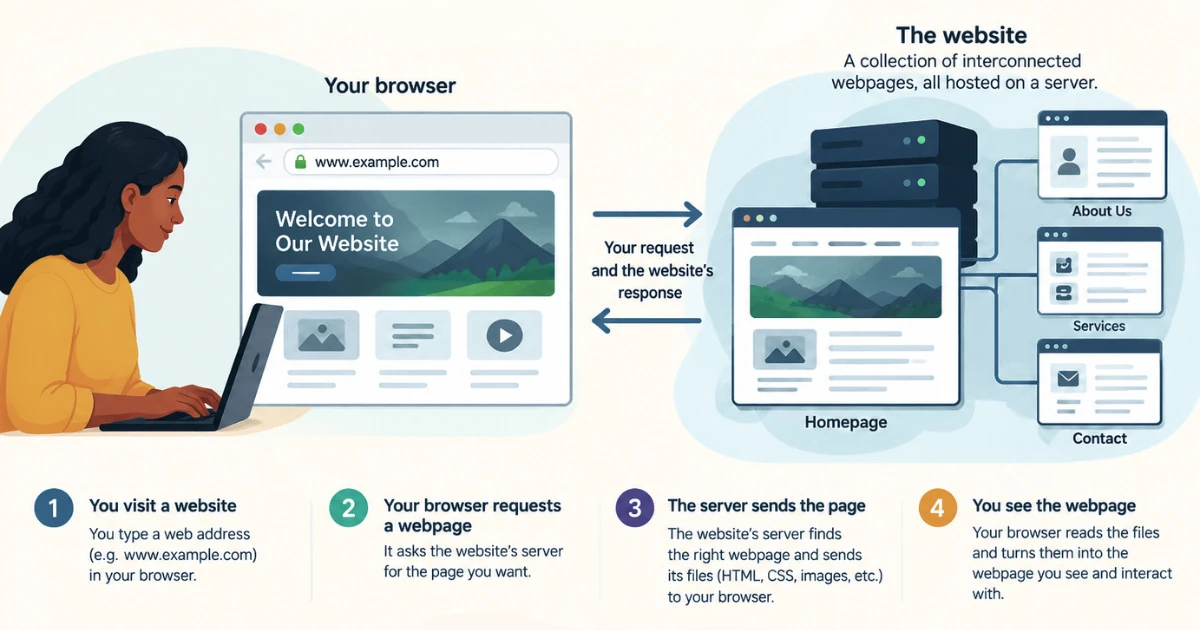
Webpages and websites depend on each other. A website is not much without its pages, and pages are easier to find and use when they belong to a well-organized website. Here is how the pieces fit together.
- The website provides the overall structure. It brings related pages and resources together under one online presence. It decides which pages exist and how they are grouped.
- Webpages provide individual content. Each page serves a particular purpose within the website. One page might introduce a service, another might answer common questions, and another might let visitors get in touch.
- Navigation connects the pages. Menus and links help visitors move from one webpage to another, so they can find what they need without guessing addresses.
- The domain identifies the website. Visitors use the domain to reach the website and its different pages. The domain is the address, not the website itself. Already own one? You can transfer your domain to Truehost Pakistan and manage it in one place.
- Hosting makes the content accessible. The website and its webpages are stored on a hosting server so visitors can access them online. Hosting comes in different forms, and options such as VPS hosting suit sites that need more resources.
FAQs
Is a webpage part of a website?
Usually, yes. Most webpages belong to a website, such as a blog post on a blog or a product page in an online store. The website is the larger whole, and the webpage is one piece of it.
Can a website have only one webpage?
Yes. Some websites consist of a single page, such as a simple landing page or one-page website. It is still a website because it is a complete web presence under its own address.
Is Google a webpage or a website?
Google is commonly referred to as a website or web service. The pages within it, such as a search results page, are individual webpages. Google the company, Google Search the service, and each page URL are three different things, so it helps to keep them separate.
What is the difference between a homepage and a website?
A homepage is one webpage that typically serves as the main entry point to a website. The website includes the homepage plus all its other pages and resources. A homepage is a webpage, not the entire website.
Does every webpage have a different URL?
Webpages generally have their own address, but URL structures vary depending on how content is organized and delivered. Some pages can be reached through more than one address, and some modern sites update content without changing the visible address.
Can a webpage exist without a website?
Sometimes. A webpage can be accessed independently, such as a standalone page or single-page website, but webpages are commonly part of a larger website structure.
How many webpages should a website have?
There is no universal number. It depends on the website’s purpose, business or organization needs, amount of content, products or services, audience, information architecture, and future growth. A small portfolio may need only a few pages, while a large store may need many more. Whatever the size, a control panel such as the one in cPanel hosting can help you manage your files and settings.
How Do Webpages and Websites Work Together?
The website provides the overall structure, and individual webpages provide specific content or functions. Navigation, links, the domain, and hosting connect the whole experience for visitors.
Building a Website? Start With a Clear Page Structure
Whether you are creating a personal blog, business website, or online store, understanding the difference between a webpage and a website helps you organize your content properly. It also helps you avoid common mistakes, such as cramming everything onto one page or creating pages with no clear purpose.
Think of the website as the complete online presence and each webpage as one part of that larger structure. Once you understand how the two work together, it becomes easier to plan your content, navigation, SEO, and overall website experience. A simple list of the pages you need, and what each one should do, is a good place to start.
Ready to put your page structure into action? Explore Truehost Pakistan web hosting and get your website online.