Domain SearchInstantly check and register your perfect .pk or international domain
 Web HostingGet a .pk domain for as low as PKR 467
 cPanel HostingUser-friendly hosting powered by cPanel
 Reseller HostingLaunch your own hosting business with minimal technical requirements
 Windows HostingOptimized for Windows-based applications and websites
 Affiliate ProgramEarn referral commissions by promoting our services
 WordPress HostingFast & Reliable WordPress Hosting
 Domain TransferMigrate your existing domain seamlessly with zero downtime.
 All DomainsAccess 324+ top-level domains (TLDs) worldwide from a single platform
 Whois LookupIdentify the owner of any domain using our whois and rdap lookup tool
 Managed VPS Hosting
 AI Website BuilderCreate beautiful websites effortlessly using intuitive drag-and-drop features
 Online ShopLaunch a professional online shop with no technical skills required
 BlogDiscover expert guides on hosting, websites, SEO, and digital growth strategies
 ContactGet instant assistance via live chat or email
 SupportAccess help articles, tutorials, and service documentation
 SSL CertificatesEncrypt data, build trust, and boost SEO.
When you create a website, you may hear terms like web hosting and web server used almost interchangeably. They are related, but they do not mean the same thing.
A web server is the system that stores and delivers your website files to visitors. It stores files such as HTML, CSS, JavaScript, images, and other website data, processes visitor requests, and sends the requested website content back to the visitor’s browser. Web servers use software such as Apache, Nginx, or LiteSpeed to handle requests and deliver content. Depending on how it is configured, one server can host websites for multiple users or businesses.
Web hosting is the service that gives your website a place on a server and provides the resources and management features needed to keep it online. Web hosting gives your website a place to store its files and data on a server. Depending on the plan, you may get storage, RAM, CPU resources, bandwidth, email, databases, and other features. The hosting provider maintains the infrastructure needed to keep your website available online. Hosting plans may also include security, backups, technical support, control panels, and other services. Shared hosting, VPS hosting, cloud hosting, and dedicated hosting provide different levels of resources and control.
This article explains how web hosting and web servers work, the key differences between them, and how they work together to make your website accessible online.
Already know your website needs a home? Compare Web Hosting Plans with Truehost Pakistan
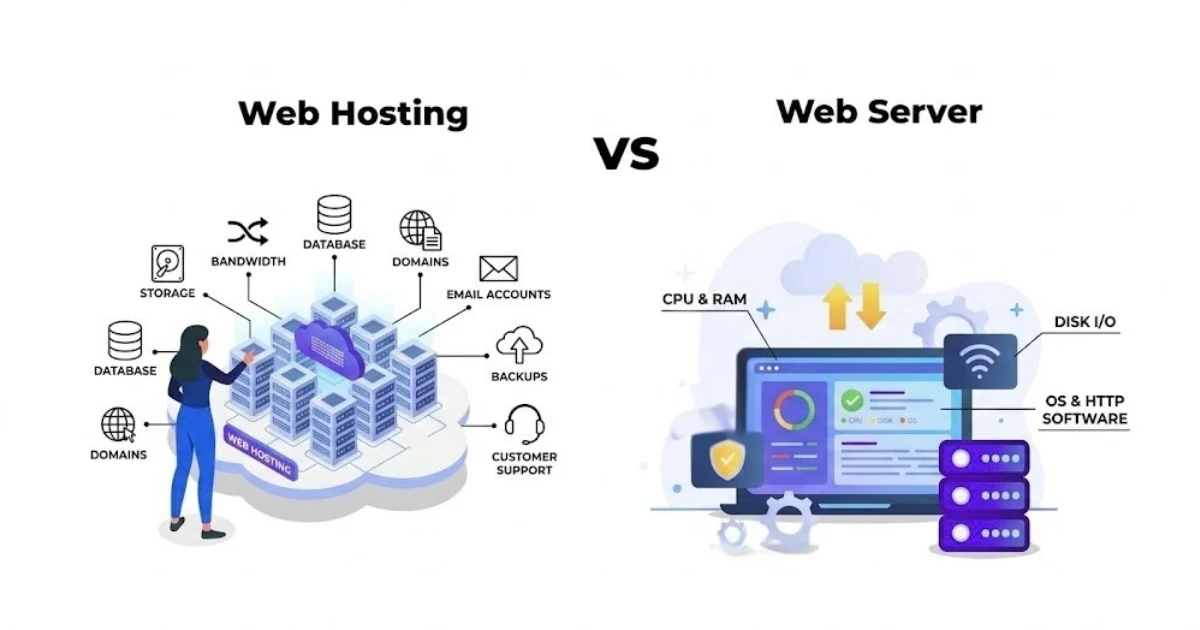
Web Hosting vs Web Server: What Is the Difference?
| Feature | Web Hosting | Web Server |
|---|---|---|
| What it is | A service for keeping a website online | A system that stores and delivers website content |
| Main function | Provides resources and infrastructure | Processes requests and delivers files |
| Includes | Server space, resources, management, and support | Hardware and server software |
| Used by | Website owners and businesses | Hosting providers, developers, and system administrators |
| Example | Shared, VPS, cloud, or dedicated hosting | Apache, Nginx, LiteSpeed |
| Main purpose | Makes hosting a website possible | Delivers the website to visitors |
| Resources | Storage, RAM, CPU resources, bandwidth, email, databases, and other features depending on the plan | Uses server resources to process requests and deliver website content |
| Management and support | May include security, backups, technical support, control panels, and other services | Requires server software and configuration to process and deliver website content |
| Hosting options | Shared hosting, VPS hosting, cloud hosting, and dedicated hosting | Apache, Nginx, LiteSpeed, and other web server software |
How Do Web Hosting and Web Servers Work Together?
Web hosting and web servers work together to make your website accessible to visitors. While the web server is responsible for storing and delivering your website’s content, web hosting provides the infrastructure, resources, and services that allow the server to keep your website online. Here is how the process works from the moment your website is hosted to the moment a visitor sees it in their browser.
1) Your Website Is Stored on a Web Server
When you purchase a hosting plan, your hosting provider places your website files and data on a web server. This server provides the environment where your website lives and keeps its content available to visitors. Depending on your website, this may include HTML, CSS, JavaScript, images, videos, databases, and other files required for the site to function properly.
2) Your Domain Points to the Hosting Server
Your domain name gives visitors an easy way to find your website without having to remember the server’s technical IP address. Through DNS settings, your domain is connected to the server where your website is hosted. Once the domain and hosting are correctly configured, visitors can simply enter your domain name into their browser to reach your website.
3) A Visitor Requests Your Website
The process begins when someone enters your domain name into a web browser or clicks a link leading to your website. The browser uses the domain information to determine where the website is hosted and sends a request for the required content. This request may involve a specific webpage, image, stylesheet, or another resource needed to display the site correctly.
4) The Web Server Processes the Request
Once the request reaches the appropriate server, the web server determines what content needs to be delivered. For a simple static website, it may locate and return the requested HTML, CSS, JavaScript, or image files. For a dynamic website, the server may also communicate with an application or database to generate the requested page before sending it to the visitor.
5) The Server Sends the Content Back to the Visitor
After processing the request, the server sends the required website content back to the visitor’s browser. The browser then interprets these files and displays the webpage on the visitor’s screen. This entire process usually happens within seconds, allowing visitors to access your website without needing to know anything about the underlying server infrastructure.
6) Your Hosting Plan Provides the Necessary Resources
Your hosting plan determines the resources and features available to your website as it handles visitor requests. These resources can include CPU, RAM, storage, bandwidth, security features, backups, and other server capabilities. The amount of resources your website needs depends on factors such as its size, traffic levels, applications, and overall complexity. As your website grows, you may need to upgrade your hosting plan to access additional resources and maintain reliable performance.
As a simple example, think about someone visiting a WordPress website. Their browser sends a request to the server hosting that site. The web server software processes the request, retrieves the needed content from the website’s files and database, and sends the finished page back to the visitor’s browser, all within a second or two under normal conditions.
What Types of Web Servers Are Used With Web Hosting?
1) Apache
Apache HTTP Server is widely used and compatible with many website applications. It supports a wide range of configurations and extensions, which is part of why it remains such a common choice across the web. Apache is commonly available with shared hosting, where providers need server software flexible enough to support many different kinds of websites running on the same infrastructure.
2) Nginx
Nginx is designed to handle large numbers of simultaneous connections efficiently. It is often used for websites that need efficient performance under heavier load, and it can work alongside other server software, sometimes running in front of Apache as a reverse proxy rather than replacing it entirely.
3) LiteSpeed
LiteSpeed Web Server is built for fast website delivery and performance. It is commonly used with WordPress hosting, and it supports caching features that can improve loading speeds by serving previously generated content more quickly on repeat requests.
Apache, Nginx, and LiteSpeed are examples of web server software, not hosting types. None of them is universally better than the others. Actual performance depends on configuration, the hosting environment, your website’s architecture, caching, traffic, and other factors.
What Types of Web Hosting Can You Choose?
1) Shared Hosting
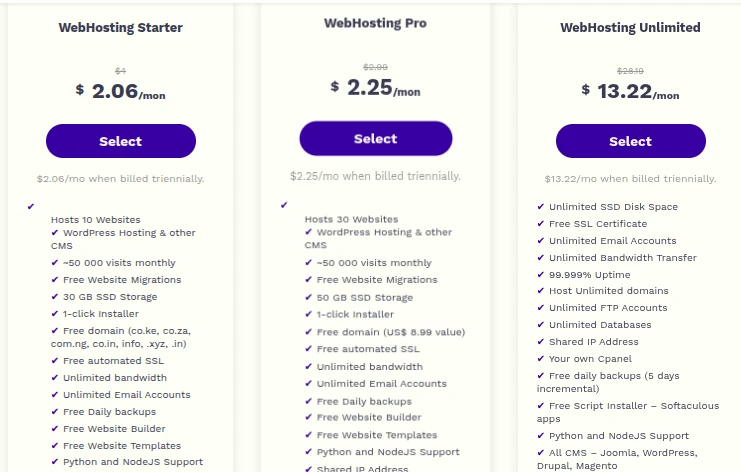
With shared hosting, multiple websites share resources on one server. It is affordable and beginner-friendly, and it is suitable for smaller websites with moderate traffic. Because resources are shared among many accounts, you generally have less control over the server environment than you would with VPS or dedicated hosting.
2) VPS Hosting
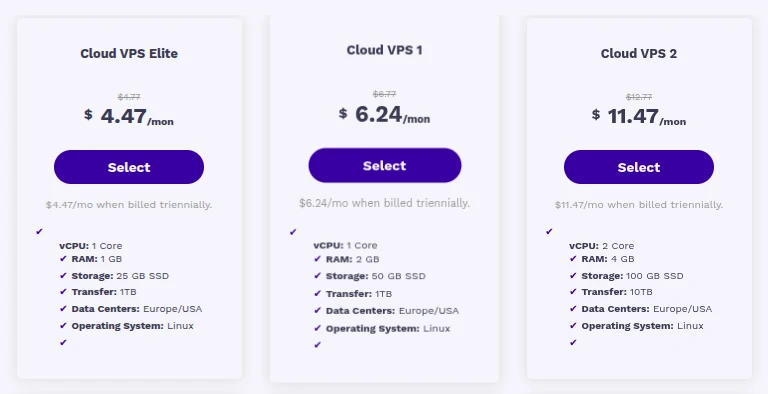
VPS hosting provides dedicated portions of server resources within a virtualized environment. It offers more control and resources than shared hosting, which makes it suitable for growing websites and applications that need more predictable performance than a shared plan can offer.
3) Cloud Hosting
Cloud hosting uses resources across a network of connected servers. It can provide flexibility as website traffic changes, which makes it useful for websites that need scalable resources. Not every cloud hosting plan automatically comes with unlimited resources or perfect uptime, so it is worth checking exactly what a specific plan includes.
4) Dedicated Hosting
Dedicated hosting gives one customer an entire physical server. It provides greater control and dedicated resources, and it is generally suitable for high-traffic websites and resource-intensive applications. It can also be more expensive and may require more technical knowledge, depending on whether the server is managed or unmanaged.
Still weighing your options? Compare All Hosting Plans from Truehost Pakistan
Which One Do You Need for Your Website?
You do not normally choose between a web server and web hosting as competing options. Your hosting service uses web server infrastructure to keep your website online.
When choosing a hosting plan, consider:
- Your website size
- Expected traffic
- Required storage
- Performance needs
- Security requirements
- Level of technical control
- Available budget
- Whether you need room to scale
Web hosting and web servers work together rather than being competing choices. Your hosting plan is what you select and pay for, while the web server infrastructure and software behind it are what actually process requests and deliver your content. Choosing a hosting plan is really a matter of deciding how much of that underlying infrastructure, and how much resource, control, and support, your website actually needs. If security is a particular concern for your project, it is also worth reviewing what website security features are included with your plan rather than assuming every hosting option covers the same ground.
FAQs
Can a web server exist without web hosting?
Yes. A web server is infrastructure and software that can process and deliver requests, and it can technically run without being part of a commercial hosting service. In practice, most website owners use a hosting provider because it manages the server setup, maintenance, and support that would otherwise fall on them.
Can I host a website on my own web server?
Yes, this is possible, and it is sometimes called self-hosting. It gives you direct control over the server, but you also become responsible for the hardware, security, uptime, and troubleshooting that a hosting provider would normally handle. For most individuals and small businesses, using a hosting provider is simpler and more practical.
Does the type of web server affect website speed?
It can be one factor among several. Server software such as Apache, Nginx, or LiteSpeed each handle requests somewhat differently, which can affect performance in certain situations. Website speed also depends on your hosting plan’s resources, your website’s own code and content, and your traffic levels, so the web server software alone does not determine speed on its own.
Can I change the web server without changing my hosting provider?
Sometimes. Some hosting providers let you choose or switch between web server software through your control panel, while others set this at the infrastructure level without offering that option. If this matters to you, check directly with your provider about what is configurable on your specific plan.
Ready to Choose the Right Hosting for Your Website?
Understanding the difference between web hosting and web servers makes it easier to choose the right hosting environment for your website. Instead of focusing only on the technical setup, consider the resources, performance, security, support, and scalability your website needs.
The right hosting plan gives your website access to the server resources it needs without making you pay for resources you will not use.
If your website runs on WordPress, WordPress hosting built around that platform is worth a look.