Domain SearchInstantly check and register your perfect .pk or international domain
 Web HostingGet a .pk domain for as low as PKR 467
 cPanel HostingUser-friendly hosting powered by cPanel
 Reseller HostingLaunch your own hosting business with minimal technical requirements
 Windows HostingOptimized for Windows-based applications and websites
 Affiliate ProgramEarn referral commissions by promoting our services
 WordPress HostingFast & Reliable WordPress Hosting
 Domain TransferMigrate your existing domain seamlessly with zero downtime.
 All DomainsAccess 324+ top-level domains (TLDs) worldwide from a single platform
 Whois LookupIdentify the owner of any domain using our whois and rdap lookup tool
 Managed VPS Hosting
 AI Website BuilderCreate beautiful websites effortlessly using intuitive drag-and-drop features
 Online ShopLaunch a professional online shop with no technical skills required
 BlogDiscover expert guides on hosting, websites, SEO, and digital growth strategies
 ContactGet instant assistance via live chat or email
 SupportAccess help articles, tutorials, and service documentation
 SSL CertificatesEncrypt data, build trust, and boost SEO.
Starting a website can feel complicated when you are not familiar with hosting, domains, servers, or technical settings. The good news is that you do not need to be a technical expert to get your website online.
Web hosting is a service that gives your website a place to store its files and makes them available to visitors online. Along with a domain name and a website platform, hosting is one of the basic things you need to build an online presence.
This article explains web hosting for beginners in 2026, how hosting works, the different types available, how to choose the right option, and the common mistakes to avoid when getting your first website online.
Ready to start now? Explore Web Hosting Plans with Truehost Pakistan
How Does Web Hosting Work?
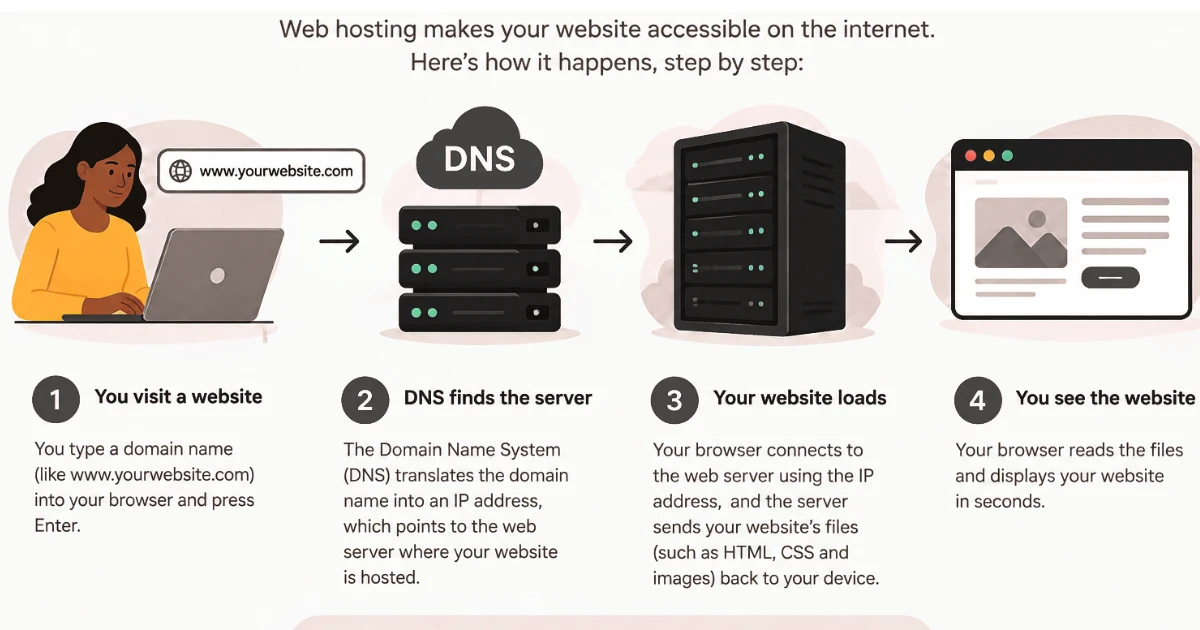
1) Your website files are stored on a server
Web hosting provides space on a server where your website’s files, images, databases, and other content are stored. A server is simply a powerful computer built to stay on and connected to the internet, so it can respond to requests at any time. Your website files, the HTML pages, images, style sheets, and any databases your site relies on, all live on this server rather than on your own computer.
2) The server delivers your website to visitors
When someone visits your website, the hosting server sends the required files to their browser so the website can load. This happens automatically every time someone visits a page. The server receives the request, gathers the files or information needed, and sends them back so the visitor’s browser can display the page.
3) Your domain connects visitors to your website
Your domain name acts as your website’s online address and directs visitors to the server where your website is hosted. Think of it like a street address for your website. You do not need to understand the technical details of how this connection works, just that your domain and your hosting need to be linked together. If you don’t have one yet, you can handle domain registration alongside your hosting.
4) A visitor enters your domain name
When someone types your domain into a browser, the browser looks for the server connected to that domain and requests the website files. Once the correct server is found, it processes that request and sends back whatever is needed to display your website, whether that’s a simple page or something more complex. Cloudflare’s guide to DNS explains how that lookup works if you want more detail.
5) Hosting resources affect performance
Resources such as storage, bandwidth, RAM, and CPU determine how much your website can store, how much traffic it can handle, and how quickly it can respond. Storage is how much space your files and data can take up. Bandwidth affects how much data can be transferred to visitors over a given period. RAM and CPU affect how efficiently your server can process requests, especially when many visitors arrive at once. None of these resources work in isolation, and a shortage in any one of them can cause problems even if the others are generous. Hosting is also only one part of speed, and Google’s web.dev performance course covers the other factors, such as images and code.
6) Uptime keeps your website available
Uptime refers to how consistently your hosting server keeps your website accessible to visitors. When a server is down, your website is temporarily unavailable and visitors cannot reach it. That is why uptime is worth considering carefully when choosing a hosting plan, rather than treating it as a minor detail.
7) Your hosting plan determines what you get
Different hosting plans provide different amounts of storage, resources, performance, security, and support. A suitable plan gives your website enough resources without paying for features you do not need. This is exactly why hosting comes in different types, which the next section covers in more detail.
What Are the Different Types of Web Hosting?
Different hosting types provide different levels of resources, control, management, and scalability. Understanding what each one actually offers makes it much easier to pick a starting point that fits your website rather than guessing.
1) Shared Hosting
With shared hosting, your website shares server resources with other websites. It’s usually one of the most affordable hosting options, which makes it a common entry point for people building their first website. It’s suitable for blogs, portfolios, small business websites, and new websites that don’t yet have heavy traffic or complex technical needs.
Shared hosting is also easy to manage, making it a good starting point for beginners who don’t want to deal with server administration. The trade-off is that resources are shared, so performance can be affected by activity from other websites on the same server. For a beginner with a relatively small website who doesn’t need advanced server control, this is often a reasonable trade-off to accept at the start.
2) VPS Hosting
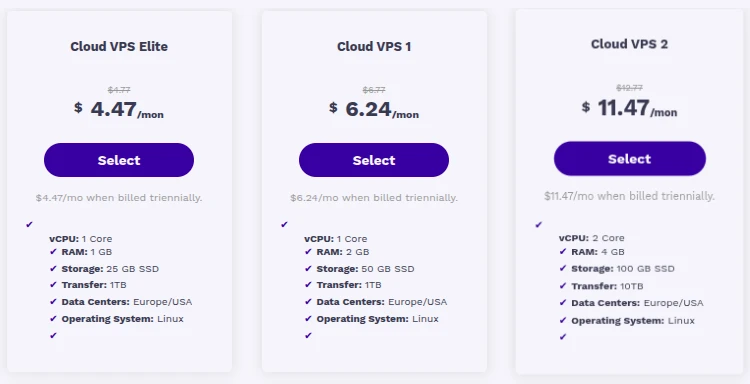
With VPS hosting, your website gets a more isolated portion of a physical server. This setup provides more dedicated resources and control than shared hosting, since your allocation isn’t shared as directly with other accounts. It’s suitable for growing websites, online stores, applications, and websites with higher traffic that have started to feel the limits of a shared plan.
VPS hosting gives you more room to scale as your website grows, and it usually costs more than shared hosting as a result. It isn’t automatically faster or better for every website. Whether it’s a good fit depends on whether your website’s actual resource needs have genuinely outgrown shared hosting.
3) Cloud Hosting
With cloud hosting, your website runs across a network of connected servers rather than a single machine. Resources can be distributed based on demand, which is useful for websites that experience changing traffic levels, such as sudden spikes during a promotion or seasonal busy periods.
Cloud hosting can provide better scalability and reliability than relying on a single server, since the workload isn’t tied to one machine’s capacity. Pricing and management vary depending on the provider, so check what a specific cloud plan includes rather than assuming it guarantees perfect uptime or unlimited scalability.
4) Dedicated Hosting
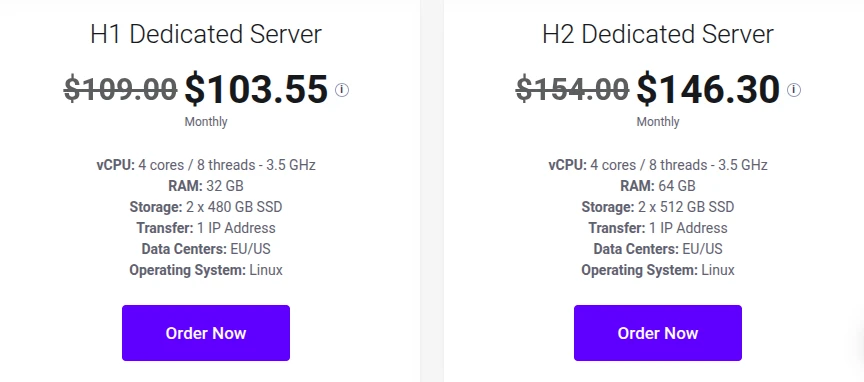
With dedicated hosting, an entire physical server is assigned to your website alone. This provides high levels of performance, control, and resources, since nothing is shared with other customers. It’s suitable for large websites, applications, and businesses with demanding workloads that genuinely need that level of dedicated capacity.
Dedicated hosting gives you more control over server configuration than the other options. It usually costs more and may require more technical knowledge to manage well. For most beginners, it is more than they need unless their website already has significant resource requirements that other hosting types can’t comfortably handle.
5) Managed Hosting
With managed hosting, the hosting provider handles many technical server tasks for you. Depending on the plan, this can include updates, security, backups, monitoring, and technical support, taking much of the day-to-day server administration off your plate. This is useful for website owners who do not want to manage server administration themselves and would rather focus on their actual website and content.
Managed hosting is often available with specific hosting types, such as managed WordPress hosting. It’s worth understanding that “managed hosting” describes the level of technical management provided by the hosting company, not a separate server architecture on its own. You can find managed options layered on top of shared, VPS, cloud, or dedicated hosting, depending on the provider.
How Do You Choose the Right Web Hosting for Your Website?
1) Consider the type of website you are building
A personal blog may need fewer resources than an ecommerce store or business website. The kind of content you’re publishing, how many pages you’ll have, and whether you need things like product databases or customer accounts all affect how much hosting your website actually requires.
2) Estimate your expected traffic
Think about how many visitors you expect now and how much your website could grow in the future. Your current traffic gives you a baseline, but it’s worth leaving some room for growth too, so you’re not stuck upgrading again almost immediately after launch.
3) Check the available resources
Look at storage, bandwidth, RAM, CPU, and other resources included in the plan. Marketing labels like “unlimited” or “premium” can be vague, so check what the plan actually provides in practical terms.
4) Look at uptime and reliability
Choose a provider that can keep your website accessible consistently. Reliable infrastructure matters because even a well-built website isn’t much use to visitors if the server hosting it is frequently unavailable.
5) Check the security features
Look for features such as SSL certificates, backups, malware protection, firewalls, and DDoS protection where appropriate. Not every hosting plan includes every one of these features, so it’s worth checking specifically what’s included rather than assuming a baseline level of protection comes with any plan you choose. An SSL certificate is a good one to confirm first, since it secures the connection between your site and its visitors.
6) Consider ease of management
Beginners may prefer hosting with a simple control panel, one-click installations, automatic updates, or managed services. These features reduce how much you need to configure manually to get your site running and keep it maintained.
7) Check customer support
Reliable support can be important when you run into technical problems or need help setting up your website. This matters especially for beginners, since you may not yet know how to diagnose or fix a hosting issue on your own, and having someone to turn to can save a lot of frustration.
8) Think about scalability
Choose a hosting provider that allows you to upgrade when your website needs more resources. This doesn’t mean you should overbuy resources from the very beginning. It simply means checking that a reasonable upgrade path exists so you’re not forced into a disruptive full migration the moment your website starts to grow.
9) Compare the overall value
Do not choose a plan based only on the lowest starting price. Consider what resources, features, support, and renewal terms are included, since the cheapest plan isn’t necessarily the best value once you account for what you actually get.
What Common Web Hosting Mistakes Should Beginners Avoid?
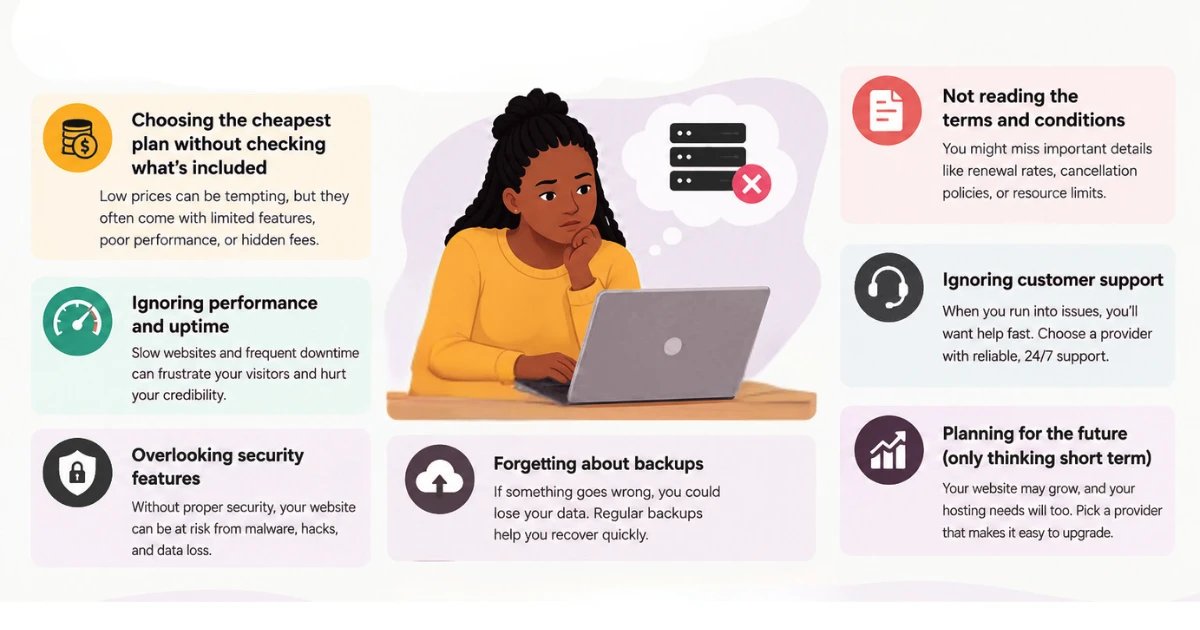
1) Choosing hosting based only on price
The cheapest plan may not provide enough resources, security, support, or room for growth. Price matters, but a plan that’s too limited can cost you more time and trouble than you saved.
2) Buying more resources than you need
Beginners sometimes pay for advanced hosting before their website actually requires it. Matching your plan to your current, realistic requirements makes more financial sense than paying for capacity you won’t use for a long time, if ever.
3) Ignoring renewal prices
A low introductory price does not always mean the same price will apply when the plan renews. It’s worth checking the renewal pricing before you purchase, so you know what you’ll actually be paying once that first discounted term ends.
4) Not checking what is included
Always review the plan’s storage, backups, SSL, email, support, and other included features before purchasing. Two plans with similar prices can include very different things.
5) Choosing a plan that cannot scale
Your website may outgrow its initial hosting plan, so make sure upgrades are available. Checking this upfront saves you from discovering, right when you need to grow, that your current provider has no reasonable path forward.
6) Ignoring backups
If something goes wrong with your website, a recent backup can help you recover your content. Not every hosting provider automatically includes comprehensive backups, so it’s worth confirming what backup options exist and whether you need to set up your own in addition to whatever the provider offers.
7) Overlooking security
Weak security can leave your website vulnerable to attacks, malware, and other problems. Basic steps like using strong passwords, keeping software updated, and choosing a host with reasonable security features go a long way, even for a simple beginner website.
8) Choosing hosting without considering support
Technical issues can happen at any time, so having accessible support can make managing your website much easier. For a beginner who may not know how to troubleshoot a hosting issue alone, knowing help is available is worth factoring into your decision.
FAQs
Do I need web hosting before I build my website?
Generally, yes, at some point, since your website needs somewhere to actually live once it’s ready for visitors. Some website builders bundle hosting together with their platform, so you may be using hosting without thinking of it separately, while other approaches require you to choose hosting on its own before uploading your site.
Can I change my web hosting provider later?
Yes. Moving to a new hosting provider is a common step as a website’s needs change. It generally involves backing up your website, setting it up with the new host, and updating your domain’s settings to point to the new server, so it does take some planning, but it’s a normal and achievable process.
How much does web hosting cost for a beginner?
Costs vary depending on the provider, the plan, the billing term, your location, and any promotions or renewal pricing involved. Rather than expecting one fixed number, compare what different plans actually include for their price before deciding what fits your budget.
Can I host more than one website on one hosting plan?
This depends on the specific hosting plan and its terms. Some plans allow multiple websites under one account, while others are limited to a single website, so it’s worth checking this detail directly with whatever plan you’re considering if it matters to you.
Do I need web hosting if I use WordPress?
It depends on which version of WordPress you mean. WordPress.org software needs to be installed on hosting that you choose and manage yourself, so you do need a separate hosting plan in that case. WordPress.org lists the hosting requirements a plan should meet. Some other hosted website services handle hosting as part of their package, so the need for separate hosting depends on exactly which setup you’re using.
Can I get a domain name and web hosting from the same provider?
Yes, many providers offer both domain registration and hosting together, which can make initial setup simpler since everything is managed in one place. You can also register a domain with one provider and host your website with another, so this is a matter of convenience rather than a strict requirement.
When should I upgrade my web hosting plan?
The right time to upgrade depends on your actual resource needs, traffic, performance, and storage, not on the fact that a more expensive plan exists. Slower loading times, running low on storage, or consistently high resource usage are better signs that an upgrade is worth considering.
Ready to Get Your Website Online?
Choosing web hosting does not have to be complicated. Start with a plan that matches your website’s current needs, gives you enough room to grow, and provides the support and security you need to manage your site confidently.
For most beginners, shared hosting is a practical place to start, while growing websites may eventually need VPS, cloud, or dedicated hosting for additional resources and control. That is the core of web hosting for beginners: choose based on what your website genuinely needs right now, with a reasonable path to grow later.