Domain SearchInstantly check and register your perfect .pk or international domain
 Web HostingGet a .pk domain for as low as PKR 467
 cPanel HostingUser-friendly hosting powered by cPanel
 Reseller HostingLaunch your own hosting business with minimal technical requirements
 Windows HostingOptimized for Windows-based applications and websites
 Affiliate ProgramEarn referral commissions by promoting our services
 WordPress HostingFast & Reliable WordPress Hosting
 Domain TransferMigrate your existing domain seamlessly with zero downtime.
 All DomainsAccess 324+ top-level domains (TLDs) worldwide from a single platform
 Whois LookupIdentify the owner of any domain using our whois and rdap lookup tool
 Managed VPS Hosting
 AI Website BuilderCreate beautiful websites effortlessly using intuitive drag-and-drop features
 Online ShopLaunch a professional online shop with no technical skills required
 BlogDiscover expert guides on hosting, websites, SEO, and digital growth strategies
 ContactGet instant assistance via live chat or email
 SupportAccess help articles, tutorials, and service documentation
 SSL CertificatesEncrypt data, build trust, and boost SEO.
You spent days on a great PDF. Maybe it is a catalog, a guide, a worksheet, or a business resource.
Then you share the link. It loads slowly, or it sends people to another website.
That is a common problem for Pakistani creators, freelancers, small businesses, schools, and startups. Household internet access in Pakistan rose from 34% to 70% in five years, according to the PBS 2024-25 survey. Many of those readers are on mobile data, and they leave fast.
Learning to host and share PDF files on your own site fixes this. Proper hosting makes PDFs load fast, stay secure, support SEO, and build trust.
This guide will teach you:
- Why hosting is important and which method fits you
- How to upload a PDF step by step
- How to embed it on a page
- How to share it and track downloads
- How to keep it secure
Want fast local performance? We at Truehost offer hosting from ₨3,391.80. You get LiteSpeed + SSD, free SSL, PKR billing, and local support.
Ways to Host PDFs on Your Website
There are three main ways to host a PDF. Each fits a different job.
| Method | Best Use | Notes |
|---|---|---|
| Direct Upload | Blogs & small sites | Best speed + SEO control |
| Embedding | Guides, catalogs, forms | Keeps users on the page |
| Cloud Storage | Team sharing | Often slower for local users |
We recommend starting with direct upload. It gives you control over speed, file names, and links.
It also helps your SEO. Google’s Search Central documentation lists PDF as a file type it can index.
Tradeoff: direct uploads use your own storage and bandwidth. And a public PDF is public. Anyone with the link can open it.
Cloud storage links work well inside a team. But they send visitors off your site, and you lose some control.
How to Host a PDF on Your Website
These steps work with WordPress and cPanel. They also work on most sites, including ones hosted with us.
Prepare the PDF
- Compress it. Aim for under 5MB. A free online PDF compressor will do the job. Size is important on mobile. Pakistan’s median mobile download speed was 24.32 Mbps at the end of 2025, according to Ookla data reported by DataReportal. At that speed, a 5MB file needs about two seconds in ideal conditions. A 25MB catalog needs about eight. This is simple math: file size in megabits divided by speed. Real-world speeds vary.
- Use a clear filename. For example, pakistan-business-guide.pdf. Use lowercase and hyphens. Skip spaces and names like “final_v3”.
- Add a title and keywords in the file properties. Google has said it builds a PDF’s search title from the title in the file’s metadata and from the text of links that point to it. You can read more in Google’s guidance on PDFs.
Log in
- WordPress: go to
yourdomain.com/wp-adminand sign in. Truehost: open cPanel from your client area. - Open the Media Library. In cPanel, open File Manager instead.
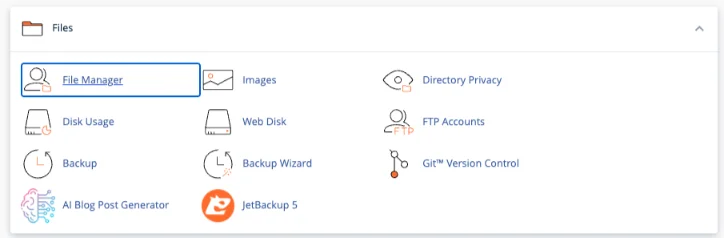
- Make sure you are inside the public_html folder.
- Click the Upload button at the top of the page (it is in the toolbar between “Move” and “Download”).
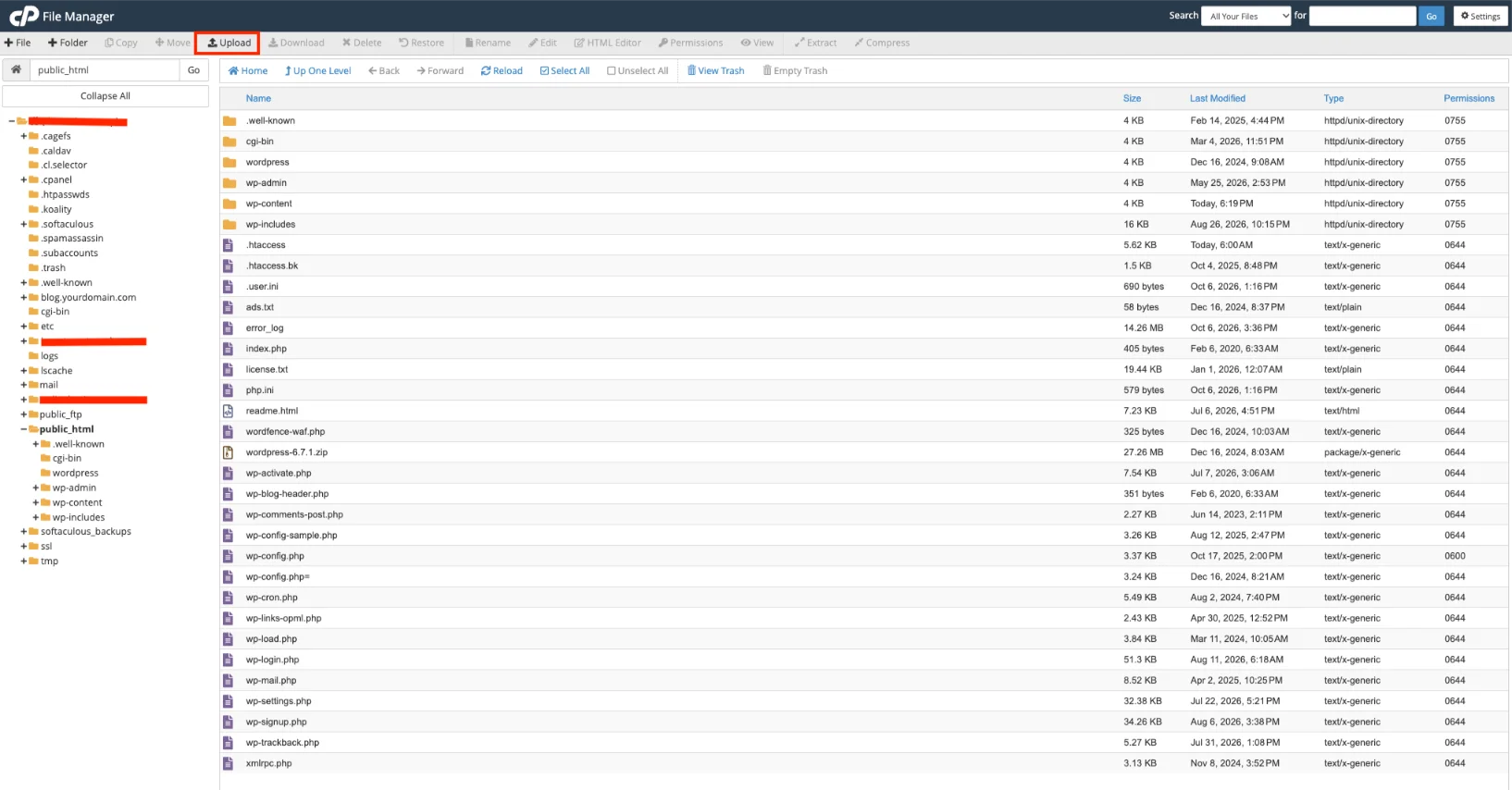
- A new page will open.
- You will see a big area that says “Select File” or “Drop files here”. Click Select File (or just drag your PDF file from your computer into the box).
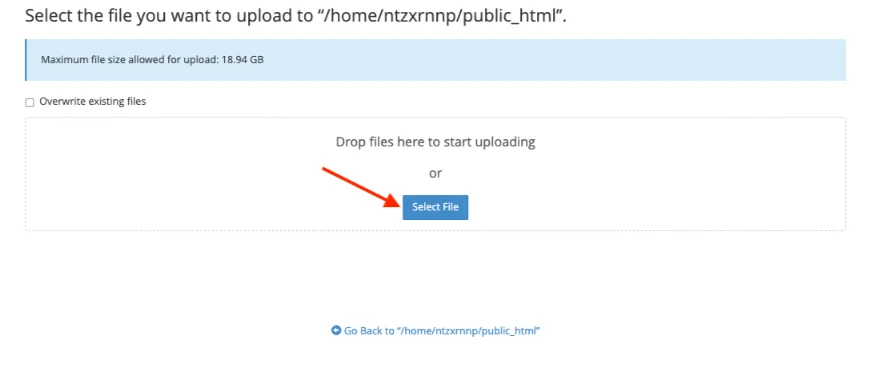
- Wait until you see a green progress bar reach 100% and the message “Upload Complete”. Click the Go Back link (or the small arrow) at the bottom of the upload page.
- This takes you back to the File Manager. You should now see your PDF file listed in the public_html folder.
After the upload
- Right-click the PDF file → choose Copy URL (or click the file name and look for the public URL).
- That URL is the one you will use on your website (e.g.
https://yourdomain.com/pakistan-business-guide.pdf).
That’s the complete “Upload the file” step.
Troubleshooting
- Upload fails? Many hosts cap uploads between 2MB and 8MB. Compress the file more, or ask support to raise the limit.
- Old version showing? Clear your cache. Check both your caching plugin and your browser.
- Link will not open? Check public access. The file must not sit in a private folder or behind a password.
Storage note: a growing PDF library needs room. Our higher plans give you more storage for larger collections, and our managed VPS plans offer 50 GB to 200 GB of SSD space. We also migrate your site for free, usually within 24 hours.
How to Embed a PDF on a Web Page
Embedding shows the PDF right on your page. Visitors read it without leaving your site. That means better engagement, and your brand stays in view.
Quick HTML iframe method
Paste this code where you want the PDF to appear:
<iframe src="https://yourdomain.com/wp-content/uploads/2026/10/pakistan-business-guide.pdf" width="100%" height="600" title="Pakistan business guide"></iframe>
A width of 100% fits any screen. Height is in pixels, so adjust it to fit your layout.
Test it on a phone. Some mobile browsers may show only the first page. Add a “Download Guide” link under the frame as a backup.
Tools for cleaner embeds
- PDF Embedder (WordPress plugin). The free version installs from your WordPress dashboard and adds a responsive viewer. Paste the file URL into the block, or use the shortcode [pdf-embedder url=”PASTE_URL_HERE”]. See the PDF Embedder setup guide. Links inside the free version cannot be clicked. The Premium plan adds a full screen mode for phones.
- Adobe PDF Embed API. This is a free JavaScript tool. You need a free client ID. It offers full window, sized container, in-line, and lightbox modes, plus usage analytics.
Both keep the PDF file on your own site, and both give you a clean, branded viewer.
Flipbook style
Tools like FlippingBook turn a PDF into a page-turning HTML5 flipbook. You can add links, videos, your logo, and lead forms.
They suit catalogs, school materials, and product showcases. Many are paid cloud services, so the flipbook usually lives on their platform and you embed it.
How to Share PDFs Online
Hosting is half the job. People still need to find your link.
Here are the channels that work best in Pakistan:
- Styled buttons on key pages. Add a button to your homepage, blog posts, product or service pages, menu, and footer. Label it clearly, like “Download the Business Guide (PDF, 2MB)”. Showing the size helps people on mobile data decide.
- Direct download links. Place them in blog posts, landing pages, forms, and chat replies. One clear link beats a long explanation.
- QR codes. Print them on event banners, posters, packaging, and business cards. Free generators work fine. Point the code to a page on your site, not the raw PDF. Then you can swap the file later without reprinting. QR TIGER’s 2025 report says global QR scans rose 57% year over year across 50 countries.
- Social media. Share on Facebook, Instagram, LinkedIn, X/Twitter, and TikTok with a strong caption. Say what the reader gets and why it helps. Captions on Instagram and TikTok usually are not clickable, so use your bio link.
- WhatsApp. Use groups, broadcast lists, and your Business profile. It fits a mobile-first market: Pakistan had 194 million cellular connections at the end of 2025. Broadcast lists hold up to 256 contacts each, and only people who saved your number receive them. Meta also said in March 2025 it would test limits on broadcast messages, so do not rely on them alone. Share a link to your page instead of attaching the file. A link lets you track clicks.
- Email newsletters and sequences. Use the PDF as a lead magnet. Add it to welcome emails and onboarding. Link to the file instead of attaching it.
Track what works
Google Analytics 4 logs a file_download event when someone clicks a PDF link. Enhanced measurement switches it on by default. Find it under Reports > Engagement > Events.
To see which channel drives downloads, add UTM parameters. The three core ones are utm_source, utm_medium, and utm_campaign. They are case-sensitive, so keep them lowercase.
Tag the page that holds your download button, not the PDF itself. Analytics tags do not run inside a PDF file.
Handling many requests? n8n can send the right PDF automatically when someone fills in a form. We offer n8n hosting so you can run it yourself. If you want AI to answer repeat questions, look at our AI Workers and OpenClaw hosting.
Security and Best Practices
A public file needs a few basic protections. Here is the short list.
- Free SSL. HTTPS encrypts the connection between your site and your visitor. Google’s October 2025 Chrome post shows HTTPS now covers nearly all page loads on major platforms. A site without it stands out. SSL is included with our hosting.
- Compress for speed. Smaller files load faster and cost visitors less data. Keep each PDF under 5MB where you can.
- Password-protect sensitive files. Adobe Acrobat offers two kinds. An open password blocks anyone without it. A permissions password limits editing, printing, and copying. A WordPress page password alone does not lock the PDF’s direct link.
- Update metadata. Keep the title and description current. Review them whenever you replace a file.
- Regular backups. Backups save your PDFs after a hack, a bad update, or a deleted folder.
- Avoid free external hosts. Some add ads or redirects. That hurts trust and sends readers away.
- Truehost advantage. You get free SSL and daily backups. On our managed VPS, backups run daily with 30-day retention and one-click restore.
How to Host and Share PDF Files on Your Website FAQs
Can I password-protect just one PDF?
Yes. Add an open password to that file in Adobe Acrobat. Visitors must enter it to open the PDF.
A WordPress page password does not protect the file’s direct URL. For private files, use a file-level password or ask your host about server-level protection.
Can visitors copy or download a view-only PDF?
Sometimes. Embed tools can hide the download and print buttons. Adobe’s PDF Embed API lets you turn them off. PDF Embedder’s Pro plan makes downloading and printing difficult.
But a determined visitor can still capture what appears on screen. For truly private files, use a password.
Is there a file size limit for hosted PDFs?
Yes. Your server’s PHP upload limit sets it. Many hosts default to somewhere between 2MB and 8MB.
You can raise it in your php.ini file or ask support to do it. Still, aim for under 5MB so the file loads fast.
Do PDF links break if I migrate hosts?
Not if your domain and file path stay the same. Links break when the domain or folder structure changes.
Check a few links after the move. We offer free migration, usually completed within 24 hours.
Do I need to submit PDFs to Google manually?
No. Google can index PDFs and finds them through links on your pages. Link to the file from a normal page, and add it to your sitemap.
To keep a PDF out of search, use the X-Robots-Tag: noindex HTTP header. A PDF has no head section for a normal noindex tag.
Get Hosting with Truehost
Here is the short version:
- Compress your PDF and give it a clear filename.
- Upload it directly for the best speed and control.
- Embed it when you want readers to stay on the page.
- Share it with buttons, WhatsApp, email, QR codes, and social posts.
- Track downloads, protect private files, and keep backups.
Clean, fast, secure, SEO-friendly PDFs help any site. A blog, shop, school, business, or freelance portfolio all benefit when you host and share PDF files the right way.
We at Truehost offer affordable, reliable hosting with local payments, free SSL, backups, and support. You can pay with cards or bank transfer. That keeps your PDFs loading quickly for Pakistani visitors.
Compare our hosting plans to find a fit for your site.
Need more room or power? Our VPS hosting starts at an affordable price.
Pick a plan, upload your first PDF today, and test the link on your phone.