Domain SearchInstantly check and register your perfect .pk or international domain
 Web HostingGet a .pk domain for as low as PKR 467
 cPanel HostingUser-friendly hosting powered by cPanel
 Reseller HostingLaunch your own hosting business with minimal technical requirements
 Windows HostingOptimized for Windows-based applications and websites
 Affiliate ProgramEarn referral commissions by promoting our services
 WordPress HostingFast & Reliable WordPress Hosting
 Domain TransferMigrate your existing domain seamlessly with zero downtime.
 All DomainsAccess 324+ top-level domains (TLDs) worldwide from a single platform
 Whois LookupIdentify the owner of any domain using our whois and rdap lookup tool
 Managed VPS Hosting
 AI Website BuilderCreate beautiful websites effortlessly using intuitive drag-and-drop features
 Online ShopLaunch a professional online shop with no technical skills required
 BlogDiscover expert guides on hosting, websites, SEO, and digital growth strategies
 ContactGet instant assistance via live chat or email
 SupportAccess help articles, tutorials, and service documentation
 SSL CertificatesEncrypt data, build trust, and boost SEO.
If you run a business, using a professional email address such as [email protected] can make your communication look more credible than sending messages from a personal email address. Clients and partners notice the difference, even if they never say so directly.
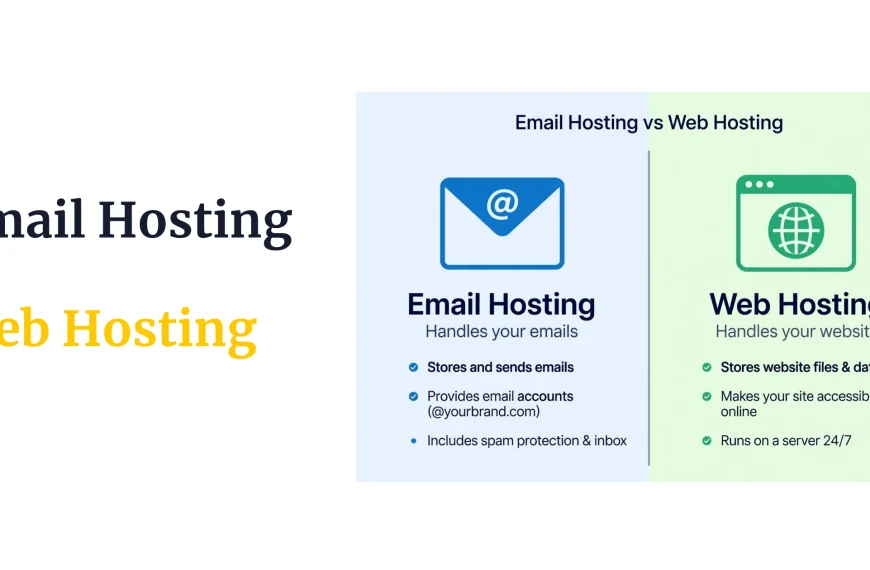
So what makes these custom addresses work? The answer is email hosting. Email hosting is a service that provides the servers, storage, and tools needed to send, receive, store, and manage email using your own domain name. Unlike free email services, which use their own domain, email hosting lets businesses create branded addresses and manage them through a dedicated email service built for that purpose.
This article covers how email hosting works, the features it offers, the benefits for businesses, the types of email hosting available, who needs it, and what to consider when choosing an email hosting service.
Already know you want professional email?You need a domain and a hosting plan that supports it. Search Web Hosting Plans to get started.
How Does Email Hosting Work?
Email hosting can sound technical, but the process is straightforward once broken into steps.
- You create an email address using your domain, such as
[email protected]. - Your domain’s DNS records direct email traffic to the correct mail server. DNS, short for Domain Name System, is the system that translates domain names into the technical information computers use to find each other. Think of it as a directory that tells the internet where to send things addressed to your domain.
- Someone sends an email to your address.
- The sending mail server looks up your domain’s email records to find out where messages for your domain should go. This lookup relies on MX records, which are DNS records used to tell other mail servers where email for a particular domain should be delivered.
- The message is delivered to your email hosting server, the system responsible for accepting and processing mail for your domain.
- The server stores the message in your mailbox, the storage space assigned to your email account.
- You access the email through webmail in a browser or through an email application on your computer or phone.
Here is a simple example. Someone sends a message to
[email protected]. Their email provider checks the MX records for yourbusiness.com and finds out which mail server handles email for that domain. The message travels to that server, gets stored in the info mailbox, and you see it the next time you check your inbox. None of this requires you to understand the technical details each time. It just needs to be set up correctly once.
Benefits of Email Hosting?
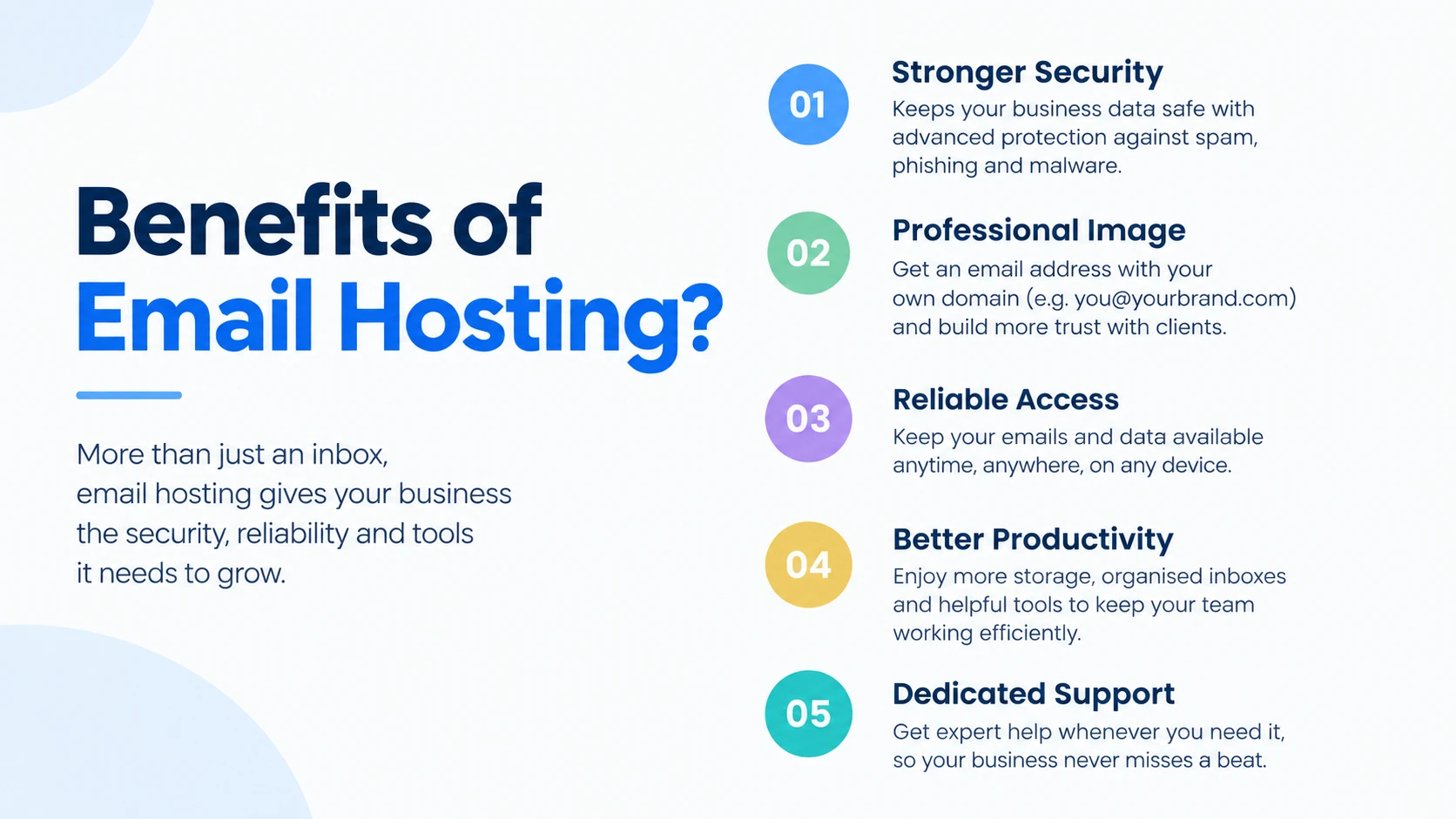
Email hosting offers more than a custom email address. It can also provide features that help businesses manage communication, protect accounts, support employees, organize business email, store messages and attachments, and maintain reliable email communication. Not every plan includes every feature, so it helps to know what to look for.
1) Professional Email Addresses
An address like [email protected] or [email protected] puts your business on every message you send, instead of a free provider’s domain. Compare [email protected] to [email protected]. The first reads as a business account. The second reads as a personal one, even if the person behind it runs a serious operation. The practical difference is where the domain points. A domain-based address ties directly to your business, while a personal address ties to whichever free service you signed up for years ago.
2) Better Business Branding
Every email you send from a domain-based address keeps your business name in front of the recipient, in the sender field and often in the signature. Over time, this builds a more consistent professional identity across invoices, replies, and outreach. This is a matter of consistency and presentation, not a guarantee that it will increase sales, conversions, or customer trust on its own.
3) Multiple Email Accounts
Email hosting typically allows you to create separate accounts for employees, departments, or specific business functions. A small business might set up [email protected] for inquiries, [email protected] for customer service, [email protected] for invoices, and [email protected] for general questions. As a company grows, separate accounts make it easier to route messages to the right person and keep records organized by function rather than mixing everything into one inbox.
4) Mailbox Storage
Email hosting plans typically come with a defined amount of storage for messages and attachments. Storage needs depend on several factors: the number of users on the account, how much email volume each person handles, the size of typical attachments, how long messages need to be retained, and how much the business expects to grow. A five-person team exchanging text-heavy emails needs far less storage than a design agency sending large files back and forth daily. Storage limits vary between providers and between plans from the same provider, so it is worth checking the specifics rather than assuming.
5) Spam and Malware Protection
Many email hosting services include filtering designed to catch spam, malicious attachments, suspicious sender behavior, and other potentially harmful content before it reaches an inbox. This filtering reduces the volume of unwanted or dangerous email that employees have to deal with. No filtering system catches everything, and no email hosting service can guarantee complete protection against every spam or malware attempt. Filtering quality and configuration options vary by provider.
6) Webmail Access
Webmail is a way to access your business email through a web browser, without installing a separate email application. You log in on any device with internet access and see your inbox the same way you would through a dedicated app. This is useful for people who need to check email occasionally from a shared or unfamiliar computer, or who prefer not to set up a full email client.
7) Mobile and Desktop Support
Most email hosting services can be configured with desktop and mobile email applications, letting employees check business email on a phone, tablet, or computer using the app they already prefer. The exact applications supported, the protocols used to connect them, and the setup steps required all vary between providers, so it is worth confirming compatibility with the devices and apps your team actually uses.
8) Email Forwarding
Email forwarding redirects messages sent to one address to another mailbox. For example, a business might forward everything sent to [email protected] into the owner’s main inbox, so they do not need to check a separate mailbox. Forwarding is different from creating a separate mailbox. A forwarded address does not necessarily store its own copy of messages; it simply passes them along to another destination.
9) Email Backups and Recovery
Some email hosting services provide backup or recovery features that help protect important messages from accidental deletion, data loss, or other email-related problems. These features can be a meaningful safety net for a business that depends on email records, such as client agreements or order confirmations. Not every email hosting service or plan offers the same backup and recovery capabilities, and some may not include them at all. Check the provider’s specific backup, recovery, and retention policies before assuming your messages are protected.
10) Reliable Email Delivery
A properly configured email hosting service helps businesses send and receive messages reliably, but correct configuration matters as much as the service itself. This is where a few more technical terms come in, each with a simple purpose.
SPF, or Sender Policy Framework, lists which mail servers are allowed to send email on behalf of your domain, so receiving servers can check whether a message really came from an authorized source. DKIM, or DomainKeys Identified Mail, adds a digital signature to outgoing messages so the receiving server can verify the message was not altered in transit. DMARC, or Domain-based Message Authentication, Reporting, and Conformance, builds on both of these by telling receiving servers what to do with messages that fail those checks, and it can send reports back to the domain owner. Cloudflare’s explanation of DMARC, DKIM, and SPF covers how these three technologies work together.
These technologies help authenticate email and reduce spoofing and some delivery problems, but they do not guarantee inbox placement. A message can be correctly authenticated and still land in spam for other reasons, such as content or sender reputation.
Want your email set up right the first time?
Getting DNS, SPF, DKIM, and DMARC configured correctly matters more than which provider you pick. If you would rather not manage this yourself, see what’s included with cPanel hosting, which bundles email management tools with your website hosting.
What Types of Email Hosting Can You Choose?
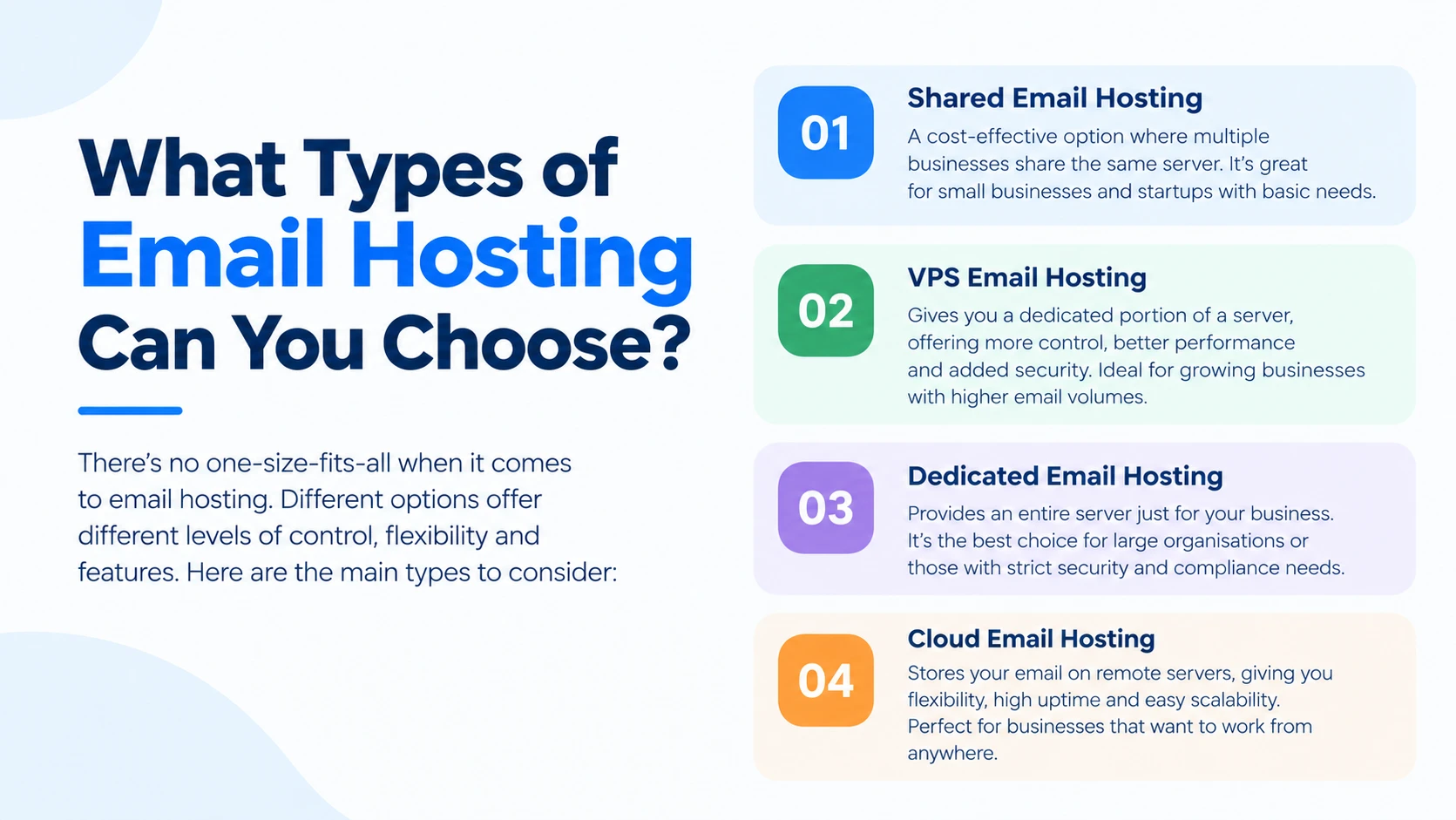
Different types of email hosting are available, and the right option depends on an organization’s size, requirements, security needs, technical requirements, and budget.
Shared Email Hosting
Shared email hosting places multiple customers on the same underlying email infrastructure. It is suitable for individuals and small businesses with basic email requirements and usually provides standard mailbox and email management features. This can be a practical option when advanced customization or dedicated resources are not required. It is not inherently unreliable, but it does mean sharing infrastructure with other customers, which can limit certain customization options compared to more dedicated setups.
Business Email Hosting
Business email hosting is designed around the needs of organizations that require multiple accounts, stronger management features, additional storage, security controls, and reliable business communication. It suits growing businesses and teams, and it may include enhanced security and administrative controls along with support for multiple users and department-specific email addresses. Features vary between providers and plans, so one business email hosting product may include tools that another does not.
Dedicated Email Hosting
Dedicated email hosting provides an email environment with greater control over resources and configuration. It suits organizations with more demanding email requirements and can be appropriate when a business has specific security, compliance, customization, or resource needs. Dedicated email hosting often involves more technical management and typically costs more than shared or standard business email services. It is not necessary for most small businesses, but it can matter for organizations with strict compliance or performance requirements. Businesses running their own mail server on a VPS fall into this category, since that setup trades convenience for full control.
Who Needs Email Hosting?
- Small businesses benefit from a professional address that matches their domain rather than relying on a free personal account for client communication.
- Startups often set up email hosting early, alongside their web hosting, to establish a consistent identity from the first customer conversation.
- Freelancers can use a domain-based address to look established, even as a one-person operation working with several clients.
- Agencies frequently need multiple accounts for different team members and departments, which makes account management and organization more important. Agencies managing several client domains at once often look into reseller hosting so they can administer email and hosting for multiple clients from one place.
- Ecommerce businesses rely on email for order confirmations, support requests, and billing questions, often through separate addresses for each function.
- Nonprofits and organizations use domain-based email to project credibility to donors, members, and partners.
- Companies with multiple employees need a structured way to assign, manage, and eventually deactivate email accounts as staff change.
FAQs
Is email hosting the same as Gmail
No. Gmail is a free email service tied to the gmail.com domain. Email hosting is a service built around your own domain name, so your address uses your business name instead. Some business email services, including Google Workspace, let you use Gmail’s interface with a custom domain, so the exact distinction depends on which service you are comparing.
Can I use email hosting without a website?
Yes. A website and email hosting are separate services. A business can use its domain for email even if no website is hosted on that domain, or if the website lives on a different server entirely.
Do I need email hosting if I already have web hosting?
It depends on your plan. Some web hosting plans include email accounts, while others focus only on website files and do not include mailboxes. A business can also use a separate email hosting provider while keeping its website hosted elsewhere. If security is a concern either way, it is worth checking how the provider handles website security, since email and website protection are often managed through the same account.
How many email addresses can I create with email hosting?
This depends entirely on the provider and plan. Some plans set a fixed number of mailboxes, while others allow more accounts, aliases, forwarding addresses, or distribution addresses at different tiers. There is no universal number, so check the specific plan details.
Can I use email hosting with Outlook?
Many email hosting services can be configured with Outlook. Compatibility and setup steps depend on the specific email hosting service and which protocols it supports, so check the provider’s documentation before assuming it will work out of the box.
Can I move my existing emails to a new email hosting provider?
Generally, yes. Email migration is possible, but the process depends on the old provider, the new provider, the size of the mailboxes involved, the protocols supported, and the migration tools available. Plan for DNS changes carefully, since a poorly timed switch can cause mail to be misrouted or temporarily lost.
Does email hosting include spam protection?
Many email hosting plans include some level of spam filtering, but the strength and configuration of that protection varies between providers and plans. Check the provider’s specific security features rather than assuming a baseline level of protection.
How much email storage does a business need?
There is no single answer that applies to every business. Storage needs depend on the number of users, email volume, typical attachment sizes, how long messages need to be retained, and how much the business expects to grow. It helps to think about both current needs and where the business will likely be in a year or two, rather than choosing the smallest plan available.
Ready to Get a Professional Business Email?
If you decide email hosting is right for your organization, here is a practical path to get started.
Step 1: Choose an Email Hosting Provider
Consider the number of mailboxes you need, available storage, spam and malware protection, security features, webmail access, and mobile and desktop support. Look into whether the provider offers email migration assistance, backup and recovery options, and responsive customer support. Also check domain compatibility, since some providers require the domain to be registered or managed a certain way, along with pricing and renewal terms, since introductory prices sometimes increase after the first term.
Step 2: Connect Your Domain
Your domain needs to be connected to the email hosting service, which commonly involves updating DNS records, particularly the MX records that direct incoming mail to the right server. Depending on the provider, you may also need to configure SPF, DKIM, and DMARC records to support authentication and delivery. Exact record values come from your specific provider, so follow their documentation rather than generic examples. Cloudflare’s overview of DNS records explains how these records fit into the broader DNS system.
If you do not have a domain yet, you will need one before any of this works. Registering a domain is the starting point, since email hosting depends entirely on having a domain name to attach it to.
Step 3: Create Your Email Accounts
Once your domain is connected, create the accounts your business actually needs, such as [email protected], [email protected], [email protected], or [email protected]. The exact process for creating accounts varies by email hosting provider, but most offer a straightforward dashboard for adding new mailboxes.
Step 4: Configure Your Email Application
You can access your new accounts through webmail right away, or configure them in a desktop or mobile email application. Your email hosting provider normally supplies the server settings and configuration details needed for this step. Setup requirements vary depending on the provider and the specific email application you use.
Step 5: Test Sending and Receiving Emails
Before relying on your new addresses for important business communication, test them. Send an email from the new address, send one to it, and confirm the message arrives in the inbox rather than the spam folder. Test the account on the devices your team will actually use. This helps catch configuration or delivery problems while the stakes are still low.