Domain SearchInstantly check and register your perfect .pk or international domain
 Web HostingGet a .pk domain for as low as PKR 467
 cPanel HostingUser-friendly hosting powered by cPanel
 Reseller HostingLaunch your own hosting business with minimal technical requirements
 Windows HostingOptimized for Windows-based applications and websites
 Affiliate ProgramEarn referral commissions by promoting our services
 WordPress HostingFast & Reliable WordPress Hosting
 Domain TransferMigrate your existing domain seamlessly with zero downtime.
 All DomainsAccess 324+ top-level domains (TLDs) worldwide from a single platform
 Whois LookupIdentify the owner of any domain using our whois and rdap lookup tool
 Managed VPS Hosting
 AI Website BuilderCreate beautiful websites effortlessly using intuitive drag-and-drop features
 Online ShopLaunch a professional online shop with no technical skills required
 BlogDiscover expert guides on hosting, websites, SEO, and digital growth strategies
 ContactGet instant assistance via live chat or email
 SupportAccess help articles, tutorials, and service documentation
 SSL CertificatesEncrypt data, build trust, and boost SEO.
Your site and email stop working overnight. Nothing changed on your end.
You check hosting. It’s fine. You check your bill. It’s paid.
Then you run a WHOIS lookup. The status field says serverHold.
Here’s the part that trips most owners up: a registry hold pulls your DNS delegation. It has nothing to do with your server. Moving to a new host won’t fix it. Reinstalling anything won’t fix it.
PKNIC is the registry behind every .pk extension. That includes .pk itself, .com.pk, .net.pk, .org.pk, .edu.pk, and .gov.pk. If your business instead runs on .com, .org, or .shop, you’re dealing with a different registry, with its own rules and its own lifecycle.
So before you troubleshoot anything, identify your domain status code. Then apply the rules for your specific extension. A .com rule won’t always match a .pk one.
One more habit worth building: judge urgency before you dig into the cause. Some codes are routine. Some need action today.
Judge urgency before you diagnose the Cause
| What you see | Likely effect | First response |
| clientHold or serverHold | Website, email, and other DNS services can stop | Contact the registrar and ask for the cause |
| inactive | The registry has no usable nameserver delegation | Check nameservers and any registration requirements |
| clientTransferProhibited | Transfer to another registrar cannot start | Leave it enabled unless you intend to transfer |
| serverTransferProhibited | PKNIC blocks a transfer | Ask the registrar what PKNIC requires |
| pendingTransfer | A registrar transfer has started but has not finished | Confirm that you authorized it |
| clientUpdateProhibited or serverUpdateProhibited | Registry-level changes can fail | Identify the lock before editing nameservers or contacts |
| redemptionPeriod or pendingDelete | The domain is late in an expiry or deletion process | Contact the registrar immediately |
| ok | No pending action or prohibition | Add appropriate security locks if the account lacks them |
One domain can carry several of these codes at once. A hold and a transfer prohibition, for example, can sit side by side.
Same protocol, different rulebook, .pk vs. .com
Every accredited registrar in the world speaks the same technical language for domain status. It’s called EPP, the Extensible Provisioning Protocol. RFC 5731 defines it, and ICANN’s registrant guide explains what each code means for you as the domain holder.
Five ideas cover almost everything you need to know:
- A hold affects DNS. Your domain stops resolving.
- TransferProhibited blocks a move to another registrar.
- UpdateProhibited blocks changes to the registry record.
- pendingTransfer marks a transfer that hasn’t finished yet.
- pendingDelete marks a domain that’s on its way out.
That’s the shared baseline. What differs is the local rulebook layered on top.
PKNIC’s published policy points to a two-week hold-then-release window after non-payment. But here’s where it gets messy. Several PKNIC resellers publish their own timelines instead, some quoting a 30-day grace period, others a two-to-three-month redemption window.
There’s also a legal layer that .com domains don’t have. Pakistan’s Prevention of Electronic Crimes Act, 2016 (PECA), gives authorities the power to order the blocking or removal of content tied to cybercrime, IP infringement, or material considered harmful to national interest.
When that kind of order reaches a registrar, it can result in a domain-level suspension, on top of any purely commercial hold.
Don’t calculate your deadline from a blog post. Don’t borrow a .com rule either. Check your domain’s live status, then confirm the deadline directly with your registrar.
A hold takes the whole domain offline, not just the site
A hold removes DNS delegation. That single change knocks out more than your homepage.
Here’s what typically goes down with it:
- Your website
- Shops and payment callbacks
- Customer portals and APIs
- DNS-based domain ownership verification
- Any remote services tied to your domain’s records
Your registration still exists. Your hosting files are untouched. Your mailboxes are still sitting there, full of messages nobody can reach. Only the DNS path connecting the world to your domain is gone.
This is why moving to new VPS or a dedicated server does nothing during a hold. The infrastructure was never the problem.
a) clientHold: your registrar pulled the plug
clientHold means your own registrar set the status. Not PKNIC.
Common causes include:
- An unpaid invoice
- Failed CNIC or business-document verification
- Inaccurate account data on file
- A policy complaint against the domain
- Abuse reports
- An unresolved legal issue
Here is an example of domain status by Truehost due to unpaid invoice:
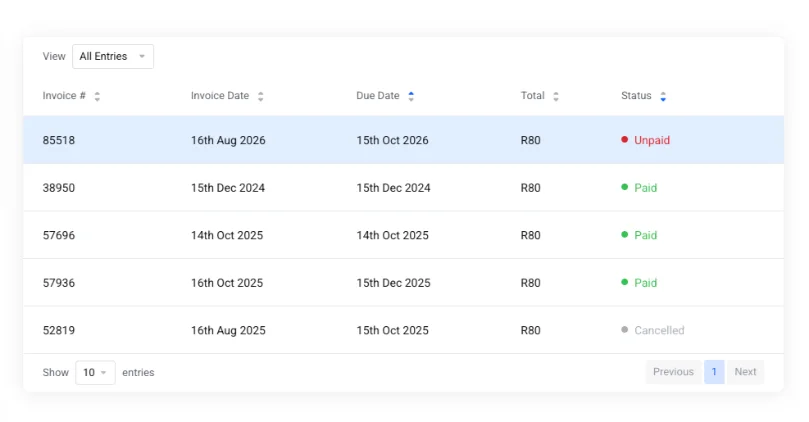
Before you call support, check these five things yourself. It saves a round of back-and-forth:
- Outstanding invoices
- Recent email notices from your registrar
- Verification requests you may have missed
- Any abuse tickets tied to your account
- Recent ownership changes and your expiry date
Most clientHold cases resolve fast once the underlying paperwork or payment is sorted out.
b) serverHold: PKNIC stepped in directly
serverHold sits one level up. PKNIC is the registry. Your accredited registrar or reseller sits between you and PKNIC. When you see serverHold, the registry itself made the call.
This status usually ties back to one of two things: PKNIC’s non-payment policy, or its suspension authority under PECA.
Even here, start with your registrar. They’re the ones with a direct relationship to PKNIC, and they can find out why the hold was placed and what it takes to lift it.
c) inactive: no nameservers, not necessarily a punishment
inactive doesn’t mean trouble. It usually just means missing nameservers.
This is common on brand-new registrations that haven’t been pointed anywhere yet. It also shows up on restricted namespaces.
A good example: .edu.pk and .gov.pk registrations. PKNIC requires supporting documentation before these go live. Until that paperwork clears, the domain sits inactive, not because anything is wrong, but because activation is still pending.
Prohibited locks are protection, not punishment
The “prohibited” codes look alarming the first time you see them. They’re security controls, working as intended.
Keep them enabled during normal day-to-day use. Only unlock through your registrar’s authenticated process, and only when you have a specific reason to.
Most .pk domain owners manage these locks through a reseller or prepaid-card partner, not through PKNIC directly. That partner is your first call, every time.
If you’re planning a transfer soon, check Truehost Pakistan’s domain transfer page before you touch anything. It walks through the checklist so you don’t accidentally lock yourself out mid-transfer.
The four client locks
| Client status | Operation it blocks | Normal owner response |
| clientDeleteProhibited | Deleting the registration | Keep it unless you genuinely need deletion |
| clientRenewProhibited | Renewing the domain | Ask the registrar to resolve it before expiry |
| clientTransferProhibited | Moving to another registrar | Keep it until you intentionally transfer |
| clientUpdateProhibited | Updating the registry record | Remove it only for an authorized update |
The four server locks
- serverDeleteProhibited
- serverRenewProhibited
- serverTransferProhibited
- serverUpdateProhibited
A registry-lock service can apply these deliberately, to protect a high-value domain from unauthorized changes. A dispute, or a PECA-related restriction, can also trigger the same codes.
Ask your registrar whether this is an intentional registry lock you set up yourself. If it isn’t, ask for the case reason directly.
Server-level restrictions take longer to resolve than client-level ones. Your registrar has to coordinate directly with PKNIC, and that adds a step you can’t skip.
Don’t mix up your status code and your transfer key
These are two different things, and mixing them up costs people time.
Your EPP status code describes the domain’s current state. Your EPP authorization code (also called an auth code or transfer key) is the credential you hand over to move the domain to a new registrar.
To transfer, request the auth code from your current registrar. Hand it to the new one.
Treat that auth code like a password. Local transfer fraud often rides in on a mix of compromised passwords and forged identity documents. So when you’re recovering an account, pair it with fresh CNIC or business-document re-verification, not just a password reset.
pendingTransfer: a request is in motion, not a threat by default
Seeing pendingTransfer isn’t automatically bad news. It means a transfer request has started and hasn’t finished yet.
If you requested it, check these before you assume something’s wrong:
- The transfer order details
- Any approval requests sitting in your inbox
- The registrant email on file
- Current lock state
- Your auth code
- Any extension-specific requirements (.edu.pk and .gov.pk carry extra ones)
If you didn’t request it, act immediately:
- Contact your current registrar
- Deny the transfer request
- Secure your account
- Turn on multi-factor authentication
Don’t confuse this with clientTransferProhibited. pendingTransfer means a transfer is in process. clientTransferProhibited means the registry is actively rejecting any transfer attempt.
The other four “pending” codes mark unfinished jobs
Beyond pendingTransfer, there are four more “pending” statuses: pendingCreate, pendingRenew, pendingUpdate, and pendingDelete.
The first three usually resolve on their own, once the registry finishes or rejects the underlying operation. No action needed on your side in most cases.
pendingDelete is different. Treat it as urgent. PKNIC’s documented two-week hold-then-release window doesn’t leave much room to act once a domain reaches this stage.
Grace-period codes, mostly routine, a few require urgency
Six more codes describe where a domain sits in its normal lifecycle: addPeriod, autoRenewPeriod, renewPeriod, transferPeriod, redemptionPeriod, and pendingRestore.
The first four are informational. They tell you where the domain sits in a standard cycle, nothing more.
redemptionPeriod, pendingRestore, and pendingDelete are the three that need your full attention.
One local wrinkle worth planning around: payment-rail settlement lag. JazzCash, EasyPaisa, and bank transfers don’t always confirm instantly on the registrar’s side. That lag alone is a good reason to renew a few days early, rather than cutting it close to the deadline.
Pricing is another reason to plan ahead. PKNIC raised its local domain price from Rs. 1,800 to Rs. 2,100 per year, effective August 1, 2026. That’s a real, recent increase, and a useful anchor for budgeting renewals rather than assuming last year’s invoice still reflects current rates.
Whatever timeline you’re working from, use a live .pk WHOIS lookup and your registrar’s written deadline. Don’t borrow a .com timeline and assume it applies here.
ok isn’t a guarantee your site works
ok means one thing: no pending operation, no prohibition. It’s never paired with another status code.
It does not confirm:
- Your hosting is running correctly
- Your DNS zone is accurate
- Your SSL certificate is valid
- Your application is healthy
- Your account is secure
If your status reads ok and your site is still down, the domain isn’t your problem. Look at DNS, hosting, SSL, and your application next.
Checking a .pk domain’s status yourself
Run your own check before you contact anyone. Here’s the process:
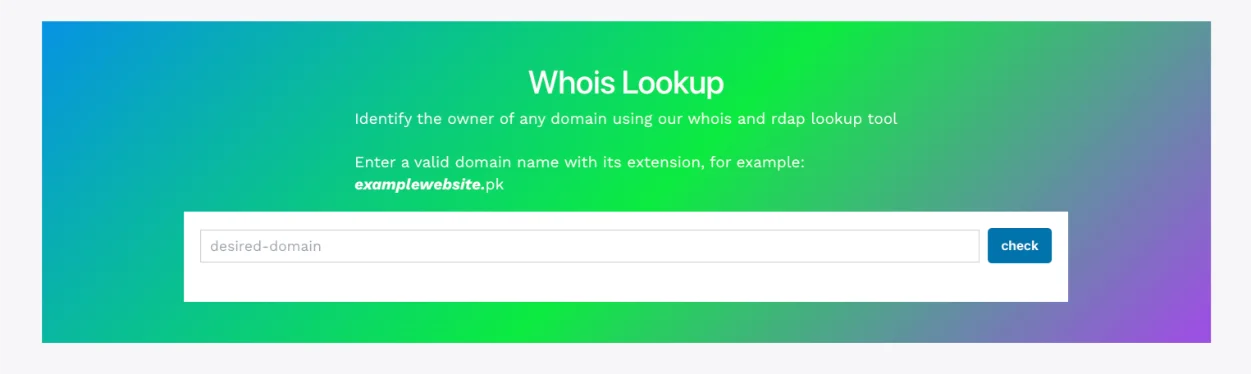
- Enter the full registered domain name into a WHOIS lookup tool.
- Record every status shown, not just the first one.
- Note the registrar, expiry date, and nameservers.
- Compare all of it against what your account shows.
- Save a timestamped screenshot for your records.
One thing to expect with .pk lookups: PKNIC’s WHOIS output is more restricted than most gTLDs by default. Registrant contact fields are hidden. You’ll typically see only the registration date, expiry date, and nameservers.
For .com or .org domains, use ICANN Lookup instead.
You may also notice that RDAP output shows human-readable text rather than the camel-case EPP code you’d expect, something like “Transfer Prohibited” instead of clientTransferProhibited. Go by the meaning, not the typography.
Diagnose by symptom, not by guesswork
Match what you’re experiencing to the right group of codes before you start troubleshooting blind:
- Website and email both fail → check clientHold, serverHold, inactive, and expiry-related states
- Website works but a transfer fails → check clientTransferProhibited, serverTransferProhibited, pendingTransfer
- Nameserver change fails → check clientUpdateProhibited, serverUpdateProhibited, pendingUpdate
- Renewal payment went through, but status didn’t change → check pendingRenew, serverRenewProhibited, redemptionPeriod, serverHold, pendingDelete
This alone will point you at the right two or three codes to investigate, instead of ten.
Give your registrar a case they can close
A vague support ticket gets a vague answer. A specific one gets resolved faster.
Include all of this in your first message:
- The domain name
- Every status currently showing
- The time you ran the lookup
- Expiry date and current nameservers
- Which services are affected
- The last date everything worked normally
- Any recent account or contact changes
- Your invoice or order reference
- The error message, word for word
If payment is involved, specify the reference type clearly. A JazzCash or EasyPaisa transaction ID is not the same as a card transaction ID, and mixing them up slows things down.
Then ask directly: which organization set this status, why, and what removes it.
Solve the domain problem at the right layer
Every code you’ve read about here sits at one of four layers. Holds affect delegation. Prohibited codes block one specific operation. Pending codes mark a transaction that hasn’t finished. Grace-period codes just describe where the domain sit s in its normal lifecycle.
Identify the layer first. It tells you who to call and how urgent the fix really is.
PKNIC’s own live policy page is the closest thing to an authoritative source you’ll find, since reseller documentation varies widely and isn’t always current.
At Truehost, we manage, renew, and transfer .pk and international domains for businesses across Pakistan, and we can check your live status with you rather than leave you guessing at a WHOIS screen. If your domain, hosting, or a full setup (from VPS and dedicated servers to OpenClaw hosting, AI Workers, and n8n hosting) all need to work together without this kind of surprise, that’s what we help with.
Open a domain with us at Truehost, and keep your transfer lock switched on until the day you intend to move it.