Domain SearchInstantly check and register your perfect .pk or international domain
 Web HostingGet a .pk domain for as low as PKR 467
 cPanel HostingUser-friendly hosting powered by cPanel
 Reseller HostingLaunch your own hosting business with minimal technical requirements
 Windows HostingOptimized for Windows-based applications and websites
 Affiliate ProgramEarn referral commissions by promoting our services
 WordPress HostingFast & Reliable WordPress Hosting
 Domain TransferMigrate your existing domain seamlessly with zero downtime.
 All DomainsAccess 324+ top-level domains (TLDs) worldwide from a single platform
 Whois LookupIdentify the owner of any domain using our whois and rdap lookup tool
 Managed VPS Hosting
 AI Website BuilderCreate beautiful websites effortlessly using intuitive drag-and-drop features
 Online ShopLaunch a professional online shop with no technical skills required
 BlogDiscover expert guides on hosting, websites, SEO, and digital growth strategies
 ContactGet instant assistance via live chat or email
 SupportAccess help articles, tutorials, and service documentation
 SSL CertificatesEncrypt data, build trust, and boost SEO.
A domain lock helps stop someone from transferring your domain name to another registrar without permission. For many generic extensions, including .com, the control appears in the registrar dashboard as Registrar Lock, Domain Lock, Transfer Lock, or Theft Protection.
You should normally leave this protection enabled. Unlock the domain only when you are deliberately moving it to another registrar, then lock it again if the transfer is cancelled. The procedure takes only a few minutes when your registrar provides a dashboard switch, but .pk domains need special attention because PKNIC also uses “lock” for protected registrant information.
This guide explains both situations without treating them as the same process.
What does locking a domain do?
The standard registrar lock blocks an inter-registrar transfer. On many generic top-level domains, the corresponding registration status is clientTransferProhibited. The registry rejects a request to move the domain while that status remains active.
Locking the domain does not normally interrupt the website, email, nameservers, or DNS records. Visitors can still reach the site because the lock concerns the registration transfer, not the domain’s day-to-day resolution.
The control also has limits. A transfer lock does not:
renew an expired domain;
protect a weak registrar password;
stop every DNS or contact change;
secure website files or hosting;
replace multifactor authentication; or
prove that the person using the account is the legal registrant.
ICANN’s status guide distinguishes a transfer prohibition from update, deletion, renewal, and registry-imposed restrictions. Check the exact status instead of assuming that one switch protects every action.
Before you change the lock
Confirm three details before signing in:
The registrar of record. The company that hosts your website is not necessarily the company that manages the registration. Use ICANN Lookup for supported generic domains or the official PKNIC lookup for
.pknames.Your account access. Use an account controlled by the domain owner, not an agency login or a former employee’s personal email.
Your intended action. Enable the lock for normal protection. Disable it only when an authorised transfer requires the domain to be unlocked.
Save the current nameservers and contact details before a transfer. Changing the registrar should not require a nameserver change, but the record gives you a reliable comparison if anything unexpected happens.
How to lock a domain in the Truehost client area
Truehost’s current support workflow places the control inside the domain management area. Interface wording can change, but the route is:
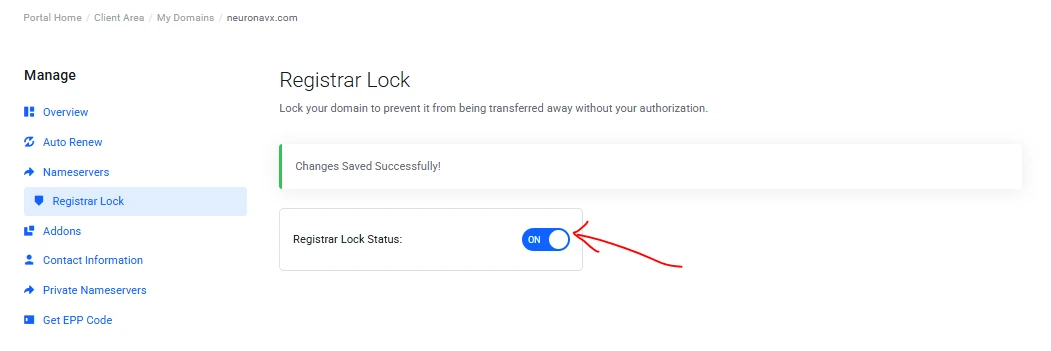
Sign in to the Truehost client area linked from the website where you created the account.
Open Domains or My Domains.
Select the domain you want to protect.
Choose Registrar Lock from the domain-management menu.
Select Enable Registrar Lock or switch the status to enabled.
Reopen or refresh the page and confirm that the control still shows enabled.
Do not look for this setting in cPanel. cPanel manages hosting features such as files, databases, email, and often DNS. The registrar lock belongs to the domain-registration account.
If the option is missing or disabled, contact support from the registered account. Include the domain name and ask whether the extension supports a customer-controlled transfer lock. Do not send a password, recovery code, or transfer code in an ordinary support message.
How to verify that the lock is active
The dashboard setting is the first check, but a public registration lookup can confirm the registry-facing status for many generic domains.
Open ICANN Lookup, enter the complete domain, and review its status values. clientTransferProhibited normally means the registrar lock is active. A domain can carry several statuses at once, so read the whole result.
These similar-looking codes need different responses:
Status | What it generally means | What to do |
|---|---|---|
| The registrar has blocked transfer requests | Leave it in place unless you are transferring |
| The registry has blocked transfers | Ask the registrar why; a dashboard switch may not remove it |
| A transfer request is already being processed | Verify that you authorised it immediately |
| The domain may be removed from DNS publication | Contact the registrar; this is not an ordinary transfer lock |
Lookup data may not update the instant you press the switch. Wait briefly and check again. If the dashboard and registry result still disagree, ask the registrar to confirm the effective status.
How to unlock a domain for transfer
Unlocking should be a short, controlled window attached to a transfer that you initiated.
Confirm that the receiving registrar and transfer destination are correct.
Make sure the registrant or administrative email can receive approval messages.
Sign in directly through the registrar’s official website.
Open the domain’s Registrar Lock setting and disable it.
Request the unique AuthInfo, EPP, or transfer code if the extension uses one.
Start the transfer with the receiving registrar and approve only the expected requests.
Monitor both registrar accounts and the registered email until the move finishes.
Treat the transfer code like a password. Give it only to the receiving registrar through its secure transfer form. Do not paste it into public chat, forward it through an unverified agent, or reuse a screenshot that exposes the code.
If you decide not to transfer, enable the lock again. Once a completed transfer reaches the new registrar, check its lock setting because the new account may apply protection automatically or may require you to enable it.
Why an unlocked domain may still not transfer
The manual registrar lock is only one possible restriction. Under the current ICANN transfer rules, a generic domain may be ineligible during the first 60 days after initial registration, during the first 60 days after a registrar transfer, or during an applicable 60-day change-of-registrant lock.
A pending dispute, court order, or another registry restriction can also block a move. Turning off Registrar Lock does not override these conditions.
Ask the current registrar for the exact denial reason. If it does not offer a self-service unlock facility, ICANN requires it to provide a reasonable method and, for covered generic domains, remove clientTransferProhibited within five calendar days of the registrant’s request. That policy does not mean every transfer must complete in five days; it addresses access to the unlock and AuthInfo process.
The .pk lock is a different case
Do not assume that a .com transfer toggle describes every .pk procedure.
PKNIC, the .pk registry, says a domain’s registrant record remains locked to prevent unauthorised domain transfers. Its published “unlock registrant information” process concerns protected ownership data and may require documentary proof. For a company, PKNIC asks for an authority letter on company letterhead with an official seal and a copy of the relevant CNIC. An individual may need an affidavit in PKNIC’s prescribed format.
PKNIC’s account-transfer instructions also distinguish moving a domain between PKNIC accounts from a standard generic-domain registrar transfer. The registry says the domain must not be expired, requires ownership documentation and email confirmation, and estimates three to four business days after document verification. For registrars outside Pakistan, an authorisation-code route may be available at PKNIC’s discretion.
Start with your registrar or reseller if it manages the .pk domain for you. Ask whether you need:
a dashboard transfer control;
a reseller-side request;
a PKNIC account transfer;
an unlock of registrant information; or
original supporting documents.
Use the current PKNIC procedure before preparing or posting documents. This avoids confusing a security toggle with a legal ownership-record change.
Keep the domain secure after locking it
A lock is useful only as one layer in a controlled account. Strengthen the surrounding access:
use a unique password stored in a password manager;
enable multifactor authentication when the registrar offers it;
secure the registered email account separately;
keep recovery details under company control;
limit administrator access to people who need it;
turn on renewal and transfer notifications; and
review registrant details and lock status periodically.
Maintain a simple domain register for business names. Record the registrar, registrant, renewal date, nameservers, recovery owner, lock status, and approved administrators. Never store live transfer codes in that register.
If an unexpected transfer notice arrives, do not click its links. Sign in through the registrar’s known address, verify the status, change compromised credentials, and contact the registrar immediately. A pendingTransfer status that you did not request needs urgent attention.
Lock by default, unlock with a purpose
The safest routine is straightforward: leave the registrar lock enabled during normal use, verify the effective status, and disable it only for a transfer you have deliberately started. Protect the registrar account and registered email as carefully as the domain itself.
For .pk domains, first identify whether “unlock” means a transfer setting, a move between PKNIC accounts, or access to locked registrant information. Those actions can require different proof and cannot be reduced to one universal toggle.
If you are registering a new name or bringing related domains under one account, search domains through Truehost Pakistan and confirm the available management and transfer controls for the extension you choose.