Domain SearchInstantly check and register your perfect .pk or international domain
 Web HostingGet a .pk domain for as low as PKR 467
 cPanel HostingUser-friendly hosting powered by cPanel
 Reseller HostingLaunch your own hosting business with minimal technical requirements
 Windows HostingOptimized for Windows-based applications and websites
 Affiliate ProgramEarn referral commissions by promoting our services
 WordPress HostingFast & Reliable WordPress Hosting
 Domain TransferMigrate your existing domain seamlessly with zero downtime.
 All DomainsAccess 324+ top-level domains (TLDs) worldwide from a single platform
 Whois LookupIdentify the owner of any domain using our whois and rdap lookup tool
 Managed VPS Hosting
 AI Website BuilderCreate beautiful websites effortlessly using intuitive drag-and-drop features
 Online ShopLaunch a professional online shop with no technical skills required
 BlogDiscover expert guides on hosting, websites, SEO, and digital growth strategies
 ContactGet instant assistance via live chat or email
 SupportAccess help articles, tutorials, and service documentation
 SSL CertificatesEncrypt data, build trust, and boost SEO.
Switching registrars shouldn’t cost you sleep, and for most domains, it won’t. The whole process comes down to three things: your domain needs to be eligible, unlocked, and armed with the right authorization code. Line those up, and the rest is just waiting it out.
This guide covers the standard transfer process end to end, what to check before you start and after you finish, plus the one major exception: .pk domains, which skip the authorization-code system entirely in favor of a manual, paperwork-based approval.
Transferring a Domain Between Registrars
Before You Start
Before you initiate anything, check that:
- The domain is eligible for transfer and isn’t inside a 60-day lock. ICANN’s transfer policy imposes a mandatory 60-day lock after a domain is newly registered, after it’s transferred between registrars, or after certain registrant contact changes, and no registrar can override or shorten it.
- The domain is unlocked at your current registrar. Separate from the ICANN lock, most registrars apply their own clientTransferProhibited status by default as a security measure, and you’ll need to remove it yourself through your account dashboard.
- Your registrant contact details and email are current, since approval requests are typically sent to the registrant email on file.
- You have the domain’s EPP/Auth code (also called a transfer secret or auth-info code) from your current registrar.
- Privacy protection is temporarily disabled if it’s blocking you from accessing transfer information you need.
- The domain isn’t expired, in redemption, under dispute, or otherwise restricted. A domain in Redemption Grace Period has to be restored by your current registrar, sometimes for an added fee, before a transfer can proceed.
- The expiration date isn’t imminent. If it’s close, renewing before you transfer can save you a headache, since a lapsed domain adds restoration steps to an already multi-step process.
How to Transfer the Domain
i) Create an account with the new registrar. You’ll need this set up before you can accept an incoming transfer.
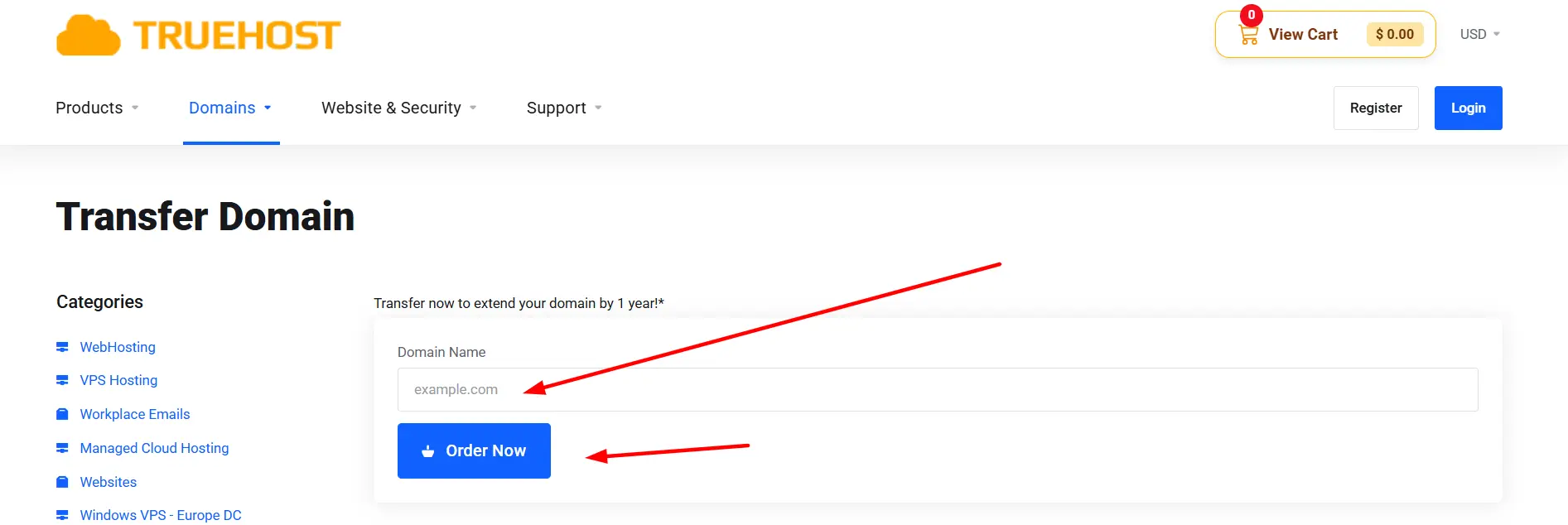
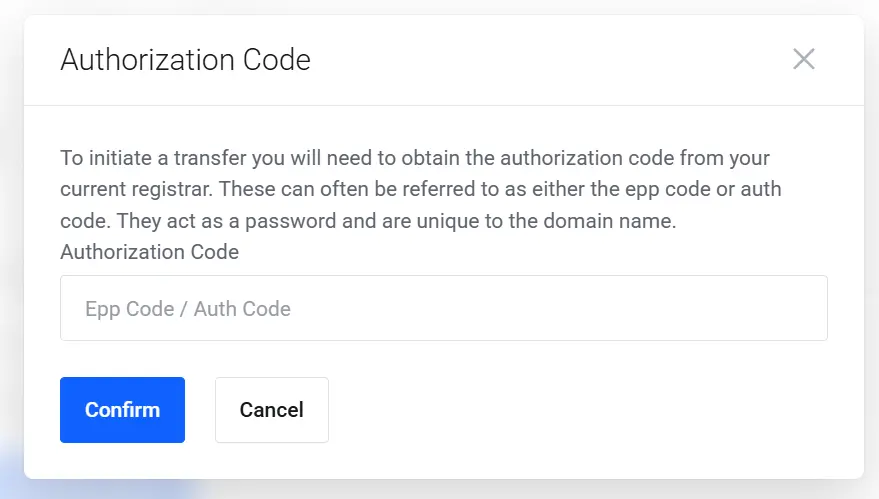
ii) Start the transfer and enter your domain name and EPP/Auth code. Get this code from your current registrar beforehand if you haven’t already; it’s case-sensitive, so copy and paste it rather than retyping it.
iii) Check your email and approve the transfer if required. Approval requests usually go to the registrant email on file, so make sure that inbox is one you can actually access.
iv) Know your rights if the transfer is rejected. Your current registrar can only deny a valid transfer request for specific reasons permitted under ICANN rules, not simply because they don’t want to lose your business.
v) Wait for the transfer to complete. This typically takes about five to seven days, though it can run longer depending on the registrars involved.
vi) Confirm everything landed correctly. Once the transfer finishes, log into your new registrar to verify the domain is there, and double-check your DNS settings carried over as expected.
If You Have a .pk Domain, Here’s What’s Different
.pk domains, including .com.pk, .net.pk, and .org.pk, don’t go through the standard EPP-code process described above. PKNIC, the Pakistani registry, handles these as a manual, document-based approval instead:
- Instead of an EPP/Auth code, you’ll need a written authority letter from the registrant, not an agent or technical contact, signed and stamped on official company letterhead.
- Company-owned domains also require a clear copy of the CNIC of whoever signs the letter (typically the CEO, director, or company head).
- If the name on the letterhead doesn’t exactly match the registrant record, PKNIC may require a supporting affidavit, sworn before a notary public or oath commissioner and executed on stamp paper, explaining the discrepancy.
- The letter needs to specify both the current account/registrar the domain is transferring from and the one it’s transferring to.
- PKNIC does not accept scanned copies of the authority letter; the original signed document has to be sent by post to their office in Lahore. Once received, PKNIC verifies the documents by phone before processing the transfer.
- Because of the manual review and postal requirement, expect this to take longer than a standard transfer; PKNIC cites roughly three to four business days after documents are verified, though total turnaround (including mail time and any corrections) commonly stretches to a week or more.
- Your site shouldn’t go down during this: the transfer changes management of the domain, not its DNS.
Exact document formats and mailing details can vary depending on which registrar or reseller you’re working with on the receiving end, so it’s worth confirming specifics with both your current and new registrar before you start.
Common Transfer Problems
Most stalled transfers trace back to one of a handful of causes:
- Domain is still locked. This could be the registrar’s own security lock, which you can usually toggle off yourself, or the mandatory ICANN 60-day lock, which no one can override regardless of registrar.
- EPP/Auth code is incorrect or expired. These codes are case-sensitive and sometimes reset automatically after certain account changes, so it’s worth generating a fresh one right before you start rather than reusing an old copy.
- Contact email is incorrect or inaccessible. Approval requests go to the registrant email on file; if that inbox is outdated or no longer checked, the transfer request can simply sit unapproved until it expires.
- Domain has an unresolved dispute or other restriction. Domains in redemption, under UDRP dispute, or flagged for non-payment typically need to be resolved or restored before a transfer can proceed at all.
- Transfer is rejected without a valid reason. ICANN policy only permits a losing registrar to deny a transfer for a specific set of reasons: an unpaid balance or suspected fraud, for example, not simply reluctance to lose the business.
If a registrar improperly blocks a transfer, you can file a complaint with ICANN; registrars aren’t allowed to deny a valid request just to retain your business.
Transferring Domain Ownership
This is a different process from transferring a domain between registrars, and it’s easy to conflate the two. A registrar transfer moves where your domain is managed. An ownership transfer changes who it belongs to.
When Do You Need an Ownership Transfer?
You’d use this process when you’re:
- Selling a domain.
- Giving a domain to someone else.
- Transferring a domain as part of a business sale.
- Moving ownership to another person or organization.
How Domain Ownership Transfer Works
This process is often called a Change of Registrant or Owner Change. Both the previous and new registrants typically need to approve the change, though some registrars allow a Designated Agent to handle approval on one or both parties’ behalf.
Depending on the circumstances, a 60-day transfer lock may also apply after the ownership change goes through.
Practical Ownership Transfer Options
- Same registrar: use a domain or account push if your registrar supports it; this is usually the fastest option since it stays within one system.
- Different registrar: you may need to complete the ownership change and the registrar transfer as two separate steps.
- Domain sale: consider using an escrow service to protect both the buyer and the seller during the handoff.
- After the change: update contact, billing, and payment information so the new owner has full control going forward.
Transfer Your Domain Easily
Domain transfers look intimidating mostly because there are several moving pieces: unlocking, contact verification, auth codes, waiting periods, not because any one step is genuinely hard. For most domains, the process boils down to unlocking at your old registrar, grabbing your EPP code, and starting the transfer at your new one, then giving it a few days to complete. The exception is .pk domains, where PKNIC’s manual, letter-based process means a bit more paperwork and patience, but the underlying goal is the same: making sure the person requesting the move is actually authorized to make it.
Whichever type of domain you’re moving, the same habits keep things simple: confirm you’re within your rights before you start, keep your contact information current, and don’t wait until the last minute if your registration is close to expiring.
Ready to move your domain? Truehost can walk you through the transfer from start to finish, including the manual .pk process, so nothing gets stuck in your inbox waiting for an approval you missed.
Transfer a Domain Name FAQs
Do .pk domain transfers use an EPP/Auth code like other domains?
No. PKNIC doesn’t use the EPP/Auth code system that gTLDs (like .com or .net) rely on. Instead, transfers are authorized through a signed, physical authority letter from the registrant, sent by post.
Do I need my CNIC to transfer a .pk domain?
If the domain is owned by a company, yes, a clear copy of the CNIC belonging to the person signing the authority letter (typically the CEO or director) is required. If the registrant is an individual and there’s a name mismatch requiring an affidavit, a CNIC copy is generally needed there too.
How long does a .pk domain transfer take?
PKNIC generally processes the transfer within about three to four business days after your documents are received and verified by phone. In practice, total turnaround is often closer to a week or more once you factor in postal delivery time and any corrections needed to the paperwork.
Can I transfer a .pk domain myself, or does it have to go through a registrar?
You (or your company’s authorized signatory) prepare and sign the authority letter yourself, but the documents are submitted to PKNIC; the party managing your account will typically coordinate this with you rather than you mailing it independently.
Is transferring .pk domain ownership different from transferring it between registrars?
Yes, the same way it is for other domains: a registrar transfer changes where the domain is managed, while an ownership transfer changes who legally holds it. For .pk domains, both processes route through PKNIC’s manual, letter-based approval rather than an automated system.
Is there a free way to transfer a .pk domain name?
PKNIC doesn’t charge a fee to process the authorization paperwork itself, though you should expect to cover postage to mail the original documents, and potentially notary or stamp-paper costs if an affidavit is required. Any additional fees would depend on your specific registrar or reseller.