Domain SearchInstantly check and register your perfect .pk or international domain
 Web HostingGet a .pk domain for as low as PKR 467
 cPanel HostingUser-friendly hosting powered by cPanel
 Reseller HostingLaunch your own hosting business with minimal technical requirements
 Windows HostingOptimized for Windows-based applications and websites
 Affiliate ProgramEarn referral commissions by promoting our services
 WordPress HostingFast & Reliable WordPress Hosting
 Domain TransferMigrate your existing domain seamlessly with zero downtime.
 All DomainsAccess 324+ top-level domains (TLDs) worldwide from a single platform
 Whois LookupIdentify the owner of any domain using our whois and rdap lookup tool
 Managed VPS Hosting
 AI Website BuilderCreate beautiful websites effortlessly using intuitive drag-and-drop features
 Online ShopLaunch a professional online shop with no technical skills required
 BlogDiscover expert guides on hosting, websites, SEO, and digital growth strategies
 ContactGet instant assistance via live chat or email
 SupportAccess help articles, tutorials, and service documentation
 SSL CertificatesEncrypt data, build trust, and boost SEO.
Domain forwarding lets you automatically send visitors from one domain or URL to another. Instead of visitors hitting a dead page or a domain you no longer use actively, they land exactly where you want them, without you touching a single line of code.
For Pakistani businesses, this comes up more often than people expect. A few common scenarios:
- Rebranding: you’ve changed your business name and registered a new domain, but people still type the old one from memory or old ads.
- Bringing .pk, .com.pk, and .com domains under one main website: many Pakistani businesses register several extensions of the same name defensively, then want all of them pointing to a single, primary site.
- Fixing www/non-www versions: making sure www.yoursite.com and yoursite.com don’t behave as two separate sites, which can confuse visitors and split your SEO signals.
- Moving away from an old domain after changing hosting providers: especially useful during a transition period, so old links and bookmarks don’t break.
Before setting anything up, it helps to know the four building blocks of domain forwarding:
- 301 redirect (permanent): Use this when the old domain or URL has permanently moved to a new one. It also helps search engines transfer SEO signals to the new URL.
- 302 redirect (temporary): Use this when the change is only temporary, such as during maintenance.
- Standard forwarding: Sends visitors to the new URL, which appears in their browser. This is the recommended option for most businesses.
- Masked forwarding: Sends visitors to the new website while keeping the old URL in the browser. It can confuse visitors and search engines, so it is generally not recommended for long-term use.
This guide walks through what you need before you start, exactly how to set up forwarding in cPanel, when it makes sense to use it, and how to fix the problems that come up most often.
What You Need Before Setting Up Domain Forwarding
a) An active domain
Your domain must be registered and currently active; an expired or suspended domain won’t forward correctly regardless of what you configure in cPanel.
If you’re working with a .pk domain (including .com.pk, .org.pk, .net.pk, and similar), it’s worth understanding how the registration side works locally. PKNIC (Pakistan Network Information Centre) is the organization responsible for administering the .PK namespace; it runs the registry, maintains the root DNS for .pk domains, and handles the registration records themselves. However, PKNIC generally doesn’t sell hosting or manage your website’s DNS day-to-day; that part is usually handled separately by a hosting provider or a PKNIC reseller.
In practice, this means your domain’s registration and your domain’s hosting/DNS can sit with two different companies, and both need to be in order before forwarding will work.
b) cPanel hosting
You need access to the cPanel account that controls the domain; not just any hosting account, but specifically the one where the domain (or the destination it’s pointing to) actually resolves.

You’ll also need the hosting provider to have the Redirects feature enabled on your account. Most shared and reseller hosting plans in Pakistan include this by default, but it’s worth checking with your host if the feature doesn’t appear in your cPanel dashboard.
c) Access to your domain/DNS settings
If the domain doesn’t already point to the hosting account where you’ll be creating the redirect, you’ll need access to your domain registrar or DNS manager as well. It helps to keep the roles straight:
- Domain registrar: the company where the domain is registered (for example, PKNIC or a PKNIC reseller for .pk domains, or an international registrar for .com domains).
- DNS: the system that directs the domain to a specific server, usually configured through nameservers or A/CNAME records.
- cPanel: where the actual redirect rule is created, once the domain is already pointing to the correct server.
In short: the domain has to reach the hosting server first (via DNS) before cPanel can do anything with it.
d) Destination URL
Decide exactly where visitors should land; not just the domain, but the specific page if that’s relevant. Always use the complete URL, including https://. cPanel requires a protocol (http:// or https://) in the destination field, and leaving it out is one of the most common reasons a redirect fails to save or behaves unexpectedly.
Step-by-Step: Setting Up Domain/URL Forwarding in cPanel
i) Log in to cPanel.
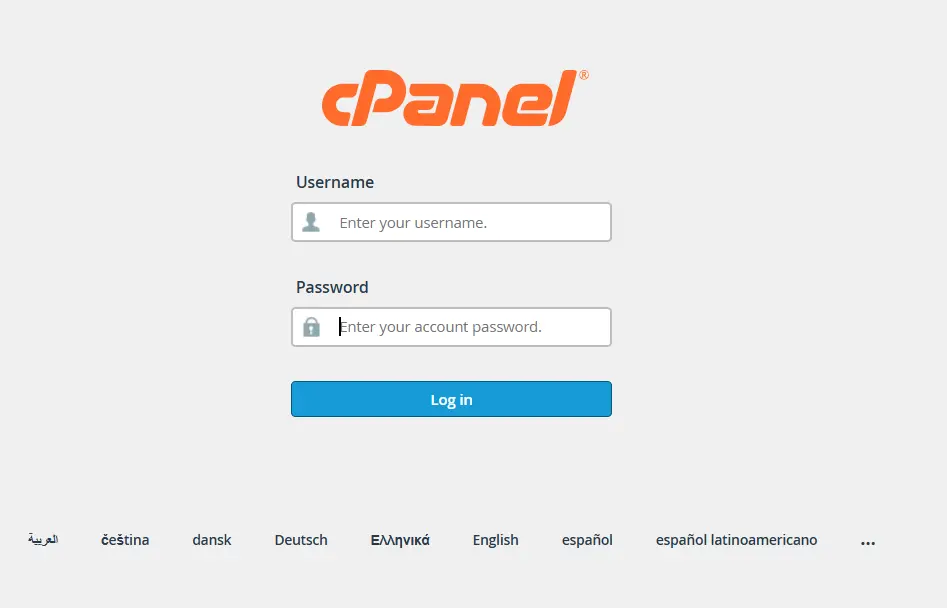
ii) Go to Domains → Redirects. Depending on your hosting provider’s cPanel theme, “Redirects” may be listed directly under the “Domains” section, or you can simply type “Redirects” into the cPanel search bar to jump straight to it.
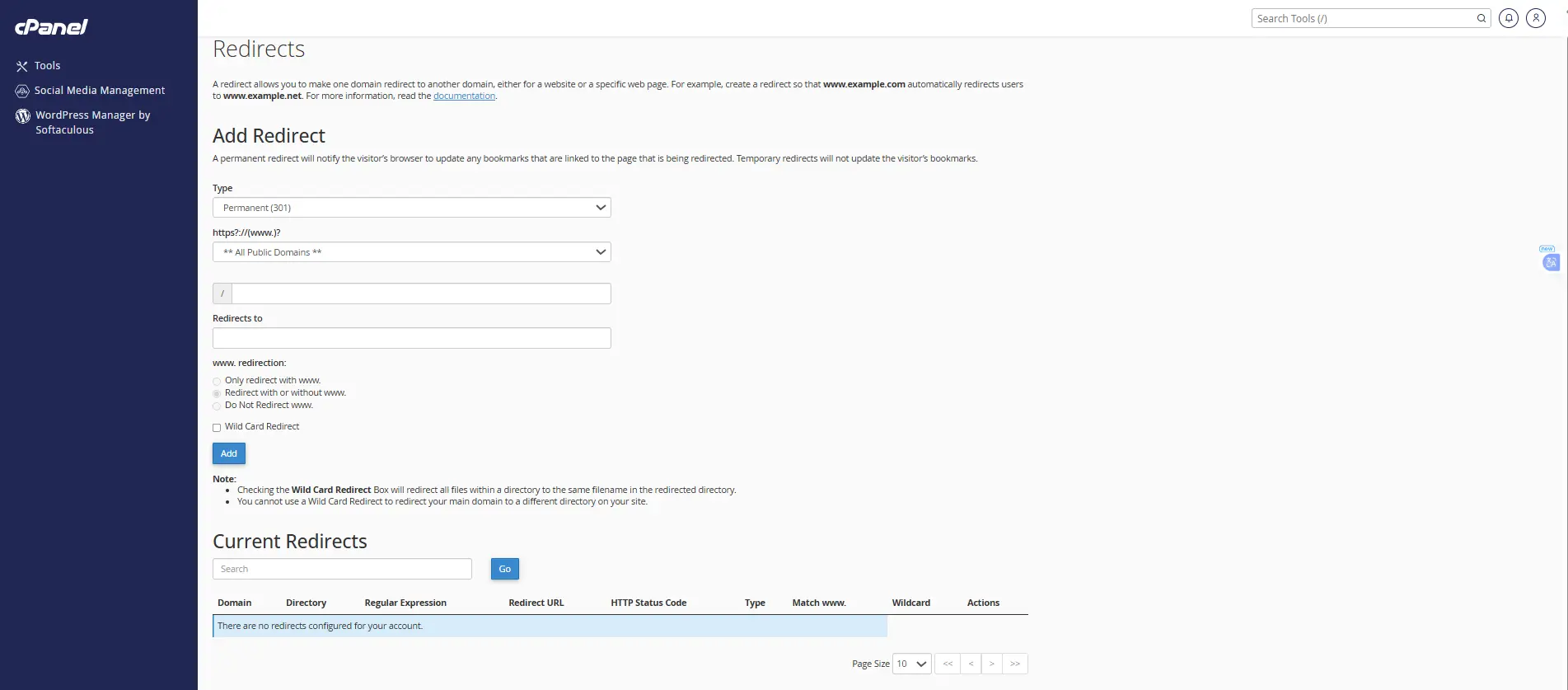
iii) Choose the redirect type: Permanent (301) if the move is final, or Temporary (302) if you expect to reverse it or reuse the original URL later.
iv) Select the domain to redirect from the dropdown. Every domain and subdomain associated with the cPanel account will appear here, including an option to select all public domains if you want the same rule applied broadly.
v) Enter the destination URL, making sure it includes http:// or https://.
vi) Set the www handling option. You’ll typically see three choices:
- Only redirect with www: only visitors who type the www version get redirected.
- Redirect with or without www: all visitors are redirected regardless of whether they include www.
- Do not redirect www: visitors using the www version are left alone. For most businesses consolidating domains, “Redirect with or without www” is the safest default, since it catches all variations of how someone might type your address.
vii) (Optional) Enable Wildcard Redirect if you also want all subdirectories and subdomains of the old domain to redirect to the corresponding path on the new one, rather than just the homepage.
viii) Click Add and confirm the success message. The new rule should now appear in the “Current Redirects” list at the bottom of the page.
After setup, it’s worth testing the redirect in a private/incognito browser window, since your regular browser may cache the old page and make it look like nothing changed.
When Should You Use Domain Forwarding?
Domain forwarding is useful any time you want visitors to land on the right website or page automatically, rather than hitting an old or inactive one. Common situations include:
- Moving from an old domain to a new one after a rebrand or business change.
- Redirecting a .pk domain to a .com domain (or vice versa), so you’re not maintaining two separate live sites.
- Redirecting a .com.pk domain to your main website, common when a business registers the local extension mainly to protect its name.
- Sending visitors from an old page to a new page after restructuring your site.
- Redirecting an alternative or shorter domain, such as a marketing-friendly nickname, to your primary site.
- Redirecting an old domain after rebranding, so existing customers, bookmarks, and backlinks aren’t lost.
Common Domain Forwarding Problems
Even a correctly configured redirect can seem “broken” at first. Here are the issues that come up most often, and how to fix them.
| Problem | Likely Cause | Fix |
| Redirect not working or keeps looping | Conflicting redirect or www settings | Check the www option, disable Wildcard if unnecessary, and make sure the destination doesn’t redirect back to the original domain. |
| Domain can’t be redirected | The domain isn’t added to cPanel or DNS hasn’t updated yet | Add the domain to cPanel and wait for DNS changes to take effect. |
| .htaccess conflict | Existing redirect or rewrite rules are conflicting | Check .htaccess for conflicting rules. Back up the file before making changes. |
| SSL/HTTPS error | The destination doesn’t have a valid SSL certificate | Install an SSL certificate on the destination domain and make sure HTTPS is working. |
| Website and email forwarding are confused | Website redirects and email forwarding are separate features | Use Domains → Redirects for website visitors and Email → Forwarders for email. |
If a redirect still isn’t working after checking all of the above, the next step is usually to verify with your hosting provider that the domain is correctly pointed to the account and that the Redirects feature is active; particularly important in Pakistan, where the domain registrar (such as PKNIC or a reseller) and the hosting provider are frequently two separate companies, and a gap between the two is the most frequent root cause of forwarding issues.
Send Your Domain Visitors to the Right Place
Domain forwarding is a small setup step that solves a lot of real problems, consolidating .pk, .com.pk, and .com domains under one brand, fixing a www mismatch, or making sure no one lands on a dead page after you’ve switched hosts. Once your domain and DNS are pointed correctly, the redirect itself takes just a few minutes to configure in cPanel.
The part that actually needs to be right is the foundation underneath it: hosting that gives you full, unrestricted access to the Redirects tool, without waiting on a support ticket to enable it. That’s exactly what you get with Truehost’s cPanel hosting; every plan comes with cPanel access, so you can set up redirects, manage DNS, and bring all your domains under one site whenever you need to, without extra approvals or add-on fees.
How to Use Domain Forwarding in cPanel in Pakistan: FAQs
Is domain forwarding in cPanel free?
Yes. The Redirects tool is a built-in cPanel feature included with standard hosting plans; there’s no extra charge to create or manage a redirect, as long as your hosting provider has the feature enabled on your account. You only pay the usual costs of owning the domain(s) and hosting involved.
Can I forward a .pk domain to a .com domain?
Yes. As long as both domains are active and the .pk domain is pointed to a cPanel hosting account with the Redirects feature enabled, you can forward it to any destination URL, including a .com domain. This is a common setup for Pakistani businesses that register the local extension mainly to protect their brand name while running their main site on .com.
Does domain forwarding affect my SEO rankings?
It can, depending on the type of redirect used. A 301 (permanent) redirect passes most of the original page’s ranking signals to the new destination, so search engines gradually update their index and rankings transfer over. A 302 (temporary) redirect tells search engines the move isn’t permanent, so it typically won’t pass ranking signals in the same way, and the original URL may stay indexed. For a permanent move, like a rebrand, a 301 is generally the better choice for SEO continuity.
How long does it take for a cPanel redirect to work in Pakistan?
If the domain is already pointed to the hosting account, the redirect itself usually takes effect within minutes of clicking “Add.” If you’ve just updated nameservers or DNS records, propagation can take anywhere from a few hours to about 24–48 hours to fully reach all networks and ISPs, including those in Pakistan. Testing in a private/incognito browser window helps avoid mistaking browser cache for a propagation delay.
Can I forward a domain without hosting (i.e., using only PKNIC/registrar tools)?
It depends on the registrar. Some registrars and resellers offer basic DNS-level forwarding that doesn’t require an active hosting account, but this is typically limited to simple, whole-domain redirects. PKNIC itself administers the .PK registry rather than providing website hosting or a redirects dashboard, so for anything beyond a basic forward, such as specific page redirects, wildcard rules, or handling www variations, you’ll generally need a cPanel hosting account.
What’s the difference between “Redirects” and “Domain Forwarders” in cPanel?
They’re two different features. Domains → Redirects sends website visitors from one URL to another; this is what’s covered in this guide. Email → Forwarders (sometimes labeled Domain Forwarders) redirects incoming email for a domain to a different email address or account, and has nothing to do with where website traffic ends up. Mixing the two up is a common source of confusion, especially since both live under similarly named sections of cPanel.