Domain SearchInstantly check and register your perfect .pk or international domain
 Web HostingGet a .pk domain for as low as PKR 467
 cPanel HostingUser-friendly hosting powered by cPanel
 Reseller HostingLaunch your own hosting business with minimal technical requirements
 Windows HostingOptimized for Windows-based applications and websites
 Affiliate ProgramEarn referral commissions by promoting our services
 WordPress HostingFast & Reliable WordPress Hosting
 Domain TransferMigrate your existing domain seamlessly with zero downtime.
 All DomainsAccess 324+ top-level domains (TLDs) worldwide from a single platform
 Whois LookupIdentify the owner of any domain using our whois and rdap lookup tool
 Managed VPS Hosting
 AI Website BuilderCreate beautiful websites effortlessly using intuitive drag-and-drop features
 Online ShopLaunch a professional online shop with no technical skills required
 BlogDiscover expert guides on hosting, websites, SEO, and digital growth strategies
 ContactGet instant assistance via live chat or email
 SupportAccess help articles, tutorials, and service documentation
 SSL CertificatesEncrypt data, build trust, and boost SEO.
Most small websites need 1 to 10 GB of hosting storage.
But the right number depends on your site type. It also depends on how much media you use.
Web pages have grown heavier every year. The median webpage has more than doubled in size since 2014.
In 2025, the typical page hit 2.86 MB on desktop and 2.56 MB on mobile. Desktop grew 7.3% year-over-year. Mobile grew 8.4%.
The heaviest 10% of pages now exceed 8 MB. That’s why experts recommend keeping individual web pages under 2 MB where possible.
Anything heavier slows load times on average connections. It also eats into your hosting storage and bandwidth faster than you’d expect.
Images still drive most of that weight, at roughly 40% of total page size. But JavaScript files have quietly overtaken images in sheer number per page. Lean code is important just as much as compressed media.
So how much hosting storage does a website need? This guide breaks it down by site type, shows you how to calculate your own needs, and helps you pick a plan that won’t leave you stuck mid-launch.
Page weight trend:
| Year | Desktop Median | Mobile Median |
|---|---|---|
| 2014 | ~1.2 MB | ~505 KB |
| 2022 | ~2.28 MB | ~2.01 MB |
| 2025 | ~2.86 MB | ~2.56 MB |
What Uses Website Storage?
Not every part of your website eats storage equally. Here’s where it goes.
- Website files (HTML/CSS/JS): Usually negligible. These files rarely cause storage problems on their own.
- Images: The biggest driver for photography sites, ecommerce stores, blogs, and news sites.
- Videos and audio: We recommend hosting these externally on YouTube or Vimeo instead of storing them on your account. Video files are large, and they add up fast.
- Databases: WordPress, WooCommerce, membership sites, and forums all rely on databases. These grow steadily over time as you add content, comments, and orders.
- Themes, plugins, and applications: Cache buildup and orphaned files from old plugin versions quietly consume space.
- Email: Your mailbox grows with every attachment you send or receive. This creeps up slowly but surely.
- Backups: Some hosts store backups on your account. Others use separate infrastructure. Check your host’s policy, because it affects your usable storage significantly.
This is important and here’s why. A photography site with 2,000 high-resolution images can burn through 10 GB before it even touches plugins or email.
A text-heavy blog with the same page count might sit under 1 GB. The content type, not the page count, decides your real usage.
What Increases Storage Needs
A few factors push your storage needs up faster than expected.
The 2 MB per-page guideline are important here too. If your pages spread heavy media across many pages instead of compressing it, your total footprint climbs quickly.
Bandwidth adds up in a similar way. Here’s a simple example:
- 1,000 visitors a day × an 800 KB page = 800 MB a day
- That’s roughly 24 GB a month, just in bandwidth
Storage and bandwidth aren’t the same thing. But heavy pages strain both at once.
There’s a tradeoff worth naming here. Compressing every image and stripping every script gives you the smallest possible footprint.
But it also takes time, and some visual quality gets lost along the way. Most site owners land somewhere in the middle: compress aggressively on high-traffic pages, and worry less about it on pages few people visit.
Typical Storage by Site Type
Every site is different. But most fall into predictable ranges.
Simple blogs and personal sites typically use around 700 MB to 1 GB. That’s a helpful baseline for what “light” looks like.
Video platforms sit at the other extreme, and they’re a useful reference point only. YouTube alone sees over 500 hours of video uploaded every minute, which works out to roughly 720,000 hours of new content per day.
No small business site needs anywhere near that scale. It just shows why storage math for video-heavy platforms doesn’t apply to typical websites.
For smaller, media-light sites, we often recommend unlimited hosting. It removes the guesswork entirely.
| Website Type | Typical Starting Storage |
|---|---|
| Simple landing page | 1–2 GB |
| Personal blog | 2–5 GB |
| Small business website | 5–10 GB |
| Portfolio website | 5–20 GB |
| WordPress website | 5–20 GB |
| Small online store | 10–30 GB+ |
| Media-heavy website | 50 GB+ |
| Large ecommerce/content website | 50–100 GB+ |
A few of these deserve a closer look.
A small online store needs more room than a blog because every product usually comes with multiple images, plus variant data, order history, and customer records stored in the database. A store with 200 products and a handful of images per product can realistically use 15–20 GB within its first year.
A media-heavy website, like a photography portfolio or a design agency’s showcase, climbs fast for the opposite reason. Even a few hundred unoptimized images at 5 MB each can add up to gigabytes of storage before you’ve written a single blog post.

If you are Not sure which bracket fits you, Check our hosting plans and match your site type to the right tier.
How to Calculate Your Storage Requirements
Guessing your storage needs is risky. A simple calculation gets you much closer to the right number.
a) Estimate Your Current Usage
Start by adding up what you already have.
- Website files (HTML, CSS, JS)
- Images
- Databases
- Email storage
- Any other account data
You don’t have to do this by hand. Most hosting control panels, including cPanel, hPanel, and Plesk, show a built-in storage and disk usage breakdown. It’s faster and more accurate than manual math.
b) Estimate Future Growth (1-Year Horizon)
Don’t size your plan to match your current usage. That leaves no room to grow.
Instead, project about 12 months forward. Consider:
- Expected new pages, posts, or products
- New images or videos and their file sizes
- Database growth from posts, comments, orders, and accounts
- Planned redesigns, plugins, or new functionality
- Traffic growth and its effect on email volume and backup size
Here’s a useful rule of thumb: if your storage grew about 30% over the past year, project similar growth going forward. Adjust upward if you know of a specific accelerator, like launching a store or adding video content.
c) Leave a Storage Buffer
Even a solid projection needs headroom. Unpredictable factors always show up.
- New content or images beyond your projections
- Additional plugins or theme updates
- Database bloat from spam, revisions, or cached data
- Temporary files created during normal operation
- Unplanned features or updates
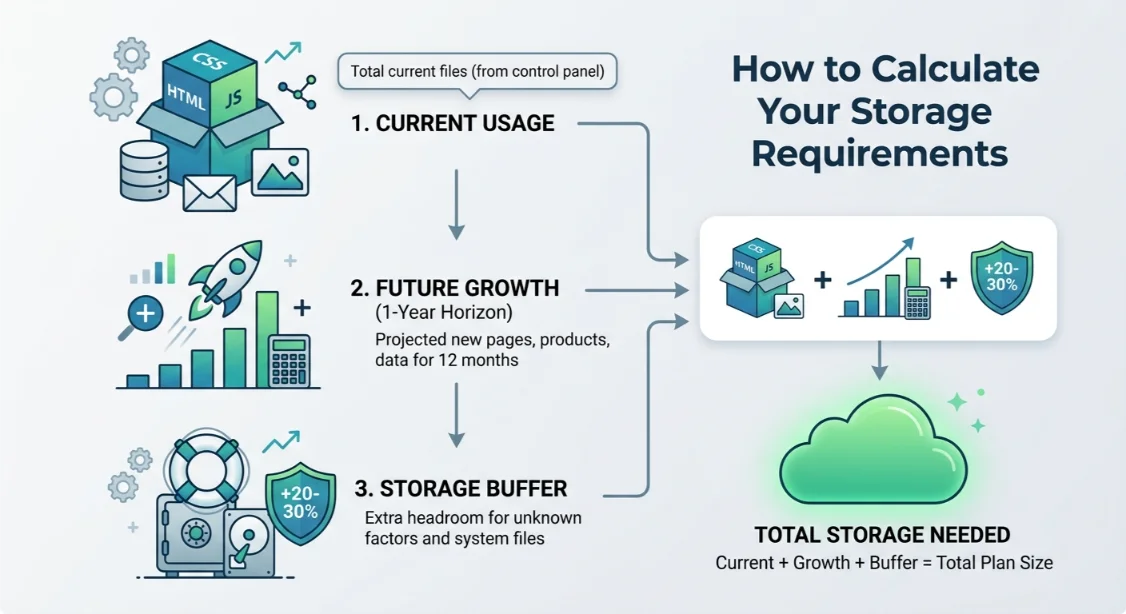
A safe rule of thumb: add 20–30% on top of your 1-year projection. This buffer exists for one reason. It keeps you from a reactive, urgent upgrade the moment your site finally gains traction.
How to Reduce Website Storage Usage
Sometimes the smartest move isn’t a bigger plan. It’s a leaner site.
- Compress images before uploading them
- Remove unused plugins and themes
- Clean up old backups regularly
- Delete unnecessary files sitting in your file manager
- Optimize your database to clear spam and old revisions
- Store large videos externally instead of on your account
- Use a CDN correctly a CDN speeds up delivery, but it doesn’t add to your storage
These habits alone can buy you months, sometimes years, before you need to upgrade.
There’s a tradeoff here too. Cleanup takes time, and some of it needs to happen regularly, not just once. Old backups pile back up.
Cache rebuilds. Database bloat returns. Storage cleanup is like ongoing maintenance, not a one-time fix, the same way you’d treat security updates or plugin patches.
Which Truehost Plan Do You Need?
Once you know your numbers, matching a plan becomes simple.
If you’re running a landing page, a blog, or a small portfolio, our Starter plans cover you comfortably. They’re built for lighter sites that don’t need much headroom.
If your WordPress or business site is growing, our Pro-tier plans give you more storage and better performance as your content library expands.
If you’re running multiple sites, an online store, or a high-traffic property, it’s time to look at our higher-tier and VPS hosting. A VPS gives you dedicated resources and far more control over storage and performance than shared hosting allows.
For resource-heavy workloads, we also offer dedicated servers, OpenClaw hosting, AI Workers, and N8n hosting, practical options if you’re running automation, AI tools, or applications that need more than standard web hosting can offer. These aren’t the right fit for a typical blog or small business site, but if you’re building automated workflows or running AI-driven tools alongside your website, they solve a real, growing need.
Choosing the right tier isn’t about buying the biggest plan available. It’s about matching your plan to your usage, plus enough buffer to grow without a rushed upgrade later.
Still unsure how much hosting storage your website needs? Open a domain and hosting plan with us and our team can help you size it correctly from day one.
Hosting Storage FAQs
How much storage does a WordPress site need?
Most WordPress sites start comfortably at 5–20 GB. The number depends on your media usage, plugin count, and how large your database grows over time.
Does storage affect website speed?
Not directly in most cases. Speed is driven more by page weight, server resources, and caching. But running out of storage can cause backup failures, broken uploads, and email issues, which do affect your site’s reliability.
What happens if I run out of hosting storage?
You may not be able to upload new images, install plugins, receive email, or generate backups. Some hosts will notify you first. Others won’t, so it’s worth checking your usage regularly.
Is unlimited storage really unlimited?
Rarely in the literal sense. Most “unlimited” plans come with fair-use policies. They work well for typical websites, but very large media libraries or databases may still hit practical limits.
Do backups count against my storage?
It depends on the host. Some store backups on your hosting account, which counts against your limit. Others use separate backup infrastructure. Always check the specifics of your plan.
How often should I check my storage usage?
Once a month is a good habit for most sites. If you’re actively adding content, uploading media, or running a store, check more often, especially after any big content push.