Domain SearchInstantly check and register your perfect .pk or international domain
 Web HostingGet a .pk domain for as low as PKR 467
 cPanel HostingUser-friendly hosting powered by cPanel
 Reseller HostingLaunch your own hosting business with minimal technical requirements
 Windows HostingOptimized for Windows-based applications and websites
 Affiliate ProgramEarn referral commissions by promoting our services
 WordPress HostingFast & Reliable WordPress Hosting
 Domain TransferMigrate your existing domain seamlessly with zero downtime.
 All DomainsAccess 324+ top-level domains (TLDs) worldwide from a single platform
 Whois LookupIdentify the owner of any domain using our whois and rdap lookup tool
 Managed VPS Hosting
 AI Website BuilderCreate beautiful websites effortlessly using intuitive drag-and-drop features
 Online ShopLaunch a professional online shop with no technical skills required
 BlogDiscover expert guides on hosting, websites, SEO, and digital growth strategies
 ContactGet instant assistance via live chat or email
 SupportAccess help articles, tutorials, and service documentation
 SSL CertificatesEncrypt data, build trust, and boost SEO.
Have you decided to host a website for your business or your blog? That is a big and exciting step. It can also feel a little confusing if this is your first time doing it. There are a few clear stages you need to move through, from picking your hosting type to hitting publish. Once you break it down, the whole thing becomes much easier to follow.
This guide walks you through every stage you need to host a website in Pakistan, from your very first choice to the moment your site goes live.
Grab a notebook and let us go through it together.
1) Choose a Hosting Type and Provider
Before you touch anything else, pick a web host that fits your budget and your comfort level with tech. This choice shapes almost everything that comes after it, so give it a proper think.
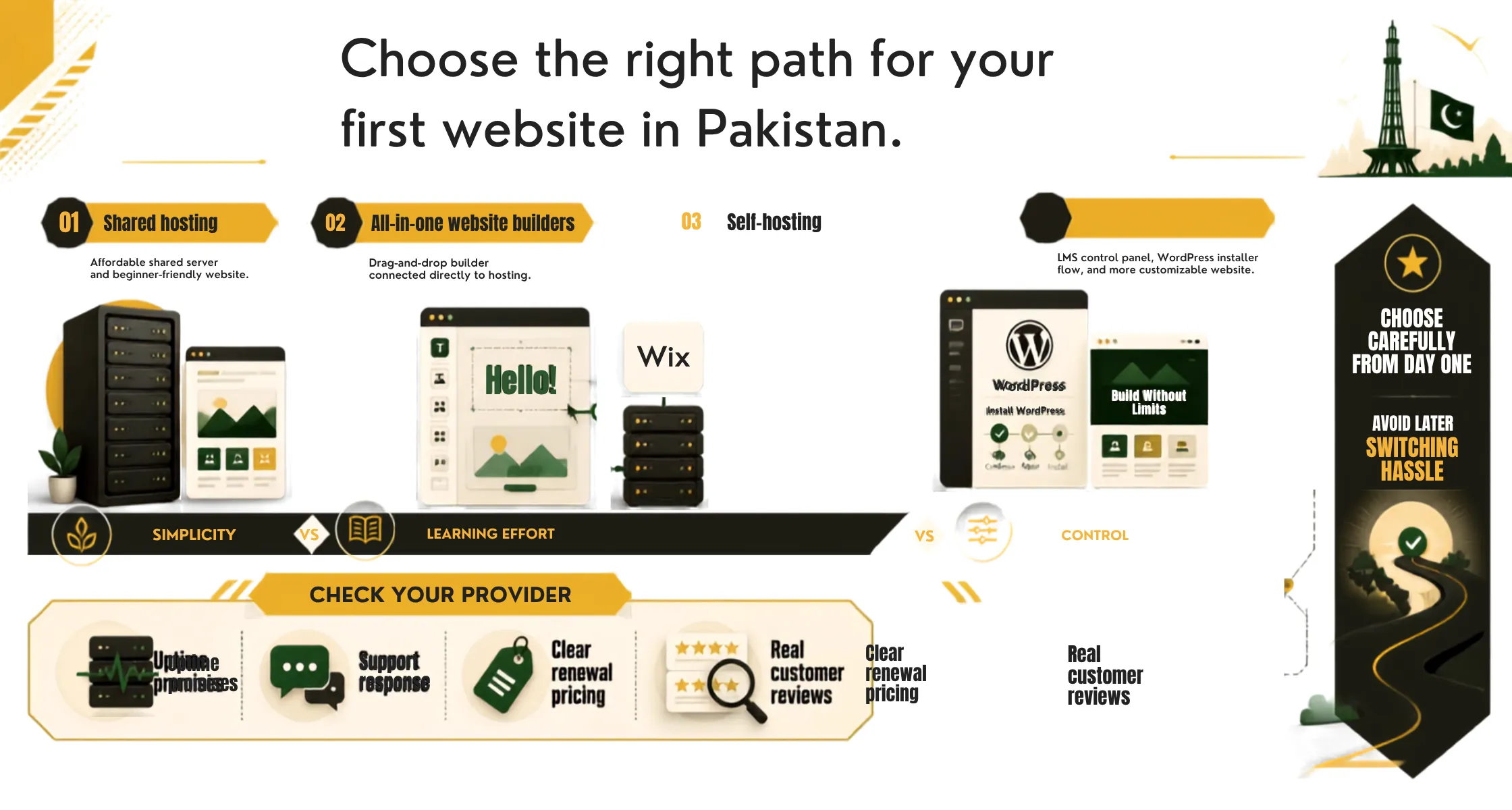
There are three common hosting types you’ll as you host a website for the first time.
a) Shared hosting
This is the simplest and cheapest option. Your site shares a server with other websites, which keeps the cost low. This is a great fit for beginners, personal blogs, and small business sites that do not get huge traffic. Most first-time website owners in Pakistan start here.
b) All-in-one website builders
This option bundles everything into one package. Platforms like Wix give you the builder tool and the hosting space together. You do not need to buy hosting separately or connect anything yourself. This path suits people who want a hands-off, drag-and-drop kind of setup.
c) Self-hosting
This happens through a CMS, and it’s a bit more hands-on. Platforms like WordPress need you to buy your own web hosting first, then use a quick installer inside your host dashboard to get WordPress running. This gives you more control over how your site looks and works, but it does ask for a little more effort from you.
To choose between these three hosting types, think about how much time you want to spend learning new tools, and how much control you want over your site.
- If you just want something simple and fast, shared hosting or a builder will serve you well.
- If you want more freedom to shape your site as it grows, a CMS like WordPress is worth the extra setup.
Once you pick your hosting type, look for a provider with a solid track record.
Check their:
- Uptime promises
- How fast their support team replies
- Whether their pricing stays clear once renewal time comes around
- Real customer reviews tell you far more than a shiny homepage ever will, since normal users tend to mention the small annoyances that marketing pages leave out.
Take your time here.
Switching providers later is possible, but it adds hassle you can skip by choosing well from day one.
2) Get a Domain Name
Your domain name is your website address, the part people type into their browser to find you, like yourname.com. Picking one is one of the more fun parts of getting ready to host a website, since it is the first thing your visitors will see and remember.
Try to keep your domain short, easy to spell, and close to your business name if you can. Avoid numbers and odd spellings where possible, since people tend to forget them or type them wrong.
Many hosting plans include a free domain name for your first year, which is a nice way to save a bit of cash when you are just starting out.
If you already bought your domain somewhere else, like Truehost or Namecheap, you will need to log into that account and point your domain’s name servers to your hosting provider instead. Your host will give you the exact details to enter, and most walk you through it step by step.
This step can feel a little technical the first time, but it only takes a few minutes once you know where to look. And once your domain and your hosting are linked, they work together as one unit, ready to carry your site the moment it goes live.
A quick tip before you commit: search your domain idea online first. Make sure no one else is already using something close to it, and check that the name is not tied to a brand or trademark. A little care now saves you a headache later.
3) Build or Upload Your Website
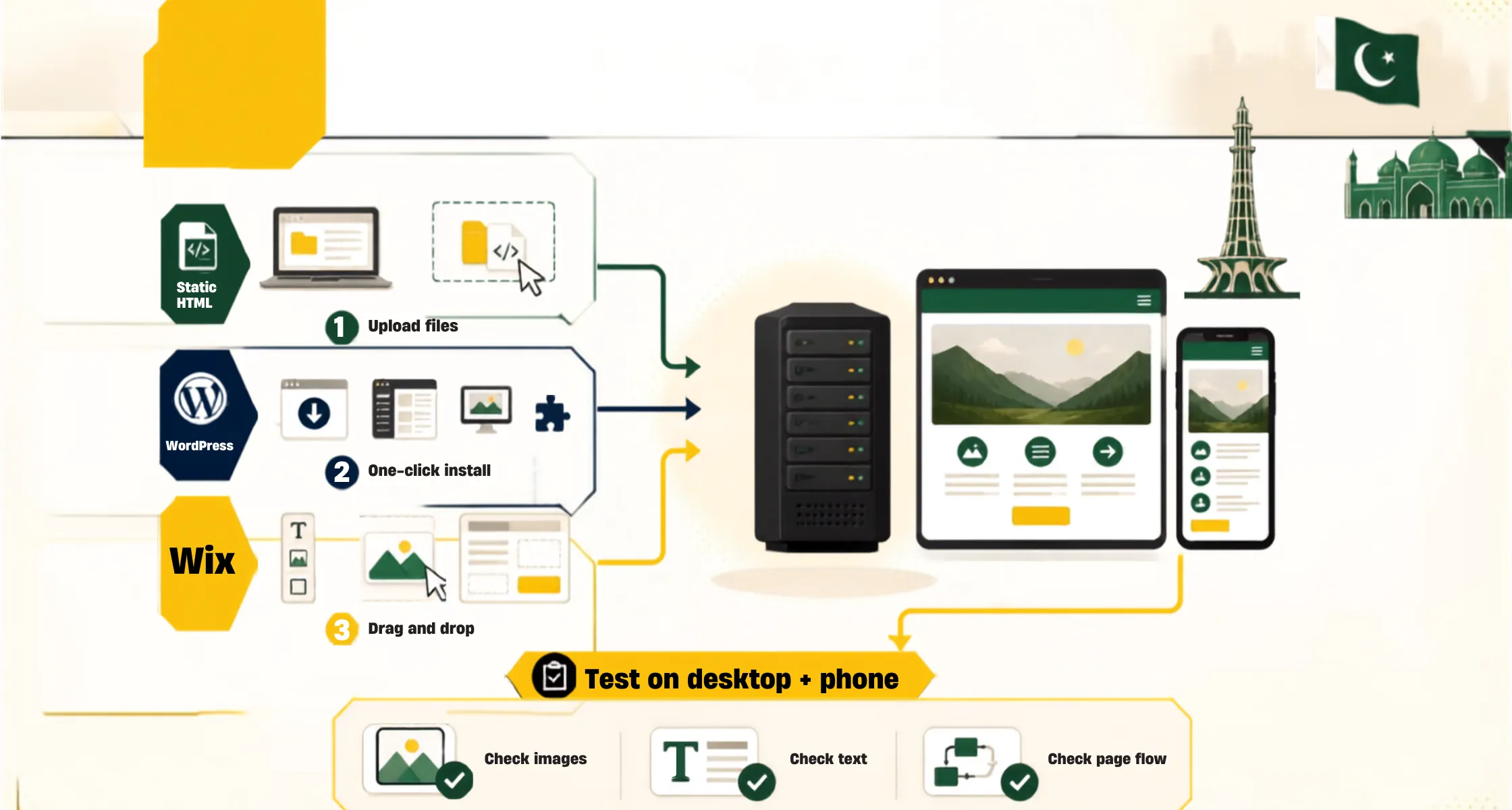
Now comes the part where your site starts to feel real. This step is about adding your content to the server, so visitors finally have something to look at when they land on your page.
How you do this depends on what kind of site you built or plan to build.
- If you have a static HTML site, meaning one built with plain code rather than a CMS, you can simply drag and drop your files into your host’s file manager. Some people also choose a free static host like Netlify for this kind of site, since it keeps things light and fast.
- If you are using WordPress or another CMS, your host’s one-click installer makes this stage fast and simple. Once WordPress is installed, you build your pages using themes for the design and plugins for extra features, all from a dashboard that does not require any coding.
- If you picked a visual builder like Wix, you get drag-and-drop tools right inside your host dashboard. You place text, images, and buttons wherever you want, and the builder handles the coding behind the scenes for you.
Whichever path you take, this is the stage where your effort to host a website actually starts to look like a finished product. Take your time here. Check that your images load properly, your text reads clearly, and your pages flow the way you want them to. A little patience now saves you from awkward fixes after your site is already public.
It also helps to view your pages on both a computer and a phone before you move forward. A lot of your visitors will land on your site through their phone, so it needs to look good there too, not only on a desktop screen.
4) Publish and Test
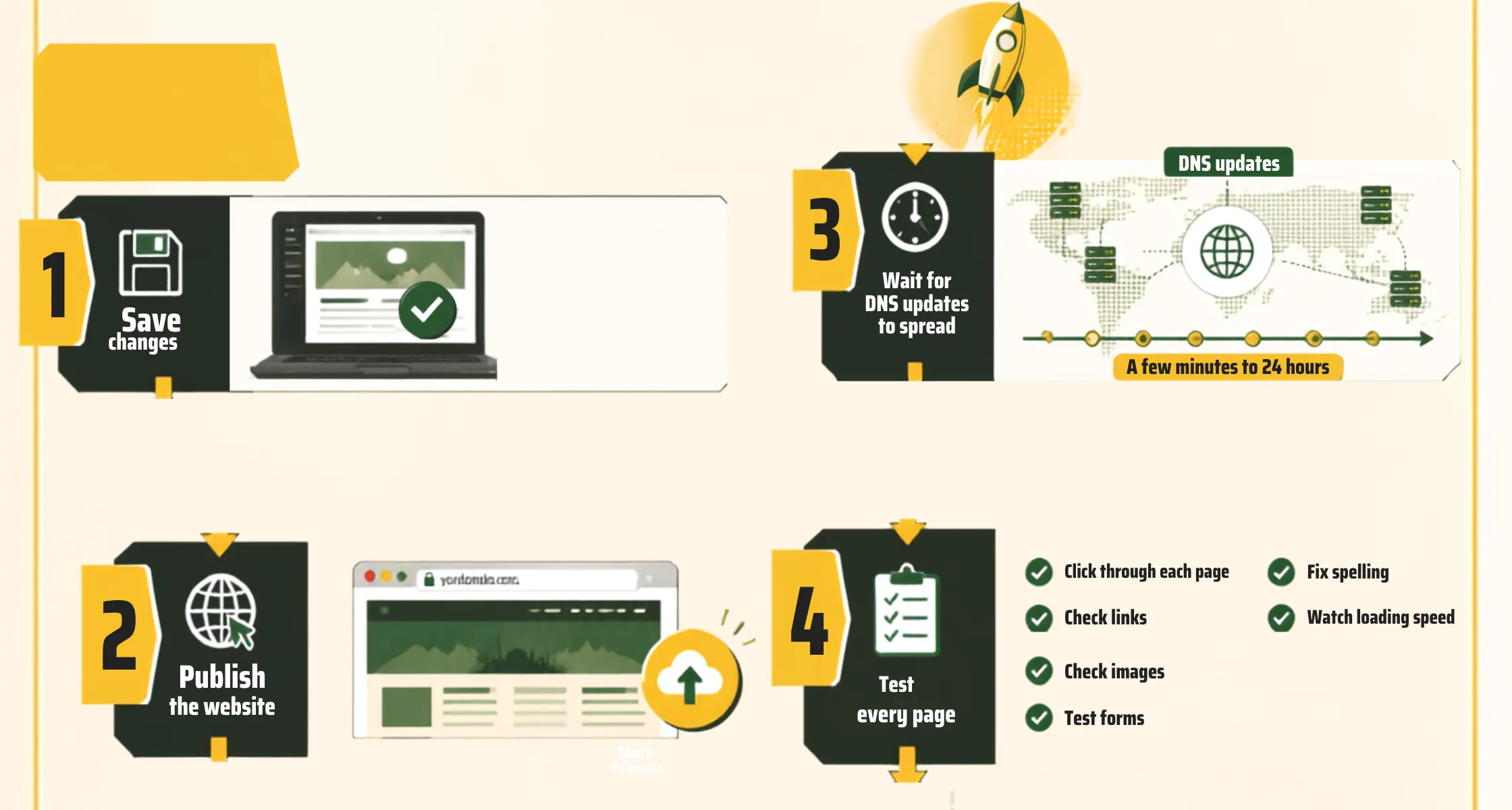
You are almost there. Once your content looks right and your pages feel ready, save your changes and hit publish.
Here is something worth knowing before you get too excited: new domains do not always load instantly for every visitor. It can take anywhere from a few minutes up to 24 hours for your domain to fully spread across the internet, since this depends on something called DNS updates working their way through different servers around the world. This is completely normal, so do not panic if a friend tells you the site is not loading for them yet while it works fine for you.
While you wait, use this time to test everything you can.
- Click through each page yourself.
- Check that your links work, your images show up, and any forms on your site send messages the way they should.
- Look out for spelling mistakes, missing images, or slow-loading pages, since these small details shape how visitors judge your site in the first few seconds.
Ask a friend or family member to browse your site too, if you can. A fresh set of eyes often catches small issues you might miss after staring at the same pages for hours.
Once everything checks out and your domain is loading properly, you are ready to share your site with the world. Post the link on social media, add it to your business cards, and let your customers know where to find you.
Host Your Website the Right Way
That is really all it takes to host a website the right way. Pick your hosting type, grab your domain name, build out your pages, then test everything before you go live. Four steps, and you have a real website ready for real visitors in Pakistan.
You do not need to get everything perfect on day one. Most site owners keep tweaking small things long after launch, and that is part of the process, not a sign you did something wrong. What matters most is starting with a solid setup, so you are not fighting your hosting or your domain later on.
If you want a smoother path to host a website without getting stuck on the technical bits, Truehost is built for exactly this. Our hosting plans come with fast local servers, real support when you need help, and setup guidance made for first-time website owners in Pakistan.
Head over to Truehost today and get your website live with a team that makes the whole process easier from start to finish.