Domain SearchInstantly check and register your perfect .pk or international domain
 Web HostingGet a .pk domain for as low as PKR 467
 cPanel HostingUser-friendly hosting powered by cPanel
 Reseller HostingLaunch your own hosting business with minimal technical requirements
 Windows HostingOptimized for Windows-based applications and websites
 Affiliate ProgramEarn referral commissions by promoting our services
 WordPress HostingFast & Reliable WordPress Hosting
 Domain TransferMigrate your existing domain seamlessly with zero downtime.
 All DomainsAccess 324+ top-level domains (TLDs) worldwide from a single platform
 Whois LookupIdentify the owner of any domain using our whois and rdap lookup tool
 Managed VPS Hosting
 AI Website BuilderCreate beautiful websites effortlessly using intuitive drag-and-drop features
 Online ShopLaunch a professional online shop with no technical skills required
 BlogDiscover expert guides on hosting, websites, SEO, and digital growth strategies
 ContactGet instant assistance via live chat or email
 SupportAccess help articles, tutorials, and service documentation
 SSL CertificatesEncrypt data, build trust, and boost SEO.
Small blogs can survive on 1–10 GB a month. Big, media-heavy sites can burn through 100 GB to several TB.
That gap feels huge. And if you’re planning a new site, or watching your hosting bill creep up, it’s fair to ask: how much bandwidth does a website need, really?
The honest answer is: it depends on your traffic, your content, and how people use your site. But you can estimate it with real numbers instead of guessing.
Bandwidth is the maximum data capacity of your connection, the size of the pipe. Throughput is the amount of data moving through that pipe at any given moment.
You can have a big pipe and still use very little of it on a quiet Tuesday morning.
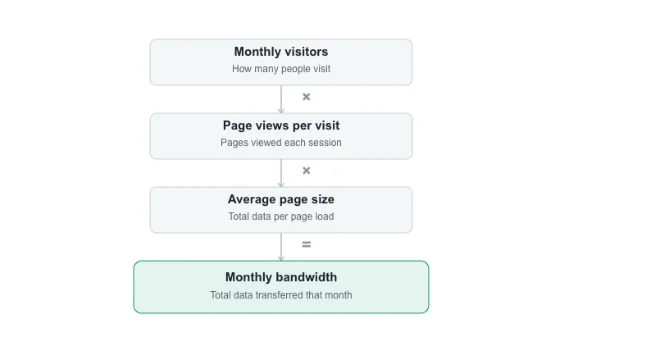
Here’s the formula you’ll come back to throughout this guide:
Monthly Visitors × Page Views × Page Size = Monthly Bandwidth
That’s it. Everything else in the article helps you fill in those three numbers accurately.
We’ll walk through industry benchmarks, a worked calculation, the factors that push your number up or down, and how to plan for growth without overpaying today.
Bandwidth needs by industry type
Not all websites use bandwidth the same way. Two sites with equal traffic can have wildly different bills.
a) E-commerce vs. blogs. A blog serves text and a few images. An online store serves product photos, zoom images, videos, and a checkout flow that often pulls in third-party scripts for payments and shipping calculators. Every product page adds more weight than a blog post does.
Cart and checkout pages also reload data more often. Users add items, remove them, apply coupons, and refresh totals. Each action can trigger a new data exchange with the server.
b) SaaS and streaming platforms. These are the heaviest by far. SaaS apps sync data constantly in the background. File-sharing tools upload and download large attachments. Video calls send and receive live streams. Streaming platforms send continuous video data for as long as someone watches.
Here’s how that plays out in practice:
| Site type | Typical Mbps needed | Typical monthly bandwidth |
|---|---|---|
| Blog / portfolio | 5–10 Mbps | 1–10 GB |
| E-commerce store | 10–25 Mbps | 20–100 GB |
| SaaS platform | 25–100 Mbps | 100 GB–1 TB |
| Streaming / video-heavy site | 100–200+ Mbps | 500 GB–several TB |
These are ranges, not hard rules. A small e-commerce store with low traffic might sit near the bottom. A blog that suddenly goes viral can spike far past its usual number for a day or two.
Calculating bandwidth based on content type and user activity
Numbers are more useful when you can run them yourself. Here’s a worked example using a simple 3-page business website with 2 images per page and a couple of downloadable PDFs.
Step 1: Throughput calc (concurrent load → Mbps needed)
Throughput planning starts with concurrent visitors, not total visitors. Ask: how many people load the site at the same moment during your busiest hour?
Say 20 people load a page at once. Each page (HTML, CSS, images) weighs around 2 MB, close to the 2.5 MB average page weight the HTTP Archive project measured across the web in 2025.
If those 20 people load their pages within a few seconds of each other, that’s roughly 40 MB moving in a short burst.
Converted to a rate, that burst needs somewhere around 8–15 Mbps of throughput to load smoothly without visitors waiting.
Add the two PDFs (say 3 MB each) if a few of those visitors download one, and you’re looking at a slightly higher peak.
Step 2: Monthly transfer calc (pageviews + downloads → total MB, +30% buffer)
Now zoom out to the whole month.
- Say the site gets 5,000 visitors a month.
- Each visitor views 2.5 pages on average.
- Average page weight is 2 MB.
- 5,000 × 2.5 × 2 MB = 25,000 MB (about 25 GB) from page views alone.
Add downloads. If 10% of visitors download one 3 MB PDF, that’s 500 downloads × 3 MB = 1,500 MB (1.5 GB).
Total: roughly 26.5 GB a month.
Now add a 30% buffer for traffic spikes, retries, and bots crawling the site: 26.5 GB × 1.3 ≈ 34.5 GB a month. That buffer is important, real traffic never arrives in a perfectly even line.
Bandwidth for business growth:
Your bandwidth needs today are only half the picture. Plan for where your traffic is heading, not just where it stands.
- Start with your baseline. Use your current usage and visitor count as your floor. This is the number from Step 2 above.
- Project forward with a growth rate. If you expect visitors to double over the next year, treat double bandwidth as your minimum requirement, not a worst case.
- Add a 30–50% buffer for non-linear growth. Marketing campaigns, product launches, and viral moments don’t scale in a straight line. A single mention on social media can send 10x your normal traffic in a day.
- Prepare practically. Monitor peak usage regularly, set usage alerts if your host offers them, and choose hosting that lets you upgrade easily instead of forcing a full migration when you outgrow your plan.
That last point is more important than people expect. Many businesses lose days of momentum migrating hosts mid-spike.
Choosing a host with an easy upgrade path, like moving from shared hosting to a Truehost VPS, avoids that scramble entirely.
Factors that determine your bandwidth requirements
These are the variables that push your monthly number up or down. Knowing them upfront helps you avoid overage surprises later.
a) Media file weight drives most of your usage
Heavier files mean more data transferred per visit, and the effect compounds fast.
One hi-res photo at 2–3 MB, viewed across 1,000 visits, adds up to 2–3 GB on its own. A single 5-minute HD video at roughly 50 MB, viewed 1,000 times, hits 50 GB by itself.
In throughput terms: light, image-based pages typically need 5–10 Mbps when several visitors load them at once. Self-hosted video can push that to 100–200+ Mbps.
Fix: compress images, shrink video files before upload, or avoid self-hosting video altogether. Modern formats make a real difference: WebP files typically run 25–34% smaller than equivalent JPEGs, and AVIF can cut file size by up to 50% compared to JPEG at similar quality. Combined with basic compression, that alone can cut your media bandwidth by 60–70%.
b) Traffic concentration is more important than total visits
The same 100 visits spread evenly across a month uses far less capacity than 50 people hitting your site at the same moment. Spikes demand more headroom than a steady trickle ever does.
It is like a restaurant. A steady stream of customers all day is easy to manage. The same number of people arriving all at once for a lunch rush needs a kitchen built for that peak, not the daily average.
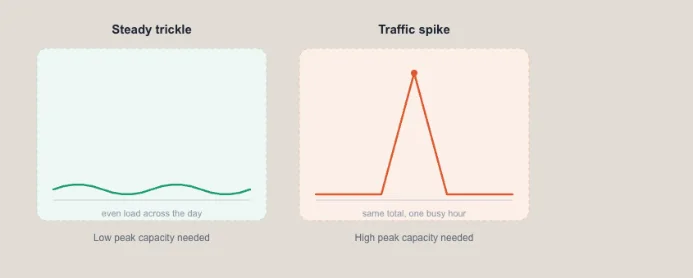
Plan your capacity around your busiest hour, not your monthly average. That’s the number that determines if your site stays fast under pressure.
c) How visitors behave changes their data footprint
A visitor who skims one 2 MB page and leaves barely registers on your bandwidth. One who browses 10 pages, streams a video, and grabs a PDF can rack up 50 MB alone.
Community and forum-style sites tend to see visitors consuming 5–10x more per session than a typical blog. If that’s your site type, size your plan for that heavier pattern from the start.
d) Interactive and dynamic elements add hidden overhead
Anything that loads or updates in real time pulls more data than a static page does. That includes:
- Live chat widgets
- Embedded video or audio players
- Interactive maps or booking widgets
- Comment sections and file upload tools
- Ajax-driven filtering and search
- Embedded social media feeds
None of these look heavy individually. Stack a few on one page, and your per-visit data usage climbs quietly.
For context on what “heavy” looks like in reality: Netflix recommends at least 3 Mbps for standard-definition streaming, 5 Mbps for HD, and 15–25 Mbps for 4K.
Its own data shows an hour of HD video can use up to 3 GB, and 4K up to 7 GB per hour. Zoom’s group video calls need roughly 800 Kbps to 1.5 Mbps just to stay smooth.
That’s the kind of load a single embedded video player or live chat widget can bring to your page, multiplied by every visitor using it.
Why Truehost is Your Best Choice
Rather than calculating GB every time your site grows, most Truehost.pk plans already bundle unlimited bandwidth. You don’t have to run these numbers yourself every time traffic shifts.
That’s one part of a bigger picture, though. Here’s the fuller case for hosting with us:
- Bandwidth and storage built in. Our Starter and Pro plans include unlimited bandwidth with 30 GB and 50 GB SSD storage respectively, built to comfortably handle around 50,000 visits a month. Our Unlimited plan removes the storage cap too, with unlimited bandwidth transfer and 99.999% uptime, which suits agencies, developers, and growing e-commerce stores.
- Local relevance for Pakistan. Plans are priced in PKR, with a free .pk domain included on annual hosting, and local payment methods supported so paying for and renewing hosting is straightforward for Pakistani businesses.
- Reliability that holds up. We back our plans with a strong uptime guarantee and fast SSD (and NVMe on premium tiers) infrastructure, so your site stays fast and available for visitors.
- Support when you need it. Our team is available 24/7 through live chat, so a bandwidth question or a traffic spike doesn’t have to wait.
- Room to grow. When your traffic outgrows shared hosting, you can move up to a Truehost VPS or dedicated server without starting from scratch. If your stack includes automation or AI tools, we also support workloads like N8n hosting, AI Workers, and OpenClaw hosting on the same infrastructure, useful as your site grows from a simple brochure page into something more complex.
If you’d rather not run bandwidth math every quarter, browse our hosting plans and pick one that already covers where you’re headed, not just where you are today.
How Much Bandwidth Does a Website Need FAQs
Does more bandwidth fix slow websites?
Not usually. Bandwidth is about capacity, not speed of individual requests. A slow site is more often caused by unoptimized images, bloated code, a distant server, or a lack of caching. More bandwidth helps if your site is genuinely hitting a data ceiling under heavy traffic. It won’t fix a poorly built page.
How do server location and CDNs affect bandwidth?
A server closer to your visitors delivers content faster and with less strain on the network path. A content delivery network (CDN) caches your static files, images, CSS, JavaScript, on servers around the world, so visitors pull data from a nearby location instead of your main server every time. This reduces the load on your hosting account and can noticeably cut effective bandwidth use.
What happens if I exceed my bandwidth limit?
This depends entirely on your host’s policy. Some hosts throttle your site’s speed once you hit the cap. Others charge overage fees. Some suspend the site until the next billing cycle. This is exactly why plans with unlimited bandwidth, like ours, remove that risk for most standard websites.
Is unlimited bandwidth really unlimited?
In practice, ‘unlimited’ bandwidth plans are built for typical, fair use rather than literally infinite data transfer. Hosts expect normal website traffic patterns. If a site starts behaving like a video streaming service or file-hosting platform, most providers will reach out about moving to a plan built for that load, such as a VPS or dedicated server.
Does bandwidth affect SEO rankings?
Not directly. But bandwidth-related issues, like a site that slows down or goes offline under traffic, do affect rankings. Google factors page speed and uptime into how it evaluates a site. Enough bandwidth headroom to avoid slowdowns during traffic spikes protects your SEO indirectly.
How is bandwidth different from disk space/storage?
Storage is how much data your site can hold on the server, like your files, images, and databases. Bandwidth is how much data can move between your server and your visitors over a given period. You could have a small site (low storage) with huge traffic (high bandwidth need), or a large site (high storage) with modest traffic.
Do I need more bandwidth for WordPress sites?
WordPress sites can use more bandwidth than a static HTML site of similar size, because of plugins, themes, and dynamic database queries running on each page load. A well-optimized WordPress site with caching enabled narrows that gap significantly. Choosing WordPress-ready hosting with built-in caching, like our plans, helps keep that overhead in check.
How much bandwidth does shared hosting typically offer?
It varies by provider. Some cap shared hosting at a set number of GB per month. Others, including our Starter, Pro, and Unlimited plans, offer unlimited bandwidth as standard, which removes the need to track usage closely on a typical site.
Can I upgrade my bandwidth mid-plan?
Yes, in most cases. With us, you can upgrade from shared hosting to a VPS, or move between shared hosting tiers, without losing your site or starting over. If you’re planning for growth, it’s worth choosing a host that makes that upgrade path simple from day one.