 Domain SearchInstantly check and register your perfect .pk or international domain
 Web HostingGet a .pk domain for as low as PKR 467
 cPanel HostingUser-friendly hosting powered by cPanel
 Reseller HostingLaunch your own hosting business with minimal technical requirements
 Windows HostingOptimized for Windows-based applications and websites
 Affiliate ProgramEarn referral commissions by promoting our services
 WordPress HostingFast & Reliable WordPress Hosting
 Domain TransferMigrate your existing domain seamlessly with zero downtime.
 All DomainsAccess 324+ top-level domains (TLDs) worldwide from a single platform
 Whois LookupIdentify the owner of any domain using our whois and rdap lookup tool
 Managed VPS Hosting
 AI Website BuilderCreate beautiful websites effortlessly using intuitive drag-and-drop features
 Online ShopLaunch a professional online shop with no technical skills required
 BlogDiscover expert guides on hosting, websites, SEO, and digital growth strategies
 ContactGet instant assistance via live chat or email
 SupportAccess help articles, tutorials, and service documentation
 SSL CertificatesEncrypt data, build trust, and boost SEO.
How to Register a .Pk Domain
Getting your .pk domain registered might seem tricky at first. But honestly, it’s simpler than you think once you know the process.
You know what? Pakistan’s digital landscape is booming right now. More businesses are going online every single day. And having a .pk domain gives you that local credibility that international domains just can’t match.
Why Choose a .Pk Domain for Your Website?
Your .pk domain tells visitors exactly where you’re from. It builds instant trust with Pakistani customers.
Google loves local domains too. They rank .pk sites higher for Pakistani searches. This means more visibility for your business.
Let me break down the real benefits:
-
Better search rankings in Pakistan
-
Increased customer trust and credibility
-
Professional appearance for local businesses
-
Protection of your brand in the Pakistani market
Here’s the thing, international domains work fine globally. But when Pakistani users see a .pk extension, they immediately know you’re local. That connection matters more than most people realize.
Understanding .Pk Domain Requirements
Before you start the registration process, you need specific documents. The Pakistan Telecommunication Authority (PTA) has clear requirements for .pk domains.
You can’t just register any .pk domain without proper documentation. Each category has different rules.
Individual Registration Requirements
Personal .pk domains need these documents:
| Document Type | Required | Format |
|---|---|---|
| CNIC Copy | Yes | Clear scan/photo |
| Contact Information | Yes | Valid phone/email |
| Address Proof | Sometimes | Utility bill or bank statement |
Business Registration Requirements
Company .pk domains require more paperwork:
- Certificate of Incorporation
- Valid business license
- Authorized signatory documents
- Company letterhead confirmation
The process takes longer for businesses. But it’s worth the wait for that professional .pk presence.
Step-by-Step .Pk Domain Registration Process
TrueHost.pk makes registering your .pk domain straightforward. Their system walks you through everything step by step.
1) Domain Search and Selection

First, check if your desired .pk domain is available. TrueHost.pk has a simple search tool on their homepage.
Type your preferred domain name. The system instantly shows availability across different .pk extensions.
You’ll see options like:
-
.com.pk (most popular)
-
.net.pk
-
.org.pk
-
.edu.pk (educational institutions only)
2) Choose Your .Pk Domain Category
Different .pk extensions serve different purposes. .com.pk works for most businesses and individuals.
.net.pk suits tech companies and service providers. .org.pk is perfect for non-profit organizations.
Educational institutions must use .edu.pk domains. Government entities get special .gov.pk extensions.
3) Choose Your Name Servers
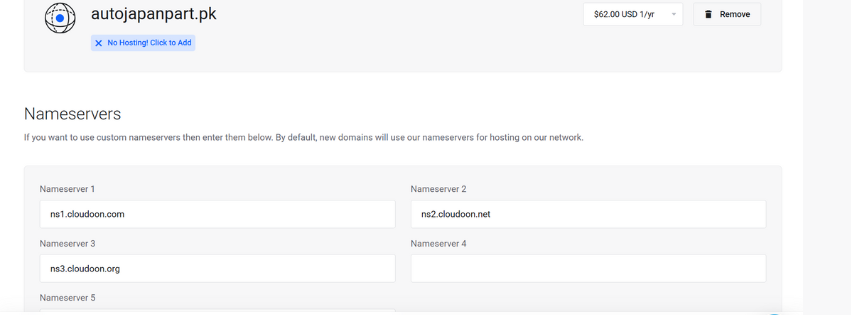
Before completing registration, you need to select name servers for your .pk domain. TrueHost.pk offers multiple options.
You can use their default name servers for immediate setup. Advanced users might prefer custom name servers.
Default TrueHost.pk name servers work perfectly for most websites. They provide reliable DNS resolution and fast response times.
If you have existing hosting elsewhere, you can specify those name servers instead.
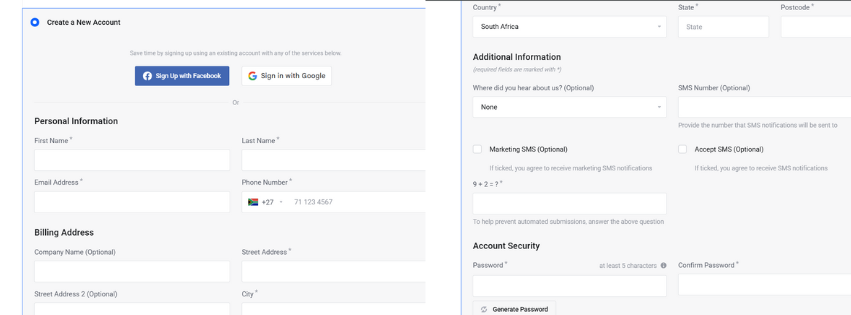
4) Complete the Registration Form
TrueHost.pk’s registration form is user-friendly. Fill in all required fields accurately.
Double-check your contact information. Mistakes here cause serious delays in .pk domain approval.
5) Review and Checkout Process
TrueHost.pk’s checkout system guides you through the final steps. Review your .pk domain selection carefully before proceeding.
The checkout page shows your domain details, pricing, and selected options. Double-check everything matches your requirements.
You’ll see the total cost including any additional services. Add-ons like privacy protection appear here too.
6) Payment Processing
Pay the registration fee through TrueHost.pk’s secure payment gateway. They accept multiple payment methods.
Credit cards, bank transfers, and local payment options are available. Choose what works best for you.
.Pk Domain Activation Process
After completing payment, TrueHost.pk begins processing your .pk domain registration. The system sends confirmation emails at each stage.
You’ll receive initial confirmation immediately after checkout. This includes your order details and payment receipt.
Your .pk domain enters the registration queue with Pakistan’s domain authority. TrueHost.pk handles all communication with PTA on your behalf.
Common .Pk Domain Registration Mistakes
Many people make these errors when registering .pk domains:
Incomplete Information
Missing contact details or incorrect data cause registration problems. Always fill every required field completely.
Wrong Name Server Configuration
Incorrect name server settings prevent your .pk domain from working properly. Use TrueHost.pk’s defaults unless you know what you’re doing.
Incorrect Contact Information
Wrong phone numbers or email addresses create approval problems. Verify everything twice.
Poor Information Quality
Inconsistent or conflicting information gets flagged during review. Verify all details match across different fields.
Wrong Domain Category Selection
Choosing the wrong .pk extension delays approval. Pick the category that matches your purpose.
Managing Your .Pk Domain After Registration
Once your .pk domain is active, you need proper management. TrueHost.pk provides a control panel for domain administration.
DNS Management
You can modify DNS settings anytime through their portal. Point your .pk domain to any hosting service.
Contact Information Updates
Keep your contact details current. Outdated information can cause renewal problems.
Transfer Procedures
Moving your .pk domain to another registrar requires specific steps. TrueHost.pk handles transfers professionally when needed.
Troubleshooting .Pk Domain Issues
Sometimes problems arise during or after .pk domain registration. Here are common solutions:
Registration Processing Issues
If your .pk domain registration encounters problems, contact TrueHost.pk support immediately. They can check status and resolve issues quickly.
Information Verification Problems
Rejected information needs correction and resubmission. Review all fields carefully before trying again.
Technical Problems
DNS or hosting issues require technical support. TrueHost.pk offers 24/7 assistance for .pk domain problems.
Maximizing Your .Pk Domain Benefits
Getting your .pk domain registered is just the beginning. Here’s how to make the most of it:
Build local SEO around your .pk domain. Target Pakistani keywords and locations.
Create content that resonates with local audiences. Cultural relevance matters for .pk domain success.
Network with other .pk domain owners. The Pakistani online community supports each other.
Final Thoughts on .Pk Domain Registration
Registering your .pk domain through TrueHost.pk gives you professional local presence. The process requires patience but delivers valuable results.
Your .pk domain connects you directly with Pakistani internet users. That local connection drives real business growth.
Don’t wait too long to secure your preferred .pk domain name. Popular names get taken quickly in Pakistan’s growing digital market.
Start your .pk domain registration today. TrueHost.pk makes the entire process smooth and professional.