Domain SearchInstantly check and register your perfect .pk or international domain
 Web HostingGet a .pk domain for as low as PKR 467
 cPanel HostingUser-friendly hosting powered by cPanel
 Reseller HostingLaunch your own hosting business with minimal technical requirements
 Windows HostingOptimized for Windows-based applications and websites
 Affiliate ProgramEarn referral commissions by promoting our services
 WordPress HostingFast & Reliable WordPress Hosting
 Domain TransferMigrate your existing domain seamlessly with zero downtime.
 All DomainsAccess 324+ top-level domains (TLDs) worldwide from a single platform
 Whois LookupIdentify the owner of any domain using our whois and rdap lookup tool
 Managed VPS Hosting
 AI Website BuilderCreate beautiful websites effortlessly using intuitive drag-and-drop features
 Online ShopLaunch a professional online shop with no technical skills required
 BlogDiscover expert guides on hosting, websites, SEO, and digital growth strategies
 ContactGet instant assistance via live chat or email
 SupportAccess help articles, tutorials, and service documentation
 SSL CertificatesEncrypt data, build trust, and boost SEO.
Want to know if a domain like mybusiness.pk or example.com is already taken?
You can check domain registration status in under a minute.
A registered domain record can tell you a lot. It shows the creation date, expiry date, and last updated date.
It also shows the status, the registrar, and the name servers. Registrant details are usually redacted for privacy, but the rest is public.
This process is free. It takes minutes. And it needs zero technical skill.
I will walk you through five ways to check domain registration status:
- Truehost’s free WHOIS tool
- ICANN Lookup
- PKNIC WHOIS (for
.pkdomains) - Your Truehost Client Area
- A few quick bonus checks
This guide is written for Pakistani domain owners and buyers. So we’ll pay close attention to .pk, .com.pk, and other local extensions along the way.
This is important because a domain record tells a story. It shows you if a name is safe to buy, if it’s about to expire, or if it’s locked and protected.
Skipping this check is how people end up overpaying for a “premium” domain that’s free, or losing a domain they forgot to renew. A two-minute check saves you both money and stress.
Simple Step-by-Step Guide to Check Any Domain
Here are five practical methods. We’ve ranked them from easiest to more advanced.
1) Using Truehost’s Free WHOIS Tool
This is the fastest way to check domain registration status. No login required.
It works for .pk domains. It also works for international extensions like .com and .net.
Here’s how to use it:
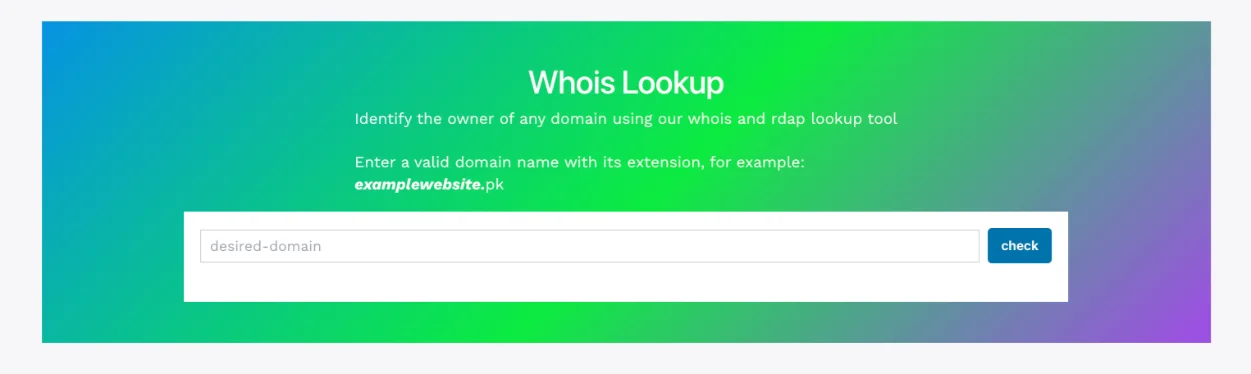
- Go to Truehost’s WHOIS tool
- Type the full domain name (e.g.,
mybrand.pkorexample.com) - Click “Check”
- View your result
You’ll get instant registration details. This includes availability, registrar, and key dates.
Say you type in mybrand.pk. If it’s taken, you’ll instantly see who registered it, when, and when it expires. If it’s free, you’ll see an “available” message, and you can register it on the spot.
2) Using the Official ICANN Lookup Tool
ICANN Lookup is the most authoritative global source for domain data. It’s a smart second check.
Steps:
- Open ICANN Lookup
- Enter the domain name
- Click “Lookup”
Note: ICANN Lookup does not cover most country-code domains, including
.pk. Pakistani domains are managed by PKNIC, not ICANN. If you search a .pk domain here, you’ll likely see an unsupported TLD error.
Here’s some helpful context. ICANN officially retired the old WHOIS protocol for generic domains (like .com and .net) on January 28, 2025. It replaced WHOIS with a newer system called RDAP. Within a few months, hundreds of gTLD registries had switched off WHOIS completely.
Country-code domains didn’t follow the same timeline. As of mid-2026, only around 28% of ccTLDs publish RDAP data. Most, including .pk, still rely on their own independent WHOIS-style systems.
That’s why ICANN Lookup can’t help you with .pk, and why the next method is so much important for Pakistani domain owners.
3) Using PKNIC WHOIS for .pk Domains
This one is important for Pakistani domain owners.
Anyone checking a .pk, .com.pk, .org.pk, .net.pk, .edu.pk, or .gov.pk domain needs PKNIC’s registry. ICANN simply doesn’t hold this data. PKNIC is the only organization authorized by the Government of Pakistan to manage .pk domain names.
Steps:
- Go to PKNIC’s official WHOIS lookup
- Enter the
.pkdomain name - Submit to view the registry-held record
A quick Pakistan-specific note: PKNIC records can show different fields and formatting compared to standard gTLD WHOIS. Also, eligibility rules for .pk vary by extension.
A direct .pk domain is open to anyone worldwide. But .com.pk is reserved for commercial entities registered in Pakistan. .org.pk is for non-profits. .edu.pk is for accredited educational institutes.
And .gov.pk is limited to federal government ministries. Keep this in mind if a domain looks “available” but won’t register, you may not meet the eligibility criteria.
There’s a naming rule worth knowing too. A direct .pk domain must be at least four characters long. It also can’t start with a reserved prefix like “com,” “net,” “org,” or “gov.” So “coms.pk” or “govs.pk” won’t register, even if PKNIC’s search shows them as available.
Standard .pk registration typically runs between PKR 1,000 and PKR 3,000 per year, depending on your registrar and any extras like WHOIS privacy.
4) Check Your Own Registered Domain via Truehost Client Area
Already a Truehost client? This is the fastest way to see everything in one dashboard.
Steps:
- Log in to your Truehost Client Area
- Go to Domains → My Domains
- Click a domain to view its status, expiry date, lock settings, renewal options, and name servers
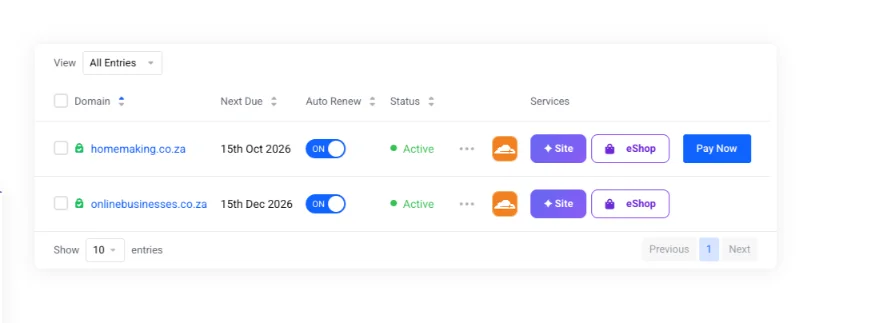
While you’re there, check two more things. First, your auto-renewal toggle, this prevents accidental expiry. Second, the Domain ID Protection add-on, priced in PKR, which hides your registrant details from public WHOIS records.
here is an example from Truehost client area:
5) Quick Bonus Methods
Short on time? Try these.
- Visit the domain directly. Type it into your browser. If it loads, it’s very likely registered and active.
- Use command-line WHOIS. On Mac or Linux, open Terminal and type
whois example.com. On Windows, use PowerShell or an installed WHOIS utility.
These quick methods confirm activity fast. But they won’t show you full detail like expiry dates or registrar contact information.
How to Read and Understand Your Results
Once you check domain registration status, you’ll see a handful of fields. Here’s what each one means for you.
| Field | What It Means | How It Benefits You | Example / Warning Sign |
|---|---|---|---|
| Domain Status | Current state (OK/active, locked, expired, etc.) | Tells you if the domain can be transferred or renewed | clientTransferProhibited = locked for safety (good). clientHold = not resolving in DNS (needs fixing). |
| Creation Date | When the domain was first registered | Shows how established it is | Registered in 2018 is more trustworthy than one created yesterday. |
| Expiry Date | When it will stop working unless renewed | Critical for renewal planning | Expiring in 30 days? Renew now to avoid losing it. |
| Updated Date | Last time any change was made | Helps you spot recent ownership changes | A sudden update yesterday could be a warning sign. |
| Registrar | The company managing the domain | Tells you who to contact for issues | Shows “Truehost”? You’re already with us. |
| Registrant Info | Owner name and contact (often redacted) | Privacy is now standard practice | If fully visible, consider adding ID Protection. |
| Name Servers | The DNS servers the domain points to | Confirms where your website and email live | Wrong name servers mean your site goes down. |
A quick word on that “Domain Status” row, since it confuses a lot of people. These are called EPP status codes, and every registrar uses the same standard set.
A code like clientTransferProhibited is good news, it’s a safety lock that stops your domain from being hijacked or moved without your consent.
A code like clientHold, on the other hand, means the domain has stopped resolving in DNS, and that needs your attention right away.
Common warning signs and what to do next
- Expiring soon or already expired → renew immediately. Expired domains can be picked up by someone else within hours of the grace period ending.
clientHoldstatus → contact your registrar to have the hold removed.- Locked status (
clientTransferProhibited) → this is good news. It prevents hijacking. - Recent update with unfamiliar owner info → verify if you sold or transferred the domain. If not, contact your registrar right away.
Register or Manage Your Domain with Truehost Pakistan
Let’s recap. Checking domain registration status is fast, free, and essential. Do it before you buy a domain. Do it before you renew one too.
When you’re ready to register or manage a domain, Truehost Pakistan makes the process simple:
- Real-time domain search and availability, so you know instantly if your name is free
- Local payment support, including bank transfers, alongside standard card payments
- WHOIS privacy included on our plans, so your personal details stay off public records
- Domain ID Protection, priced transparently in PKR, with no hidden renewal jumps
We’re upfront about pricing too. Some registrars lure you in with a cheap first year, then quietly raise renewal fees. We don’t do that. Our domains stay predictable, year after year.
One more thing worth knowing before you buy: registration speed varies by extension. Standard domains like .pk and .com register in minutes and are usually active within 15 minutes.
DNS changes can still take up to 24–48 hours to fully propagate worldwide. Special domains like .edu.pk or .gov.pk are different, they require manual approval and supporting documents, so they can take several days to go live.
Ready to secure your name? Register your domain with Truehost and get instant registration, free DNS management, and 24/7 support, all in one place.
Domain Registration Status FAQs
How can I check if a domain is registered in Pakistan?
Use Truehost’s WHOIS tool for a fast, general check. For .pk, .com.pk, .org.pk, or .net.pk domains specifically, cross-check with PKNIC WHOIS, since PKNIC, not ICANN, holds the official registry data for Pakistani domains.
Can I check .pk domain status through ICANN Lookup?
No. ICANN Lookup does not cover most country-code domains, including .pk. You’ll need PKNIC’s WHOIS tool instead, since ccTLDs are managed independently by their own regional registries.
What does “clientTransferProhibited” status mean?
It means the domain is locked against unauthorized transfers. This is a protective status, not a problem. It’s usually a good sign that your registrar is keeping your domain safe from hijacking attempts.
Does Truehost support local payment methods like JazzCash and EasyPaisa for domain registration?
Yes. Truehost Pakistan accepts JazzCash, Easypaisa, bank transfer, and card payments for domain registration and renewal, so you can pay the way that’s most convenient for you.
What should I do if my domain is about to expire?
Renew it immediately. Once a domain enters its expiry grace period and then drops, it can be picked up by anyone within hours. Turning on auto-renewal in your Truehost Client Area is the simplest way to avoid this risk entirely.