 Domain SearchInstantly check and register your perfect .pk or international domain
 Web HostingGet a .pk domain for as low as PKR 467
 cPanel HostingUser-friendly hosting powered by cPanel
 Reseller HostingLaunch your own hosting business with minimal technical requirements
 Windows HostingOptimized for Windows-based applications and websites
 Affiliate ProgramEarn referral commissions by promoting our services
 WordPress HostingFast & Reliable WordPress Hosting
 Domain TransferMigrate your existing domain seamlessly with zero downtime.
 All DomainsAccess 324+ top-level domains (TLDs) worldwide from a single platform
 Whois LookupIdentify the owner of any domain using our whois and rdap lookup tool
 Managed VPS Hosting
 AI Website BuilderCreate beautiful websites effortlessly using intuitive drag-and-drop features
 Online ShopLaunch a professional online shop with no technical skills required
 BlogDiscover expert guides on hosting, websites, SEO, and digital growth strategies
 ContactGet instant assistance via live chat or email
 SupportAccess help articles, tutorials, and service documentation
 SSL CertificatesEncrypt data, build trust, and boost SEO.
Learning how to renew .pk domain properly can save your online presence from disappearing overnight. You know what happens when domains expire, right?
Your website goes dark. Your emails stop working. Years of SEO efforts vanish into thin air.
But here’s the thing – thousands of Pakistani businesses face this nightmare every year simply because they don’t know the renewal process. Let me walk you through everything you need to know about keeping your .pk domain alive and kicking.
Understanding .Pk Domain Renewal Basics
What Really Happens When Your .Pk Domain Expires
Picture this: It’s Monday morning, and your customers can’t access your website. Your domain expired over the weekend.
Most .pk domains get a 30-day grace period after expiration. During this time, you can still renew .pk domain without losing it entirely.
However, your website and email services stop working immediately. That’s lost business right there.
Auto-renewal sounds great in theory. But honestly? Many Pakistani registrars don’t offer reliable auto-renewal for .pk domains yet.
The Smart Timing Strategy for Domain Renewal
Here’s what seasoned web professionals do: they renew .pk domain 60-90 days before expiration.
Why so early? Payment processing can take time in Pakistan. Bank transfers might get delayed. Credit card payments sometimes fail.
Smart move: Set up three reminders – at 90 days, 30 days, and 7 days before expiry.
Managing multiple domains? Consider bulk renewal to lock in current prices and avoid the last-minute rush.
Step-by-Step Guide: How to Renew .Pk Domain
Method 1: Renewing Through Your Domain Registrar
This is usually your easiest option. Most Pakistani businesses register through local providers.
Here’s your action plan
1) Log into your registrar account
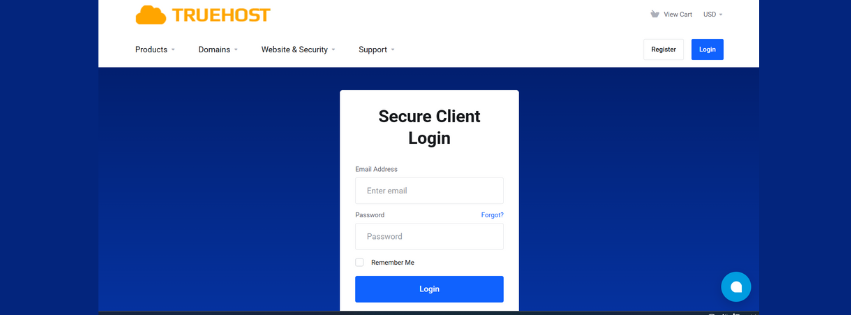
2) Find the “Domain Management” or “My Domains” section
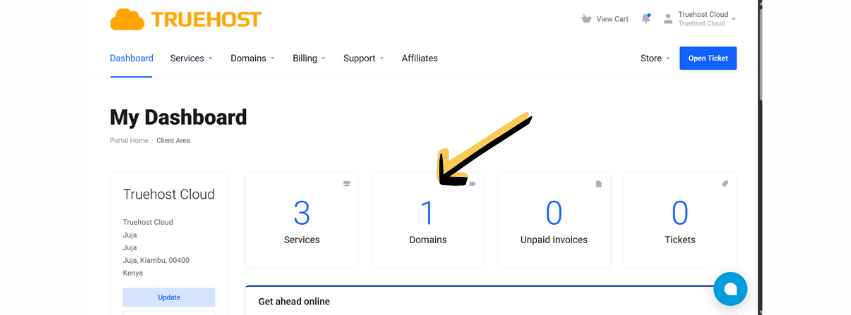
3) Locate your expiring domain
4) If you wish to automate renewals, Activate Auto Renew
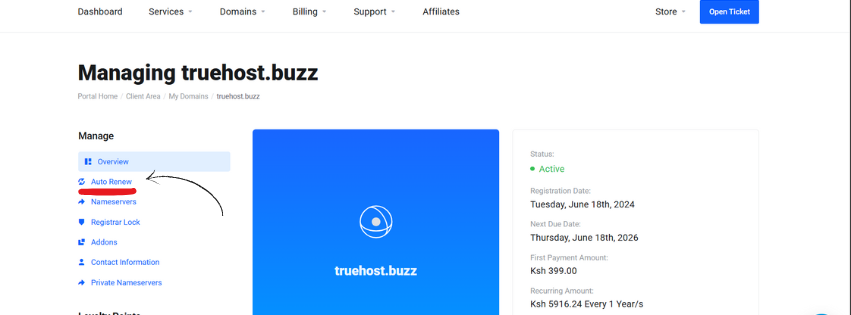
5) Select Renew Domain
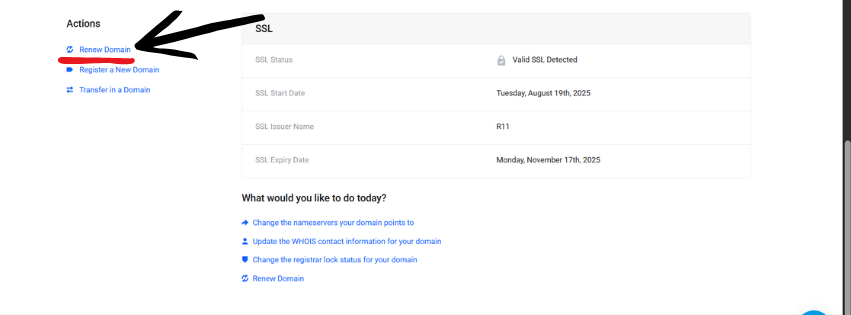
6) Add to Cart and renew another year
7) Choose payment method
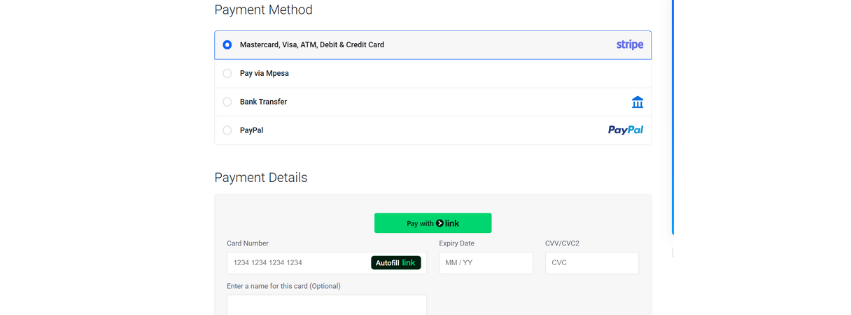
8)Complete the payment
Save your renewal confirmation
Popular Pakistani registrars like Truehost and others usually send renewal notices 30 days ahead. Don’t ignore these emails.
Method 2: Using PKNIC’s Official Portal
Sometimes you need to go straight to the source. PKNIC manages all .pk domains in Pakistan.
The official route:
- Visit the PKNIC website
- Access the domain renewal section
- Enter your domain name
- Provide required documentation
- Submit payment through approved channels
- Wait for verification
- Receive renewal confirmation
This method takes longer but gives you direct control. You’ll need updated business documents for commercial domains.
Method 3: Automatic Renewal Setup
Want to sleep better at night? Set up automatic renewal where available.
Configuration steps:
- Enable auto-renewal in your registrar account
- Add backup payment methods
- Set spending limits if available
- Monitor renewal confirmations
Pros: Never miss a renewal deadline again Cons: Less control over renewal timing and costs
.Pk Domain Renewal Costs and Payment Options
Current Renewal Pricing Structure (2025)
Let’s talk money. Domain renewal costs vary significantly across Pakistan.
| Domain Type | Average Annual Cost | Notes |
|---|---|---|
| .pk | PKR 2,000-3,500 | Basic domains |
| .com.pk | PKR 1,500-2,500 | Most popular |
| .org.pk | PKR 1,200-2,000 | Non-profits |
| .net.pk | PKR 1,500-2,500 | Technical sites |
| .edu.pk | PKR 800-1,500 | Educational |
Renewal costs are typically 20-30% higher than initial registration. That’s just how the domain business works.
Multi-year renewals often offer discounts. Renewing for 3-5 years upfront can save you 10-15%.
Accepted Payment Methods in Pakistan
Pakistani registrars have expanded payment options recently. Here’s what works:
Local Options:
- HBL, UBL, and other major bank transfers
- JazzCash mobile payments
- Easypaisa digital wallets
- Local credit/debit cards
International Methods:
- Visa/MasterCard (with international transactions enabled)
- PayPal (where accepted)
- Wire transfers for bulk renewals
Pro tip: Keep multiple payment methods ready. Payment failures happen more often than you’d think.
Common Issues and How to Fix Them
Renewal Problems You’ll Actually Encounter
Payment declined? This happens frequently with Pakistani cards on international platforms.
Quick fixes:
- Call your bank to enable international transactions
- Try a different payment method
- Use a local payment gateway
- Consider bank transfers for larger amounts
Domain shows as locked? Some registrars lock domains near expiration to prevent transfers.
Contact support immediately. You’ll need to verify ownership before they unlock it.
Getting Help When You Need It
Pakistani domain support isn’t always 24/7. Plan accordingly.
PKNIC Support Channels:
- Email: [email protected]
- Phone during business hours
- Official complaints process for disputes
Documentation you’ll need:
- Original registration emails
- Business documents for commercial domains
- Payment receipts
- Identity verification
Response times vary from same-day to several business days. Start early if you’re close to expiration.
Best Practices for Managing Your .Pk Domain
Proactive Domain Management That Actually Works
Set calendar reminders across multiple platforms. Phone, email, physical calendar – redundancy saves domains.
Keep your contact information current. Registrars send renewal notices to registered email addresses.
Essential maintenance checklist:
- Update payment methods annually
- Review contact information quarterly
- Monitor domain security settings
- Track renewal dates in a spreadsheet
Multiple domains need systematic tracking. Create a simple spreadsheet with domain names, expiry dates, and registrar information.
Avoiding the Mistakes That Cost Money
Don’t wait until the last week to renew .pk domain. Payment processing delays are real in Pakistan.
Never ignore renewal emails. Yes, they look like spam sometimes, but they’re not.
Common expensive mistakes:
- Forgetting to update expired credit cards
- Ignoring renewal notices as spam
- Assuming auto-renewal is working
- Not checking DNS settings after renewal
Keep backup payment methods active. Your primary card might get blocked right when you need it most.
Your Next Steps for Domain Security
Renewing your .pk domain isn’t rocket science, but it requires attention to detail. The process might seem straightforward, but small oversights lead to big problems.
Check your domain expiry dates right now. Seriously, stop reading and go check.
Set up those renewal reminders today. Your future self will thank you when your website stays online while competitors’ sites go dark.
Ready to secure your digital presence?
Start by logging into your domain registrar account. Check your expiry dates, update your payment information, and set up automatic reminders.
Your Pakistani online business depends on that simple .pk domain. Don’t let it slip away due to poor planning.
Remember: every day your domain is down is revenue walking out the door. The few minutes you spend managing renewals properly can save you thousands in lost business.
Take action today. Your domain renewal can’t wait for tomorrow.
Learning how to renew .pk domain properly can save your online presence from disappearing overnight. You know what happens when domains expire, right?
Your website goes dark. Your emails stop working. Years of SEO efforts vanish into thin air.
But here’s the thing – thousands of Pakistani businesses face this nightmare every year simply because they don’t know the renewal process. Let me walk you through everything you need to know about keeping your .pk domain alive and kicking.
Understanding .Pk Domain Renewal Basics
What Really Happens When Your .Pk Domain Expires
Picture this: It’s Monday morning, and your customers can’t access your website. Your domain expired over the weekend.
Most .pk domains get a 30-day grace period after expiration. During this time, you can still renew .pk domain without losing it entirely.
However, your website and email services stop working immediately. That’s lost business right there.
Auto-renewal sounds great in theory. But honestly? Many Pakistani registrars don’t offer reliable auto-renewal for .pk domains yet.
The Smart Timing Strategy for Domain Renewal
Here’s what seasoned web professionals do: they renew .pk domain 60-90 days before expiration.
Why so early? Payment processing can take time in Pakistan. Bank transfers might get delayed. Credit card payments sometimes fail.
Smart move: Set up three reminders – at 90 days, 30 days, and 7 days before expiry.
Managing multiple domains? Consider bulk renewal to lock in current prices and avoid the last-minute rush.
Step-by-Step Guide: How to Renew .Pk Domain
Method 1: Renewing Through Your Domain Registrar
This is usually your easiest option. Most Pakistani businesses register through local providers.
Here’s your action plan:
- Log into your registrar account
- Find the “Domain Management” or “My Domains” section
- Locate your expiring domain
- Click “Renew” or “Extend”
- Select renewal period (1-10 years typically)
- Choose payment method
- Complete the payment
- Save your renewal confirmation
Popular Pakistani registrars like Web.pk and others usually send renewal notices 30 days ahead. Don’t ignore these emails.
Method 2: Using PKNIC’s Official Portal
Sometimes you need to go straight to the source. PKNIC manages all .pk domains in Pakistan.
The official route:
- Visit the PKNIC website
- Access the domain renewal section
- Enter your domain name
- Provide required documentation
- Submit payment through approved channels
- Wait for verification
- Receive renewal confirmation
This method takes longer but gives you direct control. You’ll need updated business documents for commercial domains.
Method 3: Automatic Renewal Setup
Want to sleep better at night? Set up automatic renewal where available.
Configuration steps:
- Enable auto-renewal in your registrar account
- Add backup payment methods
- Set spending limits if available
- Monitor renewal confirmations
Pros: Never miss a renewal deadline again Cons: Less control over renewal timing and costs
.Pk Domain Renewal Costs and Payment Options
Current Renewal Pricing Structure (2025)
Let’s talk money. Domain renewal costs vary significantly across Pakistan.
| Domain Type | Average Annual Cost | Notes |
|---|---|---|
| .pk | PKR 2,000-3,500 | Basic domains |
| .com.pk | PKR 1,500-2,500 | Most popular |
| .org.pk | PKR 1,200-2,000 | Non-profits |
| .net.pk | PKR 1,500-2,500 | Technical sites |
| .edu.pk | PKR 800-1,500 | Educational |
Renewal costs are typically 20-30% higher than initial registration. That’s just how the domain business works.
Multi-year renewals often offer discounts. Renewing for 3-5 years upfront can save you 10-15%.
Accepted Payment Methods in Pakistan
Pakistani registrars have expanded payment options recently. Here’s what works:
Local Options:
- HBL, UBL, and other major bank transfers
- JazzCash mobile payments
- Easypaisa digital wallets
- Local credit/debit cards
International Methods:
- Visa/MasterCard (with international transactions enabled)
- PayPal (where accepted)
- Wire transfers for bulk renewals
Pro tip: Keep multiple payment methods ready. Payment failures happen more often than you’d think.
Common Issues and How to Fix Them
Renewal Problems You’ll Actually Encounter
Payment declined? This happens frequently with Pakistani cards on international platforms.
Quick fixes:
- Call your bank to enable international transactions
- Try a different payment method
- Use a local payment gateway
- Consider bank transfers for larger amounts
Domain shows as locked? Some registrars lock domains near expiration to prevent transfers.
Contact support immediately. You’ll need to verify ownership before they unlock it.
Getting Help When You Need It
Pakistani domain support isn’t always 24/7. Plan accordingly.
PKNIC Support Channels:
- Email: [email protected]
- Phone during business hours
- Official complaints process for disputes
Documentation you’ll need:
- Original registration emails
- Business documents for commercial domains
- Payment receipts
- Identity verification
Response times vary from same-day to several business days. Start early if you’re close to expiration.
Best Practices for Managing Your .Pk Domain
Proactive Domain Management That Actually Works
Set calendar reminders across multiple platforms. Phone, email, physical calendar – redundancy saves domains.
Keep your contact information current. Registrars send renewal notices to registered email addresses.
Essential maintenance checklist:
- Update payment methods annually
- Review contact information quarterly
- Monitor domain security settings
- Track renewal dates in a spreadsheet
Multiple domains need systematic tracking. Create a simple spreadsheet with domain names, expiry dates, and registrar information.
Avoiding the Mistakes That Cost Money
Don’t wait until the last week to renew .pk domain. Payment processing delays are real in Pakistan.
Never ignore renewal emails. Yes, they look like spam sometimes, but they’re not.
Common expensive mistakes:
- Forgetting to update expired credit cards
- Ignoring renewal notices as spam
- Assuming auto-renewal is working
- Not checking DNS settings after renewal
Keep backup payment methods active. Your primary card might get blocked right when you need it most.
Your Next Steps for Domain Security
Renewing your .pk domain isn’t rocket science, but it requires attention to detail. The process might seem straightforward, but small oversights lead to big problems.
Check your domain expiry dates right now. Seriously, stop reading and go check.
Set up those renewal reminders today. Your future self will thank you when your website stays online while competitors’ sites go dark.
Ready to secure your digital presence?
Start by logging into your domain registrar account. Check your expiry dates, update your payment information, and set up automatic reminders.
Your Pakistani online business depends on that simple .pk domain. Don’t let it slip away due to poor planning.
Remember: every day your domain is down is revenue walking out the door. The few minutes you spend managing renewals properly can save you thousands in lost business.
Take action today. Your domain renewal can’t wait for tomorrow.