 Domain SearchInstantly check and register your perfect .pk or international domain
 Web HostingGet a .pk domain for as low as PKR 467
 cPanel HostingUser-friendly hosting powered by cPanel
 Reseller HostingLaunch your own hosting business with minimal technical requirements
 Windows HostingOptimized for Windows-based applications and websites
 Affiliate ProgramEarn referral commissions by promoting our services
 Domain TransferMigrate your existing domain seamlessly with zero downtime.
 All DomainsAccess 324+ top-level domains (TLDs) worldwide from a single platform
 Whois LookupIdentify the owner of any domain using our whois and rdap lookup tool
 Managed VPS Hosting
 AI Website BuilderCreate beautiful websites effortlessly using intuitive drag-and-drop features
 Online ShopLaunch a professional online shop with no technical skills required
 SSL CertificatesEncrypt data, build trust, and boost SEO.
 BlogDiscover expert guides on hosting, websites, SEO, and digital growth strategies
 ContactGet instant assistance via live chat or email
 SupportAccess help articles, tutorials, and service documentation
Have you ever wondered what happens after you register a domain name? The mystery behind those domain nameservers settings can feel overwhelming, especially if you’re running a business in Karachi or launching a blog from Lahore.
Let me tell you about Farhan, a small business owner in Islamabad who learned this lesson the hard way.
Farhan registered his online store’s domain on a Friday afternoon. He was excited to launch his handicrafts business by Monday. But when he tried to connect his domain to his hosting account, everything went blank. His website wouldn’t load. His emails bounced back. And his launch? Completely derailed.
The culprit? Those confusing nameserver settings he’d ignored during setup.
You’re not alone if this sounds familiar. Many Pakistani entrepreneurs, freelancers, and business owners face the same confusion. But here’s the good news: understanding domain nameservers isn’t rocket science.
What Exactly Are Domain Nameservers?
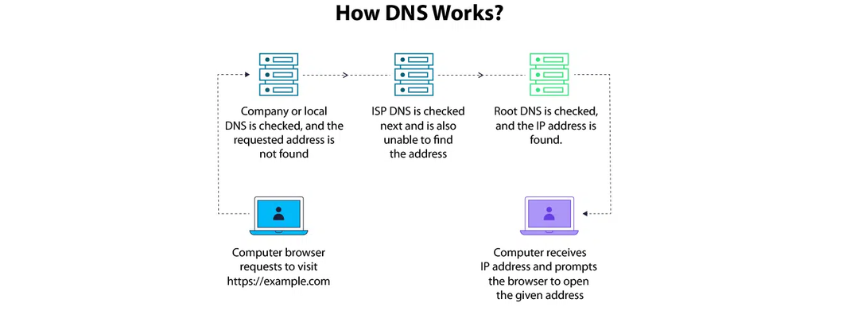
Think of domain nameservers as the internet’s address book. They’re the behind-the-scenes workers connecting your domain name to your actual website.
When someone types your website address, nameservers tell their browser exactly where to find your site. No nameservers? No website. It’s that simple.
The Phone Directory Analogy
Remember the old phone directories we used in Pakistan? You’d look up someone’s name to find their number.
Nameservers work the same way. Your domain name is like the person’s name. The IP address where your website lives is like the phone number. Nameservers connect the two.
The Technical Side
Here’s what actually happens: domain nameservers are part of the Domain Name System or DNS. This system translates human-friendly domain names into computer-friendly IP addresses.
Your computer speaks in numbers. Humans prefer words. DNS bridges that gap beautifully.
According to ICANN, the organization managing internet protocols, DNS is one of the internet’s most critical infrastructures. Without it, we’d all be memorizing strings of numbers instead of simple web addresses.
Why Should Pakistani Website Owners Care?
Your nameserver settings affect three critical things. First, whether your website loads at all. Second, how fast it loads for visitors in Pakistan. Third, whether your business emails actually reach customers.
Get these settings wrong and you’re basically invisible online. Get them right and everything flows smoothly.
How Domain Nameservers Work
Let me walk you through what happens when someone in Lahore types your domain into their browser.
Their computer sends a query asking: where does this domain live? The query travels to your domain nameservers first. These servers respond with your website’s IP address. The browser then connects to that IP address and loads your site.
This entire process takes milliseconds. Pretty impressive, right?
The DNS Resolution Process
Your visitor’s ISP (maybe PTCL, Nayatel, or StormFiber) checks its cache first. If the information isn’t there, it queries your nameservers directly.
Your nameservers respond with the necessary records. These records tell the ISP exactly where everything lives. Your website files, your email server, your subdomains. All of it.
The ISP caches this information for faster future lookups. That’s why sometimes changes take a while to show up.
Understanding Different DNS Records

Domain nameservers manage several types of records. Each serves a specific purpose.
A Records point your domain to an IPv4 address. That’s the most common type you’ll encounter. AAAA Records do the same thing for IPv6 addresses (the newer internet protocol).
MX Records tell email servers where to deliver your messages. Without proper MX Records, your business emails won’t work. That’s what happened to Farhan initially.
CNAME Records create aliases for subdomains. TXT Records verify domain ownership and improve security. These become important as your online presence grows.
Nameservers vs DNS Records
This confuses everyone at first. Think of nameservers as the building where all your records live. The records themselves are like individual apartments inside.
You change nameservers when you move to a completely different building (different hosting provider). You modify DNS records when you’re just rearranging furniture inside your current apartment.
Most Pakistani website owners will change nameservers once during initial setup. After that, you’ll mainly work with individual DNS records.
Types of Nameservers You’ll Encounter in Pakistan
Not all nameservers are created equal. Let’s break down what you’ll actually see when managing domains in Pakistan.
1) Registrar Default Nameservers
When you register a .pk domain or any domain through a registrar, they assign default nameservers automatically. These come from the registrar itself.
For instance, PkNIC managed domains use their own nameservers. International registrars like GoDaddy or Namecheap do the same thing.
These work fine if you’re just parking your domain. But they won’t connect to your hosting account.
2) Web Hosting Provider Nameservers
Here’s what most Pakistani businesses actually use. Your hosting company provides their own domain nameservers when you sign up.
Companies like TrueHost Pakistan give you specific nameserver addresses during account setup. You’ll need to update your domain registrar with these addresses.
This is the most common setup. Your domain points to your host’s nameservers. Those nameservers then direct traffic to your actual hosting account.
3) Third Party DNS Services
Some folks prefer using specialized DNS services. Cloudflare is massively popular in Pakistan for good reason.
These services often provide faster resolution times. They add extra security features. Some even include DDoS protection for free.
Google Public DNS and Cloudflare DNS both work excellently for Pakistani websites. The performance improvement can be noticeable, especially during peak hours when local ISPs get congested.
Custom Nameservers for Advanced Users
Web agencies and developers sometimes create custom nameservers. These look more professional with branded names.
Instead of ns1.hostingcompany.com, you might see ns1.yourcompany.pk. It’s purely cosmetic but adds a professional touch.
Setting these up requires more technical knowledge though. Most business owners can safely skip this option.
Finding Your Current Domain Nameservers
So where do you actually find these mysterious settings? Let me show you the easiest methods.
Checking Through Your Domain Registrar
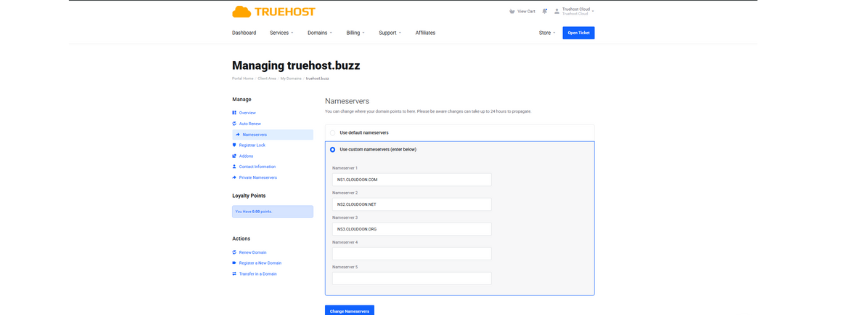
Log into wherever you registered your domain. Look for a section called DNS Management, Nameservers, or Domain Settings.
For .pk domains registered through PkNIC, you’ll find this in your domain control panel. International registrars usually place it under Domain Settings or Advanced DNS.
The interface looks different everywhere. But the concept stays the same. You’re looking for two to four nameserver addresses listed.
Using Online DNS Tools

Want a quick check without logging in anywhere? Use a DNS lookup tool. Just search DNS checker in Google and you’ll find several free options.
Type your domain name into the tool. It shows your current nameserver settings immediately. Plus, you can see if changes have propagated across different locations.
WhatsMyDNS.net works particularly well for checking propagation in Pakistan. It shows results from servers in Karachi, Lahore, and other Pakistani cities.
Command Line Methods for Tech Folks
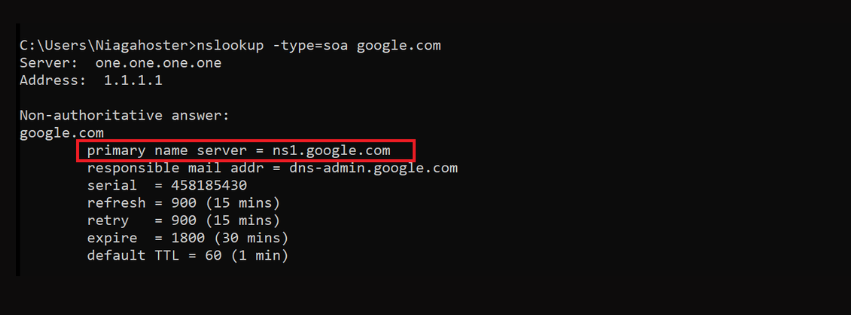
If you’re comfortable with terminals, try the nslookup command. Open your command prompt or terminal and type: nslookup yourdomain.com
The output shows your current nameservers along with other DNS information. It’s faster than any web interface once you know the commands.
Pakistani web developers often prefer this method. It’s quick, accurate, and doesn’t require opening multiple browser tabs.
Understanding DNS Propagation in Pakistan
You’ve changed your nameservers. Now comes the waiting game. This part frustrates everyone initially.
What DNS Propagation Really Means
Your nameserver changes need to spread across the internet’s DNS network. Every ISP maintains its own DNS cache. These caches need updating with your new information.
Think of it like updating every phone directory in Pakistan simultaneously. It takes time for everyone to get the memo.
The technical term is propagation. And yes, it’s as slow as it sounds.
Typical Propagation Times for Pakistani Users
Most changes complete within 24 to 48 hours. Sometimes you’ll see updates in just a few hours. Other times the full 48 hours is needed.
Your specific ISP matters here. PTCL subscribers might see changes at different times than Nayatel or StormFiber users. Each provider updates their DNS cache on their own schedule.
According to Cloudflare’s DNS documentation, global propagation rarely exceeds 72 hours. If you’re still waiting after three days, something’s configured wrong.
Checking Propagation Status Effectively
Use propagation checker tools to monitor progress. These tools query DNS servers worldwide and show where your changes have updated.
Check from multiple devices and networks if possible. Your office connection might show the new site while your phone still loads the old version. That’s normal during propagation.
Clear your browser cache and DNS cache regularly during this period. Old cached data on your device can make you think changes haven’t propagated when they actually have.
Choosing the Right Nameservers for Your Needs
Not sure which nameservers to use? Here’s how to decide based on your specific situation.
What Matters Most?
Reliability trumps everything else. Your nameservers need to respond 24/7 without fail. Research your hosting provider’s uptime record before committing.
Speed matters significantly for user experience. Slow nameserver responses add delays before your site even starts loading. Test potential providers using DNS benchmark tools.
Support availability can save you during crises. Pakistani time zones mean you want providers offering support during your business hours.
| Provider Type | Best For | Average Speed | Cost |
|---|---|---|---|
| Local Pakistani Hosts | Small businesses, local audience | Good | PKR 500-2000/month |
| Cloudflare DNS | All websites, free tier available | Excellent | Free – PKR 2000/month |
| Google Cloud DNS | Large enterprises, high traffic | Excellent | Pay per query |
| International Hosts | Global audience, e-commerce | Good to Excellent | $5-20/month |
Options for Pakistani Website Owners
Local hosting providers understand Pakistani internet infrastructure. They know the quirks of local ISPs and can troubleshoot issues specific to our market.
International providers often have more robust infrastructure. Companies like Cloudflare invest billions in their DNS networks. That translates to better reliability and speed.
Hybrid approaches work well too. Use your hosting provider’s nameservers but implement Cloudflare’s CDN on top. You get the best of both worlds.
My Personal Recommendation
For most Pakistani businesses starting out, use your hosting provider’s nameservers initially. Get comfortable with the basics first.
Once you’re established, consider moving to Cloudflare’s free DNS service. The speed improvement is worth the minor hassle of switching.
Enterprise businesses should evaluate Google Cloud DNS or Amazon Route 53. These professional services offer advanced features and guaranteed uptime.
Domain Nameservers and Website Migration
Planning to switch hosting providers? Your domain nameservers play a central role in this process.
Preparing for a Hosting Move
Set up your entire website on the new host before changing nameservers. Test everything thoroughly. Make sure all pages load, forms work, and databases connect properly.
Lower your DNS TTL (Time To Live) values a few days before migration. This speeds up propagation when you actually switch nameservers.
Back up everything from your old host. Files, databases, emails. Everything. Assume you’ll lose access to the old server immediately after switching.
Minimizing Downtime During Transition
Change nameservers during your lowest traffic period. For most Pakistani businesses, that’s between 2 AM and 6 AM.
Keep your old hosting account active for at least a week after migration. Some visitors might still resolve to old nameservers during propagation.
Monitor your website closely for the first 24 hours. Check functionality from different devices and networks across Pakistan.
Post Migration Verification
Test all website functions systematically. Forms, shopping carts, user logins. Everything needs verification.
Send test emails to confirm mail server connectivity. Check that you’re receiving emails too, not just sending them.
Review your website analytics for any unusual drops in traffic or spikes in error rates.
Wrapping Up Your Nameserver Journey
Remember Farhan from the beginning? He eventually figured out his nameserver settings. His handicrafts business launched successfully, just a few days late.
You now know more about domain nameservers than 90% of website owners in Pakistan. That knowledge gives you real power over your online presence.
Here’s what really matters: nameservers connect your domain to your hosting. Get this right and everything else becomes easier. Get it wrong and you’re fighting constant technical battles.
Start with your hosting provider’s nameservers. They’re reliable and simple. As you grow, explore advanced options like Cloudflare.
Don’t panic during propagation waits. Changes take time. That’s normal, expected, and unavoidable.
Keep your settings documented. Future you will be grateful. Trust me on this one.
Your Next Steps
If you’re launching a new website in Pakistan, choose a reliable hosting provider first. Check out options like TrueHost Pakistan that offer straightforward nameserver setup and local support.
Already have a website but experiencing issues? Review your current nameserver configuration. Sometimes a simple switch to better nameservers solves mysterious performance problems.
Planning a hosting migration? Follow the steps outlined above carefully. Take your time. Rushing causes mistakes that create downtime.
The internet might seem complicated. But you’ve just mastered one of its fundamental components. That’s pretty awesome if you ask me.
Now go forth and configure those nameservers with confidence. Your online business deserves reliable DNS management. And you now have the knowledge to make that happen.
Need help with domain management or hosting in Pakistan? The team at TrueHost Pakistan specializes in making these technical details simple for business owners. Sometimes having expert support makes all the difference between confusion and clarity.