 Domain SearchInstantly check and register your perfect .pk or international domain
 Web HostingGet a .pk domain for as low as PKR 467
 cPanel HostingUser-friendly hosting powered by cPanel
 Reseller HostingLaunch your own hosting business with minimal technical requirements
 Windows HostingOptimized for Windows-based applications and websites
 Affiliate ProgramEarn referral commissions by promoting our services
 Domain TransferMigrate your existing domain seamlessly with zero downtime.
 All DomainsAccess 324+ top-level domains (TLDs) worldwide from a single platform
 Whois LookupIdentify the owner of any domain using our whois and rdap lookup tool
 Managed VPS Hosting
 AI Website BuilderCreate beautiful websites effortlessly using intuitive drag-and-drop features
 Online ShopLaunch a professional online shop with no technical skills required
 SSL CertificatesEncrypt data, build trust, and boost SEO.
 BlogDiscover expert guides on hosting, websites, SEO, and digital growth strategies
 ContactGet instant assistance via live chat or email
 SupportAccess help articles, tutorials, and service documentation
Ever tried to buy a house only to find someone else already owns it? That’s exactly what happens when you fall in love with a domain name without doing a whois lookup first.
I learned this the hard way back in 2019. I’d spent weeks branding my startup around a perfect .pk domain, designed logos, printed business cards. Then I discovered someone in Lahore already owned it. The embarrassment still stings.
Here’s the thing about Pakistan’s digital landscape. It’s growing faster than anyone predicted. More businesses are moving online every single day. And .pk domains? They’re the prime real estate everyone’s scrambling to claim.
You know what makes this interesting? Most people don’t even know how to check if their dream domain is available. They just assume and hope for the best. That’s like buying a plot of land without checking the property records.
This guide will show you everything about PK domain whois lookup tools. You’ll learn how to check availability, verify ownership, and secure your piece of Pakistan’s internet before someone else does.
What Is This WHOIS LookUp?
Let me break this down in plain Urdu-English. WHOIS (pronounced “who is”) is basically the phonebook of the internet. Remember when we used to flip through those thick yellow directories? WHOIS is that, but for websites.
Every time someone registers a domain, their information gets stored in a massive database. Names, contact details, registration dates. The whole nine yards.
Think of it this way. When you buy property in Karachi, the records go to the land registry office. Domain registration works the same way. PKNIC (Pakistan Network Information Centre) keeps all the records for .pk domains.
Why Should You Care About WHOIS Data?
Good question. Here’s why this matters more than you think.
First off, you can see who owns any .pk domain. Want to buy a domain from its current owner? Whois lookup gives you their contact information. Sometimes.
Second, you’ll know when a domain expires. Honestly, this is gold for businesses eyeing premium domains. If a domain’s about to expire and the owner forgets to renew it, you might snag it.
Third, it helps you avoid scams. There are fake registrars out there claiming to sell domains they don’t actually control. A quick WHOIS check exposes them instantly.

The Pakistan Advantage
Look, I’ve worked with businesses across Pakistan. Islamabad startups, Karachi e-commerce stores, Lahore digital agencies. They all share one thing.
The moment they switched to a .pk domain, their local visibility skyrocketed.
Google loves local domains. When someone in Pakistan searches for your product, having a .pk domain gives you a ranking boost. It’s not magic. It’s just how search engines work.
Plus, Pakistani customers trust .pk domains more. It signals you’re a legitimate local business, not some overseas operation that might disappear overnight.
How to Actually Do a PK Domain WHOIS Lookup
Alright, let’s get practical. You’ve got a domain name in mind. Maybe it’s your business name, maybe it’s that killer brand idea you had at 2 AM. Now what?
The Step-by-Step Process
Start with PKNIC’s official website. They’re the official registry for all .pk domains in Pakistan. Their data is always accurate because, well, they’re the source.
Type your desired domain name into their search box. Hit enter. Wait about three seconds.
The results tell you everything. If the domain’s available, you’ll see a green light. If someone owns it, you’ll see their registration details (unless they’ve enabled privacy protection).
Here’s what you’re looking for in those results:
- Registration date
- Expiry date
- Current owner’s name
- Registrar information
- Domain status codes
Status codes might look like gibberish at first. ClientTransferProhibited. ServerHold. They’re actually telling you important stuff about the domain’s current state.
Best Tools Beyond the Official Route
PKNIC isn’t your only option. Sometimes you want more features or a faster interface.
Who.is offers a clean, simple interface. Just type any domain and get instant results. They pull data from multiple sources, including PKNIC.
Whois.com provides historical data too. You can see previous owners and track how long a domain’s been registered. This helps when you’re researching a domain’s reputation.
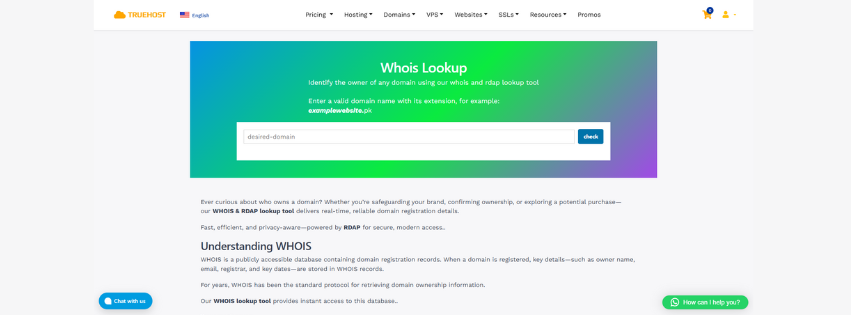
Your domain registrar probably has a whois lookup tool built in. TrueHost Pakistan offers free WHOIS searches right on their platform, making it easy to check availability and register in one place.
Checking If Your Dream Domain Is Up for Grabs
This is where things get exciting. You’ve got a name. You’ve got the tools. Now let’s see if fate is on your side.
The Availability Game
Type your domain into a whois lookup tool. Cross your fingers. Hope for the best.
Available domains show up with a big green checkmark. Or they’ll say Domain not found in registry. Both mean the same thing. Nobody owns it yet. It’s yours for the taking.
But here’s something most people miss. Just because a domain isn’t registered doesn’t mean it’s available right this second. Some domains are in redemption period after expiring. Others are locked for various reasons.
Reading Between the Lines of Domain Status
Domain status codes are like traffic signals. They tell you whether you can proceed or need to wait.
Available means go ahead, register it now. Registered means someone beat you to it.
Pending Delete means the domain’s about to free up, but you can’t grab it yet.
ClientHold or ServerHold status? The domain’s locked. Could be a legal dispute, unpaid fees, or administrative issues. Stay away unless you enjoy legal headaches.
When Plan A Doesn’t Work Out
Your perfect domain is taken. Now what? Don’t panic. You’ve got options.
Try different extensions. If yourname.pk is gone, check yourname.com.pk or yourname.net.pk. They might be available and work just as well.
Add a relevant word. YourNamePK, YourNameOnline, YourNamePakistan. Sometimes these variations work better than the original anyway.
Contact the current owner. Seriously. Use the whois lookup contact info and make an offer. You’d be surprised how many unused domains owners are willing to sell.
Pakistan’s Domain Categories
Not all .pk domains are created equal. Pakistan has different categories, each with its own rules and requirements.
The Six Main Types You Need to Know
| Domain Type | Best For | Requirements |
|---|---|---|
| .pk | Anyone, any purpose | Minimal documentation |
| .com.pk | Commercial businesses | Business registration |
| .net.pk | Network infrastructure | Technical documentation |
| .org.pk | Non-profits | NGO registration |
| .edu.pk | Educational institutions | Government approval |
| .gov.pk | Government entities | Official authorization |
Most businesses go for .com.pk. It’s professional, recognizable, and signals you’re a serious commercial operation. That’s what I recommend for startups and established companies alike.
.pk works for personal brands, blogs, and flexible projects. You don’t need business registration papers. Just your CNIC and you’re good to go.
The Documentation Dance
Here’s what you’ll actually need to register a .pk domain. Get these ready before you start the process.
For individuals: A clear copy of your CNIC or NICOP. Front and back. Make sure it’s not expired.
For businesses: Your company registration certificate from SECP. A letter on company letterhead authorizing the domain registration. Sometimes they ask for your NTN certificate too.
The verification process usually takes 24 to 72 hours. ICANN guidelines require registrars to verify all information before activating domains.
Registering Your Domain After the Check
You’ve done your whois lookup. The domain’s available. Your documents are ready. Time to make it official.
Choosing a Registrar That Won’t Let You Down
PKNIC accredits specific registrars to sell .pk domains. Not everyone can. Make sure you’re working with an authorized one.
TrueHost Pakistan is one of the most reliable registrars for .pk domains, offering competitive pricing and excellent customer support for Pakistani businesses.
Prices vary between registrars. .pk domains typically cost between PKR 1,500 to PKR 3,000 per year. .com.pk domains run slightly cheaper, around PKR 1,200 to PKR 2,500 annually.
Compare not just prices but renewal costs too. Some registrars offer cheap first-year rates then jack up renewal fees. Read the fine print.
The Registration Process Itself
Once you pick a registrar, the process is straightforward. Search for your domain on their platform. Add it to cart. Upload your documents.
Fill out the registration form carefully. Your contact information needs to match your CNIC or business documents exactly. Mismatches cause delays.
Pay the registration fee. Most registrars accept credit cards, debit cards, and bank transfers. Some even take JazzCash or Easypaisa.
Wait for verification. PKNIC reviews your documents. If everything checks out, your domain goes live within 48 hours. You’ll get an email confirmation with your login details.
When Things Go Wrong
Even with careful planning, problems pop up. I’ve seen it all. Here’s how to handle the common headaches.
The Mystery of Missing Domains
Sometimes you search for a domain in whois lookup and get zero results. But you know for sure it exists because you’ve seen the website.
This happens when WHOIS databases sync slowly. Wait a few hours and try again. Or check multiple WHOIS tools. One might have fresher data.
Dealing with Expired Domains You Want
You found an expired domain sitting there unused. Perfect, right? Not so fast.
Expired domains enter a grace period first. The original owner can still renew without penalty. This lasts 30 to 45 days usually.
After grace period comes redemption period. Now the owner pays a hefty fee to get it back. This lasts another 30 days.
Only after redemption does the domain become truly available. Then it’s first-come, first-served. Domain lifecycle management requires patience.
Contacting Current Owners
The whois lookup shows contact details for the domain owner. You want to reach out and make an offer. How do you approach this without seeming desperate?
Keep your first message short and professional. Introduce yourself briefly. Mention you’re interested in purchasing the domain. Ask if they’re open to discussing it.
Don’t lowball. If you offer PKR 5,000 for a premium domain, you’ll just annoy them. Research comparable domain sales. Make a reasonable offer based on actual market value.
Smart Domain Management for the Long Haul
You’ve registered your domain. Congratulations. But ownership comes with ongoing responsibilities. Let me share what separates successful domain owners from those who lose their domains.
Setting Up Auto-Renewal
I cannot stress this enough. Enable auto-renewal the moment you register your domain. Set it and forget it.
Every year, thousands of valuable domains expire because owners forget renewal dates. Companies lose their entire web presence overnight. Customers can’t find them. Email stops working. It’s a disaster.
Your registrar’s dashboard has an auto-renewal toggle. Turn it on. Link a valid payment method. Check that your payment card won’t expire soon.
Keeping Your Information Current
WHOIS records need to stay accurate. When you change phone numbers, update your WHOIS info. When you move offices, update your address. When you hire a new IT manager, update the technical contact.
PKNIC requires accurate contact information at all times. If they can’t reach you about important domain matters, they can suspend your domain. That’s not a scare tactic. It actually happens.
Log into your registrar account every few months. Review your WHOIS details. Make sure everything’s still correct. Takes five minutes and saves massive headaches.
Privacy Protection Considerations
Some registrars offer WHOIS privacy protection. They replace your personal details with generic registrar information in public WHOIS searches.
Sounds great for privacy, right? Sometimes yes, sometimes no.
For businesses, hiding your information might hurt credibility. Customers want to see legitimate contact details. It builds trust.
For personal blogs or side projects, privacy protection makes sense. You don’t need your home address and phone number visible to the entire internet.
Your Next Steps Start Right Now
Look, you’ve got all the information. You understand whois lookup tools. You know how to check domain availability in Pakistan. You know what documentation you need.
But knowledge without action is just entertainment. What matters is what you do next.
Open a new tab right now. Go to PKNIC or your preferred registrar. Type in that domain name you’ve been thinking about. Do the whois lookup. See if it’s available.
If it is, register it today. Not tomorrow. Not next week. Today. Domain names don’t wait for anyone. While you’re thinking about it, someone else is registering it.
Pakistan’s digital economy is exploding. E-commerce is growing at 35% annually. More businesses are going online every single day. The best .pk domains are disappearing fast.
TrueHost Pakistan makes the entire process simple, from initial WHOIS search to final registration, with local support in Urdu and English whenever you need help.
Your competitors are already claiming their digital territory. Your customers are searching for businesses like yours online right now. A strong .pk domain puts you exactly where they’re looking.
The question isn’t whether you need a .pk domain. You do. The question is whether you’ll claim yours before someone else does.
Stop reading. Start searching. Your perfect domain is waiting.